
Claude Code Voice Mode: Hands-Free Coding is Finally Here (2026 Guide)
We have been waiting for this one. Anthropic just shipped voice mode for Claude Code, and it changes the way developers interact with their terminal. No more hunt-and-peck prompts. No more typing out long architectural descriptions. You hold the spacebar, speak your mind, and Claude does the rest.
In this guide, we break down everything you need to know about Claude Code voice mode: what it is, how to enable it, practical use cases that actually matter, and where it falls short. Whether you already have access or you are waiting for the rollout to hit your account, this is the complete walkthrough.
Table of Contents
- What Is Claude Code Voice Mode?
- How Voice Mode Works
- How to Enable Voice Mode
- Multi-Language Support
- Hybrid Voice and Typing Workflow
- Current Rollout Status
- Practical Use Cases for Developers
- Claude Code Voice vs GitHub Copilot Voice
- Known Limitations
- Tips for Getting the Most Out of Voice Mode
- FAQ
What Is Claude Code Voice Mode?
Claude Code voice mode is a native speech-to-text feature built directly into the Claude Code CLI. Launched on March 3, 2026, it lets developers speak commands, describe features, explain bugs, and dictate documentation without ever touching the keyboard.
Get Your AI Tool in Front of Thousands of Buyers
Join 500+ AI tools already listed on PopularAiTools.ai — DR 50+ backlinks, expert verification, and real traffic from people actively searching for AI solutions.
Starter
$39/mo
Directory listing + backlink
- DR 50+ backlink
- Expert verification badge
- Cancel anytime
Premium
$69/mo
Featured + homepage placement
- Everything in Starter
- Featured on category pages
- Homepage placement (2 days/mo)
- 24/7 support
Ultimate
$99/mo
Premium banner + Reddit promo
- Everything in Premium
- Banner on every page (5 days/mo)
- Elite Verified badge
- Reddit promotion + CTA
No credit card required · Cancel anytime
This is not a bolted-on browser extension or a third-party plugin. Voice mode lives inside the terminal itself, which means zero additional setup, zero browser tabs, and zero context switching. You stay in your flow state and just talk.
The feature is available to all paid tiers — Pro, Max, Team, and Enterprise — at no extra cost. Transcription tokens are free and do not count against your rate limits, which is a meaningful detail when you are already pushing usage on large projects.
What makes this different from generic dictation software is context. Claude Code already understands your codebase, your file structure, and your project history. When you speak to it, those words land in an environment that knows what you are building. That is the difference between dictating into a void and having a conversation with a coding partner.
How Voice Mode Works
The mechanics are intentionally simple. Anthropic went with a push-to-talk design rather than an always-on microphone, and we think that was the right call.
Here is the flow:
- Type
/voicein your Claude Code prompt to activate voice mode - Hold down the spacebar to begin speaking
- Speak your command, question, or description naturally
- Release the spacebar when you are done
- Claude transcribes your speech in real time and sends it as input
Your spoken words appear in the input field as text, just as if you had typed them. Claude then processes that input the same way it handles any typed prompt — reading files, writing code, running commands, or answering questions.
The push-to-talk approach is deliberate. There is no always-on microphone listening in the background. No accidental commands triggered by a conversation with a coworker. No privacy anxiety about your terminal capturing ambient audio. You speak only when you choose to, and the microphone is dead silent the rest of the time.
For developers who prefer a different keybinding, the push-to-talk key is fully customizable. You can remap it through keybindings.json using the voice:pushToTalk key, and it supports combinations like meta+k if the spacebar conflicts with your existing workflow.
How to Enable Voice Mode
Getting started takes about ten seconds:
- Make sure you are on Claude Code version 1.0.33 or later (run
claude --versionto check) - Open your terminal and start Claude Code as usual
- Type
/voiceand press Enter - Grant microphone permissions if your OS prompts you
- Hold the spacebar and start talking
That is it. No API keys to configure, no extensions to install, no settings files to edit. The feature is built in and ready to go once it is enabled on your account.
To turn voice mode off, type /voice again. It is a simple toggle.
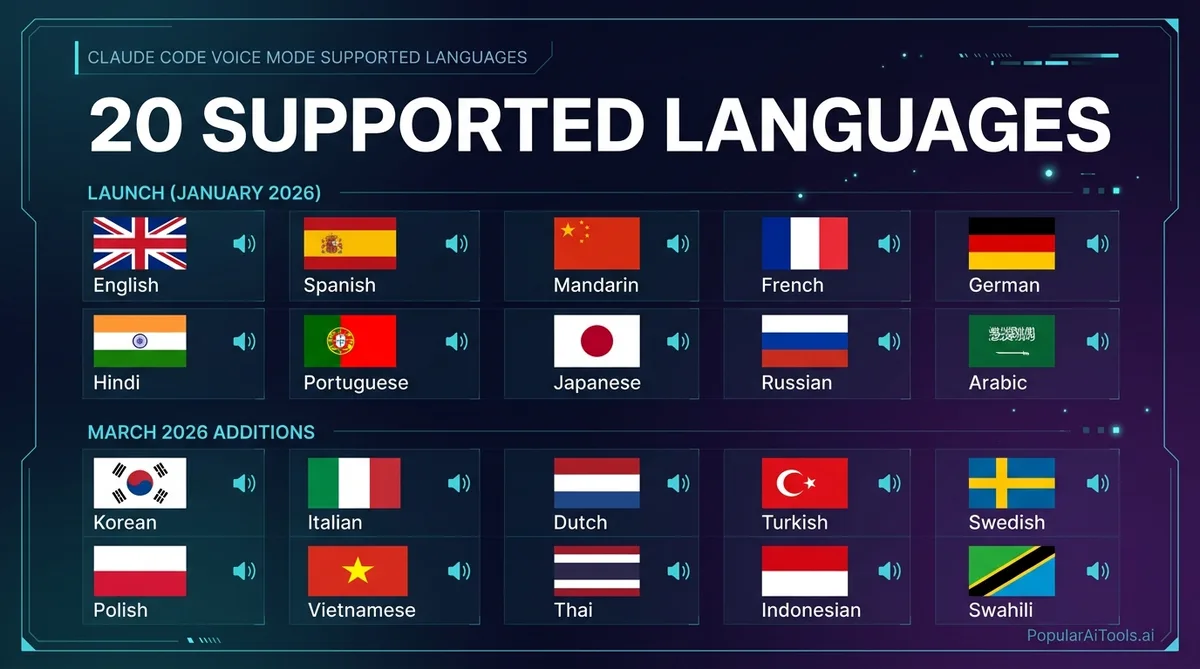
Multi-Language Support
Voice mode launched with support for 10 languages and expanded to 20 in the March 2026 update cycle. The full list of supported languages includes:
To change your voice input language, use the /config command within Claude Code and set the voiceLanguage parameter. The default is English, and if you do not change it, all transcription will assume English input regardless of what language you are actually speaking.
A fair warning: accuracy varies by language. English transcription is the most polished and reliable. Japanese, for example, works but lags behind English in accuracy according to developer reports. Languages added in the March expansion are functional but still being refined. If you are working in a non-English language, expect to do occasional corrections, especially with technical terminology and variable names.
Hybrid Voice and Typing Workflow
One of the smartest design decisions is that voice mode does not lock you out of your keyboard. You can seamlessly switch between speaking and typing within the same interaction.
This matters more than it sounds. Here is a common scenario: you want to describe a feature at a high level using voice (because talking is faster for abstract ideas), but you need to paste a specific file path, a URL, or an exact variable name. With hybrid input, you hold the spacebar to say “refactor the authentication middleware to match the pattern in,” then release and type the exact path src/middleware/auth-handler.ts.
The practical workflow looks like this:
- Voice for the big picture: Describe architecture, explain intent, walk through logic
- Typing for precision: File paths, variable names, URLs, code snippets, regex patterns
- Voice for debugging: Talk through what you expected versus what happened
- Typing for commands: Quick terminal commands, git operations, specific flags
This hybrid approach means voice mode is not an all-or-nothing switch. It is another tool in your input toolkit, and you use whichever method fits the moment.
Current Rollout Status
As of mid-March 2026, voice mode is live for approximately 5% of users across all paid plans. Anthropic is ramping the rollout progressively over the coming weeks.
Here is what we know about availability:
If you do not see the /voice command in your Claude Code installation, you are not in the current rollout wave. There is no waitlist to join. Anthropic is expanding access automatically, so your best move is to keep Claude Code updated and check periodically.
Transcription tokens generated by voice mode are completely free. They do not count against your usage limits on any plan. This is a significant perk — it means using voice instead of typing does not cost you anything extra, even on high-volume projects.
Practical Use Cases for Developers
We have been tracking how developers use voice mode in real workflows, and these are the use cases where it genuinely makes a difference.
Architectural Conversations
Describing what you want built works better out loud than typed. When you speak, you naturally explain intent and context without worrying about formatting or prompt engineering. “I need a REST API that handles user authentication with JWT tokens, rate limiting per endpoint, and a Redis cache layer for session management” flows out in five seconds of speech. Typing that same prompt takes four times as long.
Multi-File Refactoring
Instead of carefully specifying which files to change, you can say: “Find every place we handle authentication errors across the codebase and make them consistent with the pattern in auth-middleware.ts.” Claude Code already knows your project structure. Voice just makes the instruction faster to deliver.
Debugging Sessions
Talking through a bug while Claude listens changes the dynamic. Speaking forces you to articulate the problem linearly, which often surfaces the root cause before Claude even responds. It is rubber duck debugging with a duck that can actually help.
Documentation and Comments
Dictating descriptions of what your code does while looking at it is far less painful than typing paragraphs from scratch. Words come out more naturally when spoken, and the resulting documentation tends to be clearer and more conversational — which is exactly what good docs should be.
Code Reviews While Mobile
With a laptop on a standing desk or using a wireless headset, you can review pull requests and provide feedback without sitting down. “Show me the changes in the latest PR on the feature-auth branch” works perfectly as a spoken command.
Ergonomic Relief
This one is underrated. Hours of typing on a keyboard causes real strain. Voice input lets you take a break from typing without leaving the terminal or breaking your workflow. For developers dealing with RSI or carpal tunnel, this is not a luxury feature — it is an accessibility feature.
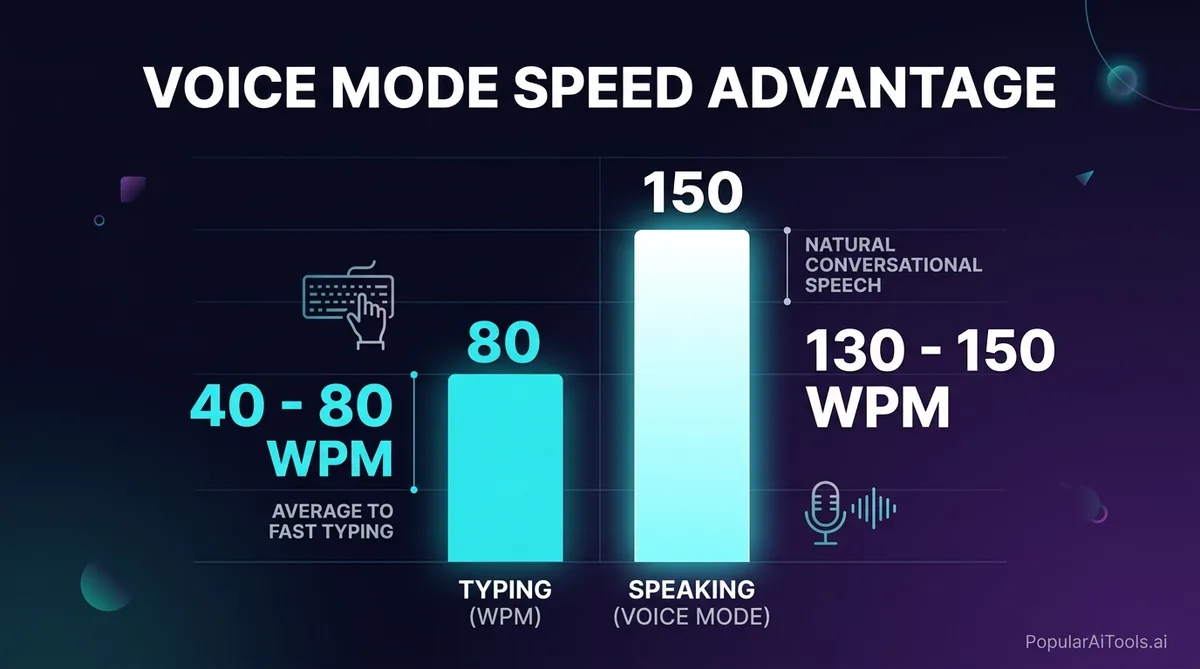
The Speed Advantage
The numbers tell the story:
That 2–3x speed advantage is before you factor in editing time, typo corrections, and the mental overhead of formatting text. For long-form prompts and architectural descriptions, the real-world advantage is even larger.
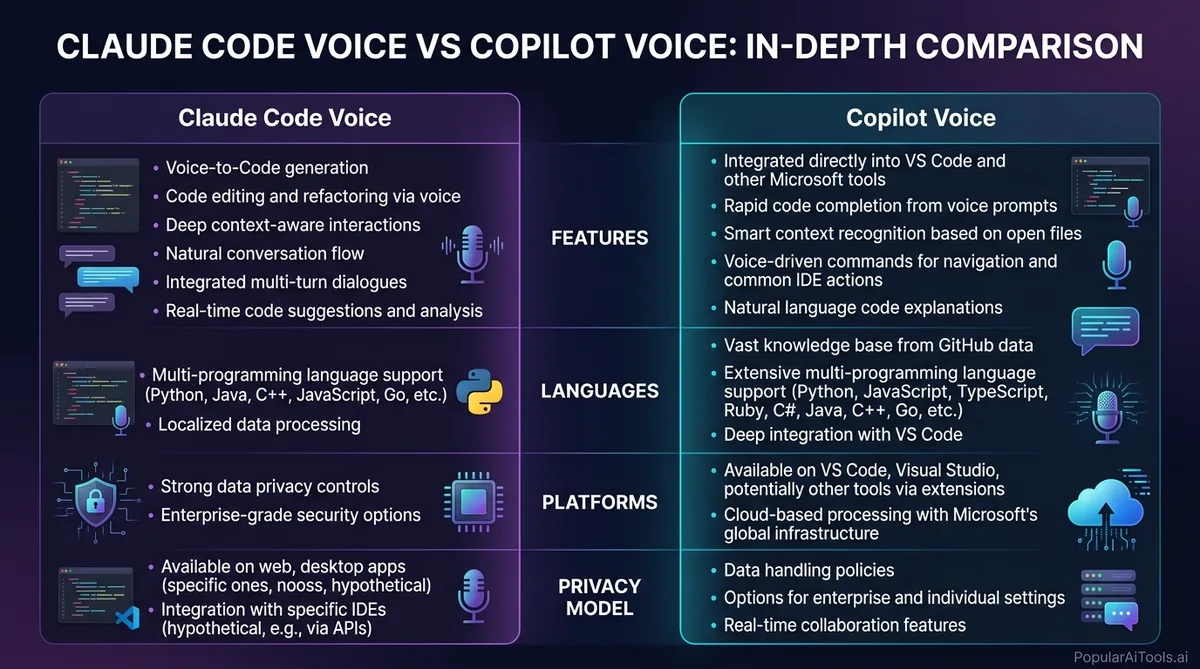
Claude Code Voice vs GitHub Copilot Voice
The comparison everyone wants to see. Here is where things stand in March 2026.
GitHub Copilot Voice (originally called “Hey, GitHub”) launched as a technical preview inside Visual Studio Code. However, GitHub concluded that technical preview on April 3, 2024, and transferred the learnings to the VS Code Speech extension. As of March 2026, there is no standalone “Copilot Voice” product with the same scope as what Anthropic just shipped.
The key differentiator is that Claude Code voice mode is terminal-native. It works everywhere Claude Code runs — macOS, Linux, Windows — without requiring a specific IDE. If you live in the terminal, this is built for you. If you live in VS Code, the Copilot ecosystem with its Speech extension may fit your workflow better, though it lacks the dedicated voice-first design that Anthropic shipped.
Claude Code also brings its 1-million-token context window to voice interactions, meaning you can speak about your entire codebase and Claude has the full picture. That level of project awareness during a voice conversation is something no other tool matches right now.
Known Limitations
Voice mode is impressive, but it is not perfect. Here is what you should know before relying on it.
Terminal-Only Feature: Voice mode only works in the interactive Claude Code CLI. If you are building programmatic workflows through the Claude Code Agent SDK, voice mode is not available. It is a human interaction feature, not an API feature.
Transcription Accuracy with Technical Terms: Variable names, framework-specific terminology, and camelCase identifiers can trip up the transcription engine. You will find yourself correcting my component dot TSX back to MyComponent.tsx occasionally. The hybrid typing approach helps here — speak the intent, type the specifics.
Non-English Accuracy Gaps: While 20 languages are supported, accuracy outside of English drops noticeably. Japanese users report workable but imperfect transcription. Languages added in the March expansion (Russian, Polish, Turkish, etc.) are still being refined. If your primary development language is not English, set your expectations accordingly.
No Voice Output: This is one-way. You speak to Claude, but Claude responds with text only. There is no text-to-speech for Claude’s responses. You are reading everything Claude says, which means this is not a fully hands-free experience — you still need to look at the screen.
5% Rollout: The biggest limitation right now is simply access. Most developers cannot use voice mode yet. There is no way to request early access or jump the queue.
Noisy Environments: In loud settings, transcription quality degrades. The push-to-talk design helps filter out background noise between commands, but sustained ambient noise during your speech can still cause issues.
No Voice Cloning: The feature uses preset voice options. There is no voice cloning or custom voice support, which is a reasonable limitation from a safety perspective.
Tips for Getting the Most Out of Voice Mode
After testing voice mode extensively, here are the patterns that work best:
- Speak in complete thoughts. Pausing mid-sentence can cause the transcription to split your input awkwardly. Formulate your full request before holding the spacebar.
- Use voice for intent, typing for specifics. Say “create a new React component for the user dashboard” out loud, then type the exact file path and props interface.
- Slow down for technical terms. Speaking slightly slower when you hit variable names, file paths, or framework terminology improves transcription accuracy significantly.
- Remap the push-to-talk key if needed. If the spacebar conflicts with your terminal setup, customize it in
keybindings.jsonwith thevoice:pushToTalksetting.
- Use voice mode for rubber duck debugging. Explain your bug out loud to Claude. The act of verbalizing the problem often reveals the solution, and Claude can catch what you miss.
- Dictate documentation while reading code. Open a file, look at it, and describe what it does via voice. This produces surprisingly good documentation drafts.
- Combine with
/loopfor complex tasks. Describe a multi-step task via voice, then let Claude’s loop mode handle the execution while you review.
Built an AI tool? Get it in front of thousands of qualified buyers on PopularAiTools.ai
FAQ
How do I activate voice mode in Claude Code?
Type /voice in your Claude Code terminal prompt and press Enter. This toggles voice mode on. Once activated, hold the spacebar to speak (push-to-talk), and release when you are done. Your speech is transcribed in real time and sent as input to Claude. To deactivate, type /voice again. You need Claude Code version 1.0.33 or later, and your account must be in the current rollout wave.
Does Claude Code voice mode cost extra?
No. Voice mode is included at no additional cost for all paid plans — Pro, Max, Team, and Enterprise. Transcription tokens generated by voice input are completely free and do not count against your usage rate limits. This means switching from typing to voice does not increase your costs in any way.
What languages does Claude Code voice mode support?
As of March 2026, voice mode supports 20 languages: English, Spanish, French, German, Italian, Portuguese, Japanese, Korean, Chinese, Hindi, Russian, Polish, Turkish, Dutch, Ukrainian, Greek, Czech, Danish, Swedish, and Norwegian. English has the highest transcription accuracy. Other languages are functional but may require occasional corrections, especially with technical terminology. You can set your preferred language via the /config command.
Can I use voice and typing at the same time?
Yes. Hybrid input is a core design feature. You can hold the spacebar to speak a high-level description, release it, then type specific file paths, variable names, or code snippets. This lets you use voice for natural-language intent (which is faster) and typing for precise technical details (which is more accurate). There is no need to toggle between modes — both work simultaneously.
How does Claude Code voice compare to GitHub Copilot Voice?
GitHub Copilot Voice ended its technical preview in April 2024 and was folded into the VS Code Speech extension. Claude Code voice mode, launched March 2026, is a dedicated terminal-native feature with push-to-talk input, 20-language support, and full codebase awareness through its 1-million-token context window. The main difference is environment: Claude Code works in any terminal on macOS, Linux, and Windows, while Copilot’s voice features are tied to VS Code. Claude Code also offers a stronger privacy model with no ambient listening.
Voice mode in Claude Code is not just a convenience feature. It is a signal of where AI-assisted development is heading: conversational, multimodal, and built into the tools developers already use. The 5% rollout means most of us are still waiting, but once you get access, the shift from typing every prompt to speaking your intent is genuinely hard to go back from.
We will keep updating this guide as Anthropic expands the rollout and adds new capabilities. For now, keep your Claude Code installation updated and watch for /voice to appear in your command list.
Have you built an AI tool that deserves more visibility? Submit your AI tool to PopularAiTools.ai and get it in front of thousands of developers and AI enthusiasts actively looking for new solutions.
