
OpenClaw Dashboard v2: Fast Mode, Plugin Architecture, and What’s New (March 2026)
OpenClaw just dropped v2026.3.12, and it is a big one. We have been running it since release day and can confirm: the new Dashboard v2, unified fast mode, and plugin architecture for local LLM providers make this the most significant OpenClaw update in months. Here is everything you need to know, why it matters, and how to upgrade without breaking your setup.
Table of Contents
- Why This Release Matters
- Dashboard v2: A Complete Overhaul
- Fast Mode for GPT-5.4 and Claude
- Plugin Architecture: Ollama, vLLM, and SGLang
- 40% Setup Time Reduction: The Numbers
- Security Improvements Worth Noting
- v2026.3.11 vs v2026.3.12: What Changed
- How to Upgrade to v2026.3.12
- Who Should Upgrade (and Who Should Wait)
- Final Thoughts
- FAQ
Why This Release Matters
OpenClaw has become the go-to open-source gateway for managing AI agents and models. Whether you are routing requests to OpenAI, Anthropic, or running local models through Ollama, OpenClaw sits in the middle and gives you control over sessions, configurations, and costs. But the previous dashboard was showing its age. It re-rendered on every tool result, froze during complex agent runs, and felt like it was built for a simpler era.
Version 2026.3.12 fixes all of that. Released on March 13, 2026, it ships with a ground-up dashboard rewrite, a unified fast-mode toggle that works across providers, and a plugin architecture that finally decouples local LLM integrations from the core release cycle. If you manage AI workloads at any scale, this update deserves your attention.
Get Your AI Tool in Front of Thousands of Buyers
Join 500+ AI tools already listed on PopularAiTools.ai — DR 50+ backlinks, expert verification, and real traffic from people actively searching for AI solutions.
Starter
$39/mo
Directory listing + backlink
- DR 50+ backlink
- Expert verification badge
- Cancel anytime
Premium
$69/mo
Featured + homepage placement
- Everything in Starter
- Featured on category pages
- Homepage placement (2 days/mo)
- 24/7 support
Ultimate
$99/mo
Premium banner + Reddit promo
- Everything in Premium
- Banner on every page (5 days/mo)
- Elite Verified badge
- Reddit promotion + CTA
No credit card required · Cancel anytime
Dashboard v2: A Complete Overhaul
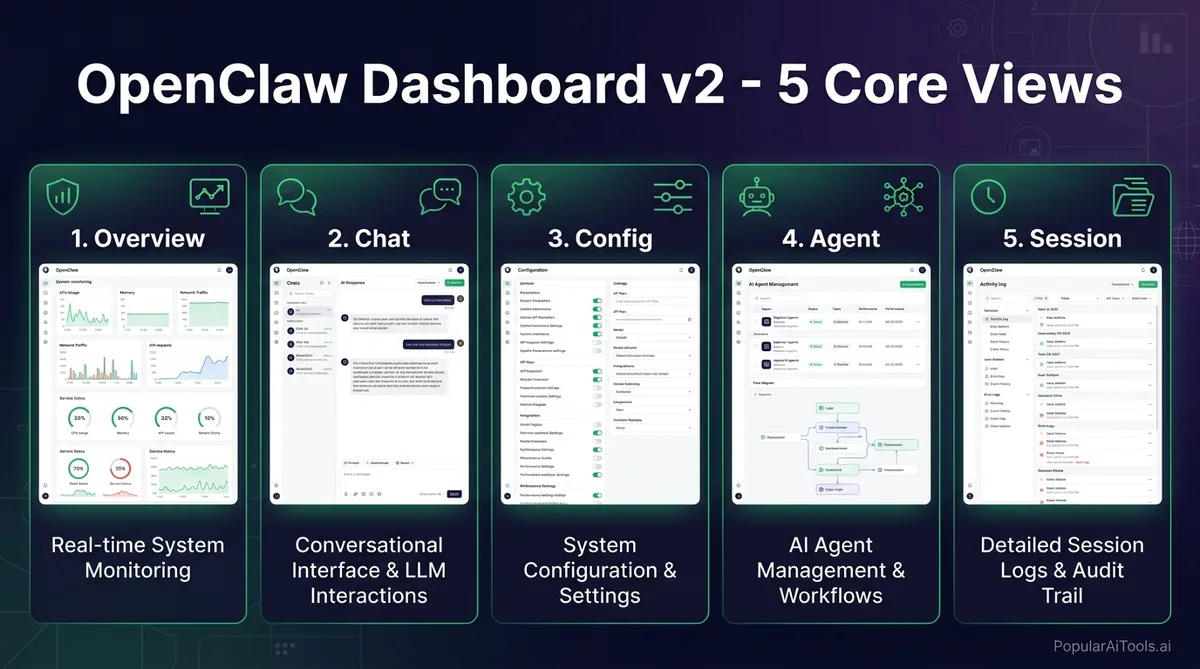
The most visible change in v2026.3.12 is the new Control UI, internally referred to as Dashboard v2. The previous interface crammed everything into a single-page layout that became unwieldy once you had more than a handful of active agents. Dashboard v2 replaces it with a modular system built around five dedicated views.
The Five Core Views
Command Palette
Dashboard v2 introduces a command palette (triggered with Ctrl+K or Cmd+K) that lets you jump between settings, active conversations, agent controls, and configuration panels without touching the sidebar. If you have used VS Code or Raycast, the interaction model will feel immediately familiar. It supports fuzzy search, so typing “oll” will surface your Ollama provider settings instantly.
Mobile Experience
The mobile interface received a complete redesign with bottom tabs that consolidate navigation. Slash commands, message search, export, and pinned messages are now accessible from a unified toolbar instead of being buried in menus. For teams that monitor agent runs from their phones, this is a meaningful quality-of-life improvement.
Performance Fix: No More UI Freezes
One of the most frustrating issues with the old dashboard was the re-render storm problem. Every time a tool produced a result during an agent run, the UI would reload the full chat history. If your agent was making dozens of tool calls in sequence, the dashboard would freeze or become unusable. Dashboard v2 uses incremental updates, appending new results without reloading the full conversation. Tool-heavy runs now display smoothly regardless of conversation length.
Fast Mode for GPT-5.4 and Claude
Fast mode is the feature that had the community buzzing before the release even landed. OpenClaw now provides a single /fast toggle that works across the TUI (terminal UI), Control UI, and the Agent Control Protocol (ACP). What it does under the hood depends on the provider.
How It Works Per Provider
Live Verification
Here is the part we appreciate most: fast mode includes live verification. When you toggle /fast on, OpenClaw immediately checks whether your API key actually has fast-tier access. If it does not, you get a clear error message instead of the system silently falling back to standard mode. No more wondering why your responses feel slow despite having “fast mode enabled.”
Per-Model Defaults and Session Overrides
You can set fast mode as the default for specific models while keeping standard mode for others. For example, you might want GPT-5.4 to always use fast mode for production workloads but keep Claude on standard for research tasks where latency is less critical. Session-level overrides let you flip the toggle mid-conversation without restarting anything.
Configuring Fast Mode
Fast mode configuration lives in your model provider settings. You can set it through the new Config view in Dashboard v2, through the TUI with /fast on, or programmatically through the ACP. The per-model config defaults are stored in your gateway configuration file, so they persist across restarts.
Plugin Architecture: Ollama, vLLM, and SGLang
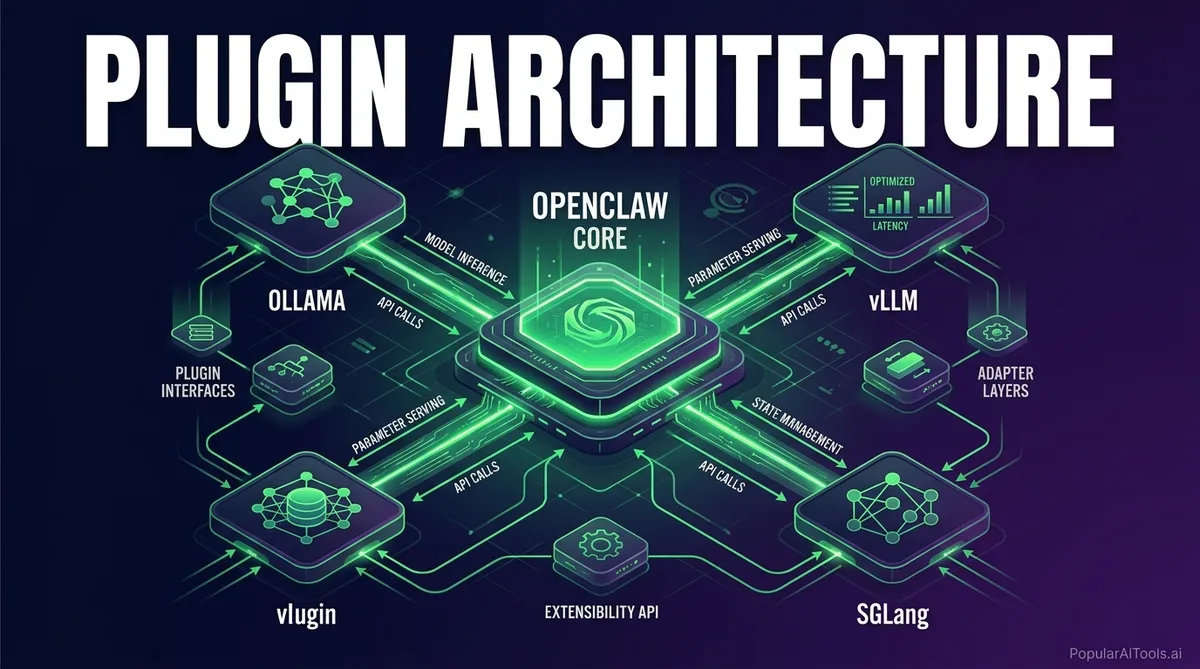
This is the change that will have the biggest long-term impact, even if it is less flashy than the dashboard rewrite. In v2026.3.12, Ollama, vLLM, and SGLang have been moved from hardcoded integrations to the new provider-plugin architecture.
What This Means in Practice
Previously, if you wanted an improvement to how OpenClaw handled Ollama model discovery or vLLM connection pooling, you had to wait for a full OpenClaw release. Every provider was baked into the core codebase, which meant provider-specific fixes were tied to the broader release schedule.
Now each provider operates as an independent plugin. The plugin handles its own onboarding, model discovery, model-picker setup, and post-selection hooks. The core OpenClaw codebase only needs to know about the plugin interface, not the implementation details of every provider.
Benefits for Each Provider
For Plugin Developers
The plugin architecture exposes a clear interface for provider integration. If you maintain a custom LLM backend or want to add support for a new provider, you can now build a plugin without forking the entire OpenClaw codebase. The provider-plugin API handles registration, lifecycle management, and UI integration through the new dashboard.
40% Setup Time Reduction: The Numbers
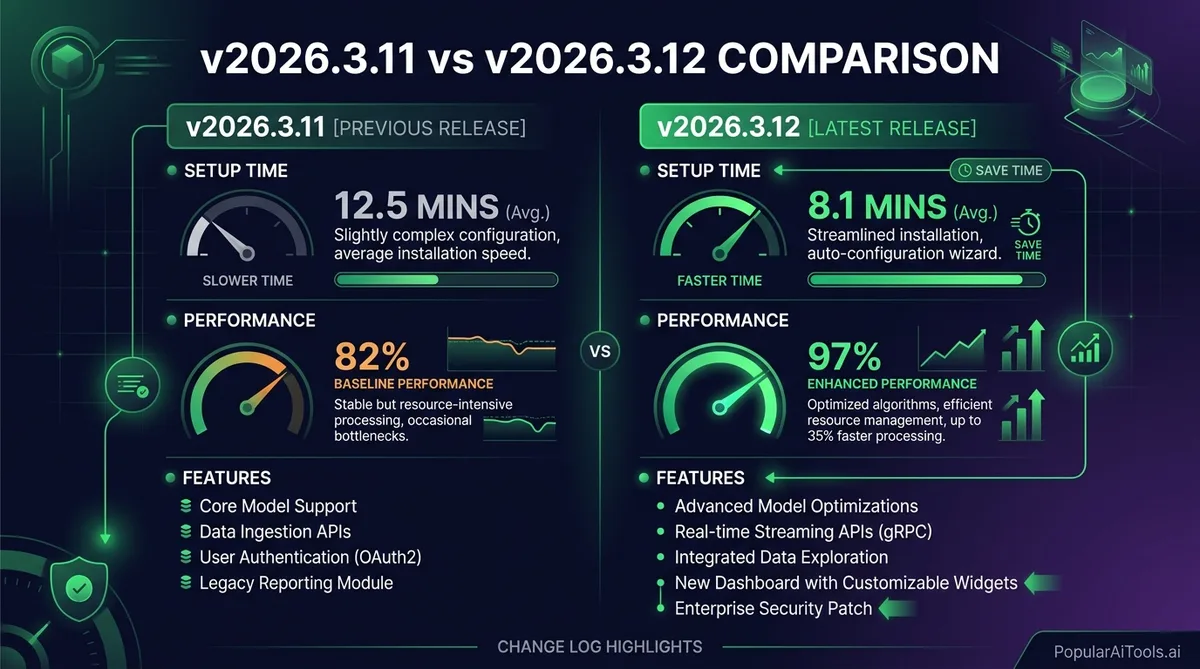
The OpenClaw team claims a 40% reduction in setup time, and from our testing, that number holds up. The improvement comes from three sources working together.
First, the plugin architecture means provider setup is now handled by provider-specific onboarding flows instead of a generic configuration wizard. When you add Ollama as a provider, the Ollama plugin walks you through its specific requirements rather than presenting a wall of generic settings.
Second, the new Config view in Dashboard v2 replaces manual YAML editing for most configuration tasks. Setting up a new model, adjusting token limits, or configuring fast mode defaults can all be done through the UI with immediate validation.
Third, the openclaw doctor command received significant improvements. It now handles config migrations automatically, checks for deprecated settings, audits security configuration, and verifies that gateway services are properly configured. Post-update setup that used to require manual intervention now happens automatically.
Setup Time Comparison
Security Improvements Worth Noting
Version 2026.3.12 builds on the critical security fix from v2026.3.11 with two additional security changes that are worth calling out.
Ephemeral Device Tokens
The /pair command and openclaw qr setup codes now use short-lived bootstrap tokens. Previously, pairing payloads embedded shared gateway credentials, which meant that a QR code screenshot or a chat log containing the pairing command could be used to gain persistent access. The new ephemeral tokens expire after use, closing this attack vector.
Workspace Plugin Auto-Load Disabled
Implicit workspace plugin auto-load has been disabled by default. This means that cloning a repository that contains an OpenClaw workspace plugin will no longer execute that plugin code automatically. You now need to make an explicit trust decision before workspace plugins run. This prevents a supply-chain attack where a malicious repository could execute arbitrary code through a bundled OpenClaw plugin.
v2026.3.11 vs v2026.3.12: What Changed
If you are on v2026.3.11 and wondering whether to jump to 3.12, here is the full picture. Version 2026.3.11 was primarily a security release that fixed a cross-site WebSocket hijacking vulnerability in trusted-proxy mode. It also included smaller fixes for tables, memory management, and session display in the CLI and UI.
Version 2026.3.12 takes that security foundation and adds the feature payload.
The short answer: if you are on 3.11, upgrade to 3.12. There is no reason to stay on the older version.
How to Upgrade to v2026.3.12
Before you upgrade, back up your gateway data. Stop the gateway so you get a consistent snapshot, create the archive, and verify it contains what you expect. Do not back up a running gateway because session files are written continuously.
Standard CLI Update
openclaw update --dry-run    # Preview what will change
openclaw update              # Pull, build, migrate, restart
The openclaw update command handles git pull, dependency installation, build, doctor checks, and restart in one step.
NPM / PNPM
npm install -g openclaw@latest
# or
pnpm add -g openclaw@latest
Docker
docker stop openclaw
docker pull openclaw/openclaw:latest
docker run -d --name openclaw openclaw/openclaw:latest
Post-Update Steps
After updating, run openclaw doctor if the update command did not trigger it automatically. The doctor will handle config migrations, check for deprecated settings, and verify that your gateway services — especially any Anthropic or OpenAI integrations — are properly configured for the new fast-mode and plugin features.
If you use Ollama, vLLM, or SGLang, check that the plugin migration completed successfully. Your existing provider configurations should transfer automatically, but verify model discovery is working in the new Agent view.
Who Should Upgrade (and Who Should Wait)
We recommend upgrading immediately if you fall into any of these categories:
- You run tool-heavy agent workflows and have experienced dashboard freezes
- You use Ollama, vLLM, or SGLang and want faster provider updates
- You want fast-mode access for GPT-5.4 or Claude
- You are managing multiple agents and need a better monitoring interface
- You are still on v2026.3.10 or earlier and skipped the 3.11 security fix
The only reason to wait is if you have heavily customized your gateway configuration in ways that might conflict with the automatic doctor migration. In that case, run openclaw update --dry-run first to preview the changes before committing.
Final Thoughts
OpenClaw v2026.3.12 is not a minor point release. The Dashboard v2 rewrite, fast mode unification, and plugin architecture together represent a shift in how OpenClaw approaches modularity and developer experience. The 40% setup time reduction is real and measurable. The security improvements from both 3.11 and 3.12 close meaningful attack vectors. And the mobile dashboard finally makes remote monitoring practical.
If you are running any version prior to 2026.3.12, now is the time to upgrade. Back up your gateway, run the update, and check out the new dashboard. We think you will be impressed.
For more detail, check the official release notes on GitHub and the OpenClaw documentation on updating.
Want more AI tool deep dives like this? Subscribe to PopularAiTools.ai for weekly breakdowns of the tools, updates, and releases that actually matter.
Built an AI tool? Get it in front of thousands of qualified buyers on PopularAiTools.ai
FAQ
What is OpenClaw Dashboard v2?
Dashboard v2 is the completely rewritten gateway interface introduced in OpenClaw v2026.3.12. It replaces the old single-page layout with five modular views (Overview, Chat, Config, Agent, and Session), adds a command palette for fast navigation, and fixes the UI freeze issue that occurred during tool-heavy agent runs. It also includes a redesigned mobile experience with bottom tabs and consolidated tooling.
How does OpenClaw fast mode work with GPT-5.4 and Claude?
Fast mode provides a single /fast toggle that maps to provider-specific performance tiers. For OpenAI GPT-5.4, it activates optimized request shaping for the fast inference tier. For Anthropic Claude, it maps directly to the service_tier API parameter for prioritized processing. The system verifies live whether your API key has fast-tier access, so you will never silently degrade to standard mode without knowing.
What is the OpenClaw plugin architecture and why does it matter?
The plugin architecture decouples local LLM providers (Ollama, vLLM, SGLang) from the core OpenClaw codebase. Each provider now operates as an independent plugin that handles its own onboarding, model discovery, and configuration. This means provider-specific updates and bug fixes can ship independently without waiting for a full OpenClaw release, and it reduces setup time by up to 40%.
How do I upgrade to OpenClaw v2026.3.12?
Back up your gateway data first by stopping the gateway and creating an archive. Then run openclaw update for CLI installations, npm install -g openclaw@latest for NPM, or pull the latest Docker image. After updating, run openclaw doctor to handle automatic config migrations and verify your provider integrations are working correctly with the new plugin architecture.
Is it safe to upgrade from v2026.3.11 to v2026.3.12?
Yes. Version 2026.3.12 builds directly on the security foundation of 3.11 and adds feature improvements without removing or breaking existing functionality. The automatic doctor migration handles configuration changes. The only caution is for users with heavily customized gateway configurations, who should run openclaw update --dry-run first to preview changes before applying them.
