
NemoClaw Setup Guide: How to Make OpenClaw Enterprise-Ready with NVIDIA
If you have been running OpenClaw agents and wondering how to lock them down for production workloads, NVIDIA just handed us the answer. NemoClaw, announced at GTC 2026 on March 16, is an open-source security stack that wraps around OpenClaw and adds everything enterprises have been demanding: sandboxing, least-privilege access, policy guardrails, and a privacy router that keeps sensitive data where it belongs.
We have spent the last 48 hours digging through the documentation, testing the quickstart, and mapping out exactly what NemoClaw changes for teams that need more than a hobby-grade agent setup. This guide covers everything from what NemoClaw actually is to a full step-by-step installation walkthrough, hardware requirements, pricing, and how it compares to rolling your own enterprise OpenClaw deployment.
Table of Contents
- What Is NemoClaw?
- Why OpenClaw Needed an Enterprise Layer
- NemoClaw vs Vanilla OpenClaw: Key Differences
- Enterprise Security Features Deep Dive
- Launch Partners and Ecosystem
- Hardware Requirements
- Step-by-Step NemoClaw Setup Guide
- Pricing and Hardware Costs
- NemoClaw vs DIY Enterprise OpenClaw
- FAQ
What Is NemoClaw?
NemoClaw is NVIDIA’s open-source security and runtime layer for OpenClaw. Released under the Apache 2.0 license and available on GitHub, it installs the NVIDIA OpenShell runtime in a single command, adding privacy and security controls that make autonomous AI agents safer, more scalable, and actually deployable in regulated environments.
Get Your AI Tool in Front of Thousands of Buyers
Join 500+ AI tools already listed on PopularAiTools.ai — DR 50+ backlinks, expert verification, and real traffic from people actively searching for AI solutions.
Starter
$39/mo
Directory listing + backlink
- DR 50+ backlink
- Expert verification badge
- Cancel anytime
Premium
$69/mo
Featured + homepage placement
- Everything in Starter
- Featured on category pages
- Homepage placement (2 days/mo)
- 24/7 support
Ultimate
$99/mo
Premium banner + Reddit promo
- Everything in Premium
- Banner on every page (5 days/mo)
- Elite Verified badge
- Reddit promotion + CTA
No credit card required · Cancel anytime
Think of it this way: OpenClaw is the assistant that does the work. NemoClaw decides what that assistant can access, where it can connect, and how closely it gets monitored. Jensen Huang described it during the GTC keynote as an “open-sourced operating system of agentic computers,” and that framing is accurate. It does not replace OpenClaw. It wraps around it with an enterprise-grade security perimeter.
The platform is currently in early-stage alpha. NVIDIA has been transparent about this, stating that developers should “expect rough edges” as the team builds toward production-ready sandbox orchestration. That said, the core security primitives are functional and the installation process is straightforward enough to get running in under an hour.
Why OpenClaw Needed an Enterprise Layer
OpenClaw is brilliant for individual developers and power users. The near-zero entry barrier, roughly 1.5 GB of RAM and under 10 minutes to set up, made it the fastest-growing agent framework in history. But that accessibility created serious security gaps that kept enterprise teams on the sidelines.
The numbers tell the story. Nearly 20 percent of skills in the OpenClaw repository, roughly 900 out of the total, were flagged as malicious. Over 135,000 OpenClaw agent instances were discovered exposed on the public internet due to insecure default network configurations. For any company handling customer data, financial records, or proprietary code, those are disqualifying risks.
OpenClaw was designed as a single-user tool. It has no built-in concept of multi-tenant access controls, audit logging, network segmentation, or compliance frameworks. NemoClaw fills every one of those gaps.
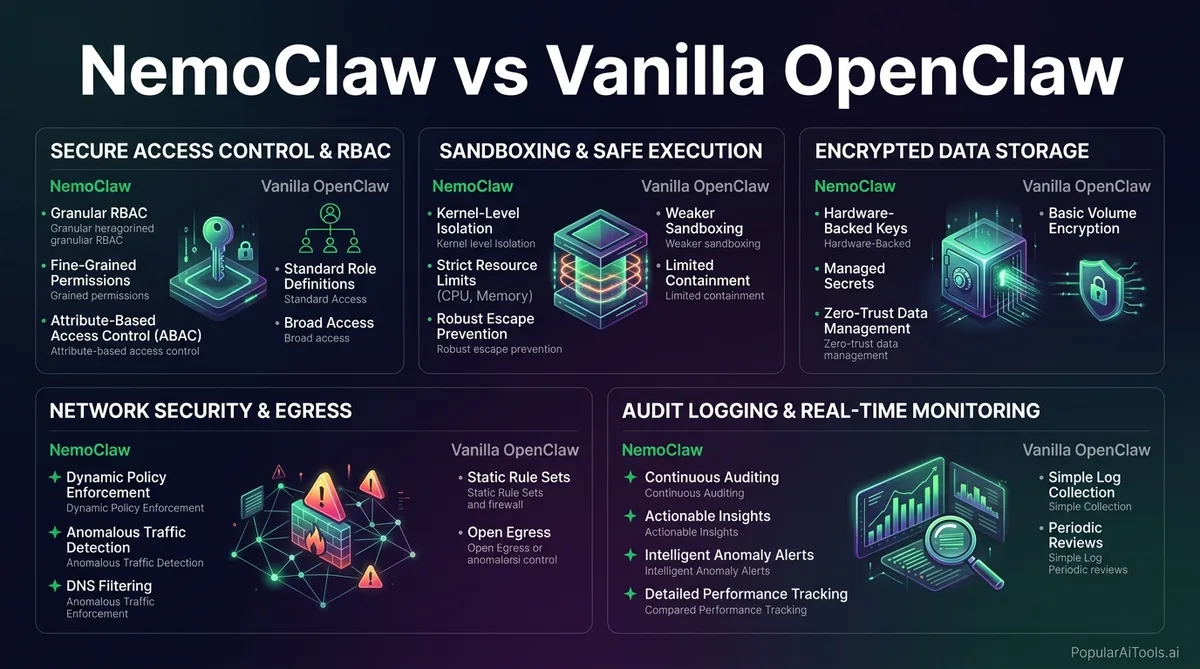
NemoClaw vs Vanilla OpenClaw: Key Differences
Here is a direct comparison of what changes when you add NemoClaw to an OpenClaw deployment:
| Feature | Vanilla OpenClaw | NemoClaw + OpenClaw |
|---|---|---|
| Sandboxed Execution | None by default | Docker-based isolation with YAML policy controls |
| Network Policy | Open by default | Strict-by-default, operator-controlled allowlists |
| Filesystem Access | Full system access | Granular per-agent restrictions |
| Privacy Routing | All data sent to configured LLM | Privacy router keeps sensitive data on-device, routes to cloud only when policy permits |
| Multi-User Support | Single-user only | Multi-user enterprise deployments |
| Audit Logging | Minimal | Full enterprise audit trails and compliance features |
| Skill Verification | No verification | Only verified skills install; unreviewed code blocked |
| Inference Models | Any configured model | Local Nemotron + cloud frontier models via privacy router |
| License | Apache 2.0 | Apache 2.0 |
The bottom line: OpenClaw is a Swiss Army knife for individuals. NemoClaw turns it into a managed toolbox for enterprises.
Enterprise Security Features Deep Dive
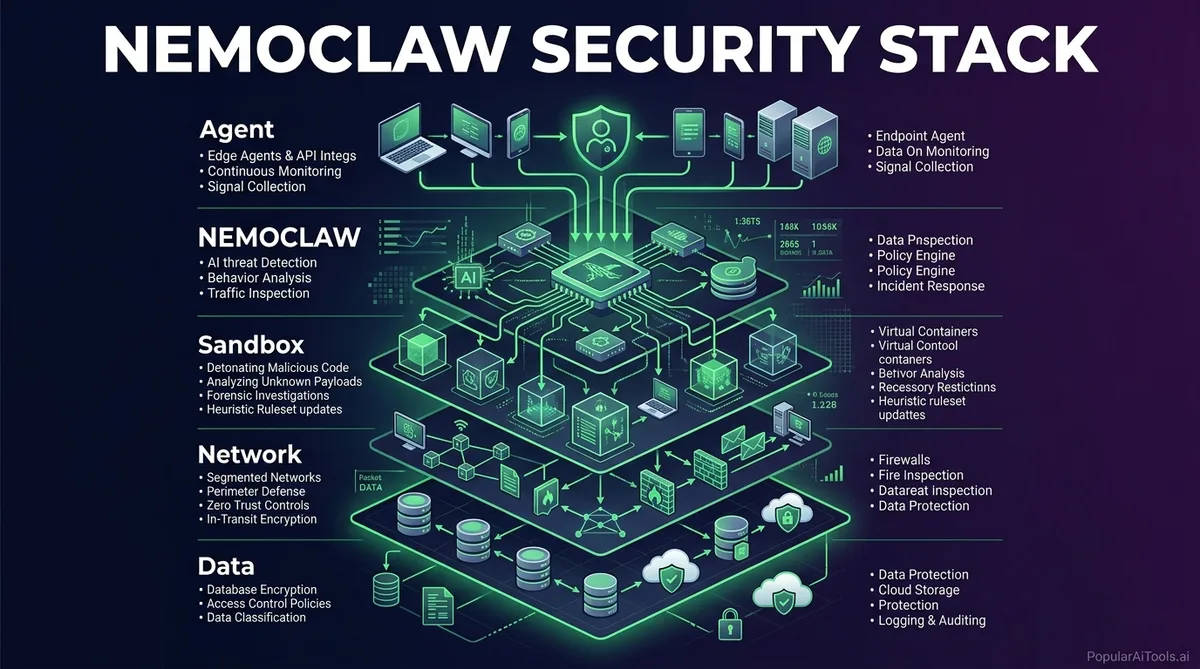
NemoClaw’s security architecture is built on OpenShell, NVIDIA’s open-source security runtime. Here is what each layer does and why it matters for production deployments.
Kernel-Level Sandboxing
Every claw runs inside an isolated sandbox, effectively a Docker container with configurable policy controls written in YAML. Administrators define precisely which files an agent can access, which network connections it can make, and which cloud services it can call. Everything outside those bounds is blocked. This is not optional or configurable-off. The sandbox is the foundation of the entire architecture.
Least-Privilege Access Controls
The policy engine enforces granular constraints across filesystem, network, and processes. Agents can learn new capabilities, install verified skills, and spawn subagents, but they cannot run unreviewed code. If an agent needs access to something outside its current policy, it proposes a policy change that an administrator must approve. This flips the default from “allow everything” to “block everything unless explicitly permitted.”
Privacy Router
This is where NemoClaw gets genuinely interesting for regulated industries. The privacy router monitors all data flowing between agents and external systems. Sensitive data stays on-device by default. The router only sends data to cloud models like Claude or GPT when the organization’s policy explicitly permits it. Decisions are driven by cost and privacy rules that administrators configure, not by the agent itself.
Policy Guardrails
Beyond individual agent controls, NemoClaw supports organization-wide policy definitions. These guardrails govern what types of tasks agents can perform, what data classifications they can handle, and what approval workflows must be completed before certain actions execute. For industries like healthcare, finance, and defense, this is table stakes.
Security Ecosystem Integration
NVIDIA is working with Cisco, CrowdStrike, Google, and Microsoft Security to bring OpenShell compatibility to their respective security tools. This means NemoClaw guardrails will embed into the broader enterprise security stack rather than existing as a standalone island.
Launch Partners and Ecosystem
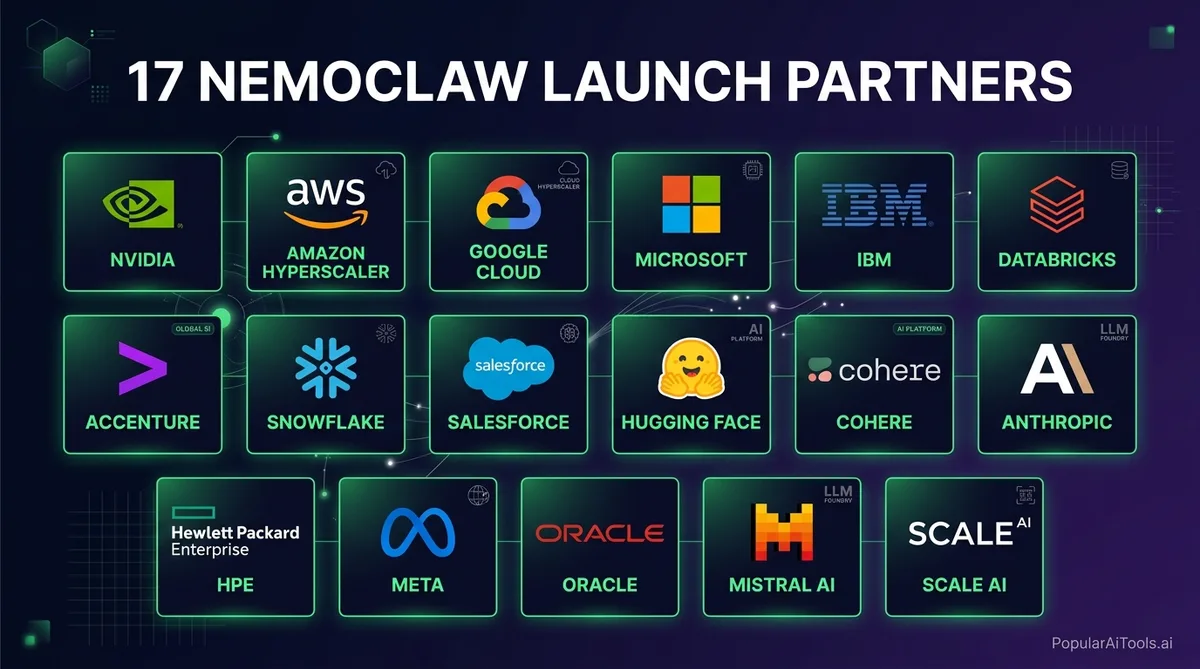
NemoClaw launched at GTC 2026 with a roster of enterprise partners that signals serious adoption momentum:
| Partner | Integration Focus |
|---|---|
| Adobe | Creative workflow agents with enterprise security |
| Salesforce | CRM and customer service agent deployments |
| SAP | Enterprise resource planning and business process automation |
| CrowdStrike | Security monitoring and threat response agents |
| Dell Technologies | First to ship GB300 Desktop with NemoClaw preinstalled |
| ServiceNow | IT service management agent automation |
| Siemens | Industrial automation and digital twin agents |
| Atlassian | Developer productivity and project management agents |
| Palantir | Data analytics and intelligence workflow agents |
| IBM Red Hat | OpenShift and hybrid cloud agent orchestration |
| LangChain | Agent framework integration and toolchain compatibility |
That is 17 total launch partners, with the biggest names in enterprise software committing to NemoClaw integration. When Adobe, Salesforce, and SAP all adopt the same agent security standard, it creates a gravitational pull that smaller vendors will follow.
Hardware Requirements
NemoClaw is hardware-agnostic at the software level. It runs on NVIDIA, AMD, Intel, or CPU-only setups. However, for optimal performance with local model inference, NVIDIA recommends the following:
Minimum Requirements:
- Ubuntu 24.04 (or compatible Linux distribution)
- Python 3.12+
- Docker (server version)
- 8 GB RAM minimum (machines with less can trigger the OOM killer; configuring 8 GB of swap works around this at the cost of slower performance)
- Any modern CPU for cloud-only inference mode
Recommended for Local Inference:
- NVIDIA GeForce RTX GPU (RTX 4090 or newer)
- 32 GB+ system RAM
- 500 GB+ SSD storage
- NVIDIA GPU drivers 550+
Enterprise-Grade Hardware:
- NVIDIA DGX Spark (GB10 GPU) for team deployments
- NVIDIA DGX Station (GB300) for department-scale workloads
- NVIDIA RTX PRO workstations for power users
The key point is that NemoClaw itself adds minimal overhead. The heavy resource consumption comes from running local inference models. If your organization routes all inference to cloud providers through the privacy router, even modest hardware can run the security stack effectively.
Step-by-Step NemoClaw Setup Guide
Here is the complete walkthrough to get NemoClaw running from a clean machine. We are following the official NVIDIA quickstart documentation with our own annotations.
Step 1: Prepare Your System
Make sure your machine meets the minimum requirements. On Ubuntu 24.04:
# Update system packages
sudo apt update && sudo apt upgrade -y

# Install Python 3.12+ if not present
sudo apt install python3.12 python3.12-venv python3-pip -y

# Install Docker
sudo apt install docker.io -y
sudo systemctl enable docker
sudo systemctl start docker
sudo usermod -aG docker $USER
Log out and back in after adding yourself to the docker group.
Step 2: Get Your NVIDIA API Key
Before installing NemoClaw, you need an API key from NVIDIA:
- Go to build.nvidia.com
- Create an account or sign in
- Navigate to the API keys section
- Generate a new key and save it somewhere secure
This key is required for the onboarding process and gives NemoClaw access to NVIDIA’s inference endpoints and model registry.
Step 3: Install NemoClaw
The installation is a single command:
curl -fsSL https://nvidia.com/nemoclaw.sh | bashThis script downloads the NemoClaw CLI, installs dependencies, sets up the OpenShell gateway, and prepares the sandbox environment. The first run will prompt you for your NVIDIA API key and save it to ~/.nemoclaw/credentials.json.
Step 4: Run the Onboarding Wizard
After installation, run the onboarding command:
nemoclaw onboardThis walks you through:
- Registering your inference providers (local models, cloud APIs, or both)
- Building the sandbox image
- Configuring initial security policies
- Creating your first sandboxed agent
Step 5: Create Your First Secure Agent
Create a new sandbox with a named agent:
nemoclaw create my-assistantThis builds an isolated container with default security policies. The agent gets its own filesystem, network rules, and process restrictions.
Step 6: Configure Security Policies
Edit the YAML policy file for your agent:
# ~/.nemoclaw/policies/my-assistant.yaml
sandbox:
filesystem:
allow:
- /home/user/projects/*
- /tmp/agent-workspace/*
deny:
- /etc/*
- /var/*
network:
allow:
- api.openai.com:443
- api.anthropic.com:443
deny:
- "*"  # Block everything else by default
processes:
max_concurrent: 5
allow_spawn_subagents: true
require_skill_verification: true
privacy:
router:
sensitive_data: on_device_only
cloud_routing: policy_permitted
approved_providers:
- nvidia_nemotron
- anthropic_claude
Step 7: Connect and Verify
Start the agent and connect:
# Start the agent
nemoclaw my-assistant start

# Connect via TUI
nemoclaw my-assistant connect

# Or check status
nemoclaw my-assistant status

# View logs
nemoclaw my-assistant logs --follow
You should see the agent running inside its sandbox with all security policies active. Test it by asking it to perform a task that your policy should block, and verify the block is enforced.
Step 8: Deploy for Your Team
For multi-user setups, configure the OpenShell gateway to accept connections from team members:
nemoclaw gateway configure --multi-user
nemoclaw gateway start
Each team member gets their own sandboxed agent instance with centrally managed policies.
Pricing and Hardware Costs
NemoClaw itself is free and open source under Apache 2.0. The costs come from the hardware you run it on and any cloud inference you consume.
| Hardware Option | Approximate Price | Best For |
|---|---|---|
| Existing RTX PC (RTX 4090+) | $0 (use what you have) | Individual developers, proof of concept |
| NVIDIA DGX Spark (GB10) | ~$3,999 | Small teams, local inference workloads |
| Dell Pro Max GB10 | ~$4,757 | Enterprise teams with Dell ecosystem |
| DGX Station GB300 | ~$97,000+ | Department-scale, trillion-parameter models |
| Cloud-only (any CPU machine) | Per-token cloud inference costs | Teams that prioritize flexibility over data locality |
The sweet spot for most enterprises will be the DGX Spark at $3,999. It gives you local inference capability, which means sensitive data never leaves your hardware, while still being affordable enough to deploy across multiple teams.
NemoClaw vs DIY Enterprise OpenClaw
We have seen teams spend months trying to bolt enterprise security onto vanilla OpenClaw. Here is how that approach stacks up against NemoClaw:
The DIY Approach:
- Build custom Docker containers for sandboxing
- Write your own network policy enforcement
- Implement filesystem access controls from scratch
- Build a privacy routing layer for data classification
- Create audit logging infrastructure
- Develop skill verification pipelines
- Maintain all of it as OpenClaw updates
Realistically, this takes a dedicated security engineering team 3-6 months and costs $200,000-$500,000 in engineering time. You end up with a bespoke solution that only your team understands and that breaks every time OpenClaw pushes a major update.
The NemoClaw Approach:
- Single command install
- YAML-based policy configuration
- Built-in privacy router
- Automatic updates that maintain compatibility with OpenClaw releases
- Backed by NVIDIA’s security partnerships with Cisco, CrowdStrike, Google, and Microsoft
- Community-maintained with enterprise support options
The only scenario where DIY makes sense is if your organization has requirements so specific that NemoClaw’s policy engine cannot express them. For the other 95 percent of use cases, NemoClaw is the obvious choice.
Built an AI tool? Get it in front of thousands of qualified buyers on PopularAiTools.ai
FAQ
What is NemoClaw and how does it relate to OpenClaw?
NemoClaw is NVIDIA’s open-source security and runtime layer that wraps around OpenClaw to add enterprise-grade features. It does not replace OpenClaw. Instead, it installs the NVIDIA OpenShell runtime on top of an existing OpenClaw installation, adding sandboxing, least-privilege access controls, privacy routing, and policy guardrails. Think of OpenClaw as the engine and NemoClaw as the safety cage around it.
Is NemoClaw free to use?
Yes. NemoClaw is released under the Apache 2.0 license and is completely free and open source. The costs come from hardware (if you want local inference) and cloud API usage (if you route inference to cloud providers). The software itself, including all security features, policy engines, and the OpenShell runtime, costs nothing.
What hardware do I need to run NemoClaw?
At minimum, you need a machine running Ubuntu 24.04 with Python 3.12+, Docker, and 8 GB of RAM. NemoClaw itself is hardware-agnostic and runs on NVIDIA, AMD, Intel, or CPU-only setups. For local model inference, an NVIDIA GeForce RTX GPU is recommended. For enterprise-scale deployments, NVIDIA offers the DGX Spark starting at $3,999 and the DGX Station GB300 for larger workloads.
Can NemoClaw work with models other than NVIDIA Nemotron?
Absolutely. NemoClaw supports any coding agent and any model backend. Through the privacy router, you can configure it to use local open models like Nemotron for sensitive tasks while routing non-sensitive work to cloud frontier models from Anthropic, OpenAI, or any other provider. The routing decisions are driven by your organization’s privacy and cost policies.
Is NemoClaw production-ready?
Not yet. NVIDIA has been transparent that NemoClaw is currently an early-stage alpha release. The company advises developers to “expect rough edges” as they build toward production-ready sandbox orchestration. The core security primitives work, and the install process is solid, but organizations should plan for some manual intervention and rapid iteration as the platform matures through 2026.
NemoClaw represents exactly the kind of enterprise infrastructure that the AI agent ecosystem has been missing. OpenClaw proved that autonomous agents are transformative. NemoClaw proves they can also be safe. If your team has been waiting for the right moment to move from experimental agent deployments to production-grade systems, that moment arrived on March 16, 2026 at GTC.
The install takes one command. The security policies take one YAML file. The peace of mind is worth every minute of setup.
