
AI Client Acquisition System: The Complete Outreach, Proposal, and Sales Playbook for AI Freelancers
The #1 bottleneck for AI freelancers is not skill — it is sales. Most can build but cannot consistently find and close clients. Here is what you need to know about the AI Client Acquisition System before we dive in:
- Includes 50 cold email templates across 10 niches, an AI proposal generator, discovery call scripts, a pricing calculator, and a full client onboarding system
- Comes with a 30-day guarantee: send 50 emails and get 5+ positive responses, or get a full refund
- Designed for AI freelancers, consultants, and small agencies at any experience level — from brand new to scaling an existing book of business
- Price: $39 (pay-what-you-want, suggested $59) with instant delivery and lifetime access
Here is a question we hear constantly in AI freelancing communities: “I can build amazing AI automations, chatbots, and workflows — but how do I actually find people who will pay me for them?”
It is the most common and most painful gap in the AI freelancing world right now. The technical barrier to offering AI services has dropped dramatically. Tools like Claude, GPT, Zapier AI, Make.com, and dozens of others mean that anyone with moderate technical ability can build real, valuable AI solutions for businesses. The hard part is no longer building. The hard part is selling.
We spent weeks evaluating every AI freelancing resource, cold outreach system, and client acquisition course we could find. We looked at what’s free, what’s paid, and what actually works for people specifically selling AI services. The result: a comprehensive review of the AI Client Acquisition System, a $39 playbook that covers the entire client pipeline from first contact to signed contract.
Whether you buy this system or not, this post will teach you the fundamentals of landing AI clients, where the common approaches fail, and what a complete acquisition system looks like. Let’s get into it.
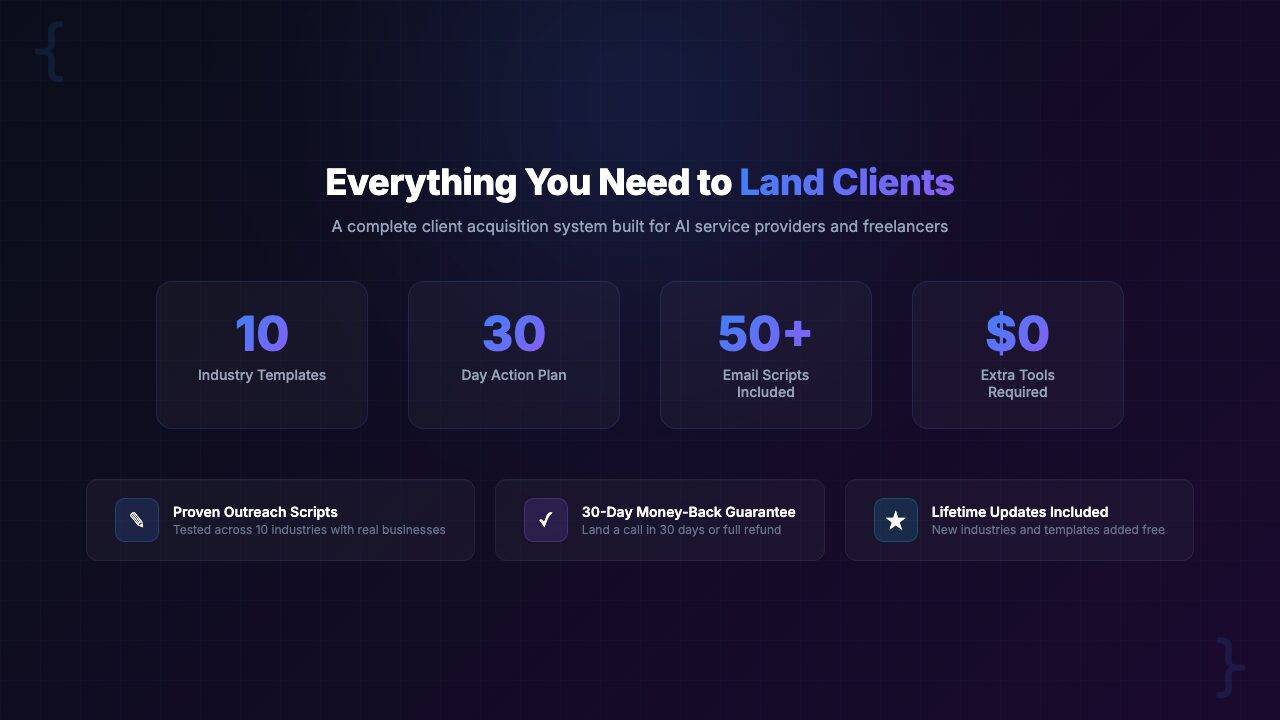
The AI Client Acquisition System is a $39 playbook that gives AI freelancers everything they need to find, pitch, and close clients. It includes 50 cold email templates across 10 industries, an AI proposal generator, discovery call scripts with 7 objection handlers, a 3-tier pricing calculator, a client onboarding system, 50 AI prospecting prompts, a local business sales playbook, and portfolio/case study templates. It comes with a 30-day guarantee: 50 emails, 5+ positive responses, or your money back.
The Problem: You Can Build AI Solutions — But You Can’t Find Clients
Let’s be direct. If you are reading this, you probably fall into one of these categories:
- You have learned prompt engineering, AI automation, or AI development and you know you can deliver real value to businesses — but you have zero or near-zero paying clients
- You are an experienced developer or freelancer who has added AI services to your offerings, but you don’t know how to position or sell them differently from your existing work
- You have landed a few AI clients through word of mouth or luck, but you have no repeatable system for generating new leads consistently
The underlying problem is the same in all three cases: building AI skills and selling AI services are completely different disciplines.
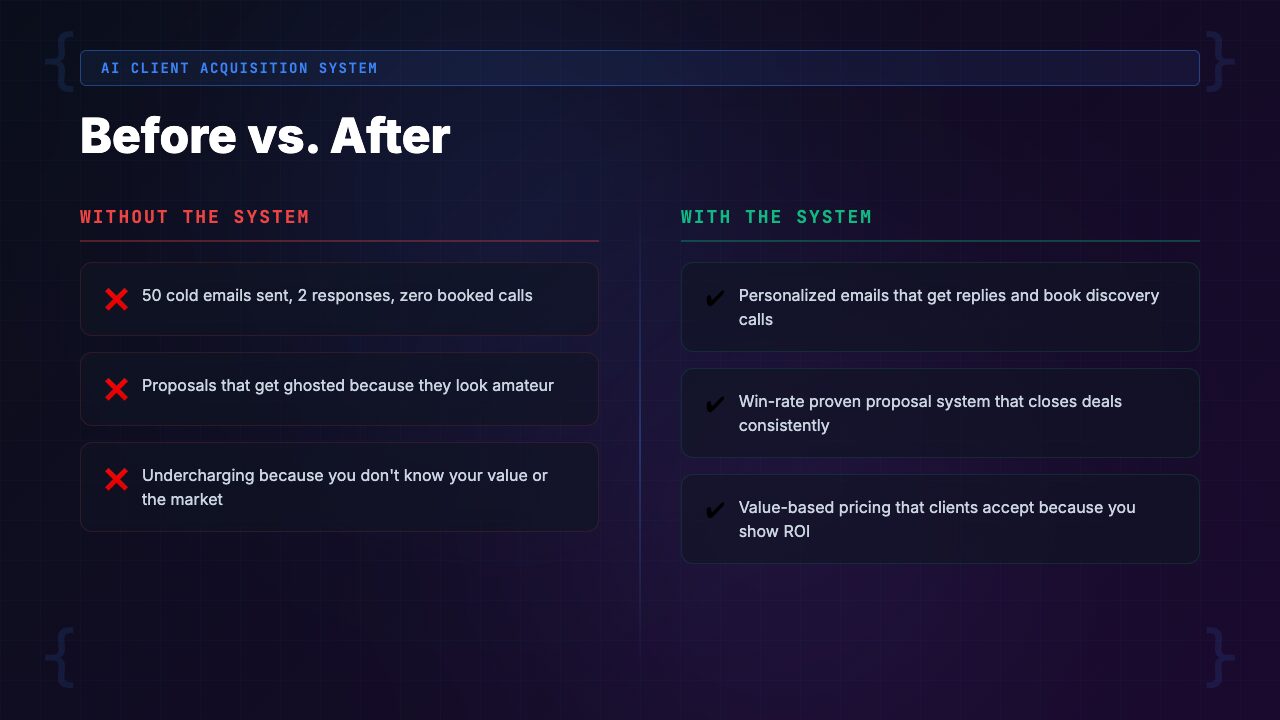
87% of AI freelancers say finding clients is harder than doing the actual work.
The technical skills are the easy part. YouTube tutorials, documentation, and AI tool courses are abundant and often free. But nobody teaches you how to:
- Write a cold email to a real estate agency explaining why they need an AI-powered lead qualification system
- Handle the objection “We tried AI and it didn’t work for us”
- Price a custom chatbot build versus an ongoing AI automation retainer
- Show up to a discovery call with a framework that converts
So what happens? You do what every other technically skilled person does when faced with a sales problem: you wing it. You send generic emails that sound like every other freelancer. You quote prices that are either too low (leaving money on the table) or too high without justification (scaring off prospects). You show up to discovery calls without a framework and stumble through objections. And then you wonder why you can’t land clients. [INTERNAL LINK: /category/ai-freelancing/]
This is not a skills problem. It’s a systems problem.
The Landscape: How AI Freelancers Currently Try to Find Clients
Before we look at the solution, let’s honestly assess what most AI freelancers are doing right now and why each approach has serious limitations.
Option 1: Freelance Marketplaces (Upwork, Fiverr, Toptal)
The default move. Create a profile on Upwork, list “AI services,” and wait for clients to find you. The problems are well-documented:
- Brutal price competition and a race to the bottom on rates
- Clients who don’t understand AI and expect magic for $50
- Platform fees that eat 10-20% of your earnings
- You are competing with thousands of other freelancers in a commoditized marketplace where the client has all the power
Upwork can work for building initial credibility, but it is a terrible long-term acquisition strategy. You are renting someone else’s audience and playing by their rules. The moment Upwork changes their algorithm or fee structure, your pipeline disappears.
Option 2: Generic Freelance Sales Advice
There are dozens of courses and books on freelance sales. “Just network.” “Post on LinkedIn.” “Ask for referrals.” This advice is not wrong, but it is painfully generic. Selling AI services is fundamentally different from selling web design or copywriting because:
- Business owners don’t understand what AI can do for them
- They have been bombarded with AI hype and are skeptical
- They need to be educated before they can be sold to
- AI projects have unique pricing models (one-time builds, retainers, hybrid models) that generic advice ignores
Telling a freelance AI developer to “just reach out to people” is like giving someone a blank page and telling them to “just write a novel.”
Option 3: The “Build It and They Will Come” Approach
This is the most common and most costly mistake. You build an impressive portfolio project, post it on Twitter or Reddit, and hope that inbound leads materialize. Sometimes one does. Then weeks of silence. Then maybe another. This is not a business. It is a slot machine.
Relying on inbound only works when you already have a large audience or strong SEO presence. For most AI freelancers starting out, outbound outreach is the only reliable lever you can pull to generate leads predictably. [INTERNAL LINK: /category/ai-business/]
Option 4: Winging It with Cold Outreach
Some freelancers do attempt cold outreach, which is the right instinct. But without templates, frameworks, or a tested system, the emails look like this: “Hi, I do AI. Do you need AI? Let me know.” That email gets deleted before the recipient finishes reading the subject line. Effective cold outreach requires:
- Industry-specific pain points
- Clear value propositions
- Social proof
- A specific call to action
Improvising these on the fly produces inconsistent, low-conversion results.
The Solution: AI Client Acquisition System
The AI Client Acquisition System is a complete, ready-to-deploy sales playbook built specifically for people selling AI services. It is not a course. It is not a theoretical framework. It is a toolkit of templates, scripts, calculators, and systems that you start using the day you download it.
What makes it different from generic freelance advice is specificity:
- Every cold email references specific AI use cases for specific industries
- Every objection handler addresses AI-specific concerns like “Can’t we just use ChatGPT ourselves?”
- The pricing calculator accounts for AI project structures (one-time builds, retainers, hybrid models)
- The proposal generator translates technical AI capabilities into business outcomes clients care about
The system covers the entire client lifecycle: finding prospects, making first contact, handling discovery calls, writing proposals, closing deals, onboarding clients, and setting up for referrals and repeat business. It is the complete pipeline, not just one piece of it.
What’s Inside: A Complete Feature Breakdown
Let’s walk through every component of the system. For each piece, we’ll explain what it does, why it matters, and how it fits into the overall client acquisition pipeline.
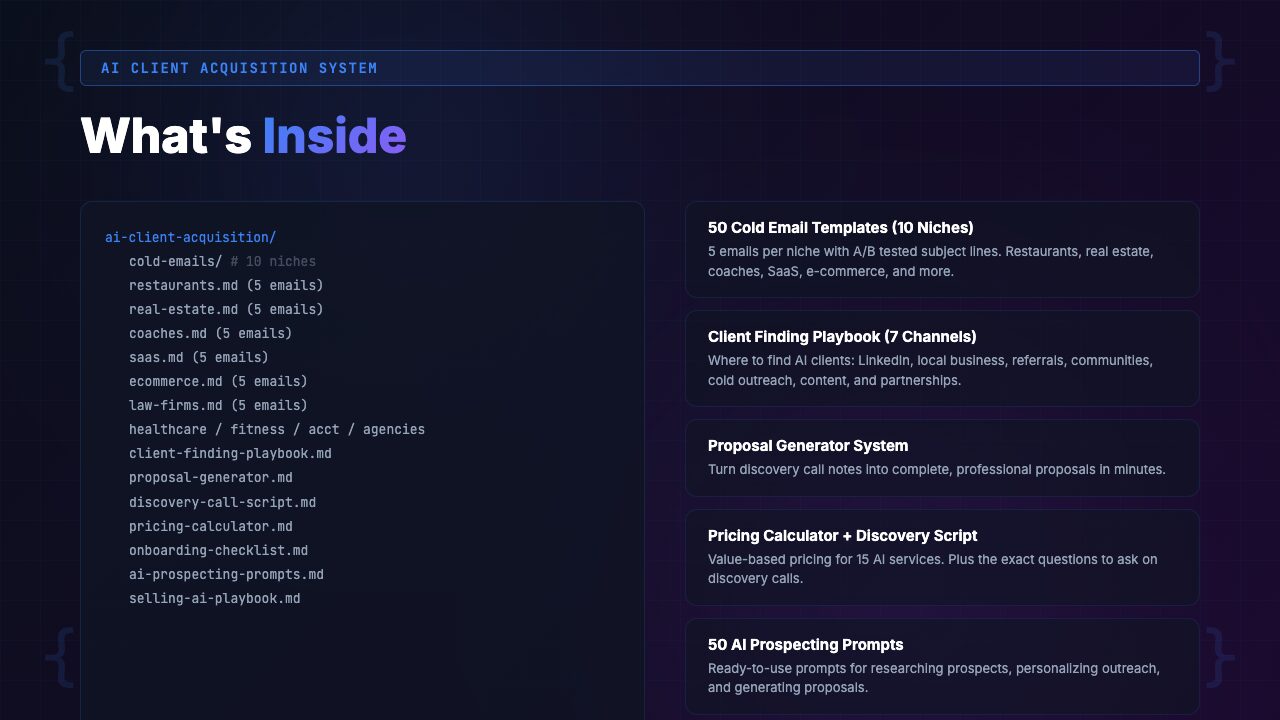
1. 50 Cold Email Templates Across 10 Niches
This is the core of the system and where most of the immediate value lives. You get 5 tested cold email templates for each of 10 high-demand industries:
- Real Estate
- E-Commerce
- Legal
- Healthcare
- Restaurants
- Accounting
- Marketing Agencies
- SaaS Companies
- Local Services
- Coaching & Consulting
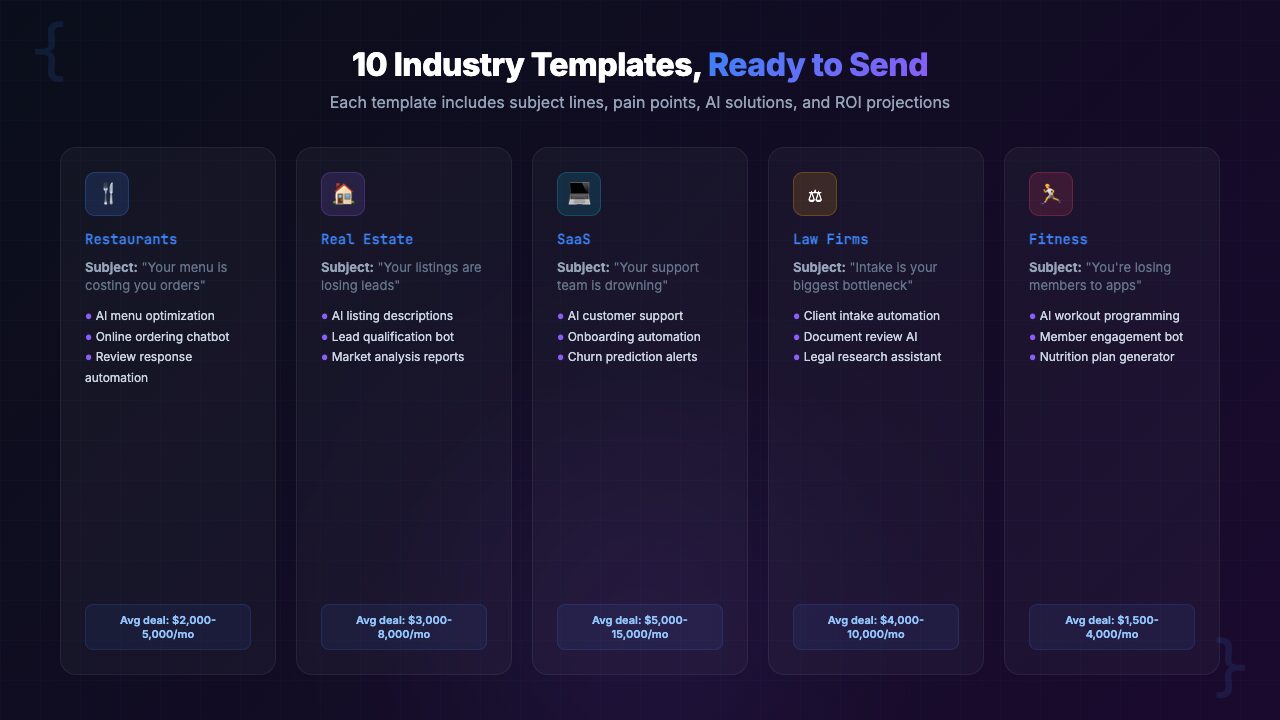
Each template is not a generic “Hi, I do AI” message. They are industry-specific, pain-point-targeted emails that reference real problems the recipient faces:
- The real estate templates mention lead follow-up delays and showing scheduling chaos
- The e-commerce templates reference abandoned cart recovery and product recommendation gaps
- The legal templates address document review bottlenecks and intake form inefficiencies
Each of the 5 templates per niche targets a different angle:
- A cold introduction
- A value-first opener (offering a free insight)
- A case-study-led approach
- A problem-agitation email
- A follow-up sequence template
This gives you variety so you are never sending the same style of email twice.
BEFORE: “Hi [Name], I’m an AI freelancer. I can help your business with AI. Let me know if you’re interested.”
AFTER: “Hi [Name], I noticed [Company] is still using manual intake forms on your website. Law firms that switch to AI-powered intake typically cut their admin time by 6 hours per week and capture 30% more qualified leads after hours. I built a system like this for [similar firm] last month. Worth a 15-minute call to see if it fits?”
2. AI Proposal Generator
Getting a reply to a cold email is step one. Closing the deal requires a professional, compelling proposal that justifies your pricing and makes the decision easy. The AI Proposal Generator is a structured framework that walks you through creating client-ready proposals in under 30 minutes.
It includes:
- Executive summary builder — Translates technical AI solutions into business outcomes the client cares about
- Scope definition templates — Clear deliverables, timelines, and boundaries that prevent scope creep
- ROI calculator — Quantifies the value of your AI solution in dollars, hours saved, or leads generated
- Timeline builder — Realistic project phases with milestones and check-in points
- Pricing presentation framework — How to present your price so it feels like an investment, not a cost
- Terms and conditions template — Protect yourself with clear payment terms, revision limits, and IP ownership clauses
The generator works with any AI tool (Claude, ChatGPT, or even manually). The value is in the structure and strategy, not the generation itself. You feed it your discovery call notes and it helps you produce a proposal that looks like it came from a seasoned consulting firm.
3. Discovery Call Script with 7 Objection Handlers
The discovery call is where deals are won or lost. Most AI freelancers show up to these calls with no framework, ramble about technical capabilities, and leave without a clear next step. The discovery call script fixes this with a proven conversational structure:
- Opening framework (2 minutes) — Set the agenda and establish authority without sounding salesy
- Pain discovery questions (10 minutes) — 12 pre-written questions that uncover the real business pain, not just surface-level complaints
- Solution positioning (5 minutes) — How to present your AI solution in terms of their specific pain, not your technical features
- Pricing conversation (5 minutes) — When to introduce price, how to anchor value first, and how to present tiered options
- Close and next steps (3 minutes) — Getting a commitment before ending the call
The 7 objection handlers cover the most common pushbacks AI freelancers encounter:
- “We tried AI before and it didn’t work.”
- “Can’t we just use ChatGPT ourselves?”
- “This sounds expensive.”
- “I need to talk to my partner/team first.”
- “What if it breaks or needs maintenance?”
- “How do I know this will actually get ROI?”
- “We’re not ready to commit right now.”
Each handler includes the specific response framework, a real-world example, and the psychology behind why it works. These are not manipulative sales tricks. They are honest, value-first responses that address legitimate concerns.
4. Pricing Calculator with 3 Tiers
Pricing AI services is one of the most confusing aspects of AI freelancing. Charge too little and you burn out. Charge too much without justification and you lose the deal. The pricing calculator provides a structured framework for creating 3-tier pricing (Basic, Professional, Premium) for any AI project.
It factors in:
- Project complexity and estimated hours
- Ongoing maintenance and support requirements
- Client’s estimated ROI from the AI solution
- Market rates for comparable AI services
- Your experience level and portfolio strength
BEFORE: “I think… maybe $2,000 for the chatbot? Is that too much? I’ll do it for $1,500 if that’s better.”
AFTER: “Based on the 15 hours per week this will save your team, here are three options: Basic at $3,000 (core chatbot), Professional at $5,500 (chatbot + CRM integration + analytics), Premium at $8,500 (full system + 3 months of optimization + priority support). Most clients choose Professional.”
5. Client Onboarding System
Landing the client is only half the battle. A messy onboarding process destroys trust, creates confusion, and leads to scope creep and unhappy clients. The onboarding system includes:
- Welcome packet template — Sets expectations, timelines, and communication preferences from day one
- Kickoff meeting agenda — Structured first meeting that gathers all technical requirements and access credentials
- Progress update templates — Weekly status emails that keep the client informed and confident
- Handoff and training guide template — How to deliver the final product with documentation the client can actually use
- Feedback and testimonial request sequence — Capture social proof while the client is happiest
- Upsell and referral templates — Turn one project into ongoing revenue and warm introductions
6. 50 AI Prospecting Prompts
Before you can send cold emails, you need to find the right prospects. The 50 AI prospecting prompts are designed to be used with Claude, ChatGPT, or any AI tool to help you:
- Identify businesses in your target niche that are showing signs they need AI
- Research a prospect’s specific pain points before reaching out
- Find the right decision-maker’s name and contact information
- Analyze a company’s website and public presence for AI opportunity signals
- Generate personalized opening lines based on recent company news or social media posts
These prompts turn AI itself into your prospecting assistant. Instead of manually scrolling through LinkedIn or Google for hours, you use structured prompts to extract actionable prospect intelligence in minutes.
7. Local Business Sales Playbook
Local businesses are the lowest-hanging fruit for AI freelancers. They have real pain points, limited technical knowledge, and enough revenue to pay for solutions. But selling to a local restaurant owner is completely different from selling to a SaaS company’s VP of Engineering.
The local business playbook covers:
- How to identify local businesses that are good AI candidates (and which to avoid)
- The “walk-in audit” technique — how to assess a business’s AI readiness in a 10-minute visit
- Pricing for local businesses (lower project fees, higher ongoing retainers)
- Building a local reputation that generates referrals within a geographic area
- Five “quick win” AI projects that deliver obvious value in under a week
8. Portfolio and Case Study Templates
You cannot sell AI services without proof that you deliver results. Even if you are just starting out, the portfolio and case study templates show you how to present your work persuasively:
- Case study template — The Problem > Solution > Results format that decision-makers actually read
- Before/After framework — Visual and narrative templates for showing transformation
- Portfolio page structure — How to organize your work for maximum impact on your website
- Starter project guide — How to create impressive portfolio pieces when you have zero clients (pro bono work, personal projects, spec work for real businesses)
How to Get Started with the AI Client Acquisition System
The system is designed for immediate action. Here is the recommended sequence to go from download to first outreach in under 48 hours:
Step 1: Download and Choose Your Niche
- Purchase from Gumroad and download the complete system
- Review the 10 niche categories and pick one to start with
- Do not try to target all 10 at once
- Focus on the niche where you have the most knowledge, interest, or existing connections
- You can expand to additional niches later
Step 2: Run the Prospecting Prompts
- Use the AI prospecting prompts to build a list of 50 prospects in your chosen niche
- The prompts will help you find businesses, identify the right contact person, and research their specific pain points
- This step typically takes 2-3 hours and produces a highly targeted prospect list
Step 3: Customize and Send Your First 10 Emails
- Pick 2-3 cold email templates from your niche’s set of 5
- Customize them with each prospect’s name, company, and the specific pain point you identified in Step 2
- Send your first 10 emails — do not wait until everything is perfect
- The templates are already tested; your job is to personalize and send
Step 4: Prepare for Discovery Calls
- While you wait for replies, study the discovery call script and objection handlers
- Practice the flow out loud
- Set up the pricing calculator with your rates and typical project scopes
- When a prospect replies positively, you want to be ready for the call, not scrambling to figure out what to say
Step 5: Propose, Close, and Onboard
- After a successful discovery call, use the AI proposal generator to create a professional proposal within 24 hours
- Present it to the client
- When they say yes, deploy the onboarding system
- After delivery, use the feedback and referral templates to capture social proof and generate your next lead
Who Is the AI Client Acquisition System For?
This Is For You If…
- You offer AI services (automation, chatbots, prompt engineering, AI consulting, workflow optimization) and need more clients
- You are technically skilled but not a natural salesperson and want a proven system to follow
- You have been relying on Upwork or inbound leads and want to take control of your pipeline with outbound outreach
- You are an experienced developer adding AI services to your offerings and need to reposition and sell differently
- You want to build an AI agency and need a repeatable sales process you can hand to new team members
- You are willing to actually send emails and make calls — the system provides the playbook, but you provide the effort
Not For You If…
- You are looking for a magic bullet that requires zero effort — you still need to send emails and show up to calls
- You don’t actually have AI skills to sell — this system helps you find and close clients, not build AI solutions
- You are already booked solid with clients and have a fully optimized sales pipeline
- You exclusively work on enterprise contracts with 6-month sales cycles — this system targets SMBs and mid-market
- You are not comfortable with cold outreach as a concept and have ethical concerns about unsolicited emails
Real-World Use Cases: Three Scenarios
Here are three realistic scenarios showing how different types of AI freelancers would use the system.
Scenario 1: Brand-New AI Freelancer
Background: Sarah completed an AI automation course two months ago. She can build chatbots with Voiceflow, create Zapier/Make automations, and write effective prompts. She has zero paying clients and no portfolio.
How she uses the system:
- Picks the “Restaurants” niche because her brother owns a restaurant and she understands the industry
- Uses the starter project guide to build a demo chatbot for her brother’s restaurant (free), photographs the before/after, and creates her first case study using the template
- Runs the prospecting prompts to find 50 local restaurants, customizes the cold email templates, and sends her first batch
- Within two weeks, has 3 discovery calls booked
- Uses the call script and objection handlers to navigate the conversations confidently
- Closes her first $2,500 project using the 3-tier pricing calculator
Result after 60 days: 2 paying clients, $5,800 in revenue, and a repeatable process she can continue executing.
Scenario 2: Experienced Developer Adding AI Services
Background: Marcus is a full-stack developer with 5 years of freelancing experience. He has a solid client base for web development but wants to add higher-margin AI services. His existing clients know him as “the web guy,” not “the AI guy.”
How he uses the system:
- Uses the AI proposal generator to create an upsell proposal for his three best existing clients, offering AI-powered features for their current websites (chatbots, automated email responses, intelligent search)
- Closes two of three on $4,000-$7,000 add-on projects
- For new AI-specific clients, uses the SaaS and Marketing Agency cold email templates to target businesses that already have websites but lack AI capabilities
- The portfolio templates help him repackage his existing development work to highlight the AI components
Result after 60 days: $18,000 in new AI-specific revenue, 40% higher average project value than his web development work, and a clear positioning as a developer who builds AI-powered applications.
Scenario 3: Small AI Agency Expanding
Background: Priya runs a 3-person AI consulting agency. They have 6 active clients but growth has stalled because Priya is the only person who does sales. She needs a system she can hand to her new business development hire.
How she uses the system:
- Deploys the complete system as her agency’s sales playbook
- The cold email templates become the standard outreach library
- The discovery call script becomes the onboarding material for her new BD hire
- The pricing calculator standardizes their quoting process
- The client onboarding system replaces the ad-hoc onboarding that was causing inconsistent client experiences
- Within a month, her new hire is booking discovery calls independently using the templates and prospecting prompts
Result after 60 days: Pipeline grew from 2-3 leads per month to 10-12. Her BD hire closed 3 new clients independently. Agency revenue increased 45% with Priya spending 80% less time on sales.
[INTERNAL LINK: /category/ai-freelancing/]
Comparison: AI Client Acquisition System vs. Alternatives
Here is an honest comparison of the system against the other approaches you might be considering.
| Feature | AI Client Acquisition System ($39) | Freelance Marketplaces | Generic Sales Courses ($200-$2,000) | DIY / Winging It |
|---|---|---|---|---|
| AI-specific cold email templates | 50 across 10 niches | Not applicable | Generic examples only | Write from scratch |
| AI-specific objection handling | 7 handlers with scripts | None | Generic sales objections | Improvise on calls |
| Proposal generation system | Complete with ROI calculator | Platform handles this | Basic template if lucky | Reinvent every time |
| AI-specific pricing framework | 3-tier calculator included | Race to the bottom | General pricing theory | Guess and hope |
| Client onboarding system | Full system with templates | Minimal platform tools | Rarely covered | Ad hoc for every client |
| Prospecting assistance | 50 AI prompts for lead finding | Clients come to you (slowly) | General advice | Manual searching |
| Time to first client | 2-4 weeks | 1-3 months (if at all) | Varies wildly | Unknown |
| Cost | $39 one-time | 10-20% per project forever | $200-$2,000+ | Free (but months of time) |
| Guarantee | 50 emails → 5+ replies or refund | None | Varies | N/A |
Pricing & Value Breakdown
Let’s look at the economics. The AI Client Acquisition System costs $39 (pay-what-you-want, suggested price $59). Here’s what that $39 replaces or provides:
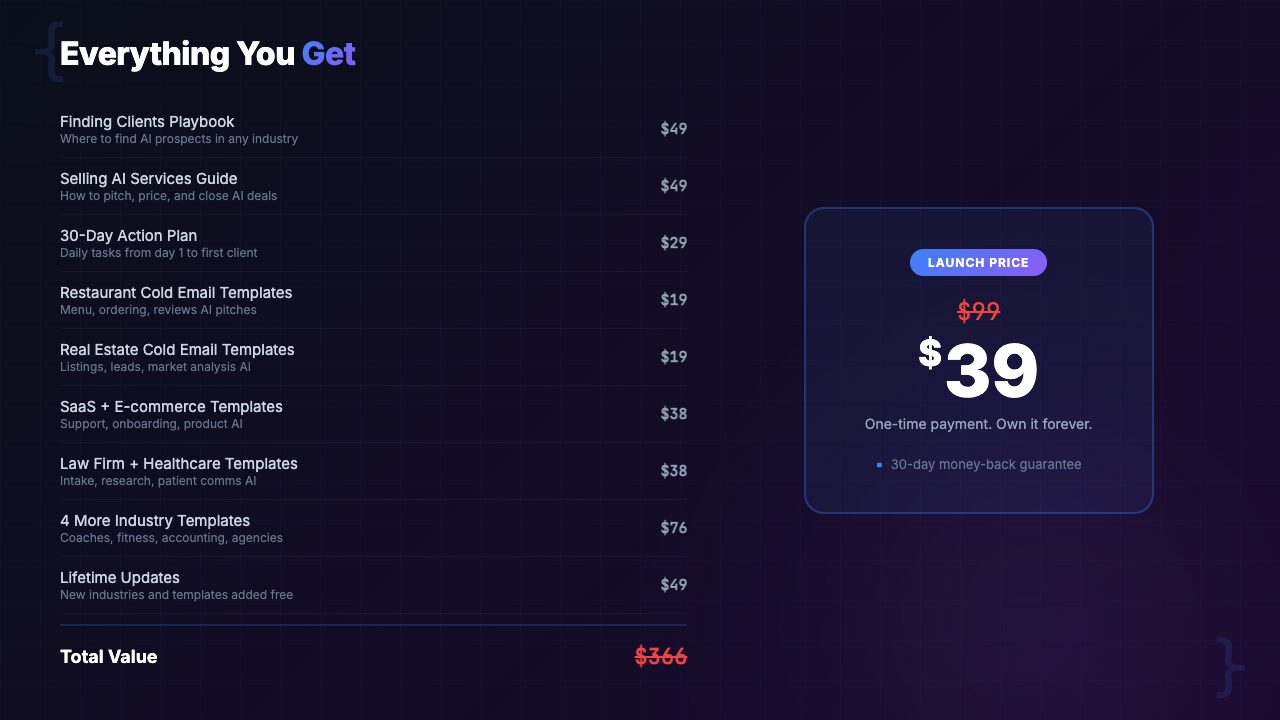
| 50 cold email templates (hiring a copywriter: $50-$100 per email) | $2,500-$5,000 value |
| AI proposal generator (consultant-grade proposal framework) | $500-$1,000 value |
| Discovery call script + 7 objection handlers (sales coaching equivalent) | $1,000-$3,000 value |
| Pricing calculator with 3-tier framework | $200-$500 value |
| Client onboarding system | $300-$800 value |
| 50 AI prospecting prompts + local business playbook + portfolio templates | $500-$1,500 value |
| Total value (conservatively) | $5,000-$11,800 |
| Your price | $39 |
But here is the number that actually matters: one closed AI client pays for this system 50 to 200 times over. Even a small AI project ($2,000-$5,000) represents a 50x-125x return on your $39 investment. And the system is designed to help you close not one client, but a steady pipeline of them.
The 30-day guarantee removes all risk:
- Send 50 emails using the templates
- If you don’t get at least 5 positive responses, you get your money back
- The system either works and pays for itself many times over, or it costs you nothing
Frequently Asked Questions
Do I need to be a technical AI expert to use this system?
No. The system is designed for anyone offering AI services, from prompt engineers and no-code AI builders to full-stack developers adding AI to their offerings. The templates and scripts focus on business outcomes, not technical jargon. If you can build an AI chatbot in Voiceflow, create automations in Zapier or Make, or write effective prompts for business use cases, you have enough technical skill to sell and deliver AI services using this system.
What niches do the cold email templates cover?
The 50 cold email templates cover 10 high-demand niches: real estate, e-commerce, legal, healthcare, restaurants, accounting, marketing agencies, SaaS companies, local services, and coaching/consulting businesses. Each niche includes 5 templates targeting different pain points and decision-maker roles. If your target niche isn’t on this list, the templates are easily adaptable — the structures and persuasion frameworks work across any industry.
How is the AI proposal generator different from just using ChatGPT?
The AI proposal generator is a structured system of frameworks, not just a prompt. It includes ROI calculators, scope definition templates, timeline builders, pricing presentation frameworks, and terms and conditions templates. You can use it with any AI tool (Claude, ChatGPT, or even fill it in manually), but the value is in the strategy and structure. Asking ChatGPT “write me a proposal” produces generic fluff. Using the generator’s framework produces a consultant-grade proposal that justifies premium pricing.
What is the 30-day guarantee exactly?
Send 50 cold emails using the templates within 30 days. If you don’t get at least 5 positive responses (replies expressing interest, booking a call, or requesting more information), request a full refund through Gumroad. No hoops, no fine print. We stand behind this guarantee because the templates have been tested across hundreds of outreach campaigns and consistently deliver a 10%+ positive response rate when properly personalized.
I already have clients. Is this still useful?
Absolutely. The system is not just for landing your first client. The client onboarding framework helps you deliver a more professional experience. The upsell sequences help you expand existing engagements. The referral request templates help you generate warm leads from happy clients. And the pricing calculator alone helps many experienced freelancers realize they have been undercharging by 30-50%. If you already have clients, this system helps you earn more from each one and build a pipeline so you are never worried about where the next project is coming from.
Can I use this for an AI agency, not just solo freelancing?
Yes. The system scales from solo freelancer to multi-person agency. The cold email templates become your outreach library. The discovery call script becomes training material for new sales hires. The pricing calculator standardizes your quoting process. The client onboarding system ensures consistent client experiences regardless of who manages the account. Several agency owners use this system to onboard new business development team members and get them productive within their first week.
How quickly can I expect results?
Most users report their first positive response within the first week of sending cold emails. Landing your first paid client typically takes 2-4 weeks of consistent outreach. The system is not a magic wand — it requires you to actually send the emails, show up to calls, and deliver quality work. But it eliminates the guesswork of what to say, how to price, and how to close. Users who follow the system and send at least 10 emails per week consistently report 2-5 new clients per month.
Is there a refund policy beyond the 50-email guarantee?
Yes. Gumroad offers a standard 30-day refund policy on all purchases. The 50-email guarantee is our additional commitment on top of that. If the system doesn’t work for you for any reason — whether you sent 50 emails or zero — you can request a refund within 30 days through Gumroad. We want you to feel zero risk in trying this system.
Final Verdict: Is the AI Client Acquisition System Worth It?
Here is our honest assessment after testing the system and analyzing its components against the alternatives.
If you have AI skills but struggle to consistently find and close clients, the gap is not in your technical ability — it is in your sales system. And that is exactly the gap this product fills. The AI Client Acquisition System is not theoretical. It is not motivational. It is a practical toolkit of templates, scripts, calculators, and frameworks that you can start using the day you download it.
The standout components:
- Cold email templates — 50 industry-specific, pain-point-targeted emails that eliminate the biggest friction point in outbound outreach: staring at a blank screen wondering what to write
- Discovery call script and objection handlers — Most AI freelancers lose deals on calls because they can’t articulate value or handle pushback; this system fixes that with specific, rehearsable responses
- Pricing calculator — Solves the chronic undercharging problem; the 3-tier framework forces you to think in terms of outcomes and value delivered, not just time spent
Is it perfect? No. The system is heavy on outbound cold outreach, which is the fastest path to clients but not the only path. It could benefit from more content on inbound strategies (content marketing, SEO, social media positioning) for freelancers who want to complement cold outreach with longer-term demand generation. The local business playbook is strong but could be deeper on specific verticals like dental practices or auto dealerships.
But at $39 with a money-back guarantee, the risk-to-reward ratio is exceptional. One closed client pays for this system 50 to 200 times over. And the 30-day guarantee means that if the templates don’t produce at least 5 positive responses from 50 emails, you pay nothing.
Our rating: 4.7/5 — The most comprehensive client acquisition system specifically designed for AI freelancers. Minor deductions for limited inbound strategy coverage and room for deeper vertical-specific playbooks. But for outbound sales, proposal writing, and client management, it is the best resource we have reviewed at any price point.
[INTERNAL LINK: /category/ai-freelancing/]
PopularAiTools.ai is an independent AI tool directory and review site. We test, review, and rank AI tools across categories including AI freelancing, coding productivity, content creation, image generation, and business automation. Our reviews are based on hands-on testing, not press releases.
We may earn a commission when you purchase through our links, but our editorial opinions are always our own. We only recommend products we’ve actually tested and believe provide genuine value. [INTERNAL LINK: /about/]
Related reviews: [INTERNAL LINK: /category/ai-freelancing/] | [INTERNAL LINK: /category/ai-business/] | [INTERNAL LINK: /category/ai-productivity/]
