7 Claude Cowork Skills That Replace a $10,000/mo Marketing Team

Head of AI Research
Table of Contents
- Why Skills Change Everything
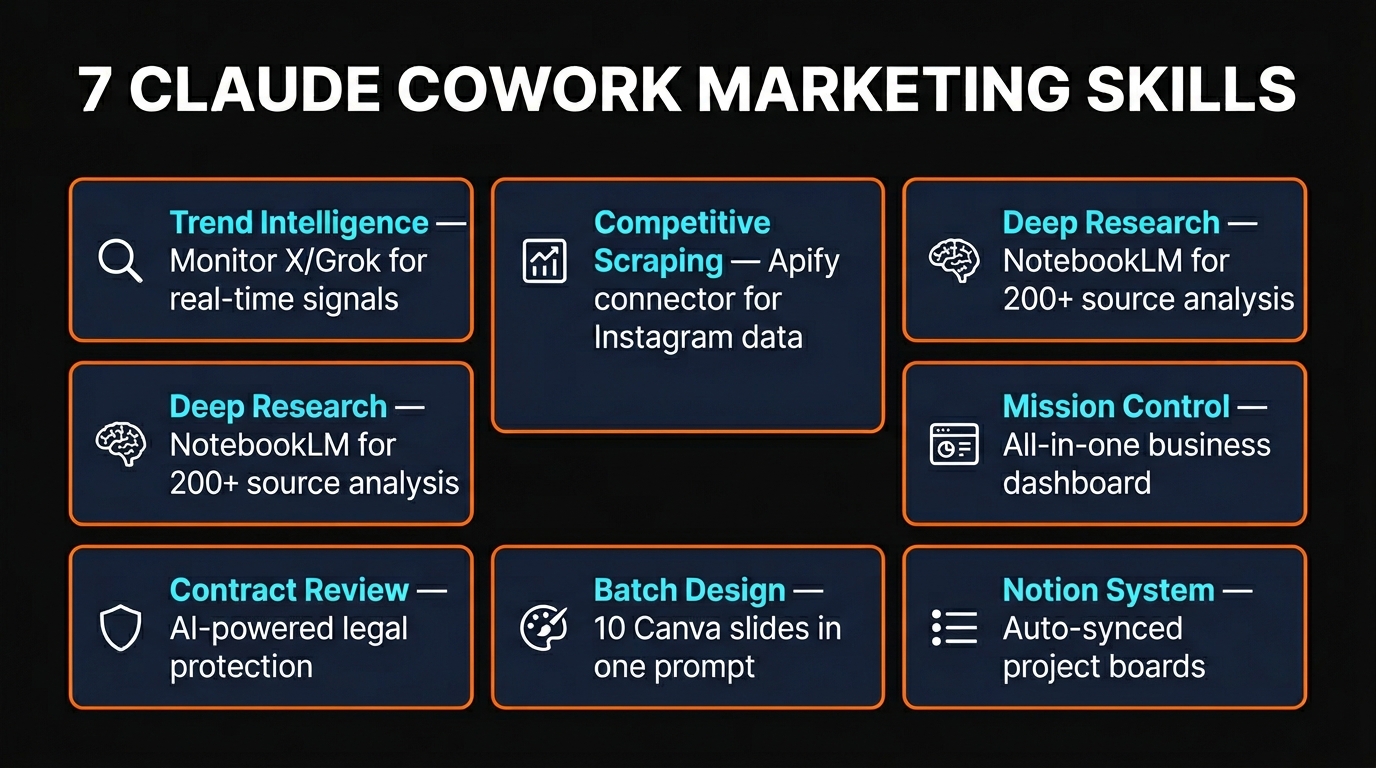
- Skill 1: Trend Intelligence via X and Grok
- Skill 2: Competitive Scraping with Apify
- Skill 3: Deep Research with NotebookLM
- Skill 4: Mission Control Dashboard
- Skill 5: AI Contract Review
- Skill 6: Batch Design with Canva
- Skill 7: Notion Productivity System
- What This Actually Costs
- Getting Started Today
- FAQ
Marketing agencies charge upwards of $10,000 per month for the services covered in this guide. Trend monitoring, competitive intelligence, content research, design production, project management, and legal review. The combined cost of doing all seven with Claude Cowork skills is under $75 per month. That is not a typo.
Claude Cowork launched in January 2026 and immediately wiped $285 billion off global software stocks. The reason was simple: for the first time, non-technical people could automate real marketing workflows without a single line of code, without drag-and-drop builders, and without hiring a developer. You describe the task. Cowork does it.
But most people still treat Cowork like a chatbot. They ask it one question, get one answer, and move on. The real power is in skills — reusable instruction sets that turn Cowork into a permanent marketing machine. Build the skill once, and it runs the same way every time you need it.
Here are seven Claude Cowork marketing skills that can replace an entire marketing department.
Why Skills Change Everything
A Claude Cowork skill is a markdown file that contains instructions Claude follows permanently. Unlike a prompt that disappears when the conversation ends, a skill persists in your account. It activates automatically whenever you start a task that matches.
Think of it as onboarding a new team member — except you only explain the process once. Every future conversation uses that same framework. Skills are shareable across teams, stackable across workflows, and they get better as you refine them.
The fastest way to create a skill is to have a conversation where Cowork nails the output, then type: "Create a skill to remember this." One sentence turns a good result into a permanent workflow.
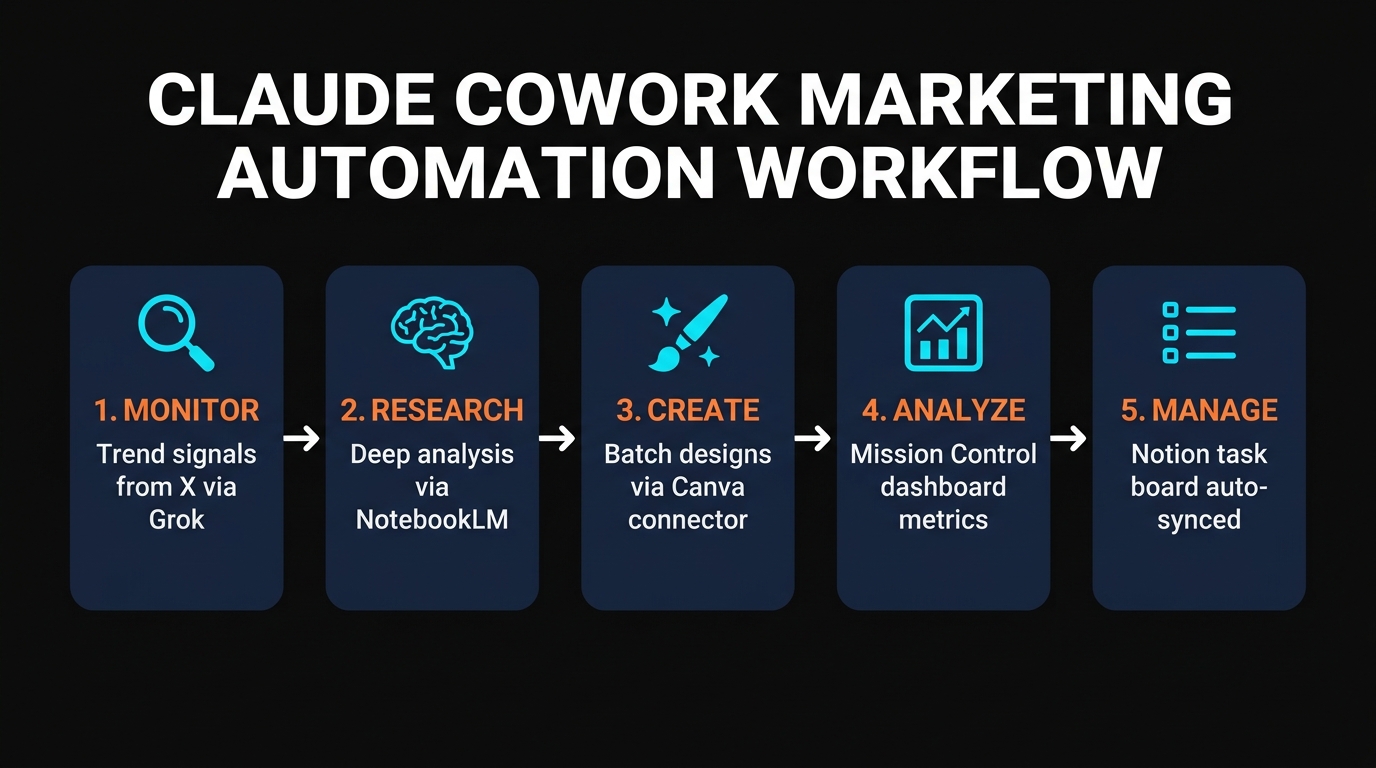
Skill 1: Trend Intelligence via X and Grok
Social listening tools cost $800 or more per month. Claude Cowork can do the same thing for free by browsing X (formerly Twitter) and having direct conversations with Grok, which has access to the entire X firehose in real time.
The setup is straightforward. Sign into X on Google Chrome, then give Cowork a prompt that defines your monitoring framework. The best approach uses a four-factor scoring matrix:
- Recency — Must be posted within the last 7 days. Anything older is disqualified.
- Authority — Prioritize accounts with higher followings as a signal of value.
- Velocity — How quickly is the topic gaining traction? Fast-rising signals matter most.
- Relevance — How closely does it match your content themes and audience interests?
Each factor scores 1 to 5 on a 20-point scale. Cowork opens X, chats with Grok, and returns a prioritized list of trending signals scored against your matrix. The entire process takes 5 to 10 minutes and can be saved as a recurring scheduled task that runs every morning at 9 AM.
Why this matters: News breaks on X days before it appears on YouTube or blogs. By monitoring trends in real time, you can create content while topics are still rising instead of chasing them after they peak.
Skill 2: Competitive Scraping with Apify
Apify is the largest marketplace for pre-built web scrapers, with over 20,000 actors covering Instagram, TikTok, Facebook, Google Maps, YouTube, LinkedIn, Reddit, and virtually every other platform. By connecting the Apify connector to Claude Cowork, you unlock an intelligence layer that most businesses pay thousands for.
Setting it up takes under two minutes. In Cowork, click the plus icon, then Connectors, then Manage Connectors. Search for Apify, click Add Custom Connector, and sign in via OAuth. No API key required.
Once connected, you can ask Cowork to scrape competitor Instagram accounts and return engagement data, likes, comments, shares, and descriptions for their last 30 posts. The results arrive in a structured table that you can analyze immediately.
Competitor Pricing
Monitor weekly price changes across your market automatically and get alerted to shifts.
Social Content Analysis
Pull top-performing reels, posts, and stories from competitors with full engagement metrics.
Review Mining
Scrape Google reviews, G2, Capterra, and Trustpilot to understand customer sentiment at scale.
Job Listings
Track competitor hiring patterns to detect strategic shifts before they announce them.
Apify's free tier includes $5 in monthly credits, which covers hundreds of moderate scraping tasks. Paid plans start at $49 per month for heavier usage. The Claude Cowork Apify connector works identically in Claude Code for users who prefer the terminal interface.
Skill 3: Deep Research with NotebookLM
Google's NotebookLM is a research powerhouse that most marketers overlook. It does not just store information — it enriches it using Google's AI systems for accuracy and depth. By connecting NotebookLM to Claude Cowork, you get a research pipeline that no single tool can match alone.
The NotebookLM MCP skill (available free on GitHub) lets Cowork create notebooks, import sources, and query them programmatically. A single prompt can import 50+ resources on any topic and return a synthesized research brief with citations.
Practical applications for marketing teams:
- Content research — Import 50 competitor videos to extract frameworks and find your unique angle
- Skill building — Study top creators in your niche and distill their storytelling patterns
- Knowledge base — Build a persistent research library that Cowork can query anytime
- Audience research — Synthesize forum posts, reviews, and social comments into persona documents
NotebookLM is completely free. The connection to Cowork means your research feeds directly into content creation, strategy documents, and campaign briefs without any manual copy-pasting between tools.
Skill 4: Mission Control Dashboard
Every business needs a single place where all the numbers live. Google Analytics, YouTube stats, HubSpot contacts, Salesforce deals, Gmail metrics, Notion tasks — scattered across a dozen dashboards that nobody checks consistently. The Mission Control skill brings everything into one view.
The concept is simple: connect your data sources via Cowork's connectors (Google Analytics, YouTube, HubSpot, Zapier, Notion, Gmail, and more), then build an HTML dashboard that displays the metrics that matter. Cowork generates the dashboard in a single prompt and updates it daily.
What makes this powerful is the morning briefing pattern. Set up a scheduled task that runs at 8 AM every day with a prompt like: "What changed overnight? What metrics moved that I need to be aware of?" Cowork pulls the latest data from all connected sources and delivers a concise briefing before you finish your coffee.
Revenue attribution, content ROI, traffic shifts, lead pipeline changes — all visible without opening a single separate dashboard. If your top-performing article drops in rankings, you know the same morning instead of discovering it weeks later.
Skill 5: AI Contract Review
An estimated 60 to 70 percent of small businesses sign contracts without legal review. The time cost of reading every clause in every agreement is prohibitive, and lawyers charge $250 or more per hour. An AI contract review skill does not replace legal counsel, but it catches the red flags that most people miss entirely.
Community-built contract review skills are available on GitHub that cover 14 areas of legal analysis: contract review, clause analysis, document generation, and compliance reporting for frameworks like SOC 2. Installing one takes three steps:
- Find the GitHub repo with the contract review skill
- Give Cowork the repo URL and ask it to create a skill from it
- Run evals to verify the skill outperforms Cowork's default contract analysis
The skill scans for IP ownership traps, non-compete clauses, auto-renewal terms, uncapped liabilities, and other common issues. Upload any contract and get a structured risk assessment in minutes instead of hours.
Important: AI contract review is a supplementary tool, not legal advice. Always consult a qualified legal professional for binding agreements. The goal is reducing the risk of missing obvious red flags, not eliminating the need for lawyers.
Skill 6: Batch Design with Canva
Creating branded social media graphics is one of the most time-consuming tasks in marketing. A single carousel for Instagram can take 30 minutes to an hour. With the Canva connector in Claude Cowork, you can generate 10 branded slides in a single prompt — without opening Canva yourself.
The workflow has three parts:
- Set up a brand kit — Upload your colors, fonts, logo, and style preferences as a Cowork skill
- Create a master template — Design one slide in Canva that matches your brand
- Batch generate — Give Claude a list of 10 headlines or topics and it creates all 10 slides programmatically
Quote graphics, article insights, ad variations, LinkedIn carousels, Instagram stories — anything that follows a repeatable format can be batched. One person can produce more visual content in 10 minutes than a design team produces in a day.
Canva Pro costs $13 per month. Combined with Claude Cowork, you replace a design contractor who would charge $2,000 or more monthly for the same output volume.
Skill 7: Notion Productivity System
The final skill ties everything together. Claude Cowork has access to your emails, calendars, conversations, and every connector you have set up. By connecting the Notion connector, you can automatically generate a daily project board that pulls tasks from all these sources.
A single prompt can scan your emails from today, check your calendar appointments, review all Cowork conversations from the past 24 hours, and create a prioritized task list in Notion with due dates, owners, and action items. The priority matrix scores each task so you know exactly what to tackle first.
This is not a basic to-do list. It is an orchestration layer that connects your marketing department's entire workflow. The trend intelligence from Skill 1 feeds into content ideas. The competitive data from Skill 2 informs positioning. The research from Skill 3 shapes strategy. The dashboard from Skill 4 tracks results. And all of it is managed in one Notion workspace that updates automatically.
Notion's free tier works for individuals. Pro costs $10 per month for teams. Either way, the cost is negligible compared to hiring a project manager at $500 or more per month.
What This Actually Costs
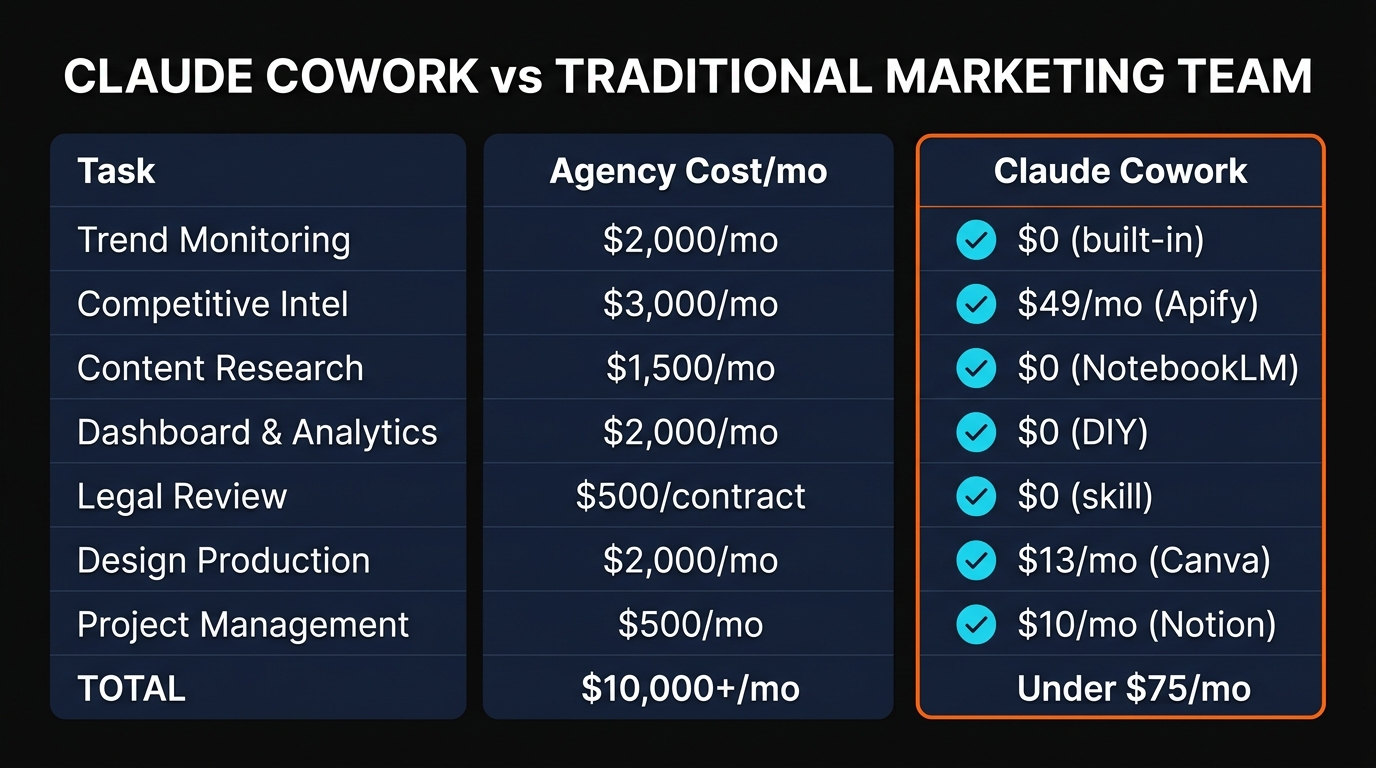
| Service | Agency Cost | With Cowork |
|---|---|---|
| Trend Monitoring | $2,000/mo | $0 (built-in) |
| Competitive Intelligence | $3,000/mo | $0-49/mo (Apify) |
| Content Research | $1,500/mo | $0 (NotebookLM) |
| Analytics Dashboard | $2,000/mo | $0 (DIY) |
| Legal Review | $500/contract | $0 (skill) |
| Design Production | $2,000/mo | $13/mo (Canva) |
| Project Management | $500/mo | $10/mo (Notion) |
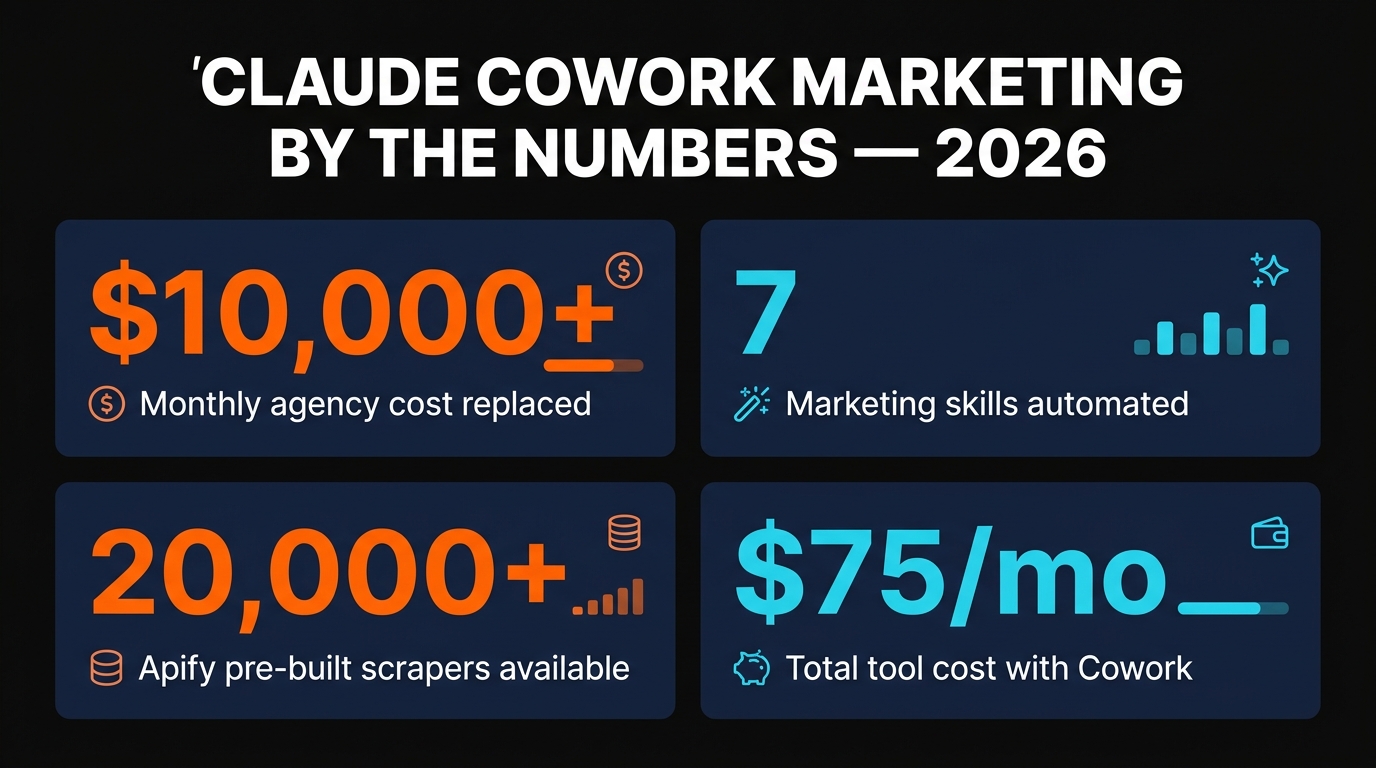
| TOTAL | $10,000+/mo | Under $75/mo |
Claude Cowork itself requires a Pro subscription at $20 per month (or Max at $100-200 per month for heavier usage). Add Canva Pro at $13, Notion Pro at $10, and optionally Apify at $49 for high-volume scraping. The total for all seven skills maxes out at around $75 per month. That is less than one hour of an agency's time.
Getting Started Today
Do not try to set up all seven skills at once. Start with the one that saves you the most time this week. For most marketers, that is either the trend intelligence skill (Skill 1) or the batch design skill (Skill 6), because they produce immediate, visible results.
- Download the Claude desktop app from claude.ai/download (requires Pro plan, $20/mo)
- Switch to the Cowork tab and enable Memory in Settings
- Connect your first service via Connectors (Canva, Notion, or Apify)
- Run your first task with a real business need — not a test prompt
- Save it as a skill once you get the output right
Each skill compounds on the others. The trend intelligence informs your content. The content gets designed via Canva. The results get tracked in Mission Control. And everything gets organized in Notion. Build one skill per week and within two months you will have a marketing system that runs itself.
Frequently Asked Questions
What is a Claude Cowork skill?
A skill is a reusable markdown instruction file that Claude follows permanently. Unlike prompts that disappear after a conversation, skills persist in your account and activate automatically when a matching task is detected. You can create them by asking Cowork to "create a skill" from any successful conversation.
Do I need Claude Max for these skills?
No. All seven skills work on the Claude Pro plan at $20 per month. Max ($100-200/mo) gives you higher usage limits and is recommended if you run multiple scheduled tasks or heavy scraping workflows. Most marketers start with Pro and upgrade only if they hit limits.
Can I use these skills in Claude Code instead of Cowork?
Yes. Claude Cowork is the user-friendly interface for the same engine that powers Claude Code. Every connector, skill, and scheduled task works identically in both. If you run out of Cowork credits, you can switch to Claude Code at any time.
Is the Apify connector free?
Connecting Apify to Cowork is free. Apify itself offers a free tier with $5 in monthly credits, enough for hundreds of moderate scraping tasks. Paid plans start at $49 per month for higher volume usage.
How do I connect NotebookLM to Claude Cowork?
Install the free NotebookLM MCP skill from GitHub. Once installed, Cowork can create notebooks, import sources, and query your research library directly from conversations. The setup takes about 5 minutes.
Recommended AI Tools
played.fm
Sell your music and keep 100%: played.fm is a direct-to-fan store + sync marketplace with 0% commission, no gatekeepers, and no bans — a strong fit for AI musicians.
View Review →OpenCode
The open-source AI coding agent: terminal-first TUI, 75+ model providers, LSP context, subagents, and privacy-first design. Free software, ~180K GitHub stars.
View Review →Exa
The neural web search API for AI agents: embeddings-based retrieval, cited highlights, sub-180ms latency, and an MCP server. 20,000 free requests/month.
View Review →Google Antigravity
Google's agent-first IDE: run a fleet of AI agents from a Manager surface, on Gemini 3 Pro, Claude Sonnet 4.5, or OpenAI models. Free in public preview.
View Review →