
Adobe Firefly Review 2026: Features, Pricing, Pros & Cons
Updated March 2026 · 12 min read · By PopularAiTools.ai
TL;DR
Adobe Firefly is the safest AI image generator for commercial use in 2026 — trained exclusively on licensed content with IP indemnification for enterprise customers. With image generation, text-to-video, sound effects, dubbing, and deep Creative Cloud integration, it’s the best choice for professionals already in Adobe’s ecosystem. Image quality trails Midjourney and Imagen 3, but the legal certainty is unmatched. Rating: 4.2/5
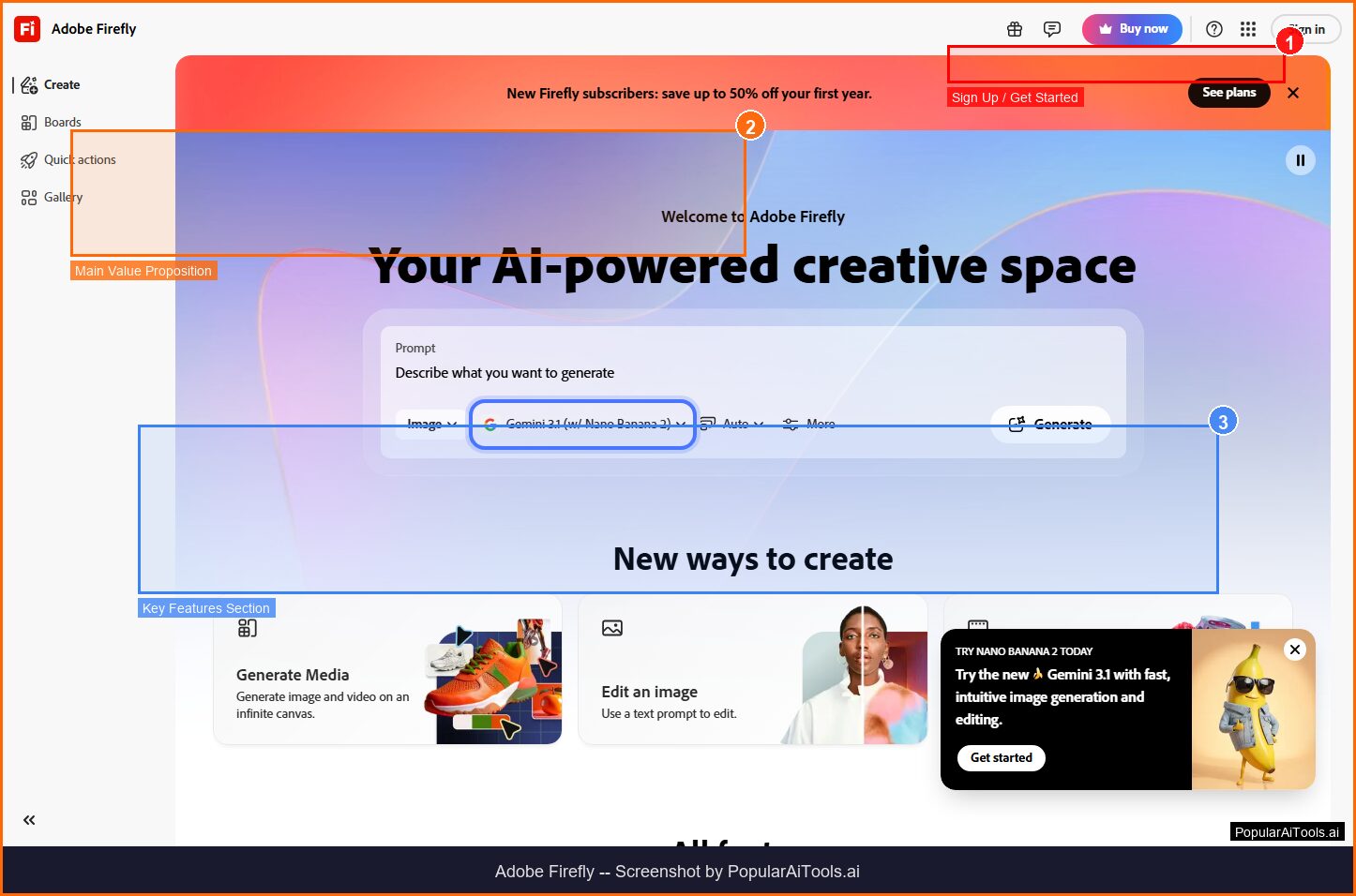
The Adobe Firefly homepage — key features and navigation highlighted
What is Adobe Firefly?
Adobe Firefly is Adobe’s family of generative AI models designed specifically for creative professionals. Unlike competitors trained on scraped internet data, Firefly is trained exclusively on Adobe Stock images, openly licensed content, and public domain works — making it the most commercially safe AI generator available. This ethical training approach is Firefly’s defining characteristic and biggest selling point.
Since its launch, Firefly has expanded far beyond text-to-image generation. The 2026 version includes a Video Model for generating video clips from text prompts, a Sound Effect Generator for creating custom audio, Dubbing and Lip Sync for translating video dialogue while preserving the original speaker’s voice, and Firefly Boards for collaborative creative concepting. These capabilities make it the most versatile generative AI suite in Adobe’s ecosystem.
Firefly is accessible in two ways: as a standalone web application at firefly.adobe.com, and integrated directly into Adobe Creative Cloud applications like Photoshop, Illustrator, Adobe Express, and Premiere Pro. The Photoshop integration is particularly powerful — Generative Fill and Generative Expand let you extend, modify, and add elements to images using natural language prompts without leaving your editing workflow.
For agencies, brands, and enterprises, Firefly’s IP indemnification is the game-changer. Adobe guarantees that if you’re sued over content generated with Firefly, they’ll cover your legal costs. No other major AI generator offers this level of legal protection. In an era of increasing AI copyright lawsuits, this guarantee transforms Firefly from a creative tool into a business-safe production asset.
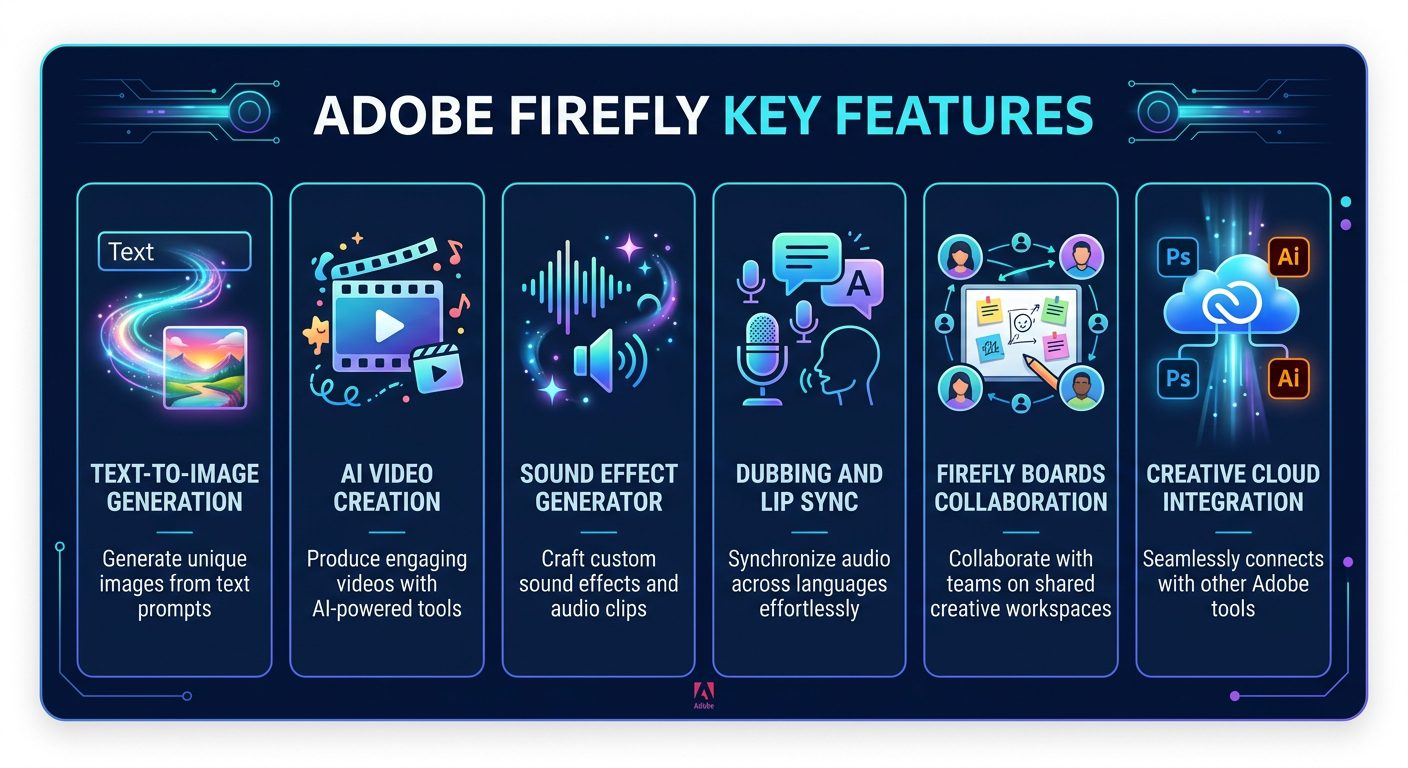
Adobe Firefly’s core generative AI features
Key Features
1. Text-to-Image Generation
Firefly’s core image generation model converts natural language prompts into high-quality images. You can specify artistic style, lighting, color palette, composition, and mood. The model generates four variations per prompt, and you can refine results through follow-up prompts or manual editing. The image quality is professional-grade — clean compositions, accurate lighting, and consistent styles — though it tends to produce more “stock photo-like” results compared to Midjourney’s artistic flair or Imagen 3’s photorealism.
2. AI Video Generation (Firefly Video Model)
The Firefly Video Model generates high-quality video clips from text prompts or reference images. You can create videos in multiple resolutions and aspect ratios, with control over camera movement, lighting, and scene composition. While the clips are short (typically 4-8 seconds), they’re suitable for b-roll footage, social media content, and creative concepts. The video quality competes with Runway ML and Pika, making Firefly a serious contender in the AI video space.
3. Sound Effect Generator
Describe a sound and Firefly generates it — footsteps on gravel, thunder rolling across mountains, a busy cafe atmosphere, or a sci-fi laser blast. The audio quality is surprisingly good, producing files suitable for video production, podcasting, and game development. This feature fills a gap that no other major AI image generator addresses, making Firefly uniquely versatile for multimedia creators.
4. Dubbing & Lip Sync
One of Firefly’s most impressive 2026 additions, the Dubbing feature translates spoken dialogue in videos to different languages while maintaining the original speaker’s voice characteristics. Lip Sync adjusts the video to match the translated audio, creating a convincing illusion that the speaker is naturally speaking the new language. For global content creators and marketers, this eliminates the need for expensive re-recording with voice actors.
5. Generative Fill & Expand (in Photoshop)
Integrated directly into Photoshop, Generative Fill lets you select any area of an image and replace or modify it using a text prompt. Generative Expand extends images beyond their original borders, intelligently filling in new content that matches the existing scene. These features work within Photoshop’s non-destructive editing workflow, meaning you can generate, refine, and undo without losing your original image. For professional designers, this integration alone justifies the Creative Cloud subscription.
6. Firefly Boards (Collaborative Concepting)
Firefly Boards provides a shared canvas where teams can collaboratively generate, arrange, and iterate on AI-created content. Think of it as a digital mood board with built-in AI generation — team members can add prompts, generate variations, annotate results, and vote on preferred directions. For creative teams in the ideation phase, Boards accelerates the concept development process significantly.
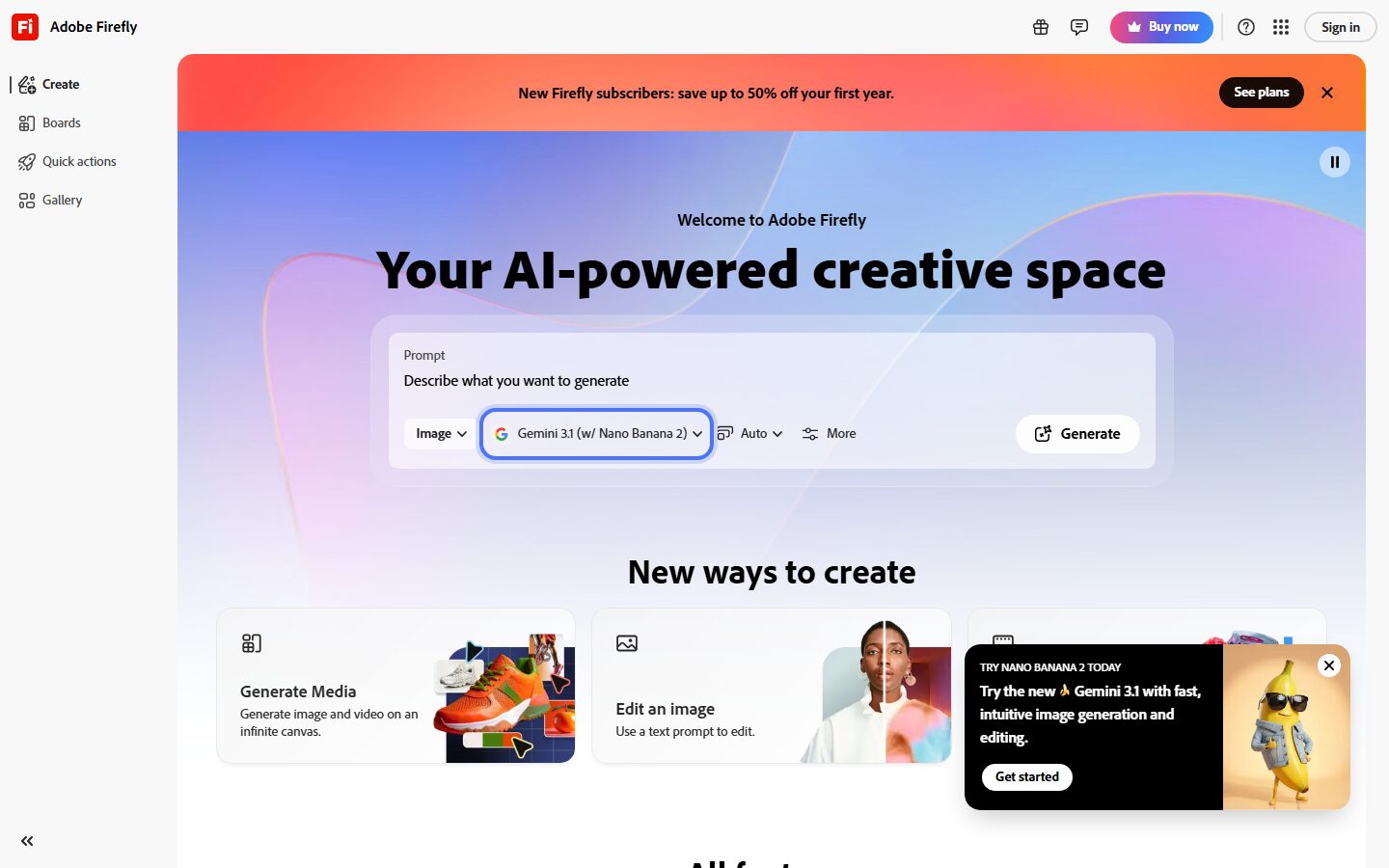
Adobe Firefly’s web application interface
7. Creative Cloud Integration
Firefly is woven throughout Adobe’s Creative Cloud ecosystem. In Photoshop, it powers Generative Fill and Expand. In Illustrator, it generates editable vectors from text prompts. In Adobe Express, it provides one-click design generation. In Premiere Pro, it assists with video editing and audio enhancement. This deep integration means you can access AI capabilities within your existing creative workflow rather than switching to a separate tool.
8. IP-Safe Training & Indemnification
Every Firefly model is trained exclusively on Adobe Stock images (with contributor consent), openly licensed content, and public domain works. Adobe provides IP indemnification for enterprise customers — meaning if you face a copyright claim over Firefly-generated content, Adobe covers your legal defense and potential damages. This is unique in the AI generation space and eliminates the legal uncertainty that shadows competitors like Midjourney and DALL-E.
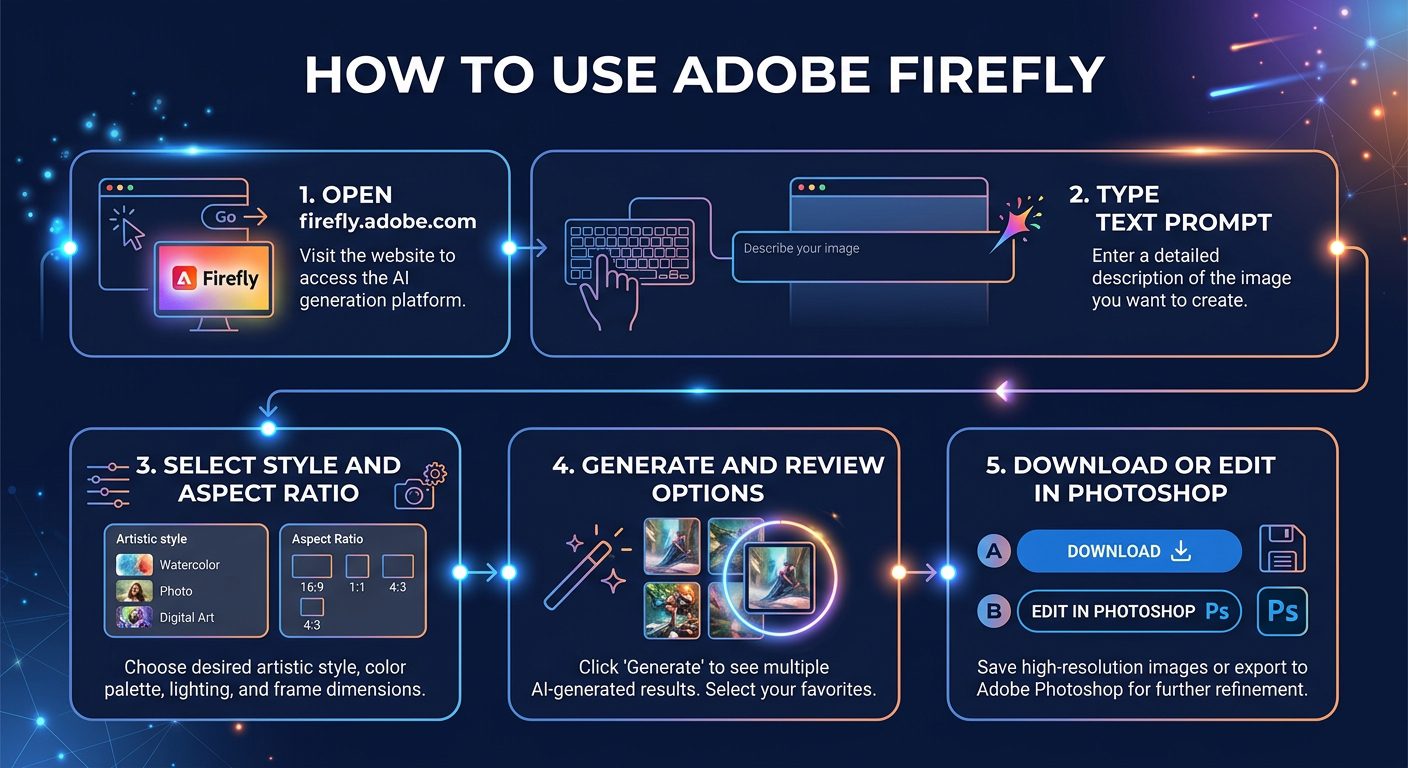
The Adobe Firefly creative workflow
How to Use Adobe Firefly (Step-by-Step)
Step 1: Access Firefly
Visit firefly.adobe.com and sign in with your Adobe account. Free accounts get 25 generative credits per month. If you have a Creative Cloud subscription, you’ll have additional credits based on your plan.
Step 2: Choose Your Creation Type
Select from Text to Image, Text to Video, Generative Fill, Sound Effect Generator, or other available tools. Each tool has a dedicated interface optimized for its specific workflow.
Step 3: Write Your Prompt
Describe what you want to generate in natural language. Firefly’s prompt interface includes style presets (Photo, Art, Graphic, etc.), aspect ratio options, and style reference uploads. You can also select content type, color palette, tone, and composition preferences to refine results before generation.
Step 4: Generate and Refine
Click Generate to create four variations. Browse results, pick your favorite, and refine using the “Generate Similar” option or by modifying your prompt. Each generation costs credits based on the output type (images cost 1 credit, videos cost more).
Step 5: Edit and Export
Download your generated content directly, or send it to Photoshop, Illustrator, or Adobe Express for further editing. Content generated in Firefly includes Content Credentials metadata — a digital “nutrition label” that identifies it as AI-generated, supporting transparency without restricting usage.
Pricing Plans
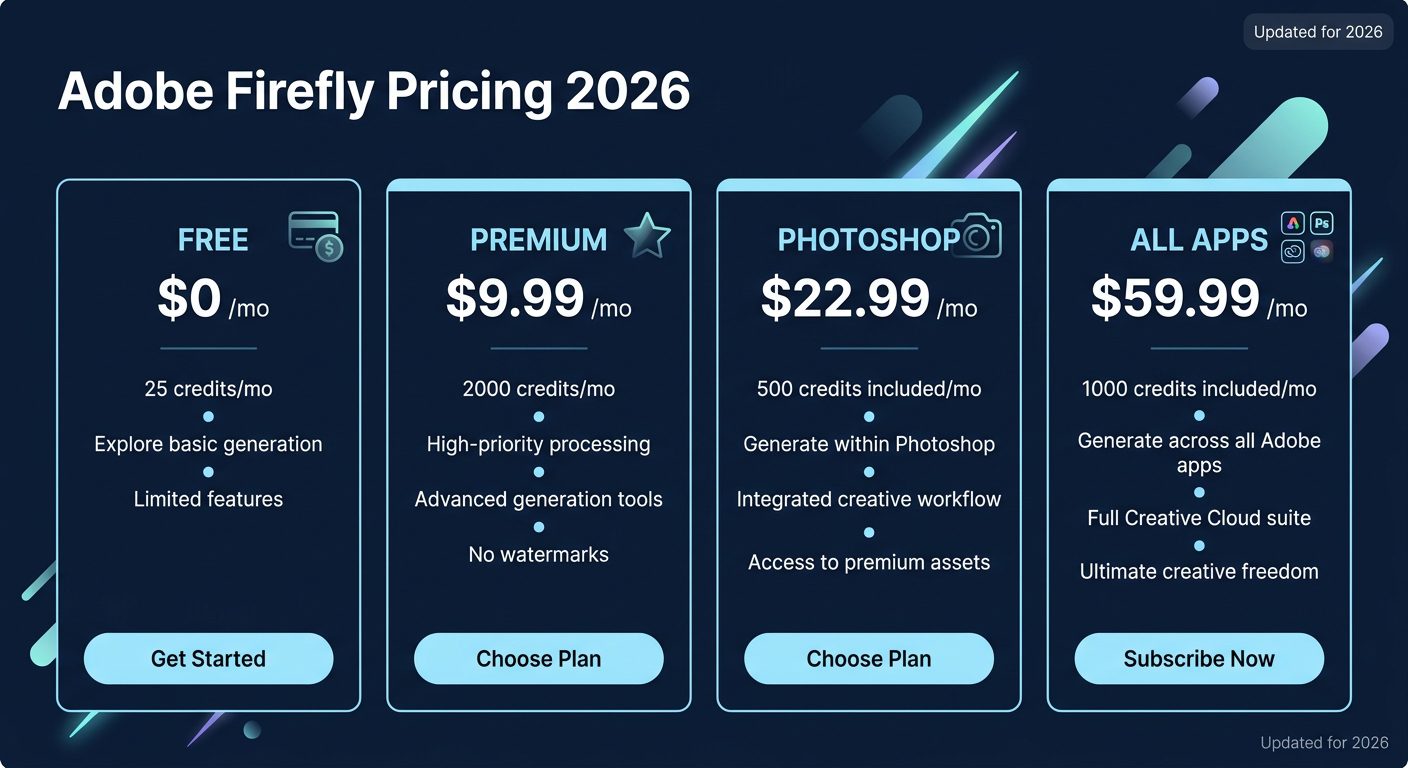
Adobe Firefly pricing options for 2026
The Firefly Premium plan at $9.99/month offers the best standalone value — 2,000 generative credits per month is enough for most individual creators. The credit system works across all Firefly tools: standard image generation costs 1 credit, while video generation and advanced features consume more.
If you’re already a Creative Cloud subscriber, you get Firefly credits included with your plan. Photoshop subscribers receive 500 credits/month, and All Apps subscribers get 1,000. These included credits mean existing Adobe users don’t need a separate Firefly subscription unless they’re heavy generators.
The free tier at 25 credits/month is extremely limited — barely enough to evaluate the tool. Adobe clearly uses it as a try-before-you-buy funnel rather than a genuinely useful free product. Compare this to Google Imagen’s generous free access through ImageFX, and Adobe’s free tier feels stingy.
Pros and Cons
Pros
- ✓ Safest AI generator for commercial use (IP indemnification)
- ✓ Trained on licensed content — no copyright concerns
- ✓ Deep integration with Photoshop, Illustrator, Premiere Pro
- ✓ Multi-modal: images, video, audio, vectors in one platform
- ✓ AI Video and Dubbing features are impressive
- ✓ Content Credentials provide AI transparency
- ✓ Firefly Boards enable team collaboration
Cons
- ✗ Image quality doesn’t match Midjourney or Imagen 3
- ✗ Free tier is extremely limited (25 credits)
- ✗ Credit system can feel restrictive for heavy users
- ✗ Best features locked behind Creative Cloud subscriptions
- ✗ Generative results tend to look “stock photo-like”
- ✗ Expensive if you need Creative Cloud just for Firefly
Best Adobe Firefly Alternatives
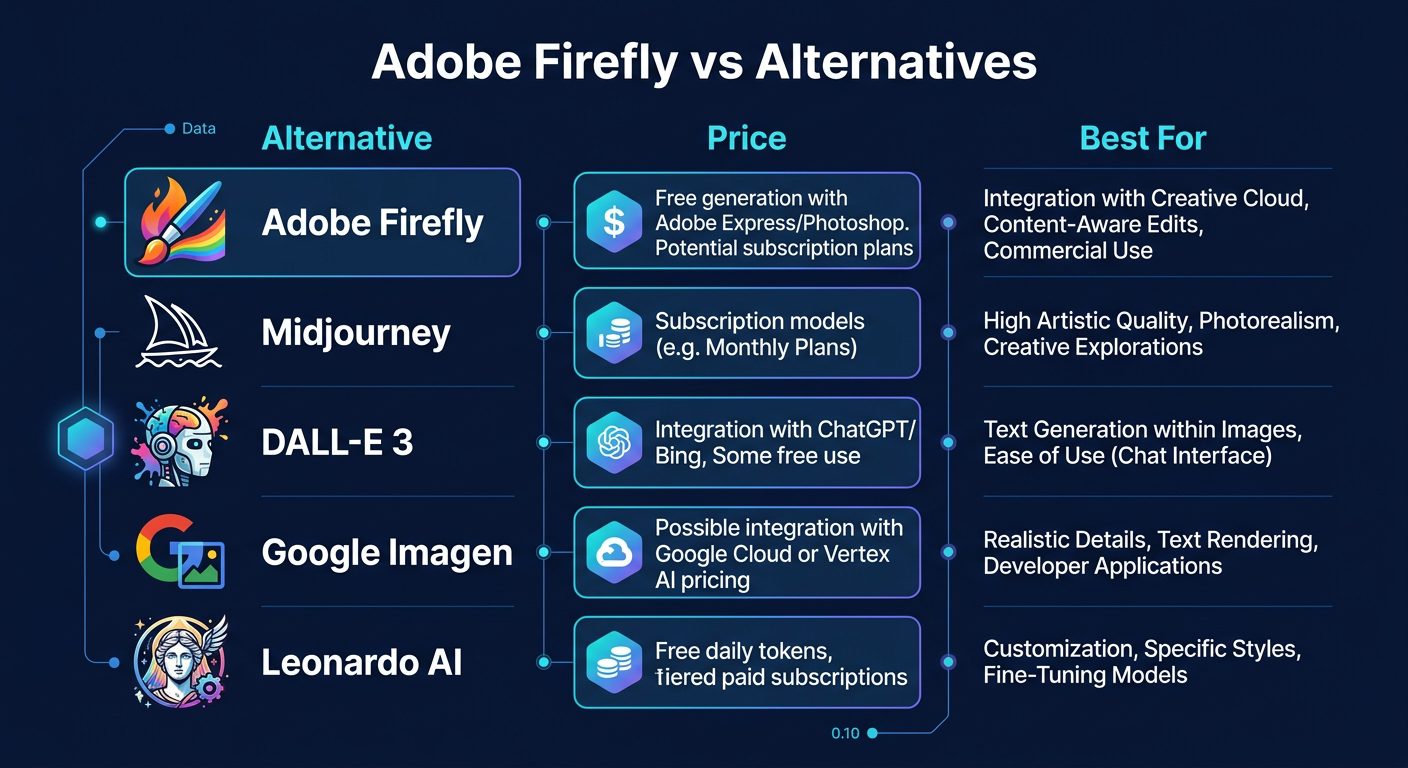
How Adobe Firefly compares to leading AI image generators
Midjourney produces the most visually impressive AI images available in 2026. If raw artistic quality is your priority and you’re less concerned about commercial IP safety, Midjourney’s output consistently outshines Firefly. The $10/month Basic plan now includes web access.
DALL-E 3 (via ChatGPT Plus) excels at accurately interpreting complex prompts and producing exactly what you describe. The conversational refinement through ChatGPT makes it incredibly intuitive. OpenAI offers partial IP protection but not the full indemnification Adobe provides.
Google Imagen 3 leads in photorealism and offers the most generous free tier through ImageFX. For budget-conscious creators who need realistic-looking images, Imagen 3 delivers more at a lower cost. The API at $0.03/image is also the cheapest developer option.
Leonardo.Ai offers the most versatile feature set among independent AI generators — multiple models, ControlNet integration, real-time generation, and a generous free tier with 150 daily tokens. It’s the best choice for creators who want maximum flexibility without Adobe’s ecosystem lock-in.
Final Verdict: Is Adobe Firefly Worth It?
Adobe Firefly’s value proposition is clear: it’s the only AI generator you can use commercially without worrying about copyright lawsuits. For agencies, brands, marketing teams, and any professional who needs legal certainty, this alone makes Firefly worth the subscription. The IP indemnification isn’t just a feature — it’s a business insurance policy.
The multi-modal capabilities — images, video, audio, and vectors in one platform — give Firefly an advantage over single-purpose generators. Combined with deep Creative Cloud integration, it fits seamlessly into professional design workflows. Generative Fill in Photoshop alone has transformed how designers work with images.
However, if you’re an individual creator prioritizing raw output quality over legal safety, Midjourney and Google Imagen 3 both produce better images. And if you’re looking for a free or low-cost option, Firefly’s 25 free credits are inadequate — Google ImageFX and Leonardo.Ai offer far more generous free tiers.
The ideal Firefly user is a creative professional or team already invested in Adobe’s ecosystem who needs commercially safe AI generation as part of their workflow. For that audience, it’s an essential tool. For everyone else, it’s worth evaluating alongside the free alternatives before committing.
Our Rating: 4.2 / 5
Build an AI Tool? Get It in Front of the Right Audience
PopularAiTools.ai reaches thousands of qualified AI buyers monthly.
Frequently Asked Questions
Is Adobe Firefly free?
Adobe Firefly offers a free tier with 25 generative credits per month — enough to try the tool but not enough for regular use. For meaningful access, the Firefly Premium plan at $9.99/month provides 2,000 credits. Creative Cloud subscribers receive additional credits based on their plan.
Can I use Adobe Firefly images commercially?
Yes, and this is Firefly’s biggest advantage. All Firefly models are trained on licensed content, and Adobe provides IP indemnification for enterprise customers. You can use Firefly-generated content in commercial projects, marketing materials, and client work with confidence.
How does Adobe Firefly compare to Midjourney?
Midjourney produces higher-quality, more artistically compelling images. Adobe Firefly offers commercial safety (IP indemnification), Creative Cloud integration, and multi-modal capabilities (image, video, audio). Choose Midjourney for raw quality, Firefly for commercial safety and workflow integration.
Do I need Photoshop to use Adobe Firefly?
No. Firefly is available as a standalone web application at firefly.adobe.com. You can generate images, videos, and audio without any Adobe subscription. However, the most powerful features (Generative Fill, Generative Expand) require Photoshop.
What are Firefly credits?
Credits are the usage currency for Firefly’s generative features. Standard image generation costs 1 credit. Video generation, sound effects, and advanced features cost more credits per generation. Unused credits don’t roll over to the next month. The Premium plan includes 2,000 credits/month.
Can Adobe Firefly generate videos?
Yes, the Firefly Video Model generates short video clips (4-8 seconds) from text prompts or reference images. You can control camera movement, lighting, and composition. The feature is available through the Firefly web app and integrates with Premiere Pro for further editing.
What is Content Credentials?
Content Credentials is Adobe’s digital provenance technology that attaches metadata to AI-generated content identifying how it was created. Think of it as a “nutrition label” for digital content. It doesn’t restrict usage but provides transparency about AI involvement in the creation process.
{
“@context”: “https://schema.org”,
“@type”: “FAQPage”,
“mainEntity”: [
{“@type”: “Question”, “name”: “Is Adobe Firefly free?”, “acceptedAnswer”: {“@type”: “Answer”, “text”: “Free tier has 25 credits/month. Premium at $9.99/month offers 2,000 credits. Creative Cloud subscribers get additional credits.”}},
{“@type”: “Question”, “name”: “Can I use Adobe Firefly images commercially?”, “acceptedAnswer”: {“@type”: “Answer”, “text”: “Yes, with IP indemnification for enterprise customers. Trained exclusively on licensed content.”}},
{“@type”: “Question”, “name”: “How does Adobe Firefly compare to Midjourney?”, “acceptedAnswer”: {“@type”: “Answer”, “text”: “Midjourney produces higher quality images. Firefly offers commercial safety, Creative Cloud integration, and multi-modal capabilities.”}},
{“@type”: “Question”, “name”: “Do I need Photoshop to use Adobe Firefly?”, “acceptedAnswer”: {“@type”: “Answer”, “text”: “No, Firefly is available as a standalone web app. Photoshop unlocks Generative Fill and Expand features.”}},
{“@type”: “Question”, “name”: “What are Firefly credits?”, “acceptedAnswer”: {“@type”: “Answer”, “text”: “Usage currency for generation. Standard images cost 1 credit. Premium plan includes 2,000/month.”}},
{“@type”: “Question”, “name”: “Can Adobe Firefly generate videos?”, “acceptedAnswer”: {“@type”: “Answer”, “text”: “Yes, 4-8 second clips from text prompts with camera and lighting control.”}},
{“@type”: “Question”, “name”: “What is Content Credentials?”, “acceptedAnswer”: {“@type”: “Answer”, “text”: “Digital provenance metadata identifying AI-generated content — a transparency label, not a usage restriction.”}}
]
}
{
“@context”: “https://schema.org”,
“@type”: “Review”,
“itemReviewed”: {
“@type”: “SoftwareApplication”,
“name”: “Adobe Firefly”,
“applicationCategory”: “MultimediaApplication”,
“operatingSystem”: “Web, Windows, macOS”
},
“reviewRating”: {
“@type”: “Rating”,
“ratingValue”: “4.2”,
“bestRating”: “5”
},
“author”: {
“@type”: “Organization”,
“name”: “PopularAiTools.ai”
},
“datePublished”: “2026-03-20”
}
