AI Automation Blueprints: 15 Production-Ready Workflows for n8n and Make.com (2026)

AI Infrastructure Lead
Key Takeaways
- 15 complete AI automation workflows, ready to import into n8n or Make.com
- 3 categories: Lead Generation & Sales (5), Content & Marketing (5), Operations (5)
- Each workflow saves 2-5 hours per week when running in production
- Both n8n JSON and Make.com blueprint versions included
The Empty Canvas Problem
You installed n8n (or signed up for Make.com) because everyone says automation is the future. Now you're staring at an empty canvas with 500+ nodes wondering where to start. Three hours later, your "simple" workflow still doesn't trigger correctly.
I know because I did this exact thing. Watched a 12-minute YouTube tutorial, thought "I can do that," and spent the next 4 hours debugging webhook configurations. There's a canyon between watching someone build a workflow and getting one working reliably in your business.
The AI Automation Blueprint Pack bridges that canyon with 15 complete, production-ready workflows you can import and run today.
15 Production-Ready Workflows
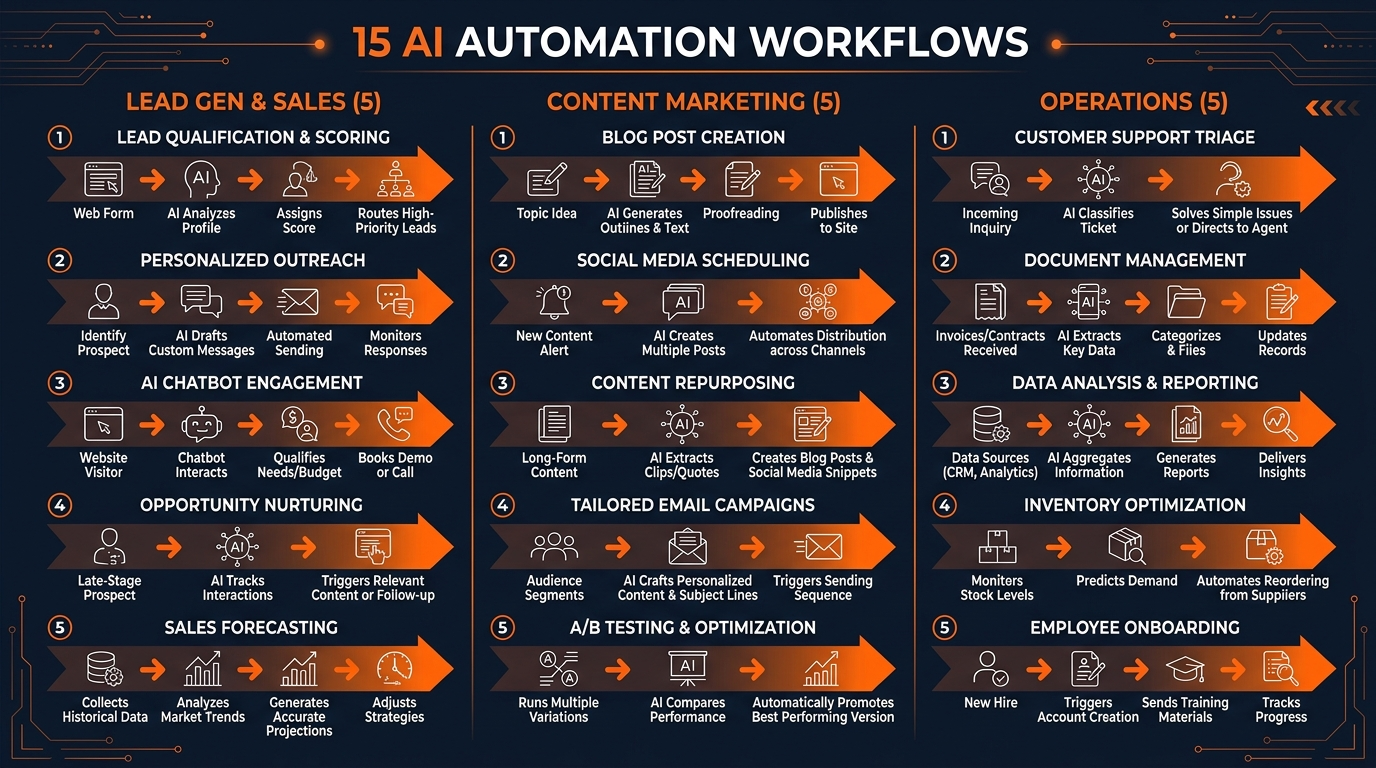
Each workflow is available as both n8n JSON and Make.com blueprint. Import, connect your accounts, and run.
Lead Generation & Sales (5 Workflows)
- AI Lead Enrichment Pipeline — New lead triggers AI research on the company, scores it, routes hot leads to your inbox immediately
- Smart Contact Form Processor — AI categorizes form submissions, drafts response, routes to the right team member
- LinkedIn Post Monitor — Monitors keywords, AI drafts personalized outreach, queues for your review before sending
- Proposal Follow-Up Sequence — Automatic follow-ups on day 3, 7, 14 based on open tracking data
- Review Request Automator — Project completes, AI drafts a personalized review request based on the work done
Content & Marketing (5 Workflows)
- Blog Post to Social Pipeline — Publish a blog post, AI generates 5 platform-specific social posts, schedules over 2 weeks
- AI Newsletter Curator — Daily RSS scan, AI scores articles by relevance, drafts newsletter in your voice
- Testimonial Extractor — Monitors reviews and emails, AI extracts quotable testimonials automatically
- SEO Content Brief Generator — Input a keyword, get competitor analysis and a detailed content brief
- Podcast Show Notes Automator — Audio to transcript to titles, timestamps, social clips
Operations (5 Workflows)
- AI Email Triage — Categorizes incoming email, drafts responses, flags urgent items in Slack, weekly summary
- Meeting Notes to Action Items — Transcript to decisions, action items, and tasks created in your PM tool
- Invoice Processing — AI extracts line items from invoices, categorizes expenses, flags anomalies
- Customer Onboarding Sequence — New customer triggers welcome email, account setup checklist, day-3 check-in
- Weekly Business Dashboard — Pulls metrics from multiple sources, AI summarizes trends, emails report every Monday
How to Use the Blueprints
- Import the JSON file into n8n or the blueprint into Make.com
- Connect your accounts (email, CRM, Slack, etc.) — each node has connection instructions
- Customize the AI prompts for your business voice and terminology
- Test with sample data
- Activate and monitor for the first week
The AI Automation Blueprint Pack is $39+ on Gumroad. If you're offering automation as a service, pair it with the Client Acquisition System to find clients. Browse our full store for more. Also check our skills directory for free Claude Code skills.
Build an AI Tool? Get It in Front of the Right Audience
PopularAiTools.ai reaches thousands of qualified AI buyers.
Submit Your AI Tool →FAQ
Do these work with both n8n and Make.com?
Yes. Every workflow includes both an n8n JSON file and a Make.com blueprint. Choose whichever platform you use.
Do I need a paid n8n or Make.com plan?
Most workflows run on free tiers. A few complex ones with many steps may need a paid plan for higher execution limits.
How much time do these save?
Each workflow typically saves 2-5 hours per week. With all 15 running, users report saving 15-30 hours per week.
Can I customize the AI prompts?
Absolutely. Each workflow has clearly marked AI nodes where you can adjust the prompts for your business voice and needs.
What if a workflow doesn't work with my tools?
The workflows use common integrations (Gmail, Slack, Google Sheets, etc.). If you use different tools, the logic transfers — you just swap the integration nodes.
Is there a refund?
Yes. Gumroad offers a 30-day money-back guarantee.
Recommended AI Tools
Grammarly
Updated March 2026 · 12 min read · By PopularAiTools.ai
View Review →Google Imagen
Updated March 2026 · 11 min read · By PopularAiTools.ai
View Review →CapCut
Updated March 2026 · 12 min read · By PopularAiTools.ai
View Review →Picsart
Updated March 2026 · 11 min read · By PopularAiTools.ai
View Review →