How to Turn Claude Code Into Your Personal Executive Assistant

AI Infrastructure Lead

How to Turn Claude Code Into Your Personal Executive Assistant
Key Takeaways
- Claude Code can handle email triage, file organization, document drafting, research, and scheduling—the core of an executive assistant's work
- The 4-phase setup (project structure, context, skills, evolution) turns scattered tools into a unified assistant
- Most users see 3-8 hours per week in time savings from automation alone
- Skills are write-once, trigger-anywhere instructions you control completely
- No coding experience required—you describe what you want in plain language
Why Claude Code Works as a Personal Assistant
Claude Code isn't a chatbot. It's a programming environment where Claude runs actual code, accesses your files, handles multiple tasks in sequence, and remembers context across sessions. That's the difference between "ask AI a question" and "have AI manage your day."
An executive assistant's job is 80% routine: filtering emails, organizing files, drafting documents, pulling data together, and following a decision framework. That's exactly what Claude Code is built for.
You're not hiring a tool. You're automating a role that currently lives in your calendar and your inbox.
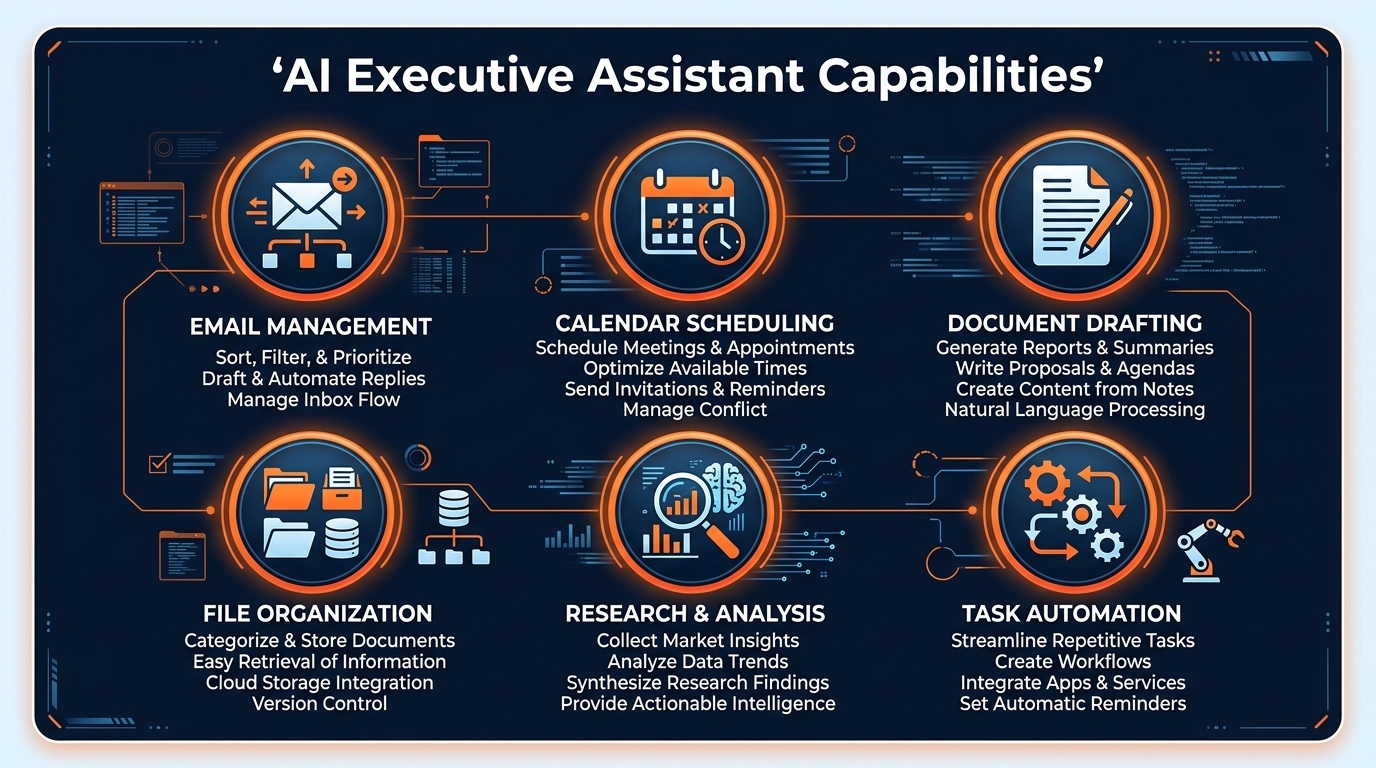
What It Can Actually Handle
Email Management
Triage inbox by priority, extract action items, draft responses, flag urgent items, route emails to projects, summarize threads. You stay in control—review before sending.
File Organization
Read, categorize, and move files across folders. Create index documents. Build project structures. Rename and standardize file naming. Keep growing archives organized without manual work.
Document Drafting
Proposals, meeting notes, status reports, project summaries. Load templates, fill in data, apply your voice. One trigger creates a finished draft you can customize.
Research & Data Assembly
Pull data from multiple files, analyze trends, compare options, create decision matrices. Synthesize information from scattered sources into one coherent summary.
Scheduling & Meeting Prep
Build agendas, summarize previous interactions with a contact, pull relevant files, create talking points. Prep for meetings without manual hunting through notes.
The 4-Phase Setup
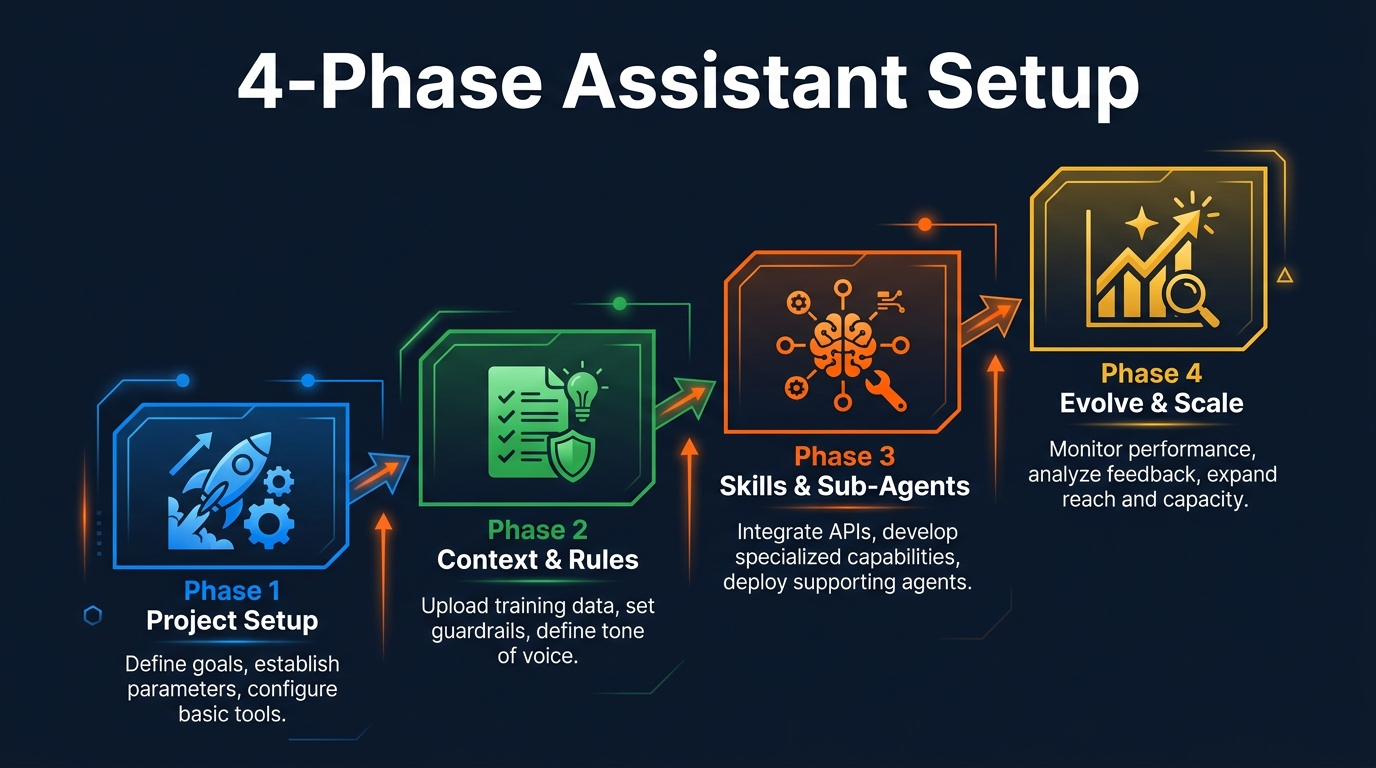
Think of this like onboarding a human assistant. First, you set up the workspace. Then you document your preferences. Then you build the tools they'll use. Then they get smarter as they work.
Phase 1: Set Up the Project
Create a folder structure that mirrors your work. You need:
/projects— active projects and clients/archive— closed projects, past work/inbox— incoming items to process/templates— email, proposal, report templates/skills— reusable automation scripts
Grant Claude Code access to read/write in these folders. This is your assistant's workspace.
Phase 2: Add Context & Rules
Create a CLAUDE.md file at the root of your project. This is how you tell Claude Code who you are and what you care about:
- Your role, priorities, and decision criteria
- Communication style (formal, casual, brief, detailed)
- What emails get flagged vs. auto-responded
- Project naming conventions and folder rules
- Who are key contacts, which deadlines matter most
- Templates you use, approval gates for sensitive actions
Write this in plain English. You're documenting your work, not coding. Claude reads this every session.
Phase 3: Build Skills & Sub-Agents
Skills are instructions you write once, then trigger anytime. Examples:
- Email Triage Skill: "Read my inbox, flag urgent items, extract action items, draft responses"
- Project Onboarding Skill: "Create folder structure, write project brief, set up file templates"
- Report Generator Skill: "Collect project status, format as monthly report, add trends analysis"
- Meeting Prep Skill: "Build agenda, pull relevant files, create talking points, note prior interactions"
Store these as markdown files in /skills. Each one is a repeatable workflow.
Phase 4: Layer, Grow, Evolve
After two weeks of use, you'll see which skills you actually use, which ones need tweaking, and what's missing. Add new skills as you discover patterns:
- Add context about new clients or projects
- Refine communication style based on how you naturally work
- Build new skills for emerging bottlenecks
- Create meta-skills that chain other skills together
This system gets smarter as you feed it more context. It's not static—it evolves with your work.
Real-World Examples
Example 1: Triaging Your Inbox (30 min saved per day)
You have 200+ emails waiting. Instead of manually reading each one:
- Run "Email Triage" skill
- Claude Code reads all messages, extracts action items, flags urgent ones, drafts responses to routine questions
- You get a summary: 15 urgent, 40 need response, 145 informational
- Review and approve responses Claude drafted
- Actionable inbox in 10 minutes instead of 45
What you control: Approval before any email is sent. Tone and priorities stay yours.
Example 2: Organizing Project Files (1 hour saved per week)
Files pile up: proposals, contracts, meeting notes, invoices. Instead of manually organizing:
- Point Claude Code to your inbox folder
- Run "File Organizer" skill
- Claude reads each file, categorizes by project/type, moves to correct folders, updates your index
- You review the structure, approve moves
- Everything is organized by 5 PM with no manual sorting
What you control: Categorization rules live in CLAUDE.md. You define what "organized" means.
Example 3: Drafting a Proposal (2 hours saved)
Client inquiry arrives. Normally: write from scratch, find past examples, check pricing, estimate timeline, review tone.
- Run "Proposal Generator" skill with client name and project scope
- Claude pulls your proposal template, finds similar past work, extracts scope details, fills in sections
- You get: complete draft with timeline, budget, deliverables—in your voice
- Customize numbers, add personal touches, send
- From inquiry to sent proposal: 20 minutes instead of 2 hours
What you control: Templates and pricing rules stay yours. Claude fills the framework.
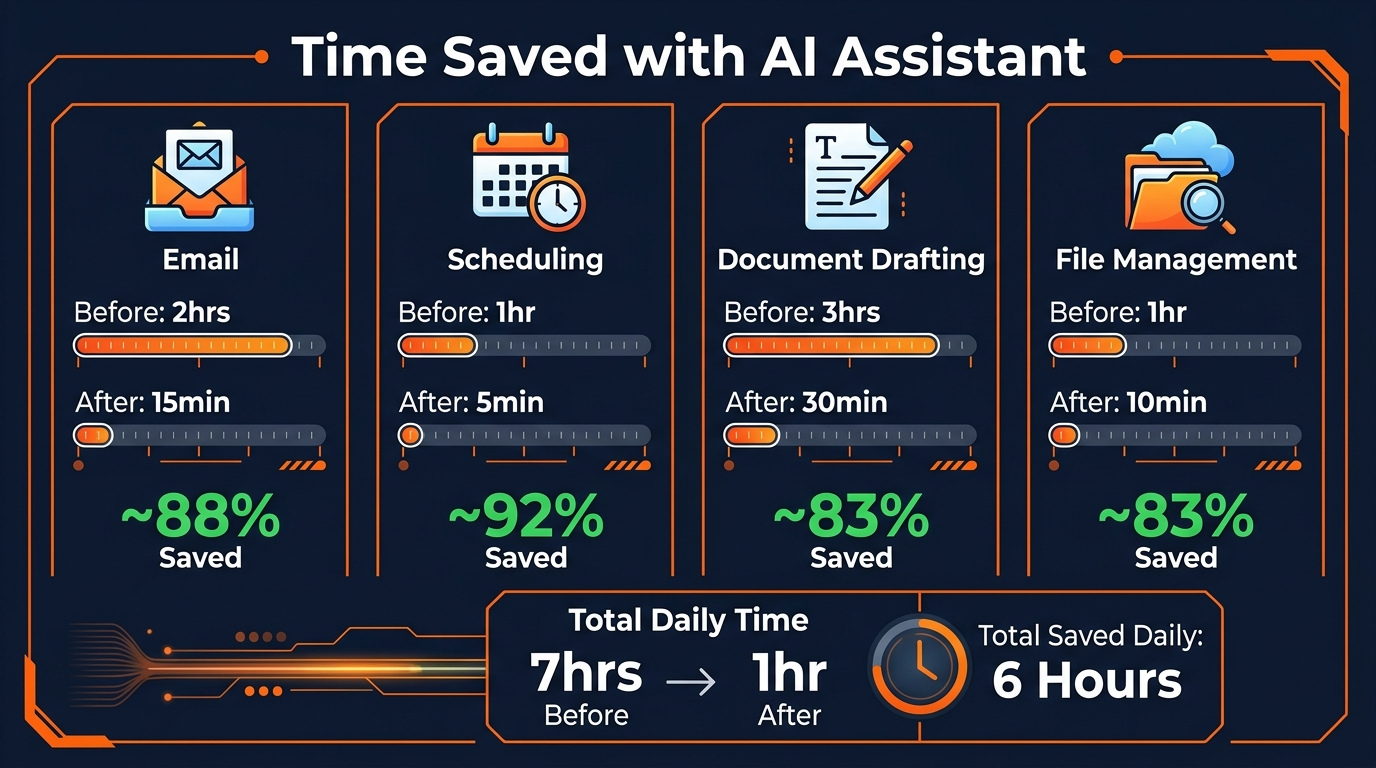
The Time Savings Breakdown
Typical user saves 4-8 hours per week
Most time comes from email and file work. Document drafting saves another 1-2 hours depending on how much you write.
Email Triage
Before: 45 min/day reading & filtering
After: 10 min/day reviewing summaries
Saves: 35 min/day = 3 hours/week
File Organization
Before: 1 hour/week manual sorting
After: 10 min/week reviewing changes
Saves: 50 min/week
Document Drafting
Before: 2 hours per proposal/report
After: 20 min per proposal/report (with review)
Saves: 1-2 hours/week depending on volume
Research & Analysis
Before: 2-3 hours pulling data, writing summaries
After: 20 min reviewing auto-generated summary
Saves: 2-2.5 hours/week as needed
The math: At $100/hour, that's 4-8 hours × $100 = $400-800/week in reclaimed time. Just from automating routine work you're already doing.
Building Your Skills Library
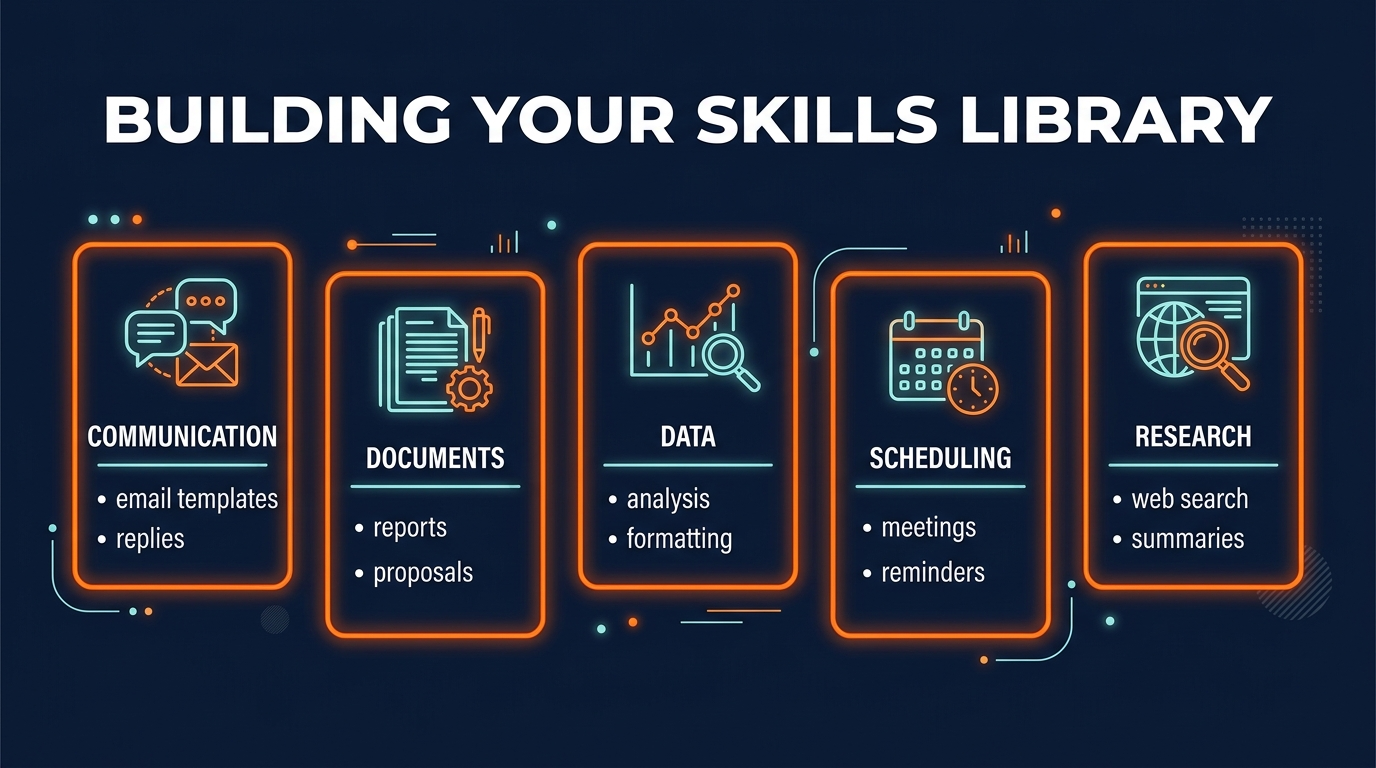
A skill is a reusable instruction. Write it once, trigger it anytime. Here's how they work:
A Skill File Looks Like This
# Email Triage Skill

## Purpose
Read my inbox daily and identify urgent items, extract action items, draft responses to routine questions.

## Rules
- Flag emails from key contacts (see CLAUDE.md for list)
- Questions about pricing → draft response using pricing_template.md
- Meeting requests → suggest 3 times based on calendar
- Spam/newsletter → auto-archive
- Everything else → summarize for daily review

## Output
Create a summary document with:
1. Urgent items (flagged)
2. Action items extracted
3. Drafted responses (for your approval)
4. Summary of 5 most important messages

## Approval Gate
Do NOT send any emails. Draft only. I review and approve before sending.
That's it. Plain language. No coding. Claude reads this, understands your rules, and executes.
Start With These 5 Core Skills
1. Daily Inbox Triage
Read all emails, flag urgent, extract todos, draft responses. Run every morning.
2. Weekly File Organizer
Sort inbox folder, move to projects, update file index. Run every Friday.
3. Proposal Generator
Load template, fill details, format, output ready-to-send draft.
4. Meeting Prep Assistant
Build agenda, pull relevant docs, write talking points, note past interactions.
5. Monthly Status Report
Pull project updates, metrics, wins, challenges. Format into your standard report.
These five handle 70% of what you do. Add specialized skills after these are working smoothly.
Pros, Cons & Honest Limits
Genuine Advantages
- You stay in control. Not a black box. You review outputs, approve actions, modify rules anytime.
- It learns your preferences. The more CLAUDE.md context you add, the better it matches your style and priorities.
- No monthly fees for assistants. One-time setup, one-time skills, no recurring cost.
- Works with your existing tools. Reads files, integrates with folders, doesn't force a new system.
- Grows without boundaries. Add skills as you discover new patterns. No licensing limits.
- Your data stays private. Runs in your environment, not in a cloud service.
Honest Limitations
- Setup time upfront. Creating CLAUDE.md, folder structure, and skills takes 2-4 hours. Then 30 min/week tweaking.
- Not for real-time decisions. It can't interrupt you. Skills run on-demand or on a schedule, not instantly.
- Needs clear rules. If your work is highly variable or intuition-based, some tasks won't automate well.
- Calendar integration is limited. Can read files, but deeply pulling calendar data requires some setup.
- Hallucinations are possible. Claude is smart but not infallible. Always review important outputs before going live.
- Doesn't replace judgment. It handles routine work. Strategic decisions, negotiations, sensitive conversations are still yours.
The Bottom Line
Claude Code works best for roles with clear patterns: managers, writers, consultants, entrepreneurs. It's weaker for roles that require constant real-time response or highly intuitive judgment. Be honest about which category you're in.
Frequently Asked Questions
Can Claude Code really replace a human executive assistant?
Claude Code handles the high-volume, repetitive work that consumes most of an assistant's day—email triage, file organization, document drafting, meeting prep. It won't replace human judgment on strategic decisions, but it frees you from the administrative noise.
How much time will this actually save me?
Most users see 3-5 hours per week in time savings from email management alone, plus another 2-3 hours from file organization and document drafting. The exact number depends on how many custom skills you build and how much repetitive work you're doing.
What if I already use email filters and project management tools?
Claude Code goes deeper. It doesn't just filter—it reads context, extracts action items, drafts responses, and learns your decision patterns. You can trigger these from anywhere, and it integrates with your existing tools instead of replacing them.
Do I need coding experience to set this up?
No. You write natural language instructions in CLAUDE.md files, and Claude Code handles the execution. You describe what you want (not how to build it), and the AI does the work.
How do I keep my data private?
This system runs entirely in your Claude Code environment. Data stays in your folder structure, Claude's processing is private, and you control what skills have access to what files. No cloud storage required unless you add it.
Can I use the same skills for different projects?
Yes. Skills are reusable. Write a "draft proposal" skill once, then trigger it for any client, project, or proposal type. You customize it with context-specific instructions each time.
How do I know which skills to build first?
Start with your pain points. Track what takes the most time for a week, then build skills in that order. Most people find email triage and file organization give the quickest wins.
What happens if Claude Code makes a mistake?
You can review outputs before they go live. Build review gates into your skills so you approve important actions (emails, file moves, etc.) before Claude executes them. That's the safety net.
Ready to Build Your Personal Assistant?
Start with the 4-phase setup. You'll save 4-8 hours per week on routine work. That's time you get back.
The investment is 2-4 hours of setup. The payback is permanent.
The Shift
Most people think of AI as a tool for building products or answering questions. Claude Code is different. It's a tool for building a system that works for you.
An executive assistant doesn't solve problems—they handle the paperwork so you can. They remember your preferences, follow your rules, and get better at their job over time. That's exactly what this setup does.
The work that steals your attention doesn't go away. But it stops stealing your time.
Recommended AI Tools
Grammarly
Updated March 2026 · 12 min read · By PopularAiTools.ai
View Review →Google Imagen
Updated March 2026 · 11 min read · By PopularAiTools.ai
View Review →CapCut
Updated March 2026 · 12 min read · By PopularAiTools.ai
View Review →Picsart
Updated March 2026 · 11 min read · By PopularAiTools.ai
View Review →