Claude Code Token Hacks: How to 5x Your Usage Without Upgrading

AI Infrastructure Lead
⚡ Key Takeaways
- Token costs compound exponentially — message 30 costs 31x more than message 1 because Claude rereads the entire conversation every time
- /clear between unrelated tasks is the single biggest token saver — most people never do it
- MCP servers are invisible token vampires — one server can add 18,000 tokens per message
- Compact at 60%, not 95% — auto-compact triggers too late and your context is already degraded
- Pick the right model — Sonnet for coding, Haiku for sub-agents, Opus only when you truly need it
- Schedule heavy work for off-peak hours — afternoons, evenings, and weekends give you more runway
If you're on Claude Code — whether the $20 Pro or the $200 Max plan — you've probably hit the usage limit way faster than expected. You're not alone. The complaints have been all over X, Reddit, and developer forums: one prompt that used to be 1% of the limit is suddenly 10%.
Anthropic acknowledged the issue and introduced peak and off-peak hour adjustments, but even after that, people are still burning through sessions too fast.
The real problem? Most people don't need a bigger plan. They need to stop resending their entire conversation history 30 times when they could send it 5. It's not a limits problem — it's a context hygiene problem.
We've organized every optimization hack into three tiers by difficulty. By the time you finish this guide, your Claude Code usage should feel like it doubled or tripled.

How Claude Code Tokens Actually Work (And Why Your Costs Explode)
Before we get into the hacks, you need to understand why Claude Code burns through tokens so fast. Once you see the mechanics, every optimization below becomes obvious.
A token is the smallest unit of text that an AI model reads and charges you for. Roughly one token equals one word. Here's the part most people miss: every time you send a message, Claude rereads the entire conversation from the beginning. Message 1, its reply, message 2, its reply — all the way up to your latest prompt. Every. Single. Time.
This means your cost isn't adding — it's compounding. Message 1 might cost 500 tokens. Message 30 costs 15,000. One developer tracked a 100+ message chat and found that 98.5% of all tokens were spent rereading old chat history.
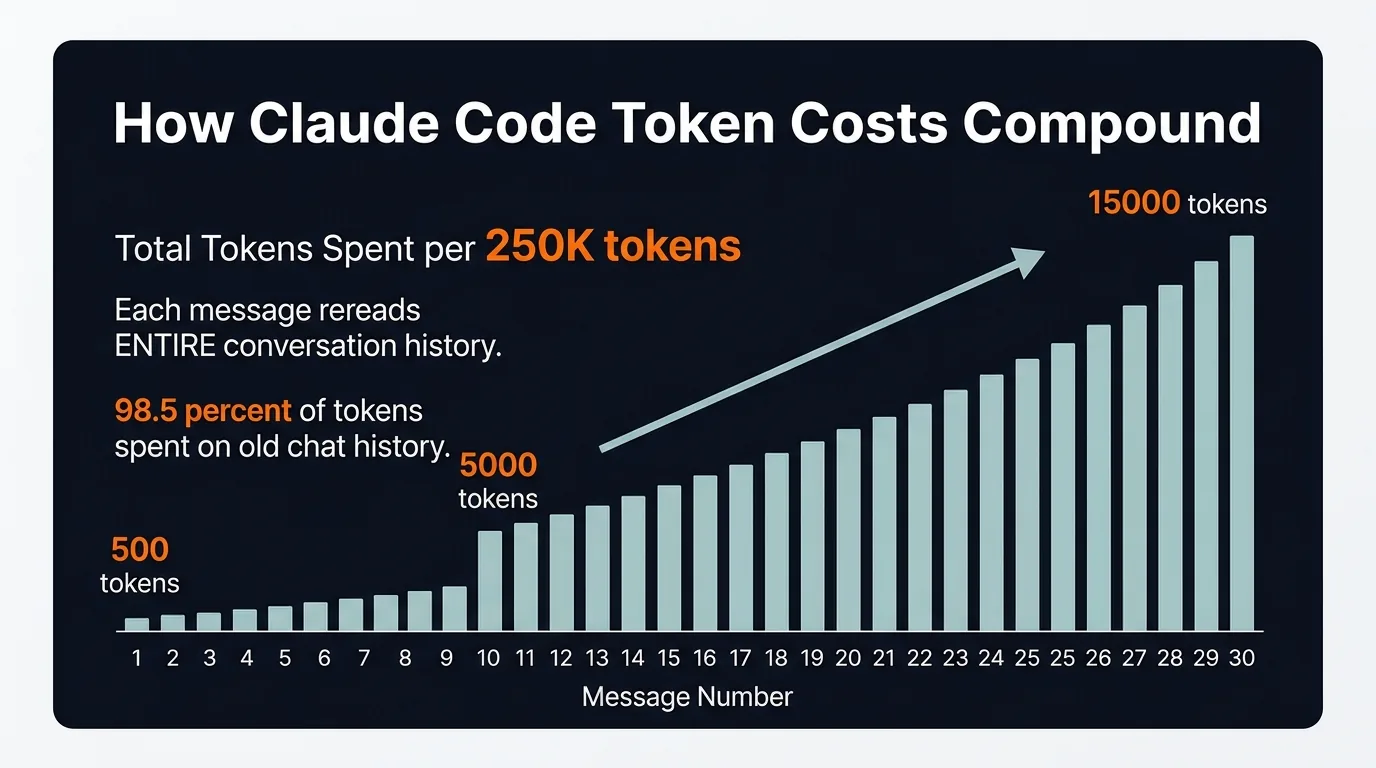
Token costs compound with every message — not linearly, but exponentially
On top of your messages, Claude also reloads your CLAUDE.md, MCP server definitions, system prompts, skills, and referenced files on every single turn. This is invisible overhead that constantly drips into your context.
And here's the kicker: bloated context doesn't just cost more — it produces worse output. There's a phenomenon called "lost in the middle" where models pay the most attention to the beginning and end of a session, and ignore the stuff in between. So you're paying more and getting less.
Tier 1: Easy Wins (9 Hacks Everyone Should Use)
These are simple, immediate, and every Claude Code user should be doing all of them.
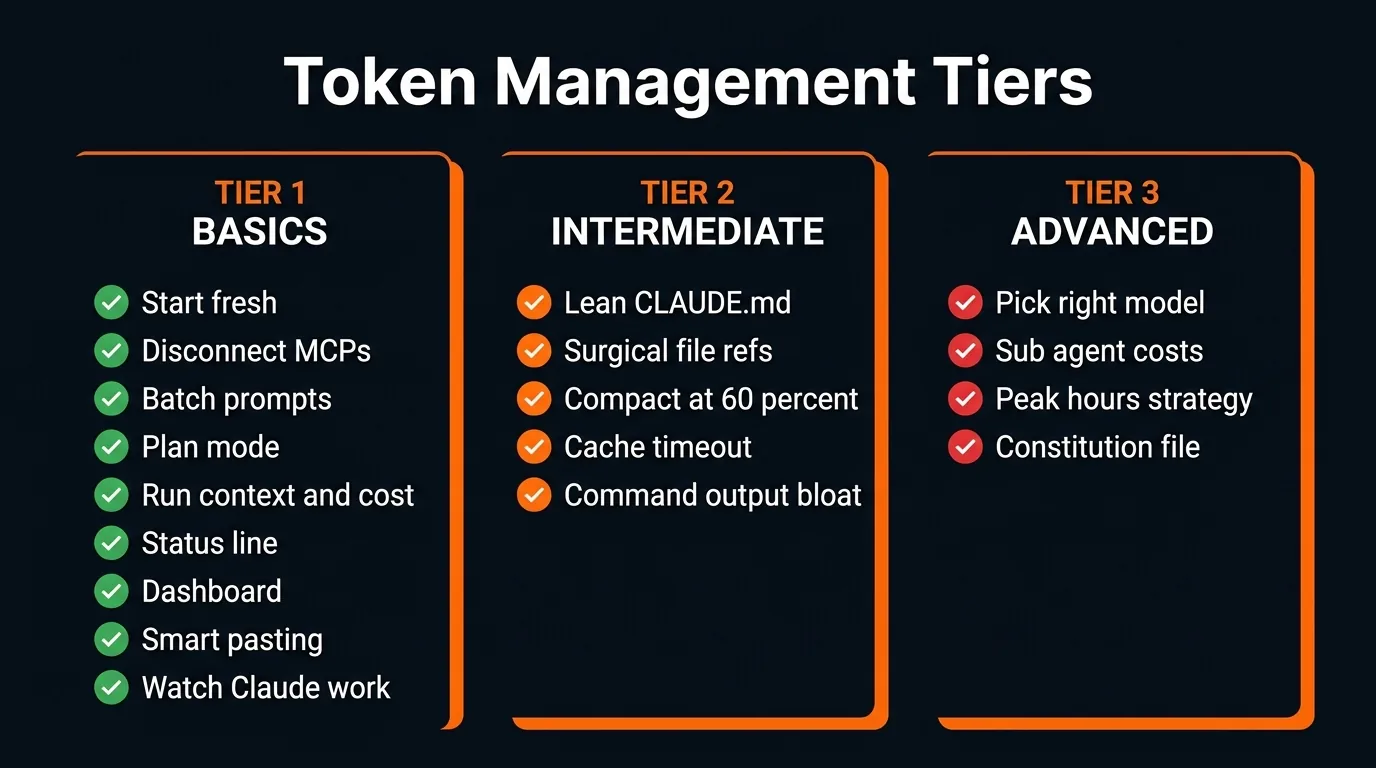
All the hacks organized by difficulty tier
1. Start Fresh Conversations
Use /clear between unrelated tasks. Don't carry context about topic A into a conversation about topic B. Every message in a long chat is exponentially more expensive than the same message in a fresh chat. This single habit is the #1 thing that extends your session life.
2. Disconnect Unused MCP Servers
Every connected MCP server loads all of its tool definitions into your context on every message. This is invisible — you don't see it happening. One server alone can add ~18,000 tokens per message.
Run /context at the start of each session and disconnect what you don't need. Better yet, if a CLI exists for the tool (like Google Workspace CLI instead of the Google Calendar MCP), use the CLI instead. It's faster, cheaper, and doesn't pollute your context.
3. Batch Prompts Into One Message
Three separate messages cost three times what one combined message costs. Instead of sending "summarize this," then "extract the issues," then "suggest a fix" — send it all in one prompt.
If Claude got something slightly wrong, edit your original message and regenerate instead of sending a follow-up correction. Follow-ups stack onto history permanently. Edits replace the bad exchange entirely.
4. Use Plan Mode Before Complex Tasks
This prevents the single biggest source of token waste: Claude going down the wrong path, writing code, and then you having to scrap everything.
Add this to your CLAUDE.md:
Do not make any changes until you have 95% confidence in what you need to build. Ask me follow-up questions until you reach that confidence level.
5. Run /context and /cost Regularly
/context shows you exactly what's eating your tokens — conversation history, MCP overhead, loaded files. /cost shows actual token usage and estimated spend for the session. Most people have no idea where their tokens go. These two commands make the invisible visible.
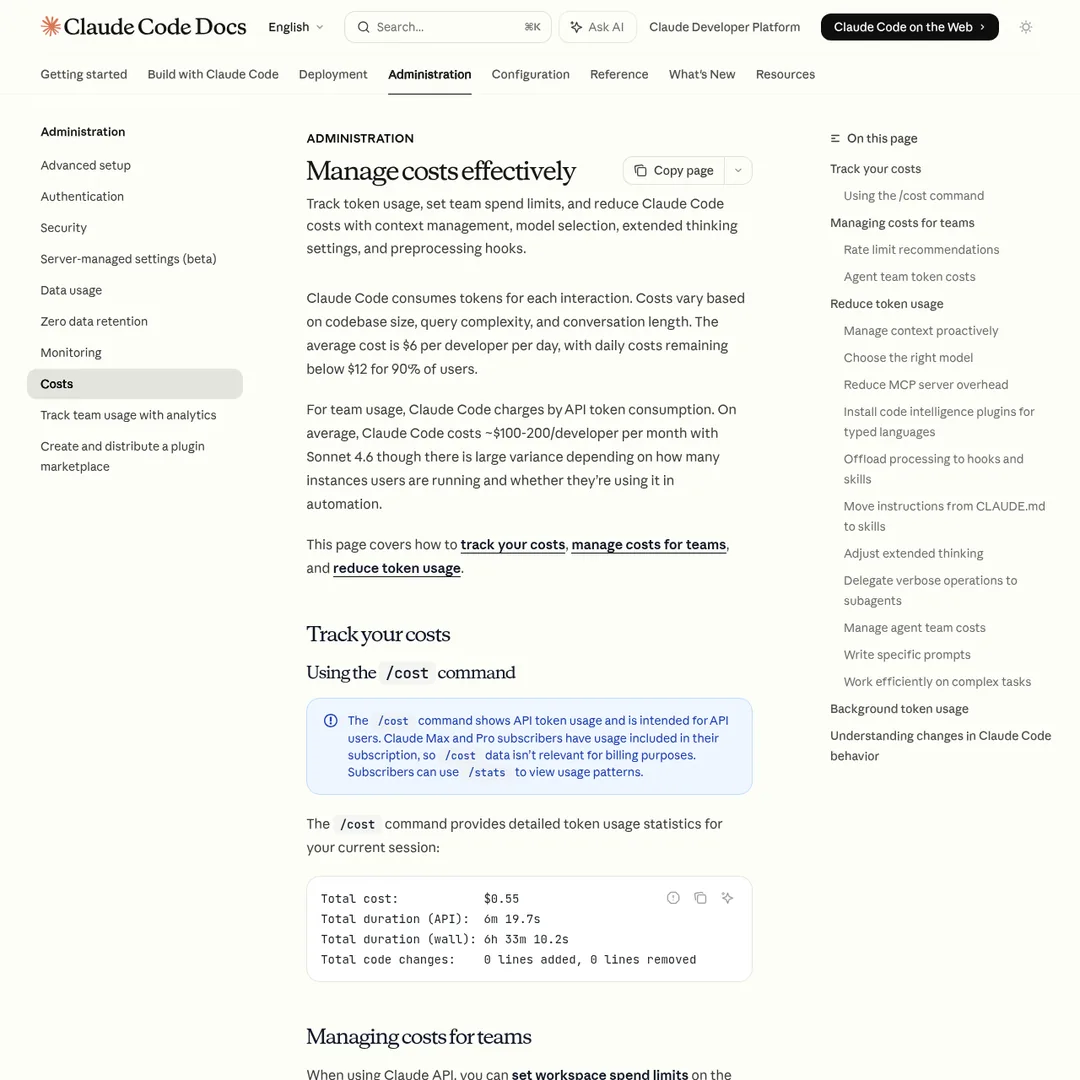
Anthropic's official cost management docs — worth bookmarking
6. Set Up a Status Line
In your terminal, run /status-line and configure it to show your model, a visual progress bar of usage, and your token count. This gives you constant visibility without having to run commands. You can see at a glance: "I'm at 52K out of 1M tokens — still plenty of room."
7. Keep Your Dashboard Open
Pull up your Claude usage dashboard in a tab and check every 20-40 minutes. You can even set up an automation to ping you on Slack when you're getting close to your limit, so you can pace yourself.
8. Be Smart With Pasting
Before you drop a document or file into Claude, ask: does it need to read the whole thing? If the bug is in one function, paste just that function. If it only needs one paragraph of context, paste just that. Claude needs to be precise about what it reads, but you need to be precise about what you feed it.
9. Watch Claude Work
Don't fire off a prompt and switch tabs. Watch what it's doing, especially on longer tasks. If it's going down the wrong path — stuck in loops, rereading the same files — stop it immediately. In a bad loop, 80% of tokens produce zero value. Catching this early saves thousands of tokens.
Tier 2: Intermediate Optimizations (5 Hacks)
These require a bit more setup but deliver serious savings.
1. Keep Your CLAUDE.md Lean
Claude auto-reads CLAUDE.md at the start of every single message — not every session, every message. If your file is 1,000 lines, every time you type even "hi," the whole thing gets read.
Keep it under 200 lines. Include your tech stack, coding conventions, build commands, and the 95% confidence rule — nothing else. Treat it like an index that points to where more data lives, not a dump of everything Claude needs to know.
This is a mindset shift. Your CLAUDE.md tells Claude Code: "Here's what matters, and here's where to find everything else." That way it only reads large files when it actually needs them, instead of loading everything into context upfront.
2. Be Surgical With File References
Don't say "here's my whole repo, go find the bug." Say "check the verifyUser function inside auth.js." Use @filename to point at specific files instead of letting Claude explore freely. Every file it reads adds to your token count.
3. Compact at 60% Capacity
Auto-compact triggers at ~95%, which is way too late — your context quality is already degraded by then. Run /context to check your capacity, and at 60% run /compact with specific instructions on what to preserve.
After 3-4 compacts in a row, quality starts to drop. At that point: get a session summary, /clear, feed the summary back, and keep going fresh.
4. Mind the 5-Minute Cache Timeout
Claude Code uses prompt caching to avoid reprocessing unchanged context. But the cache expires after 5 minutes. If you step away for a coffee break and come back, your next message reprocesses everything from scratch at full cost.
This is why some people feel their usage randomly spikes. The fix: /compact or /clear before stepping away.
5. Watch Command Output Bloat
When Claude runs shell commands, the full output enters your context window. A git log that returns 200 commits? All of those are tokens sent to the model. Be intentional about what you let Claude run. If certain commands aren't needed for a project, deny those permissions.
Tier 3: Advanced Strategies (4 Hacks)
These are for power users who want to squeeze every last drop out of their allocation.
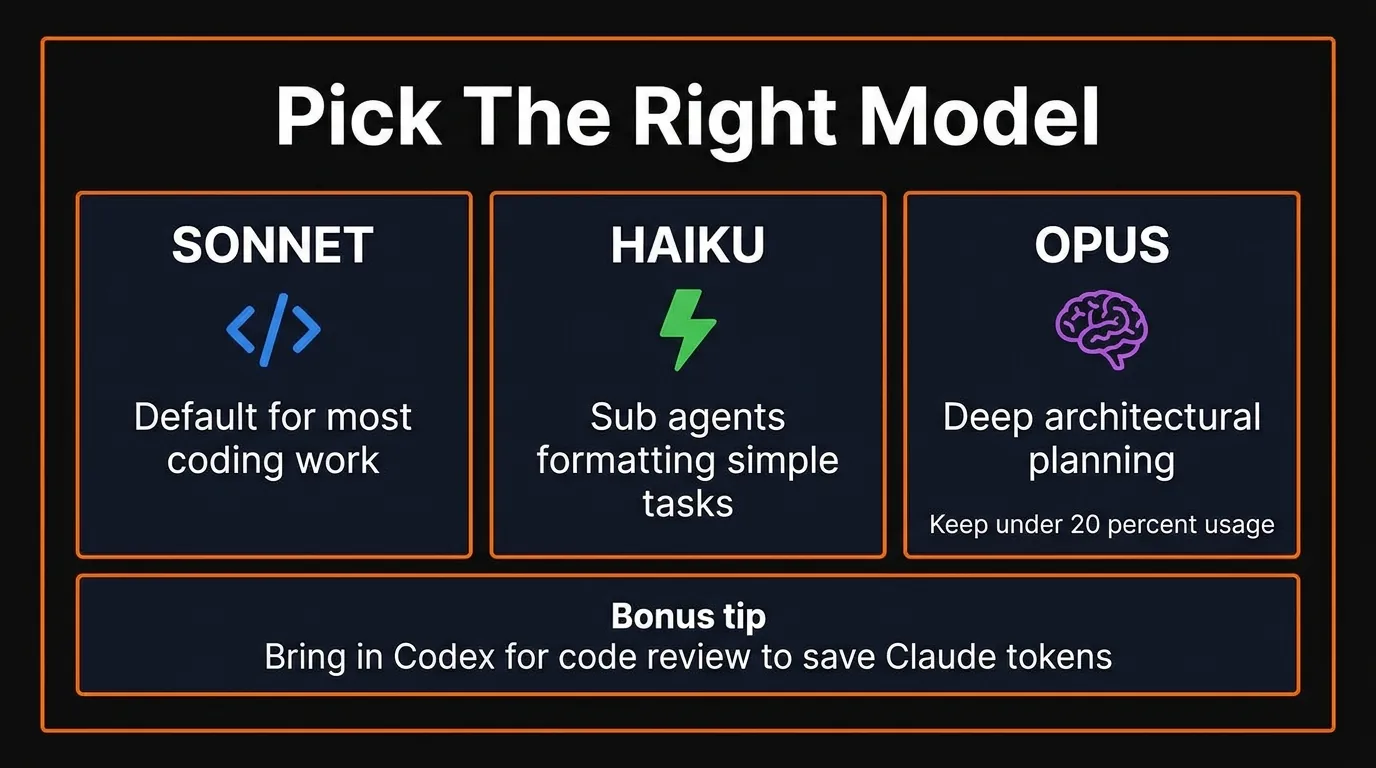
Match the model to the task — this alone can cut costs significantly
1. Pick the Right Model
Pro tip: for large codebase reviews, bring in Codex via the official plugin. Have Opus and Sonnet build the project, then let Codex review everything — saving your Claude tokens for actual development.
2. Understand Sub-Agent Costs
Agent workflows use roughly 7-10x more tokens than a standard single-agent session. Each sub-agent wakes up with its own full context — it reloads everything from scratch.
That said, sub-agents are great for one-off tasks, especially when you can run them on Haiku. Need to process a lot of information or run research? Spawn a Haiku sub-agent, get the summary back, and you've saved significant tokens on the cheaper model.
Agent teams are cool and sometimes produce higher-quality output. But they're expensive. Use them sparingly.
3. Exploit Peak vs. Off-Peak Hours
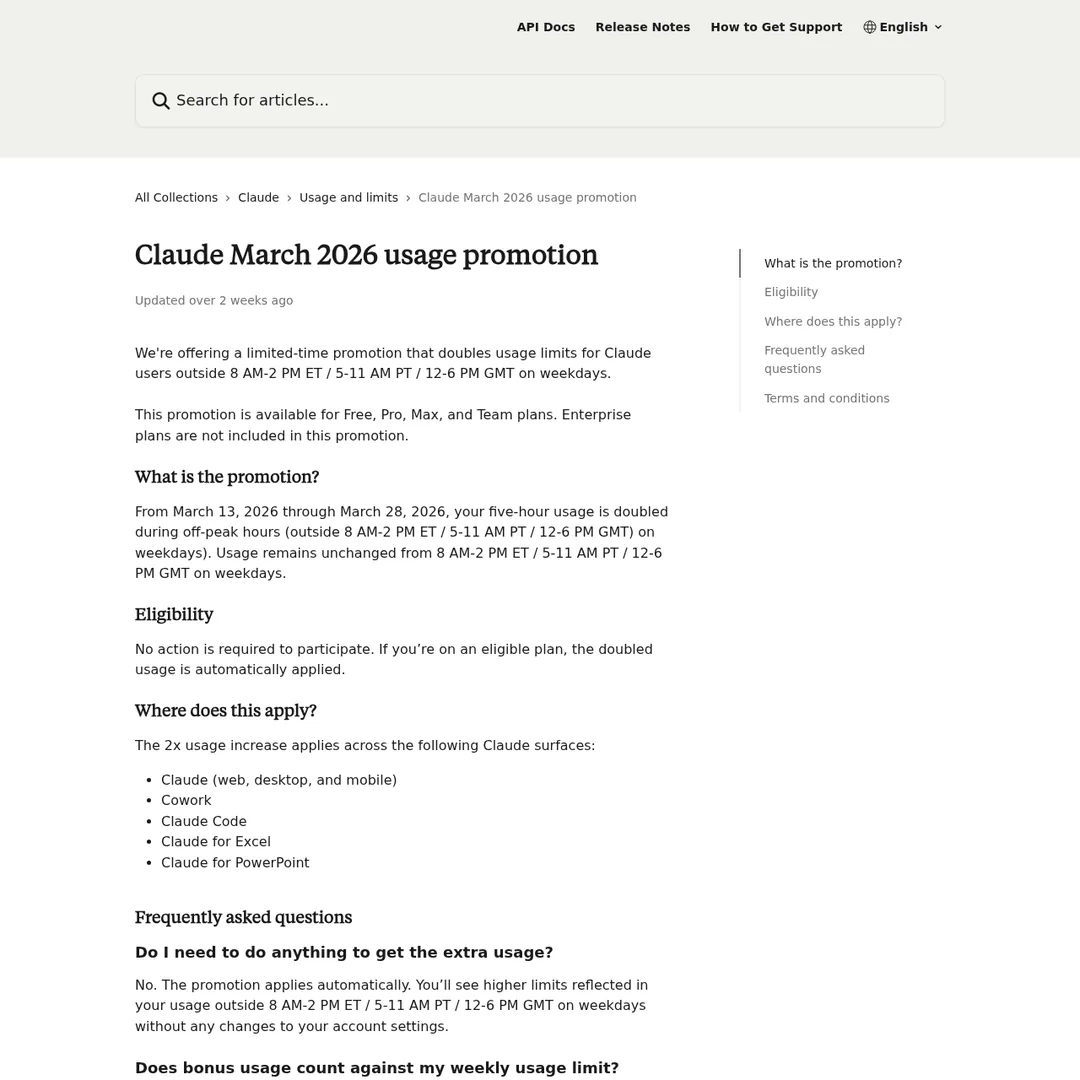
Anthropic's peak hours documentation
Your 5-hour session drains faster during peak hours: 8 AM – 2 PM Eastern (5 AM – 11 AM Pacific) on weekdays. Off-peak — afternoons, evenings, weekends — gives you normal or extended usage.
Think strategically: save big refactors, multi-agent sessions, and heavy projects for off-peak. During peak, do lighter work — planning, reviews, documentation.
Bonus Timing Hack
If you're near a reset and have room left — go heavy. Let your agents loose. Get your money's worth before it resets.
If you're near your limit but have lots of time — step away. Take a walk. Come back with a full budget instead of burning the last 5% and getting stuck mid-task.
4. Build a Self-Improving CLAUDE.md
This is the advanced version of "keep your CLAUDE.md lean." Add a section that lets it learn from failures:
## Applied Learning When something fails repeatedly, when I have to re-explain, or when a workaround is found for a platform/tool/limitation, add a one-line bullet here. Keep each bullet under 15 words. No explanations. Only add things that will save time in future sessions.
Be careful with this — check on it frequently. You don't want your CLAUDE.md to accidentally bloat itself. But the concept of having it continuously learn how to save you time and tokens is powerful when managed well.
You can also add token-specific rules:
- Use sub-agents for any exploration or research
- If a task needs 3+ files or multi-file analysis, spawn a sub-agent and only return summarized insights
- Spawn exploration sub-agents in Haiku
Your Action Plan: Do This Right Now
Don't just read this and close the tab. Go do these things now:
- Run
/contextin your current session — see what's eating your tokens - Run
/cost— see your actual spend - Set up your status line showing model, context %, and token count
- Open your Claude usage dashboard in a tab
- Disconnect unused MCP servers
- Trim your
CLAUDE.mdto under 200 lines - Add the 95% confidence rule to your CLAUDE.md
- Start using
/clearwhen switching tasks - Compact manually at 60% — don't wait for auto-compact
- Schedule your heavy sessions for off-peak hours
The Bottom Line
There's a balance between quality and cost — sometimes you need Opus, sometimes you need a multi-agent team, and that's going to cost more. That's fine.
But most token waste isn't from using powerful models. It's from bad context hygiene: resending your entire conversation history 30 times when you could send it 5. It's from MCP servers silently adding 18,000 tokens per message. It's from letting auto-compact trigger at 95% when your context is already degraded.
Fix those, and you'll feel like your plan doubled overnight. No upgrade required.
Build an AI Tool? Get It in Front of the Right Audience
PopularAiTools.ai reaches thousands of qualified AI buyers.
Submit Your AI Tool →Frequently Asked Questions
Why does Claude Code use so many tokens?
Every time you send a message, Claude Code rereads the entire conversation from the beginning. This means token costs compound exponentially — message 30 in a session costs roughly 31x more than message 1. One developer tracked a 100+ message chat and found 98.5% of all tokens were spent rereading old chat history.
What is the best way to reduce Claude Code token usage?
Start fresh conversations between unrelated tasks using /clear. This single habit has the biggest impact because every message in a long chat is exponentially more expensive than the same message in a fresh chat. Also disconnect unused MCP servers, batch prompts into single messages, and use plan mode before complex tasks.
When should I use /compact vs /clear in Claude Code?
Use /compact at around 60% context capacity to summarize and preserve your session. Auto-compact triggers at 95%, which is too late — context quality is already degraded. After 3-4 compacts in a row, quality drops, so at that point get a session summary, /clear, and feed the summary back to continue.
What are Claude Code peak hours?
Peak hours are 8 AM to 2 PM Eastern Time (5 AM to 11 AM Pacific) on weekdays. During these hours, your 5-hour session limit drains faster. Off-peak hours — afternoons, evenings, and weekends — give you normal or extended usage. Schedule heavy tasks like refactors and multi-agent sessions for off-peak.
Which Claude model should I use for coding?
Use Sonnet for most coding work (it's the default and most cost-efficient). Use Haiku for sub-agents, formatting, and simple tasks. Reserve Opus for deep architectural planning only when Sonnet wasn't enough — keep Opus under 20% of your total usage.
How much do MCP servers cost in tokens?
Every connected MCP server loads all its tool definitions into your context on every single message. A single server can add roughly 18,000 tokens per message — completely invisible overhead. Run /context at the start of each session and disconnect servers you don't need.
Does taking a break waste Claude Code tokens?
Yes. Claude Code uses prompt caching to avoid reprocessing unchanged context, but the cache has a 5-minute timeout. If you step away for longer than 5 minutes, your next message reprocesses everything from scratch at full cost. Either /compact or /clear before stepping away.
How long should CLAUDE.md be?
Keep it under 200 lines. It gets read on every single message — not just every session, every message. Treat it as an index that points to where more data lives, not a dump of everything Claude needs to know. Include your tech stack, coding conventions, build commands, and the 95% confidence rule.
Recommended AI Tools
played.fm
Sell your music and keep 100%: played.fm is a direct-to-fan store + sync marketplace with 0% commission, no gatekeepers, and no bans — a strong fit for AI musicians.
View Review →OpenCode
The open-source AI coding agent: terminal-first TUI, 75+ model providers, LSP context, subagents, and privacy-first design. Free software, ~180K GitHub stars.
View Review →Exa
The neural web search API for AI agents: embeddings-based retrieval, cited highlights, sub-180ms latency, and an MCP server. 20,000 free requests/month.
View Review →Google Antigravity
Google's agent-first IDE: run a fleet of AI agents from a Manager surface, on Gemini 3 Pro, Claude Sonnet 4.5, or OpenAI models. Free in public preview.
View Review →