MCP Server Setup: 10 Pre-Built Configs for Claude Code (2026 Starter Guide)

AI Infrastructure Lead
Key Takeaways
- 10 tested MCP server configurations that actually work — copy-paste into Claude Code
- Verified on macOS and Windows as of February 2026
- Covers Playwright, Brave Search, Context7, GitHub, Filesystem, Memory, Postgres, SQLite, Puppeteer, Fetch
- Includes troubleshooting guide for the 'Connection closed' and 'spawn npx ENOENT' errors everyone hits
The MCP Setup Problem
I spent 3 hours trying to get my first MCP server working. Copied a config from a blog post, got "Connection closed." Tried another from GitHub, got "spawn npx ENOENT." Found a video tutorial, followed it step by step, got a different error.
MCP (Model Context Protocol) servers make Claude Code dramatically more capable — browser automation, web search, database queries, file access, persistent memory. But the setup process is a minefield of JSON syntax, PATH issues, and platform-specific gotchas.
The MCP Server Starter Pack gives you working configs. Tested on macOS and Windows, verified February 2026.
10 MCP Server Configs
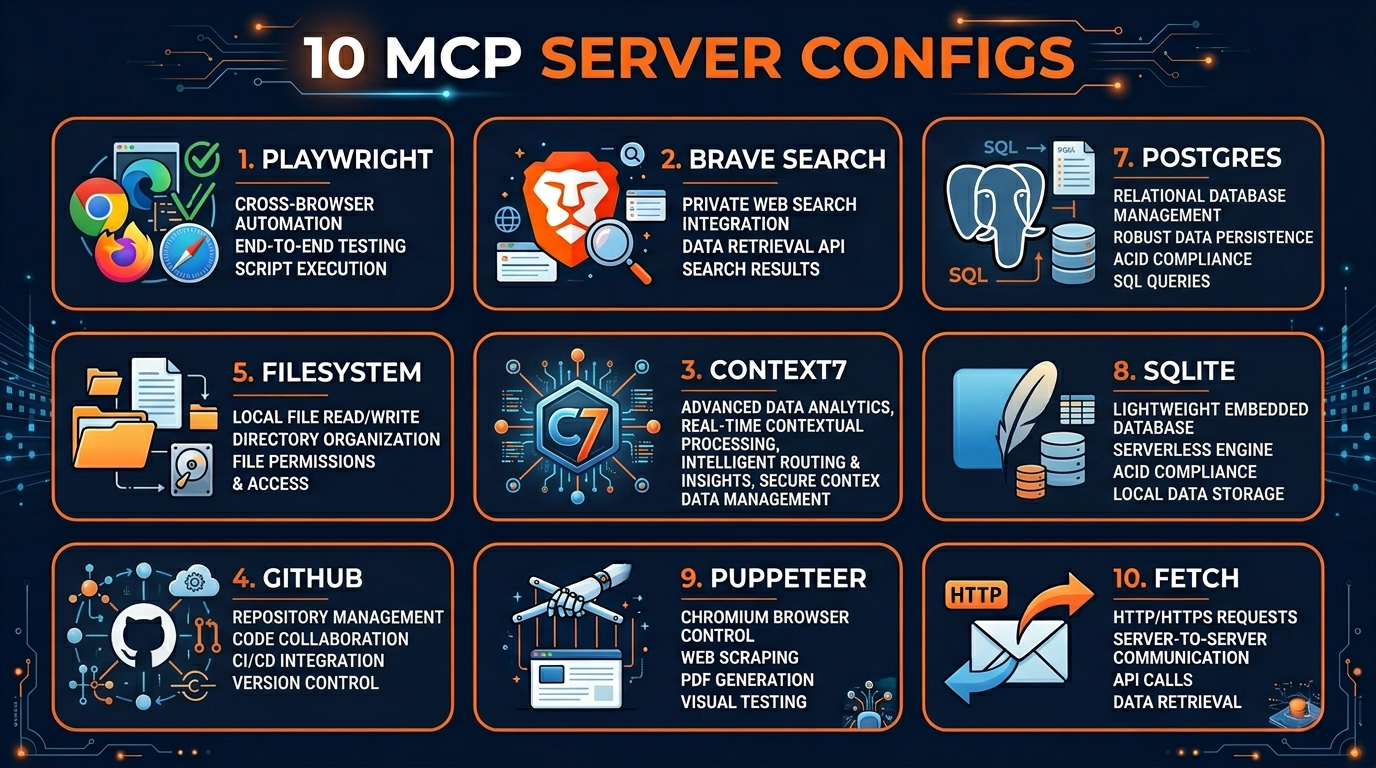
Playwright
Claude controls a real browser. Fill forms, click buttons, take screenshots, scrape data from any website.
Brave Search
Claude searches the web and reads results in real time. No more hallucinated answers about current events.
Context7
Up-to-date documentation for any library. No more hallucinated API methods or outdated syntax.
GitHub MCP
Read issues, PRs, code, and commits from any GitHub repo directly from Claude Code.
Filesystem
Read, write, and search files outside the project directory. Access any file on your machine.
Memory
Persistent knowledge graph across sessions. Claude remembers decisions, preferences, and context.
Postgres
Query your production or dev database directly from Claude Code. Read-only by default.
SQLite
Local database access for mobile and embedded projects. Good for D1 and Turso development.
Plus Puppeteer (lighter-weight browser automation) and Fetch (HTTP requests, API calls, file downloads).
Browser Automation: Playwright & Puppeteer
Playwright is the most powerful MCP server. With it, Claude can fill out forms, navigate multi-step flows, take screenshots of specific elements, and scrape data from JavaScript-rendered pages. I use it daily for testing, data collection, and automating repetitive browser tasks.
Puppeteer is the lighter alternative. Fewer features, but faster to start and uses less memory. The pack includes configs for both so you can choose based on your needs.
Search & Documentation: Brave + Context7
Brave Search gives Claude real-time web access. Context7 gives it up-to-date library documentation. Together, they eliminate the two most common Claude mistakes: hallucinating current information and using outdated API syntax.
Database Access: Postgres & SQLite
The Postgres config connects Claude to your database (read-only by default for safety). Claude can query tables, analyze data, and write migrations based on the actual schema. The SQLite config does the same for local databases.
Troubleshooting Guide
The pack includes fixes for the most common errors:
- "Connection closed" — 4 different causes and fixes (missing deps, wrong Node version, config syntax, timeout)
- "spawn npx ENOENT" — PATH issues on Mac vs Windows, with platform-specific fixes
- "MCP server not responding" — startup timing, firewall rules, port conflicts
- Server connects but tools don't appear — tool registration, capability mismatch
The MCP Server Starter Pack is $29+ on Gumroad. Pairs perfectly with the Claude Code Power User Kit (skills and CLAUDE.md templates) and the AI Coding Agent Blueprints (workflows). Browse all MCP-related content in our skills directory.
Build an AI Tool? Get It in Front of the Right Audience
PopularAiTools.ai reaches thousands of qualified AI buyers.
Submit Your AI Tool →FAQ
Do these configs work on both Mac and Windows?
Yes. Each config has platform-specific setup notes. Tested on macOS 15 and Windows 11 as of February 2026.
Do I need to install Node.js?
Yes, Node.js 18+ is required for most MCP servers. The setup guide covers installation for both platforms.
Are these configs free to run?
Most are free. Brave Search requires a free API key. Postgres and SQLite connect to your existing databases. The pack itself is a one-time purchase.
Will these work with Claude Pro ($20/mo)?
MCP servers require Claude Code (via CLI). Claude Pro ($20/mo) includes Claude Code access.
Can I add my own MCP servers later?
Absolutely. The configs show you the exact pattern. Once you understand the format, adding new servers is straightforward.
Is there a refund?
Yes. Gumroad offers a 30-day money-back guarantee.
Recommended AI Tools
Grammarly
Updated March 2026 · 12 min read · By PopularAiTools.ai
View Review →Google Imagen
Updated March 2026 · 11 min read · By PopularAiTools.ai
View Review →CapCut
Updated March 2026 · 12 min read · By PopularAiTools.ai
View Review →Picsart
Updated March 2026 · 11 min read · By PopularAiTools.ai
View Review →