OpenClaw Freelancer: AI Tools to Protect Your Revenue

Senior AI Tools Analyst
Key Takeaways
- OpenClaw Freelancer Command Center includes 10 pre-built OpenClaw skills designed specifically for ai freelance tools workflows.
- Targets the core problem: 15-20% revenue lost to scope creep and unpaid invoices that most freelance developers and designers deal with daily.
- One-time purchase at $49+ with a 30-day money-back guarantee. No subscriptions, no recurring fees.
- Skills include: Scope Creep Detector, Proposal Generator, Invoice Chaser, Pipeline Tracker, Time Analyzer, and 5 more.
- Works with OpenClaw out of the box. Install in under 10 minutes, start automating the same day.
Freelancers lose 15-20% of their revenue to problems they could prevent: scope creep on projects with vague boundaries, invoices that sit unpaid for 30+ days, proposals that took hours to write and never converted, and a complete lack of visibility into which clients are actually profitable versus which ones are draining your time.
OpenClaw Freelancer Command Center is an AI freelance tools suite built on the OpenClaw platform. 10 skills that detect scope creep before it eats your margins, generate proposals that convert, chase invoices automatically, and give you a weekly revenue report that shows exactly where your money is going.
The Problem: Freelancers Leaking Revenue They Cannot See
The freelance revenue leaks are systematic and often invisible until you sit down and do the math:
- Scope creep on 60% of projects — clients ask for "one more thing" that somehow takes 8 hours, and you eat the cost because the boundaries were never clearly documented.
- Proposals convert at under 30% — you spend 2 hours per proposal, send 10 per month, and land 2-3. That is 14-16 unbilled hours on proposals that went nowhere.
- Invoices are 30+ days late — because sending them is a manual chore that gets pushed to "next week."
- No visibility into client profitability — your highest-paying client might actually be your least profitable when you account for scope creep and communication overhead.
The OpenClaw Freelancer system is different from the Freelancer Command Center (Claude Code version) in that it runs on the OpenClaw platform. Same operational philosophy, different runtime — so you pick the one that matches your existing setup.
What OpenClaw Freelancer Command Center Actually Does
OpenClaw Freelancer Command Center is not a collection of generic prompts or a chatbot that needs to be retrained every conversation. It is a fully configured OpenClaw system with 10 specialized skills that understand the specific workflows of freelance developers and designers.
Each skill is a purpose-built automation that handles one specific operational task. You run a slash command (like /scope-creep-detector), provide the relevant information, and get a polished, ready-to-use output. No prompt engineering required. No explaining your business from scratch every time.
The system comes pre-configured with a CLAUDE.md (or equivalent configuration file) that establishes the AI's understanding of your industry, your workflows, and your terminology. When you ask it to do something, it already knows the context.
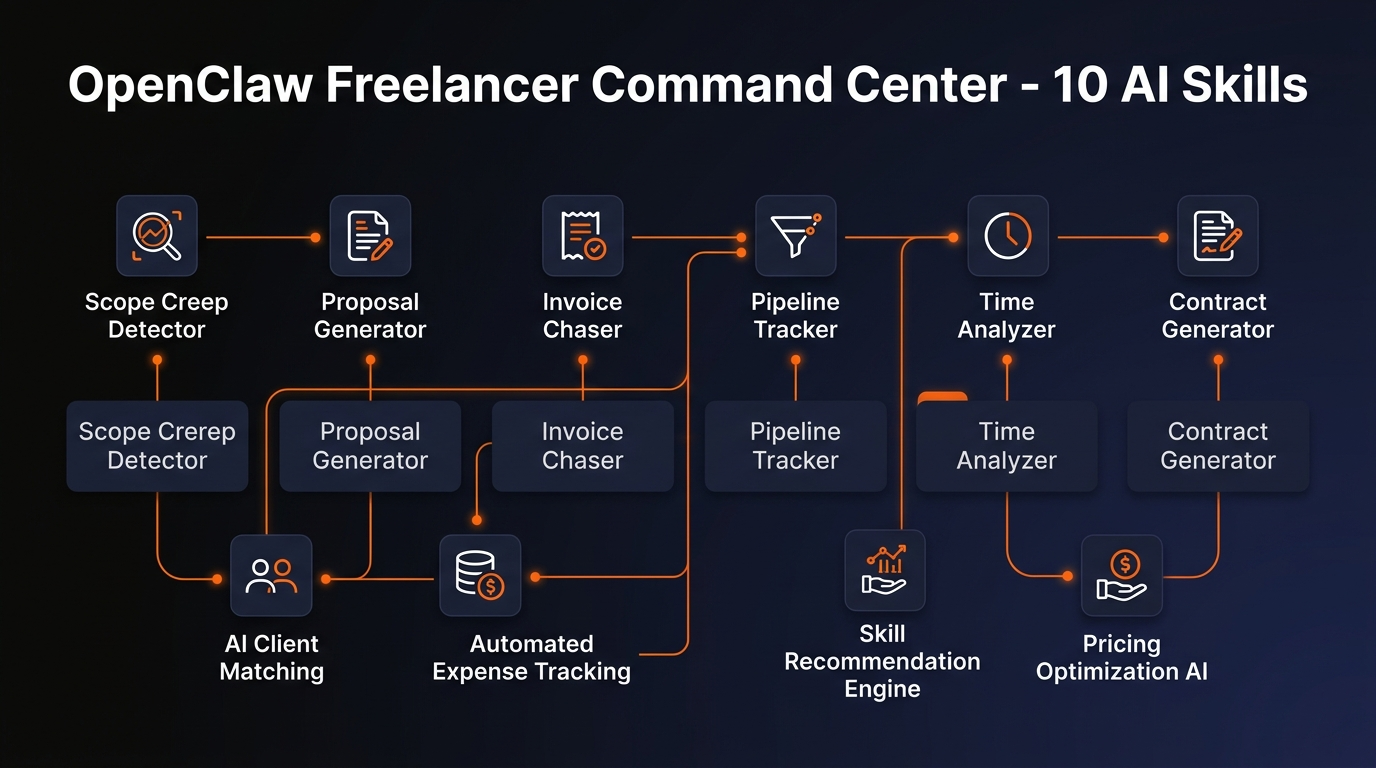
What's Included: 10 OpenClaw Skills
- Scope Creep Detector
- Proposal Generator
- Invoice Chaser
- Pipeline Tracker
- Time Analyzer
- Contract Generator
- Rate Calculator
- Client Health Monitor
- Lead Qualifier
- Weekly Revenue Report
1. Scope Creep Detector — Analyzes project conversations and deliverables against the original agreement. Flags out-of-scope work, quantifies the dollar value, and drafts change order communication.
2. Proposal Generator — Takes your project details, client requirements, and pricing and produces a complete, send-ready document with scope, timeline, terms, and pricing breakdown.
3. Invoice Chaser — Creates professional invoices from hours, milestones, or deliverables. Tracks payment status and sends automated follow-up reminders for overdue amounts.
4. Pipeline Tracker — Maintains a real-time view of all active work in progress, with status updates, next actions, and bottleneck identification.
5. Time Analyzer — Logs time entries with client and matter context, tracks billable vs. non-billable ratios, and identifies where hours are being lost.
Plus 5 more skills: Contract Generator, Rate Calculator, Client Health Monitor, Lead Qualifier, Weekly Revenue Report. Each one follows the same pattern — run the command, provide inputs, get polished output. See the full skill list on the product page.
How It Works (3 Steps)
Install OpenClaw
Download and install the OpenClaw CLI on your machine. The installer handles dependencies automatically. Five minutes, no technical background required.
Add the OpenClaw Freelancer Command Center Skills
Drop the skill files into your OpenClaw skills directory. The CLAUDE.md configuration file is pre-built — it already understands your industry's workflows, terminology, and common tasks. No prompt engineering needed.
Run Your First Command
Type a slash command like /scope-creep-detector and provide the relevant details. The skill handles the rest — formatting, calculations, industry-specific logic, output structure. You get a ready-to-use result in seconds.
Who Is This For?
- Freelance developers and designers
- Independent consultants
- Contract workers and gig professionals
- Solo agency operators
The short answer: anyone in the list above who is spending significant time on operational tasks that follow predictable patterns. If you find yourself doing the same administrative work every week — the same reports, the same follow-up emails, the same calculations — and thinking "there has to be a better way," this is the better way.
This is not for people who want a general-purpose chatbot. OpenClaw Freelancer Command Center is specifically configured for freelance developers and designers workflows. If that is your world, the skills will feel immediately relevant. If you are in a completely different industry, check the full store — there are kits for real estate, law firms, accounting, restaurants, and more.
Pricing
$49+
One-time purchase. No subscription. Lifetime access.
Includes all 10 skills, message templates, automation workflows, configuration variants, setup guides, and lifetime updates.
See Full Details Buy on Gumroad30-day money-back guarantee. If it doesn't work for you, full refund, no questions asked.
For context: hiring a virtual assistant to handle these same operational tasks costs $500-$2,000 per month. Most SaaS tools that automate similar workflows charge $50-$200 per month. OpenClaw Freelancer Command Center is a one-time purchase that you own permanently — and because the skills are plain text files, you can customize them to fit your exact workflow.
The 30-day money-back guarantee is straightforward: if you follow the setup guide and the skills do not work for your use case, you get a full refund. No hoops, no retention calls.
Build an AI Tool? Get It in Front of the Right Audience
PopularAiTools.ai reaches thousands of qualified AI buyers.
Submit Your AI ToolFrequently Asked Questions
Is OpenClaw Freelancer Command Center a subscription?
No. OpenClaw Freelancer Command Center is a one-time purchase at $49+. You own it forever with no recurring fees. Lifetime updates are included.
Do I need coding skills to use OpenClaw Freelancer Command Center?
No coding required. Each product includes step-by-step setup instructions written for non-developers. If you can install an app and follow written instructions, you can set this up. Most users are running their first skill within 30 minutes.
What is OpenClaw and do I need it?
OpenClaw is an AI assistant platform that runs locally on your computer. OpenClaw Freelancer Command Center is built on top of it, so yes, you need OpenClaw installed. The product includes installation instructions. It takes about 5 minutes.
What if OpenClaw Freelancer Command Center does not work for my specific situation?
Gumroad offers a 30-day money-back guarantee. If you follow the setup guide and the skills do not fit your workflow, email for a full refund. No questions asked.
Can I customize the skills?
Yes. Every skill file is plain text that you can edit to match your specific workflows, terminology, and preferences. The configuration file is designed to be modified. Many users start with the defaults and customize over time as they identify their specific needs.
How is this different from just using ChatGPT?
ChatGPT is a general-purpose chatbot that starts from zero every conversation. OpenClaw Freelancer Command Center is a pre-configured system that already understands freelance developers and designers workflows, terminology, and common tasks. You do not need to explain your business every time you use it. The skills produce structured, ready-to-use outputs, not conversational text that needs reformatting.
Recommended AI Tools
Grammarly
Updated March 2026 · 12 min read · By PopularAiTools.ai
View Review →Google Imagen
Updated March 2026 · 11 min read · By PopularAiTools.ai
View Review →CapCut
Updated March 2026 · 12 min read · By PopularAiTools.ai
View Review →Picsart
Updated March 2026 · 11 min read · By PopularAiTools.ai
View Review →