OpenClaw Zero: Run a Free AI Assistant With No API Fees (2026 Guide)

Senior AI Tools Analyst
Key Takeaways
- OpenClaw Zero runs entirely on your computer — no API keys, no cloud, no monthly bills
- Uses Ollama for local AI model inference (Llama 3, Mistral, Phi-3)
- One Docker command gets everything running in about 15 minutes
- Includes 6 pre-built business skills and messaging integration (Telegram, Discord)
The Cost Problem With AI Assistants
I added up what I was spending on AI tools last month. Claude Pro: $20. GPT-4 API calls: $35. A cloud server to run OpenClaw: $12. That's $67/month — $804/year — just to have a personal AI assistant.
For a business running multiple team members on AI tools, multiply that by headcount. Suddenly your "productivity tool" has a serious line item on the P&L.
OpenClaw Zero takes a different approach: run everything locally. Your computer already has the processing power. Ollama makes it dead simple to run open-source AI models on consumer hardware. And OpenClaw Zero wraps it all into a one-command setup with business skills pre-installed.
How OpenClaw Zero Works
The architecture is straightforward: Docker runs two containers side by side. One runs OpenClaw (the AI assistant framework). The other runs Ollama (the local model server). They talk to each other over a private network. Nothing leaves your machine.
├── Docker Container 1: OpenClaw (assistant framework)
├── Docker Container 2: Ollama (local AI model)
└── Private network (localhost only, no external access)
You interact with it through a password-protected web chat at localhost:8080, or via Telegram/Discord from your phone. The AI model runs on your CPU or GPU. Zero data sent to any cloud service.
What's Included in the Kit
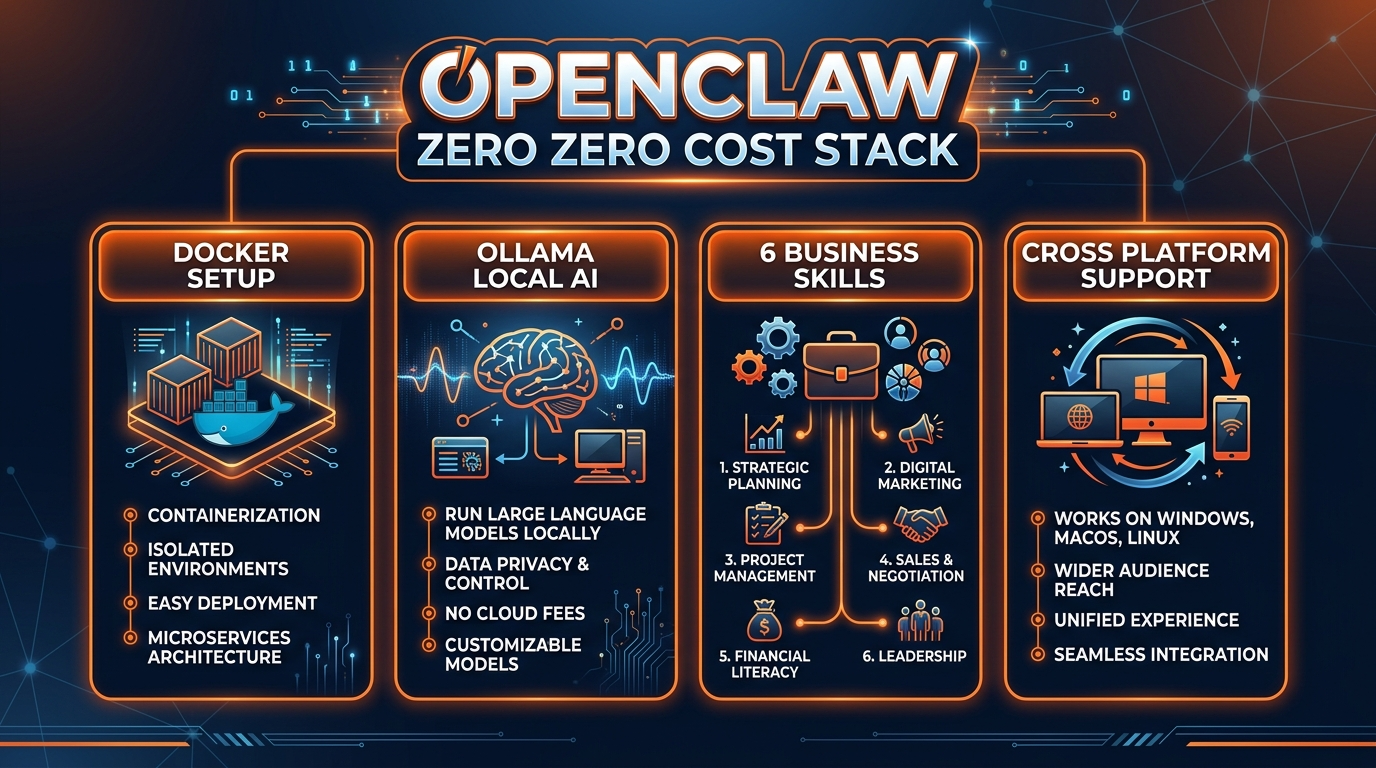
- Docker Compose stack — one command launches everything with health checks and auto-restart
- Ollama integration — pre-configured for local AI, no API keys needed
- 6 business skills — Email Drafter, Meeting Prep, Content Writer, Business Research, Customer Support, Weekly Report
- 8-section walkthrough — plain English, non-technical, each section has a checkpoint
- Messaging integration — Telegram and Discord setup guides
- Web chat interface — localhost:8080, password-protected
- Security hardening — ports locked to localhost, read-only configs
- Model selection guide — 4 models compared with RAM requirements and quality ratings
- Setup scripts for Mac, Windows, and Linux
6 Pre-Built Business Skills
Each skill is a focused capability your AI assistant can perform on command:
Email Drafter
Tell it the context and tone. Get a ready-to-send email in seconds.
Meeting Prep
Paste an agenda, get talking points, questions to ask, and follow-up action items.
Content Writer
Blog posts, social updates, product descriptions in your business voice.
Business Research
Competitor analysis, market sizing, trend summaries from data you provide.
Customer Support
Draft responses to support tickets using your FAQ and tone guidelines.
Weekly Report
Feed it your metrics, get a formatted report with highlights and action items.
Hardware Requirements
Here's the honest truth about running AI locally. The model quality scales directly with your hardware:
| Model | RAM Needed | Quality | Speed |
|---|---|---|---|
| Phi-3 Mini | 8GB | Basic | Fast |
| Llama 3 8B | 16GB | Good | Medium |
| Mistral 7B | 16GB | Good | Medium |
| Llama 3 70B | 32GB+ | Excellent | Slow |
Most business laptops bought in the last 2 years have 16GB RAM, which is the sweet spot. If you have a GPU, response times drop significantly.
Setup Process
The 8-section walkthrough covers everything, but here's the high-level flow:
- Install Docker Desktop (free, 5 minutes)
- Unzip the kit and run the setup script for your OS
- Run
docker compose up -d— this pulls both containers and starts them - Open localhost:8080, set your password
- Choose your model (the guide recommends Llama 3 8B for most people)
- Start chatting — the 6 skills are pre-installed
Total time: about 15 minutes, most of which is waiting for Docker to download images.
Honest Limitations
I want to be straight about what local AI can't do as well as cloud models:
- Complex reasoning — Llama 3 8B is noticeably less capable than Claude or GPT-4 for multi-step analysis
- Long documents — context windows are smaller on local models (4K-8K vs 200K on Claude)
- Speed on older hardware — without a GPU, responses can take 10-30 seconds
- No internet access — local models can't search the web or fetch live data
For drafting emails, prepping meetings, writing content, and handling basic customer support? Local models perform surprisingly well. For complex analysis and coding? You'll want to upgrade to the Business Starter Kit with cloud API access.
The OpenClaw Zero kit is $39.99+ on Gumroad — one-time purchase. Browse more options in our store or check out free OpenClaw skills.
Build an AI Tool? Get It in Front of the Right Audience
PopularAiTools.ai reaches thousands of qualified AI buyers.
Submit Your AI Tool →FAQ
Can I really run an AI assistant with zero API fees?
Yes. Ollama runs AI models on your computer. No API keys, no cloud, no monthly fees.
How much RAM do I need?
8GB minimum, 16GB recommended. The model selection guide in the kit covers this in detail.
Is the quality as good as ChatGPT?
For business tasks like email drafting and meeting prep, Llama 3 8B is surprisingly good. For complex analysis, cloud models still win.
Can I switch to cloud APIs later?
Yes. The setup makes swapping from Ollama to Claude or GPT-4o straightforward. The skills stay the same.
Does it work on Windows?
Yes — Mac, Windows, and Linux setup scripts are all included.
What's the difference between OpenClaw Zero and the Business Starter Kit?
Zero runs 100% locally with no API costs. The Business Starter Kit connects to cloud APIs (Claude, GPT-4o) for higher quality responses and includes industry-specific configs.
Recommended AI Tools
Grammarly
Updated March 2026 · 12 min read · By PopularAiTools.ai
View Review →Google Imagen
Updated March 2026 · 11 min read · By PopularAiTools.ai
View Review →CapCut
Updated March 2026 · 12 min read · By PopularAiTools.ai
View Review →Picsart
Updated March 2026 · 11 min read · By PopularAiTools.ai
View Review →