
Claude Cowork Review: The Desktop AI Agent That Works While You’re Away
What if your AI assistant could actually do the work instead of just telling you how? We tested Anthropic’s Claude Cowork — the desktop agent that organizes files, processes documents, and runs research while you step away from your desk. Here is everything we found.
Table of Contents
- What Is Claude Cowork?
- Claude Cowork vs Claude Code: Who Is It For?
- How Claude Cowork Actually Works
- Platform Support: macOS and Windows
- Real Use Cases We Tested
- What Reviewers Are Saying
- Pricing Breakdown
- Claude Cowork vs Microsoft Copilot Cowork
- Limitations and What to Watch Out For
- Our Verdict
- FAQ
What Is Claude Cowork?
Claude Cowork is Anthropic’s agentic mode built directly into the Claude Desktop app. Launched in January 2026 as a research preview, it transforms Claude from a chatbot that answers questions into an autonomous digital coworker that can read, edit, create, and organize files on your computer — all without writing a single line of code.
The concept is straightforward but genuinely ambitious. Instead of asking Claude a question and then manually carrying out the steps yourself, you give Cowork access to the files or apps involved in a task and let it handle the work. It formulates a plan, executes steps (sometimes in parallel), checks its own output, and asks for clarification only when it hits a genuine roadblock.
Get Your AI Tool in Front of Thousands of Buyers
Join 500+ AI tools already listed on PopularAiTools.ai — DR 50+ backlinks, expert verification, and real traffic from people actively searching for AI solutions.
Starter
$39/mo
Directory listing + backlink
- DR 50+ backlink
- Expert verification badge
- Cancel anytime
Premium
$69/mo
Featured + homepage placement
- Everything in Starter
- Featured on category pages
- Homepage placement (2 days/mo)
- 24/7 support
Ultimate
$99/mo
Premium banner + Reddit promo
- Everything in Premium
- Banner on every page (5 days/mo)
- Elite Verified badge
- Reddit promotion + CTA
No credit card required · Cancel anytime
What makes Cowork different from every other AI chatbot on the market is that it operates directly on your local file system. It can open folders, read documents, create spreadsheets with working formulas, sort your downloads, compile research across multiple sources, and generate polished reports — all autonomously. Anthropic designed it for knowledge workers, office professionals, researchers, and anyone who spends their day wrestling with documents and data but does not necessarily write code.
Here is what caught our attention: Anthropic reportedly built the entire Cowork feature in approximately a week and a half, using Claude Code itself. That is the kind of recursive self-improvement that makes you sit up and pay attention.
Claude Cowork vs Claude Code: Who Is It For?
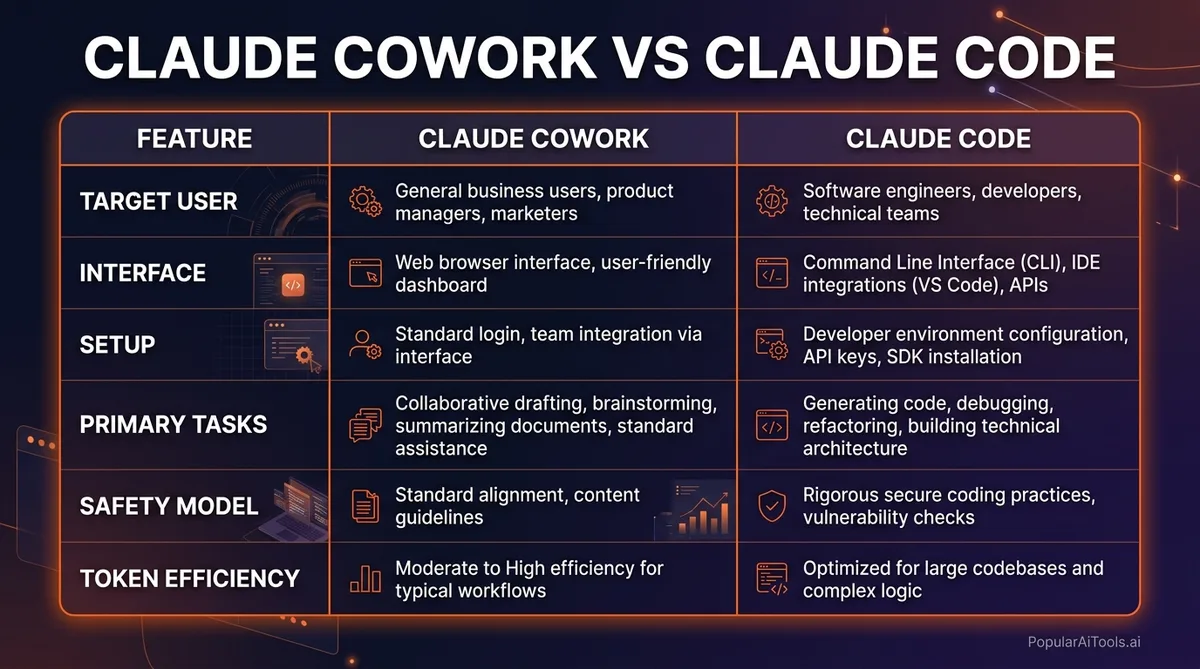
This is the question we hear most often, and the distinction matters. Claude Code and Claude Cowork serve fundamentally different users despite sharing the same underlying AI models.
Think of it this way: Claude Code is the power tool you install in your terminal and configure for maximum control. Cowork is the digital coworker who sits in an app you already have and gets things done when you describe what you need in plain language.
If you are a developer who lives in the terminal, Claude Code gives you more precision, speed, extensibility, and reliability. If you are a project manager, researcher, content creator, analyst, or anyone who works primarily with documents and data, Cowork is built specifically for you.
The important insight from Forte Labs’ breakdown is that these are not competing products — they are complementary. Many teams use Claude Code for their engineering workflows and Cowork for everything else.
How Claude Cowork Actually Works
When you activate Cowork inside the Claude Desktop app, something fundamentally different happens compared to a normal chat. Here is the workflow:
1. You describe the task in plain language. No special syntax, no commands. Just tell it what you need. “Organize my downloads folder by project and create an index document” or “Analyze these three quarterly reports and build a comparison spreadsheet.”
2. Cowork creates a plan. Before touching anything, it outlines what it intends to do. This is a critical safety feature — you see the proposed actions before any files get moved or modified.
3. It executes autonomously. Once you approve, Cowork works through its plan step by step. It can run multiple steps in parallel when tasks are independent. During execution, it takes screenshots of its own work to verify accuracy.
4. It checks its own output. This self-verification loop is what separates Cowork from simpler automation. It does not just blindly execute — it reviews what it produced and catches errors before presenting the final result.
5. It asks when stuck. If Cowork encounters ambiguity or needs a decision only you can make, it pauses and asks rather than guessing. This makes it dramatically more reliable than fully autonomous agents that barrel ahead regardless.
The entire process runs inside a sandboxed virtual machine that is isolated from the wider internet. Your conversation history stays stored locally on your device, not on Anthropic’s servers. This architecture means Cowork can interact with your files without the privacy concerns that plague cloud-based alternatives.
Platform Support: macOS and Windows
Cowork initially launched as a macOS-exclusive feature in January 2026, but Anthropic shipped Windows support on February 10, 2026, with what they are calling “complete feature parity.” This was faster than most analysts expected.
macOS: Full support. This is where Cowork launched first and where it has the longest track record. Chrome automation, file system access, and all agent capabilities work as expected.
Windows: Full support since February 10. Every feature available on macOS is now available on Windows, with one exception — Windows ARM64 is not supported. If you are running Windows on an ARM-based processor (like some Surface devices), you will need to wait for that specific build.
Linux: Not yet available. Anthropic has not announced a timeline for Linux support.
Web and Mobile: Cowork is a desktop-only feature. It requires direct file system access, which browser-based and mobile interfaces cannot provide in the same way.
Real Use Cases We Tested
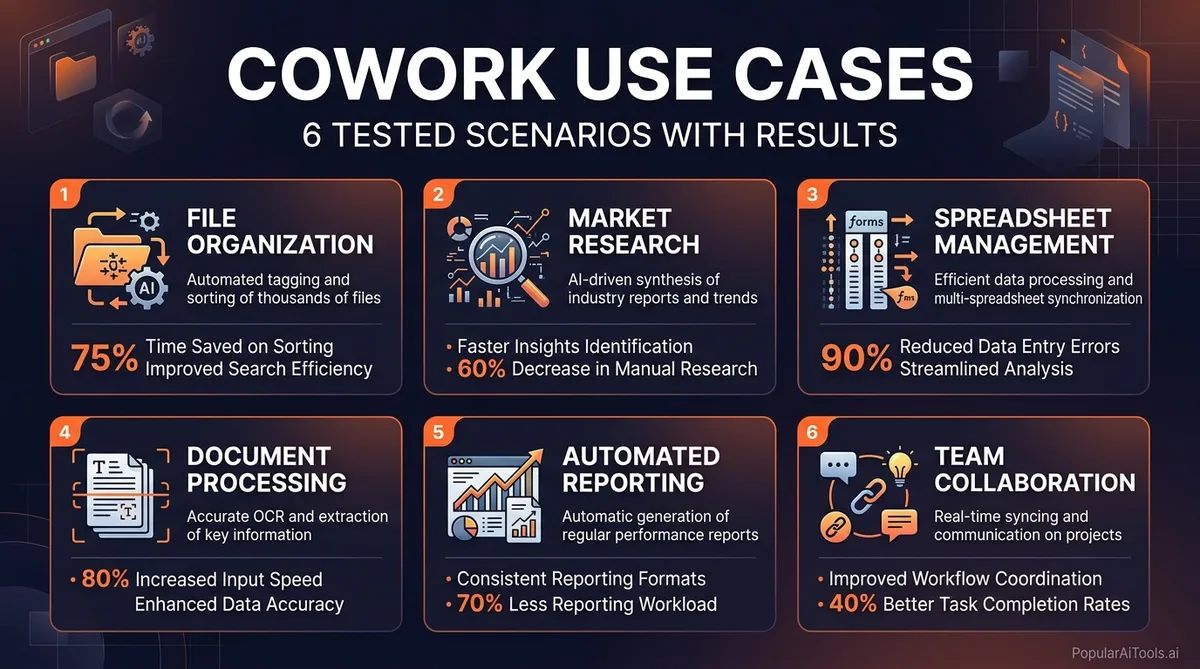
We spent two weeks putting Cowork through real-world scenarios. Here is what impressed us and where it stumbled.
File Organization
This is Cowork’s signature strength. We pointed it at a downloads folder with over 800 files and asked it to organize everything. Instead of simply sorting by file extension (which any script can do), Cowork analyzed file contents. It recognized that an image file was actually a receipt from a coffee supplier and filed it under expenses rather than photos. It identified PDF invoices, grouped related project documents, and created a clean folder structure with an index document.
The content-aware sorting is the real differentiator here. Traditional file organization tools look at filenames and extensions. Cowork reads the actual content and makes intelligent decisions about where things belong.
Document Processing and Report Generation
We gave Cowork three quarterly financial reports in PDF format and asked for a comparison analysis. It extracted key metrics from each report, built a spreadsheet with multiple tabs, applied conditional formatting to highlight trends, and wrote a two-page summary with actionable insights.
The spreadsheet included working VLOOKUP formulas and properly formatted charts. This is not something we expected from a first-generation desktop agent, and it saved roughly four hours of manual work.
Research Synthesis
We asked Cowork to research a specific industry topic using web searches, analyze the findings, cross-reference with local notes we had saved, and produce a structured briefing document. It delivered a comprehensive report that surfaced patterns and connections across sources that we might have missed doing this manually.
Where It Struggled
Complex spreadsheets with heavy macro usage confused the xlsx parser. Chrome automation, while functional, ran slower than expected — page loads and interactions had noticeable latency. And if you are doing high-volume work, you will hit usage limits faster than you expect because Cowork burns through tokens aggressively behind the scenes (screenshots, image processing, and self-verification all consume quota).
What Reviewers Are Saying
The most widely cited review comes from Tom’s Guide, where the headline says it all: “Anthropic’s new AI feels more like a coworker than a chatbot.” The reviewer found that Cowork does not just suggest what to do next — it actually completes the task. The folder cleanup test particularly impressed them, with Cowork proposing an organization structure before touching anything and then executing it cleanly.
Simon Willison, a respected developer and blogger, shared his first impressions and noted the agent’s ability to handle multi-step tasks with genuine autonomy. The self-correction behavior stood out — when Cowork made a mistake, it caught and fixed the error without being told.
CNBC reported on Anthropic’s February update that expanded Cowork with enterprise integrations including Google Drive, Gmail, DocuSign, and FactSet. The report emphasized that Anthropic is positioning Cowork as a productivity tool for the average office worker, not just technical power users.
The consensus across reviews is consistent: Cowork is the first AI desktop agent that feels genuinely useful for real work rather than being a tech demo. The permission-based approach (it always asks before modifying files) and local data storage address the two biggest concerns people have about giving an AI access to their computer.
Pricing Breakdown
Claude Cowork is available across two paid tiers. Here is what you get at each level:
Cowork initially launched exclusively for Max subscribers ($100-$200/month), but Anthropic expanded access to Pro subscribers in February 2026. The Pro tier gives you Cowork with the Sonnet model, which is capable but noticeably less powerful than Opus for complex multi-step tasks.
Our recommendation: if you plan to use Cowork for occasional file organization and simple research tasks, the Pro tier at $20/month is sufficient. If you are delegating substantial daily work to Cowork — multi-document analysis, report generation, complex research — the Max tier at $100/month is where the experience gets genuinely transformative. The Opus model handles ambiguity better, produces higher-quality output, and makes fewer mistakes that require correction.
The $200/month Ultra tier makes sense only if you are running Cowork for hours daily and consistently hitting the limits of the $100 plan.
Claude Cowork vs Microsoft Copilot Cowork
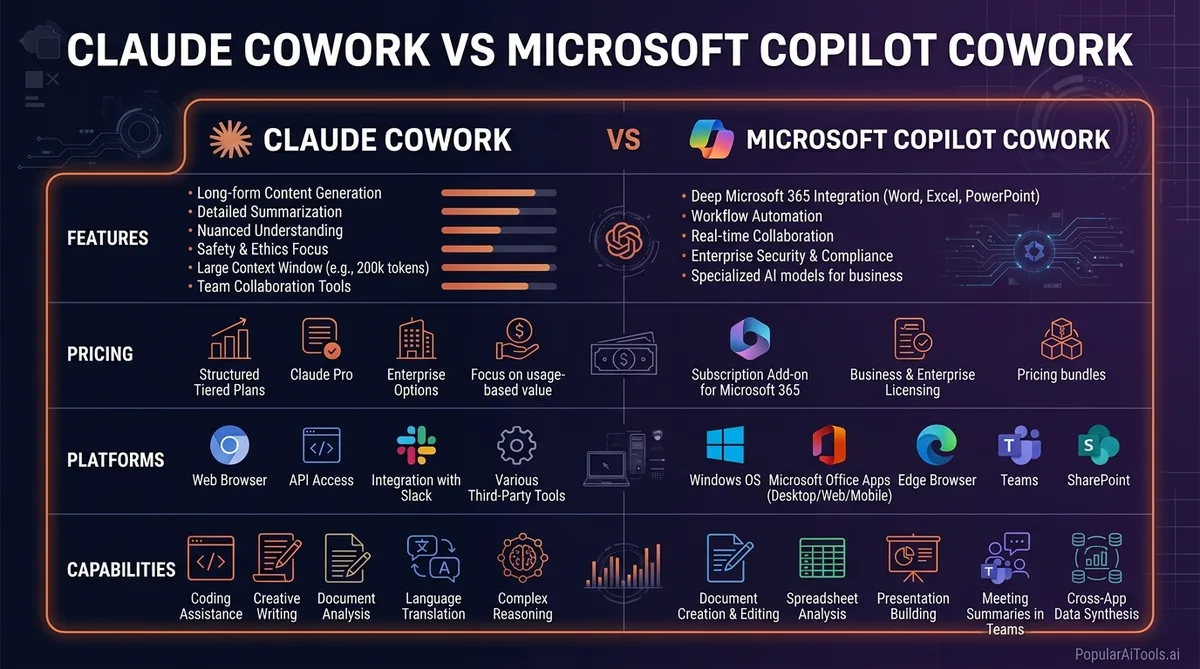
Microsoft launched Copilot Cowork in March 2026 as “Wave 3” of Microsoft 365 Copilot, built in close collaboration with Anthropic. Yes, both products use the same underlying Claude models. But they are designed for fundamentally different contexts.
The key distinction is scope. Claude Cowork excels at deep, focused tasks on your local machine — think “process these 50 documents and build me a report.” Copilot Cowork excels at tasks that span your entire corporate environment — think “prepare for my 3pm meeting by pulling relevant emails, documents, and past meeting notes from across Teams and SharePoint.”
If you are an individual user or a small team without a Microsoft 365 enterprise license, Claude Cowork is the clear choice. It runs locally, costs less, and gives you more autonomous capability for file-based work.
If your organization is already deep in the Microsoft ecosystem and you need an AI that understands your corporate context (emails, calendar, Teams chats, SharePoint documents), Copilot Cowork’s “Work IQ” feature makes it the stronger option for enterprise workflows.
Interestingly, there is no reason you cannot use both. They do not compete for the same tasks.
Limitations and What to Watch Out For
We believe in honest reviews, so here is what you need to know before committing:
Token consumption is aggressive. Cowork uses significantly more tokens than a standard Claude chat because of all the hidden work happening behind the scenes — screenshots for self-verification, image processing, file reading, and multi-step planning. Budget accordingly, especially on the Pro tier.
Complex spreadsheets can trip it up. Heavy macro-driven Excel files and extremely complex formulas sometimes confuse the parser. For straightforward spreadsheet work (formulas, formatting, multi-tab analysis), it handles things well. For enterprise-grade financial models with nested macros, verify the output carefully.
Chrome automation is slow. Web-based tasks work but with noticeable latency. If your workflow involves heavy browser automation, temper your expectations on speed.
Prompt injection is a real risk. Anthropic has acknowledged that Cowork can be vulnerable to prompt injection if you ask it to process a downloaded file that contains a malicious prompt embedded in the content. Be cautious about pointing Cowork at files from untrusted sources.
The “research preview” label is accurate. This is not a finished product. Anthropic is actively iterating, and you will encounter rough edges. The core functionality is solid, but edge cases will surprise you.
No Linux support yet. If you are on Linux, you are waiting. No timeline has been announced.
ARM64 Windows is excluded. If you run Windows on an ARM-based device, Cowork is not available to you yet.
Our Verdict
Claude Cowork is the first AI desktop agent that we would actually recommend for daily professional use. It is not perfect — the token consumption is high, complex spreadsheets need babysitting, and the research preview label is honest about its maturity. But the core promise delivers. You can describe a multi-step task in plain language, walk away, and come back to genuinely useful output.
The file organization capabilities alone justify the Pro subscription for anyone drowning in digital clutter. The document processing and research synthesis features justify the Max subscription for knowledge workers who spend hours daily on tasks that Cowork can handle autonomously.
What impressed us most is the safety model. Cowork asks before acting, runs in a sandbox, stores data locally, and self-verifies its output. Anthropic built this for people who are rightfully cautious about giving an AI access to their files, and it shows.
If you have been waiting for AI to move beyond “helpful chatbot” into “actual productivity tool,” Claude Cowork is the strongest argument that we have arrived at that inflection point.
Rating: 4.2 out of 5
Try Claude Cowork on the official Claude website
Built an AI tool? Get it in front of thousands of qualified buyers on PopularAiTools.ai
FAQ
What is Claude Cowork and how is it different from regular Claude?
Claude Cowork is an agentic mode inside the Claude Desktop app that can autonomously execute multi-step tasks on your computer. Regular Claude is a conversational chatbot that answers questions and generates text. Cowork goes further by reading, editing, creating, and organizing files directly on your local machine without requiring you to manually carry out each step.
Do I need to know how to code to use Claude Cowork?
No. Cowork was designed specifically for non-technical users. You describe tasks in plain language — “organize my downloads folder” or “analyze these reports and build a comparison spreadsheet” — and Cowork handles the execution. Claude Code is the separate product built for developers who want terminal-based coding assistance.
How much does Claude Cowork cost?
Cowork is available on the Pro plan at $20/month (using the Sonnet model) and the Max plan at $100/month or $200/month (using the more capable Opus model with higher usage limits). It was initially exclusive to Max subscribers but expanded to Pro users in February 2026.
Is Claude Cowork available on Windows?
Yes. Anthropic launched Windows support on February 10, 2026, with full feature parity to the macOS version. The only exception is that Windows ARM64 devices are not yet supported. Linux support has not been announced.
Is it safe to give Claude Cowork access to my files?
Cowork runs inside a sandboxed virtual machine isolated from the wider internet, and all conversation history is stored locally on your device rather than on Anthropic’s servers. It always asks for permission before modifying files and shows you its plan before executing. However, be cautious about processing files from untrusted sources, as prompt injection through malicious file content remains a potential risk.
Want to stay updated on the latest AI tools and reviews? Subscribe to our newsletter at PopularAiTools.ai and never miss a breakthrough.
