
Google Imagen Review 2026: Features, Pricing, Pros & Cons
Updated March 2026 · 11 min read · By PopularAiTools.ai
TL;DR
Google Imagen 3 is one of the most capable AI image generators available in 2026, producing photorealistic images with exceptional detail and natural lighting. Free access through ImageFX and Gemini makes it incredibly accessible, while the API at $0.03/image is developer-friendly. The main limitation is less artistic stylization compared to Midjourney. Rating: 4.4/5
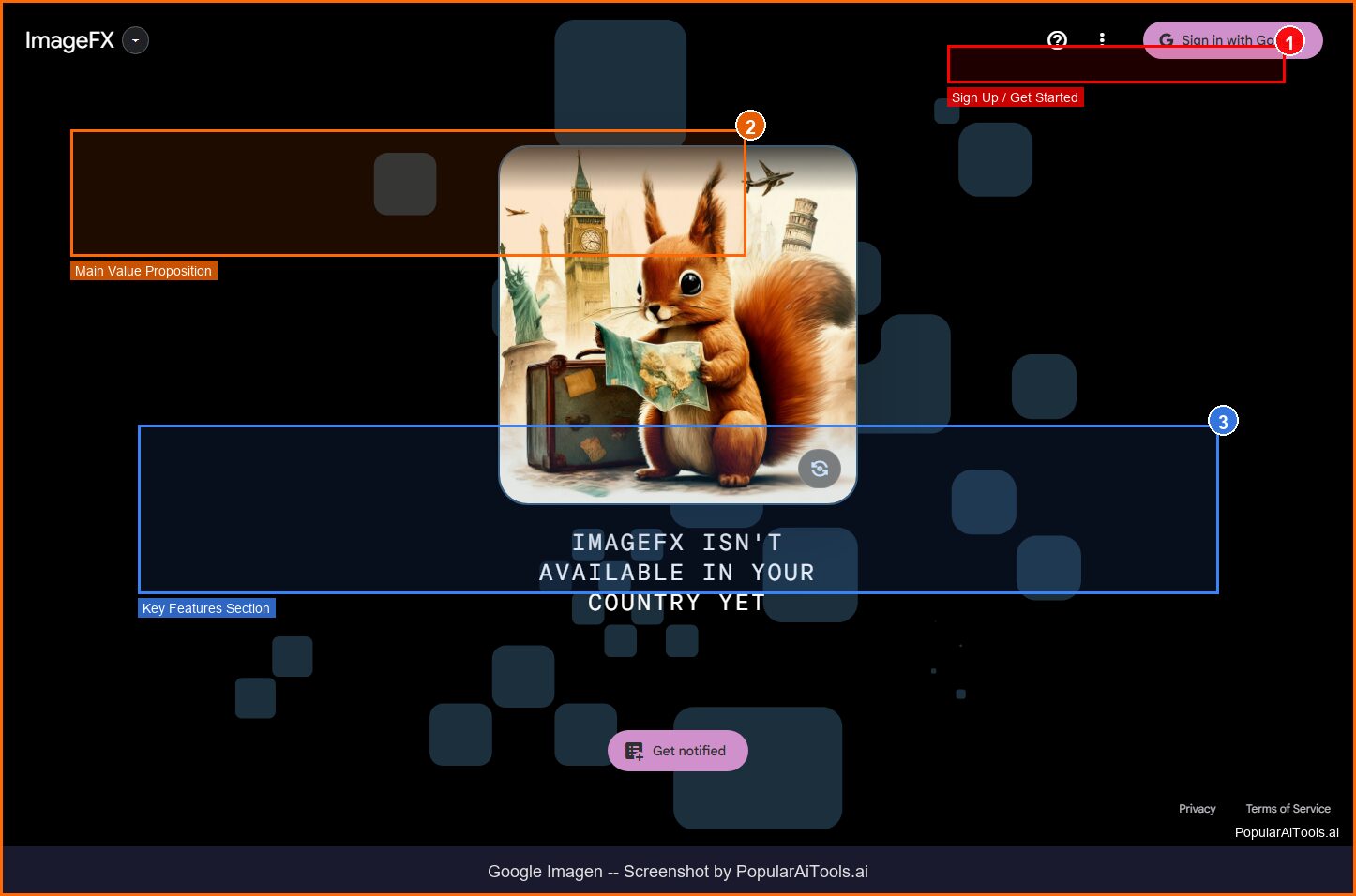
Google ImageFX — the primary free interface for Imagen 3
What is Google Imagen?
Google Imagen is Google’s flagship text-to-image AI model, now in its third major iteration (Imagen 3). It converts natural language text prompts into high-quality images, producing everything from photorealistic photographs to stylized illustrations, abstract compositions, and anime-style artwork. The model is available through multiple Google products including ImageFX, Gemini, and the Vertex AI developer platform.
What sets Imagen 3 apart from competitors like DALL-E 3 and Midjourney is its exceptional photorealism. The images it generates capture fine textures, natural lighting nuances, and accurate spatial relationships that are often indistinguishable from actual photographs. Google trained Imagen 3 on a massive dataset with particular attention to reducing artifacts — those telltale “AI glitches” like malformed hands or inconsistent shadows that plague other generators.
The model also stands out for accessibility. While Midjourney requires a paid subscription and DALL-E 3 is primarily accessed through ChatGPT Plus, Google offers Imagen 3 for free through ImageFX (a dedicated web tool from Google Labs) and directly within Gemini. For developers and businesses, the Gemini API provides programmatic access at just $0.03 per image — one of the most competitive rates in the industry.
Every image generated by Imagen 3 includes SynthID, Google’s invisible digital watermark that identifies AI-generated content. This forward-thinking approach to AI transparency helps combat misinformation while maintaining image quality. The watermark is imperceptible to the human eye but detectable by verification tools.
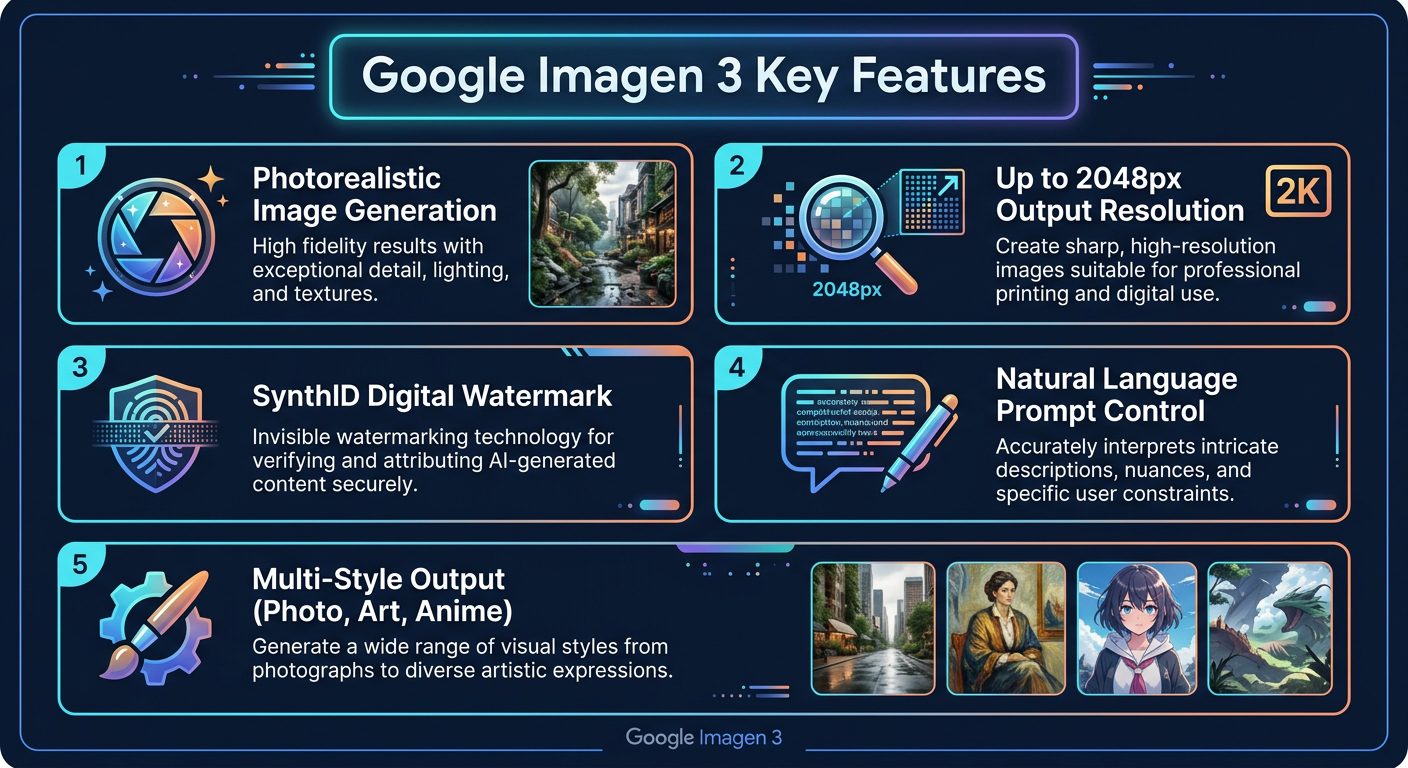
Google Imagen 3 core features overview
Key Features
1. Photorealistic Image Generation
Imagen 3’s standout capability is producing images that look genuinely real. Skin textures, fabric patterns, water reflections, and atmospheric lighting all render with remarkable fidelity. The model handles complex multi-element scenes better than most competitors — a prompt requesting “a coffee shop on a rainy evening with warm interior lighting visible through foggy windows” produces results that could pass as professional photography. This makes it particularly valuable for marketing materials, product mockups, and visual concepts.
2. High-Resolution Output (Up to 2048px)
While many AI generators cap output at 1024×1024, Imagen 3 supports resolutions up to 2048 pixels. This makes generated images suitable for print materials, large-format displays, and professional design work without the quality loss that comes from upscaling lower-resolution outputs. The higher resolution also preserves fine details that get lost in smaller images — text on signs, patterns in fabric, individual leaves on trees.
3. Natural Language Prompt Understanding
Imagen 3 excels at interpreting complex, multi-layered prompts written in natural English. You don’t need to learn special syntax, negative prompts, or weighted keywords like some competitors require. Describing what you want in plain sentences — including spatial relationships, lighting conditions, color palettes, and emotional tones — generally produces accurate results. Google’s investment in language understanding (through years of search and NLP research) gives Imagen a genuine edge in prompt comprehension.
4. Multi-Style Versatility
The model generates images across a wide spectrum of visual styles: photorealistic photographs, oil paintings, watercolor art, digital illustrations, 3D renders, anime/manga, pixel art, and abstract compositions. Each style maintains high quality and internal consistency. You can also blend styles — requesting “a photorealistic portrait with watercolor splashes” produces coherent hybrid results rather than awkward mashups.
5. SynthID Digital Watermarking
Every Imagen 3 output includes Google’s SynthID — an imperceptible watermark embedded directly in the image data. Unlike traditional watermarks that overlay visible text, SynthID survives crops, resizing, and even screenshots while remaining invisible to viewers. This technology helps identify AI-generated content for content moderation and misinformation prevention, positioning Google as a leader in responsible AI deployment.
6. Composition and Camera Control
Imagen 3 understands photographic concepts like depth of field, rule of thirds, leading lines, and camera angles. Specifying “shot from below with a wide-angle lens” or “shallow depth of field with bokeh background” produces images that respect these compositional rules. This level of control makes it a powerful tool for photographers and designers who think in visual language.
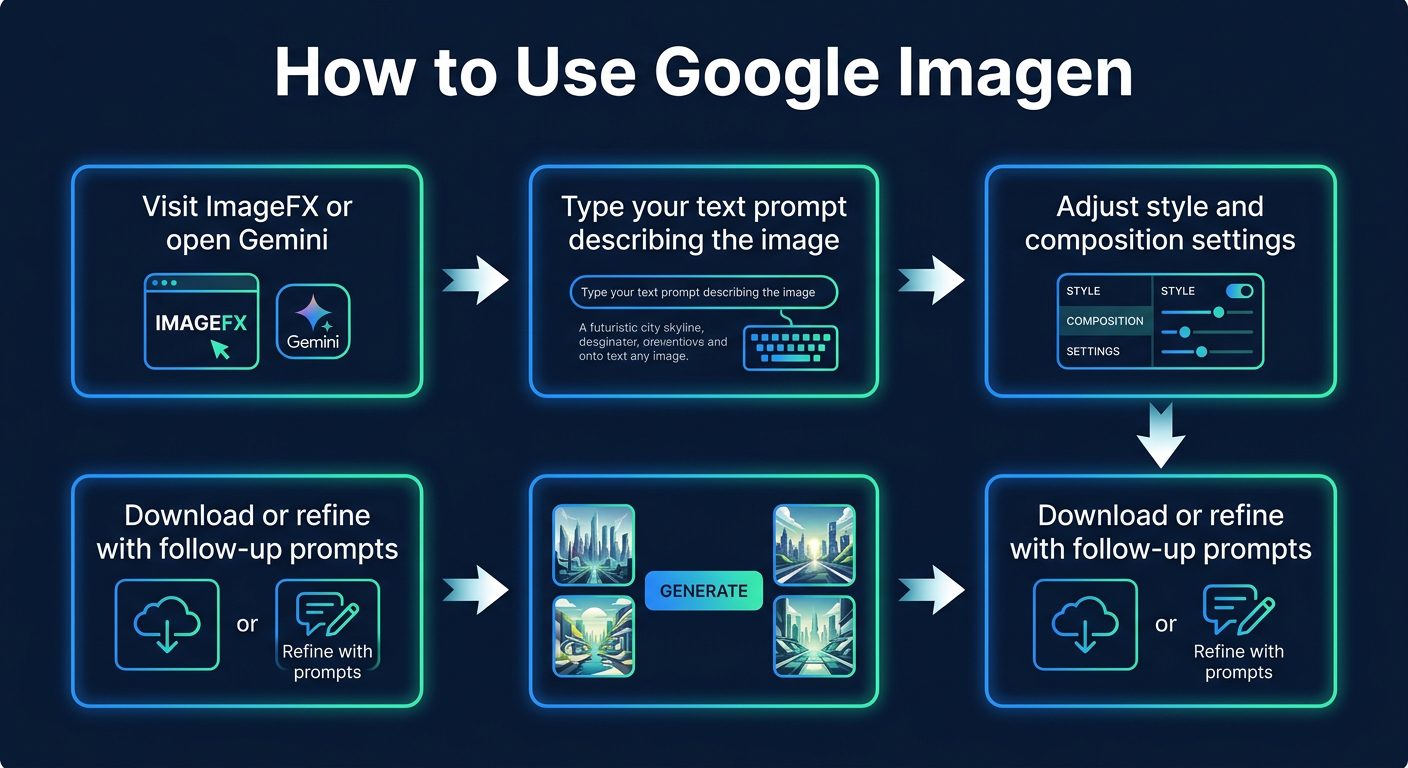
The Google Imagen workflow from prompt to final image
How to Use Google Imagen (Step-by-Step)
Step 1: Choose Your Access Point
You have three options: ImageFX (dedicated image generation tool), Gemini (Google’s AI chatbot), or the Vertex AI API (for developers). ImageFX offers the most focused experience for image generation.
Step 2: Write Your Prompt
Describe the image you want in natural language. Be specific about subject, setting, lighting, style, and mood. For example: “A modern minimalist kitchen with marble countertops, morning sunlight streaming through floor-to-ceiling windows, photorealistic style.” More detail generally produces better results.
Step 3: Generate and Review
Click generate and wait a few seconds. Imagen 3 typically produces 4 variations of your prompt. Browse through them to find the version closest to your vision. Each variation interprets your prompt slightly differently, offering creative options you might not have considered.
Step 4: Refine Your Prompt
If the results aren’t quite right, modify your prompt and regenerate. ImageFX highlights “expressive chips” — key terms in your prompt that you can click to see alternative phrasings. This iterative approach helps you dial in exactly the image you need without starting from scratch.
Step 5: Download and Use
Download your selected image in PNG format. The image includes the invisible SynthID watermark but is otherwise ready for use in your projects. Images generated through the free consumer tools are subject to Google’s usage policies for AI-generated content.
Pricing Plans
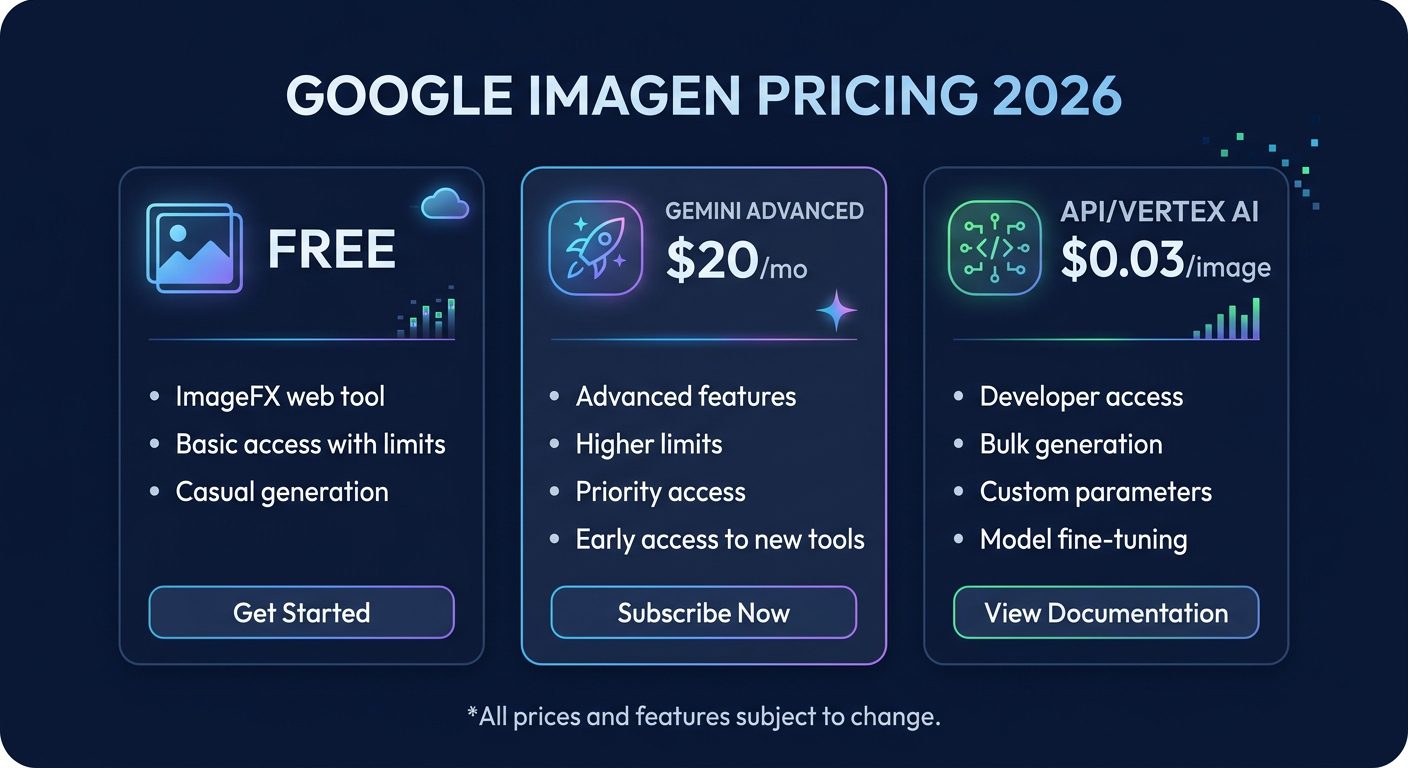
Google Imagen pricing tiers for 2026
Google Imagen’s pricing is remarkably competitive. The free tier through ImageFX is genuinely useful — not a crippled trial version. You get full Imagen 3 quality with reasonable daily generation limits. Gemini Advanced at $20/month bundles Imagen access with Google’s most capable AI chatbot, 2TB of storage, and priority access to new features — making it strong value if you already use Google’s ecosystem.
The API pricing at $0.03/image is particularly attractive for businesses and developers. Compare this to DALL-E 3’s API at $0.04-0.08/image or Midjourney’s subscription model that doesn’t offer per-image API access at all. For high-volume image generation workflows, Google’s pricing can result in significant savings.
Pros and Cons
Pros
- ✓ Best-in-class photorealism among AI generators
- ✓ Generous free tier through ImageFX and Gemini
- ✓ Cheapest API pricing at $0.03/image
- ✓ Excellent prompt comprehension in natural language
- ✓ High-resolution output up to 2048px
- ✓ SynthID watermark for responsible AI use
- ✓ Integrated across Google ecosystem (Gemini, Vertex AI, Workspace)
Cons
- ✗ Less artistic flair than Midjourney for creative/stylized work
- ✗ Strict content filtering blocks many legitimate prompts
- ✗ No inpainting or image editing capabilities (generation only)
- ✗ Text rendering in images still inconsistent
- ✗ Limited customization options compared to Stable Diffusion
- ✗ Availability varies by region — not accessible everywhere
Best Google Imagen Alternatives
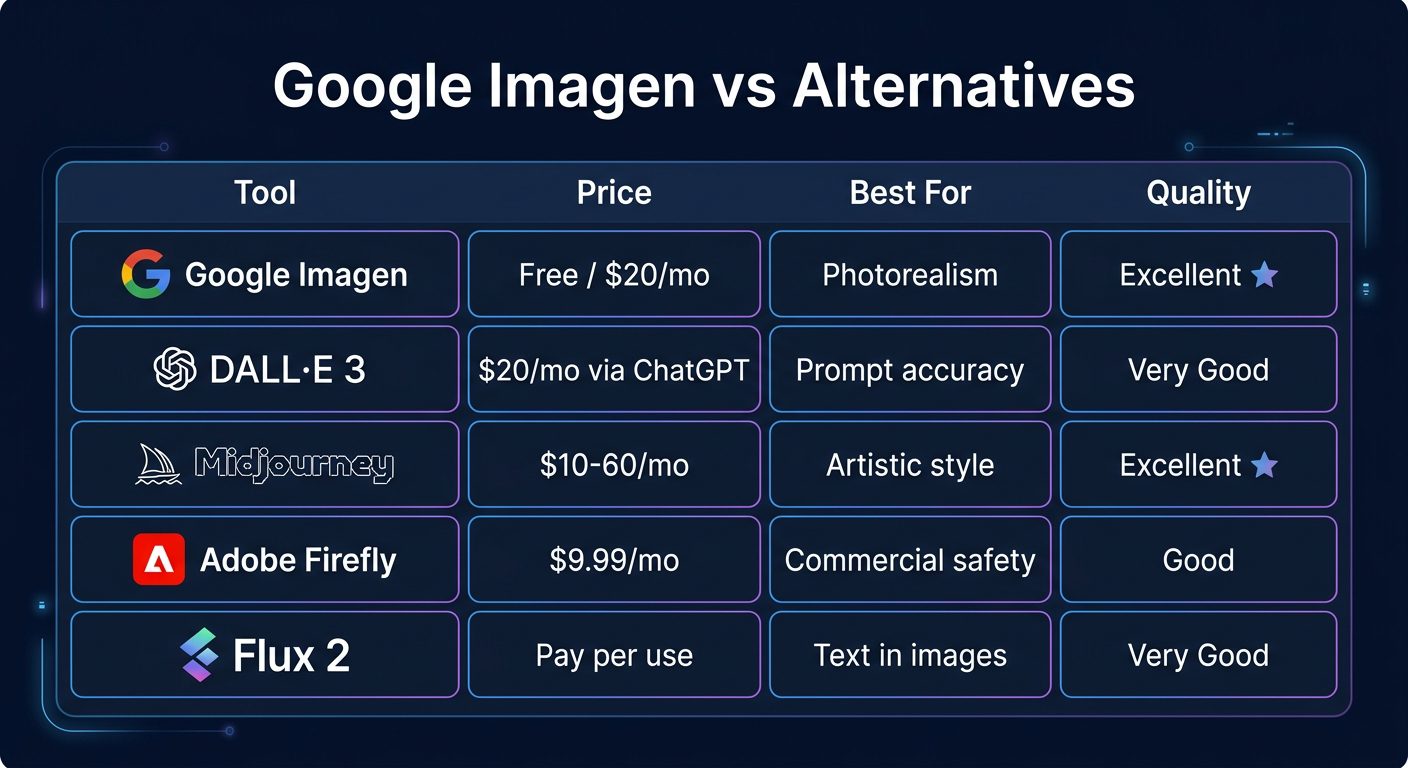
How Google Imagen compares to leading AI image generators
DALL-E 3 (via ChatGPT Plus at $20/month) is Imagen’s closest competitor for photorealistic output. Its key advantage is conversational refinement — you can chat with ChatGPT to iteratively improve images. However, Imagen 3 edges it out on pure photorealism quality and offers free access.
Midjourney produces the most aesthetically pleasing images of any generator, with a distinctive artistic quality that makes every output look like a professional illustration. If your priority is visual beauty and creative styling over photorealism, Midjourney remains king. The $10/month Basic plan now includes web access (no more Discord-only).
Adobe Firefly is the safest choice for commercial use. Trained exclusively on licensed content, it comes with IP indemnification for enterprise customers. The image quality doesn’t match Imagen or Midjourney, but the legal peace of mind is invaluable for agencies and brands.
Flux 2 has emerged as the leader in rendering text within images — a challenge that trips up most AI generators. If your use case involves generating images with readable text (posters, social media graphics, signage), Flux 2 is the specialist choice.
Final Verdict: Is Google Imagen Worth It?
Google Imagen 3 is a top-tier AI image generator that delivers exceptional photorealism, generous free access, and competitive API pricing. It’s the best choice for anyone who needs realistic-looking images and doesn’t want to pay a subscription fee to get started.
The free access through ImageFX alone makes it worth trying — there’s literally no barrier to entry. If you’re already paying for Gemini Advanced ($20/month), Imagen 3 access is included at no extra cost, making it a no-brainer addition to your creative toolkit.
Where Imagen 3 falls short is in artistic expression and creative styling. Midjourney still produces more visually striking, artistically composed images. And Google’s aggressive content filtering can be frustrating when legitimate creative prompts get blocked. But for product mockups, marketing visuals, blog post images, and any use case where photorealism matters most, Google Imagen 3 is among the best tools available in 2026.
Our Rating: 4.4 / 5
Build an AI Tool? Get It in Front of the Right Audience
PopularAiTools.ai reaches thousands of qualified AI buyers monthly.
Frequently Asked Questions
Is Google Imagen free to use?
Yes, Google Imagen 3 is available for free through ImageFX (aitestkitchen.withgoogle.com) and within Gemini. Free access includes full-quality image generation with reasonable daily usage limits. No credit card is required.
How does Google Imagen compare to DALL-E 3?
Imagen 3 generally produces more photorealistic images, while DALL-E 3 excels at prompt accuracy and conversational refinement through ChatGPT. Imagen has the advantage of free access and cheaper API pricing ($0.03 vs $0.04-0.08 per image).
Can I use Google Imagen images commercially?
Images generated through Gemini and ImageFX are subject to Google’s terms of service. For commercial use at scale, Google recommends using the Vertex AI API, which includes clearer commercial licensing terms. All images carry SynthID watermarks but are otherwise usable.
What is ImageFX?
ImageFX is a free, dedicated image generation web tool from Google Labs. It provides a focused interface for creating images with Imagen 3, featuring “expressive chips” that help you refine prompts and explore variations. It’s the simplest way to access Imagen 3.
What is SynthID and can I remove it?
SynthID is Google’s invisible digital watermark embedded in all Imagen 3 outputs. It identifies images as AI-generated without affecting visual quality. The watermark survives cropping, resizing, and screenshots, and cannot be removed through normal editing. It’s designed for transparency, not restriction.
What resolution does Google Imagen support?
Imagen 3 supports output resolutions up to 2048×2048 pixels, with various aspect ratios available including square, landscape, and portrait orientations. This is higher than many competitors’ standard outputs.
{
“@context”: “https://schema.org”,
“@type”: “FAQPage”,
“mainEntity”: [
{“@type”: “Question”, “name”: “Is Google Imagen free to use?”, “acceptedAnswer”: {“@type”: “Answer”, “text”: “Yes, Google Imagen 3 is available for free through ImageFX and Gemini with daily usage limits.”}},
{“@type”: “Question”, “name”: “How does Google Imagen compare to DALL-E 3?”, “acceptedAnswer”: {“@type”: “Answer”, “text”: “Imagen 3 produces more photorealistic images, while DALL-E 3 excels at prompt accuracy. Imagen offers free access and cheaper API pricing.”}},
{“@type”: “Question”, “name”: “Can I use Google Imagen images commercially?”, “acceptedAnswer”: {“@type”: “Answer”, “text”: “For commercial use at scale, Google recommends the Vertex AI API with clearer commercial licensing terms.”}},
{“@type”: “Question”, “name”: “What is ImageFX?”, “acceptedAnswer”: {“@type”: “Answer”, “text”: “ImageFX is a free web tool from Google Labs providing a focused interface for Imagen 3 image generation.”}},
{“@type”: “Question”, “name”: “What is SynthID?”, “acceptedAnswer”: {“@type”: “Answer”, “text”: “SynthID is Google’s invisible digital watermark in all Imagen outputs that identifies AI-generated content without affecting quality.”}},
{“@type”: “Question”, “name”: “What resolution does Google Imagen support?”, “acceptedAnswer”: {“@type”: “Answer”, “text”: “Imagen 3 supports up to 2048×2048 pixels with various aspect ratios.”}}
]
}
{
“@context”: “https://schema.org”,
“@type”: “Review”,
“itemReviewed”: {
“@type”: “SoftwareApplication”,
“name”: “Google Imagen 3”,
“applicationCategory”: “MultimediaApplication”,
“operatingSystem”: “Web”
},
“reviewRating”: {
“@type”: “Rating”,
“ratingValue”: “4.4”,
“bestRating”: “5”
},
“author”: {
“@type”: “Organization”,
“name”: “PopularAiTools.ai”
},
“datePublished”: “2026-03-20”
}
