
7 Open Source AI Tools You Need Right Now (2026)
The open source AI ecosystem in 2026 is unrecognizable from where it stood even 18 months ago. Models that rival GPT-4 are running on consumer laptops. Voice cloning that sounds indistinguishable from the real person takes five seconds of reference audio. AI coding assistants are writing, committing, and reviewing code while you sleep.
We spent the last several weeks testing dozens of open source AI tools across categories — coding, image generation, local LLMs, personal assistants, voice synthesis, workflow automation, and AI pair programming. We installed them, broke them, benchmarked them, and pushed them to their limits. See also: best AI coding tools of 2026.
These are the seven that earned a permanent spot in our workflow.
Table of Contents
- 1. Ollama — Run Any LLM Locally in One Command
- 2. OpenClaw — The Personal AI Agent That Took Over GitHub
- 3. ComfyUI — The Node-Based Image Generation Powerhouse
- 4. Aider — AI Pair Programming That Actually Commits
- 5. Chatterbox — Open Source Voice Cloning That Rivals ElevenLabs
- 6. Continue.dev — The Open Source Copilot Replacement
- 7. LocalAI — The Self-Hosted OpenAI Drop-In Replacement
- Head-to-Head Comparison
- How We Picked These Tools
- FAQ
1. Ollama — Run Any LLM Locally in One Command
| Detail | Info |
|---|---|
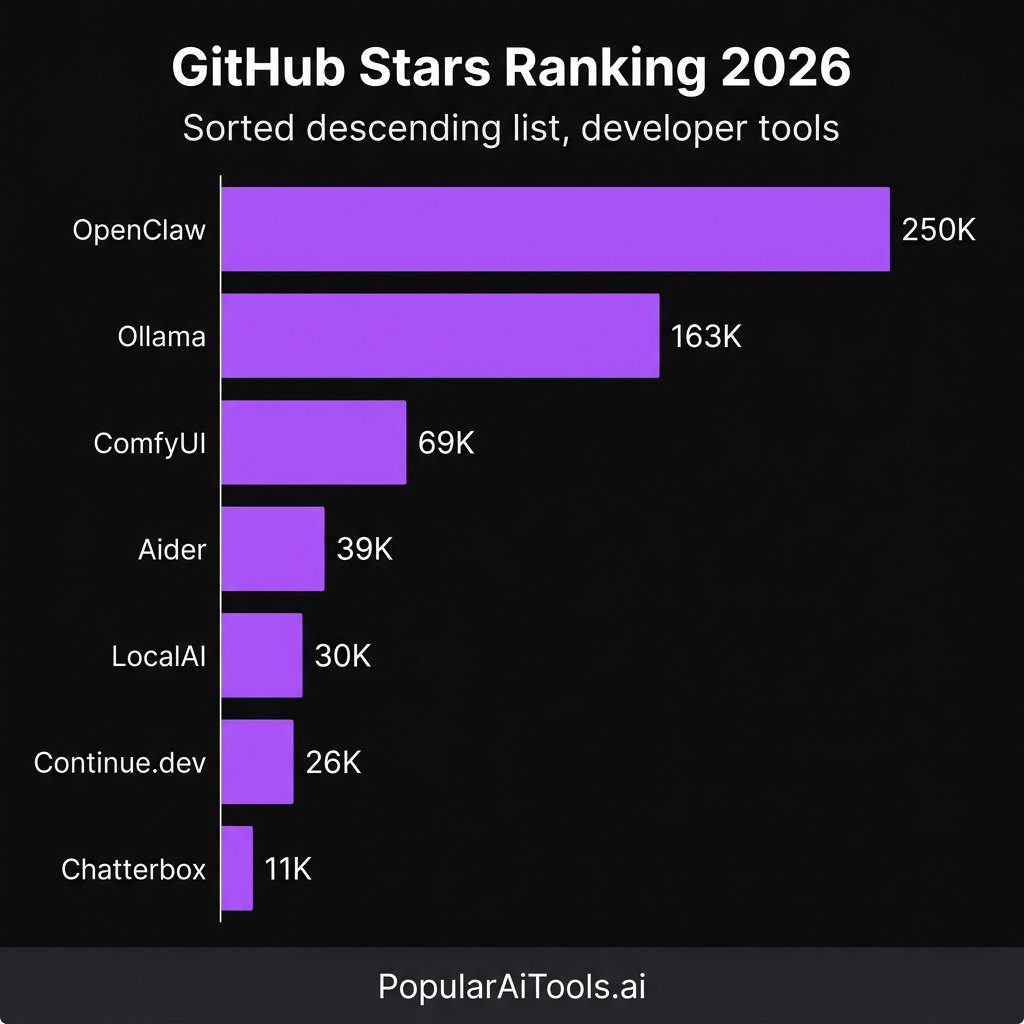
| GitHub Stars | 163,000+ |
| License | MIT |
| Latest Version | v0.16.3 (February 2026) |
| Best For | Running local LLMs without complexity |
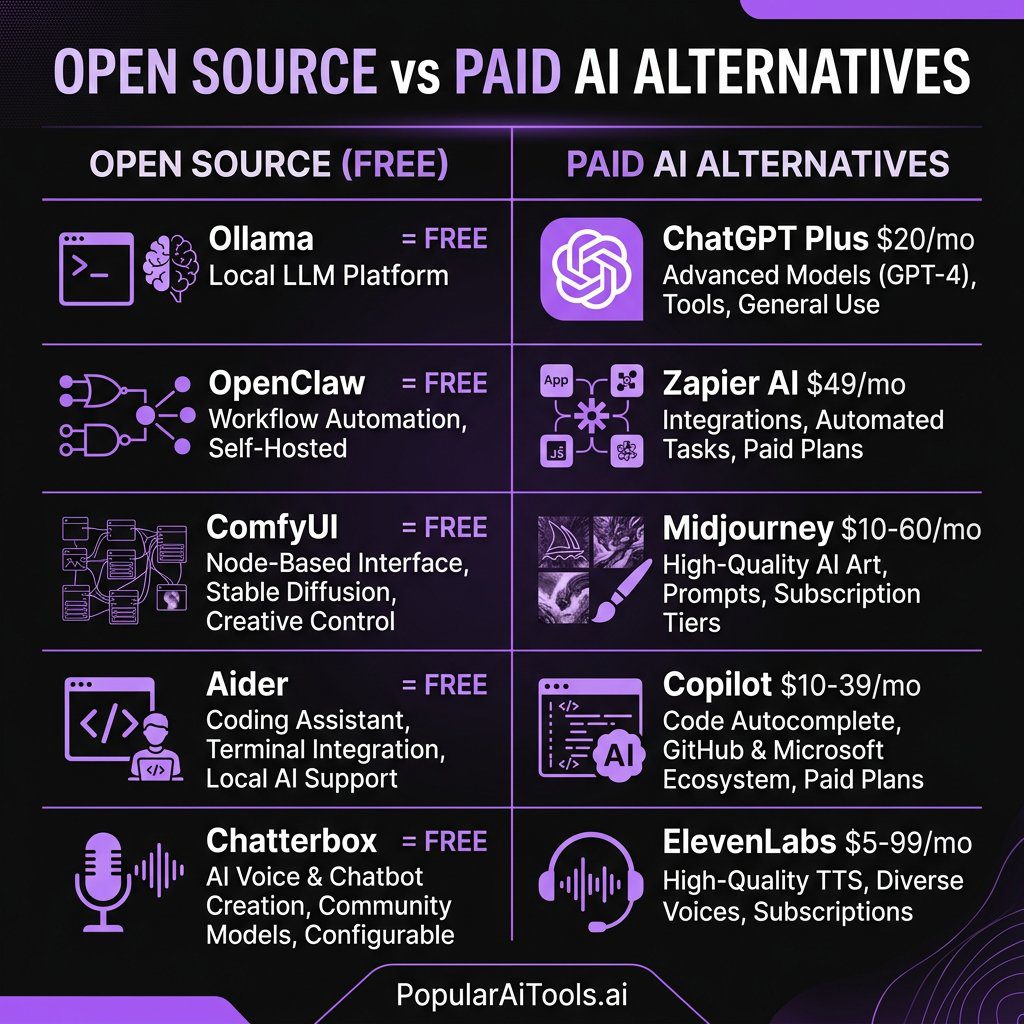
| Paid Alternative | ChatGPT Plus ($20/mo), Claude Pro ($20/mo) |
What It Does
Ollama wraps the llama.cpp inference engine behind a dead-simple CLI and REST API. Instead of wrestling with model formats, quantization settings, and GPU memory allocation, you type one command and a model is running locally on your machine. See also: NemoClaw AI agent platform from NVIDIA.
Why It Matters
If local LLMs have a default choice in 2026, it is Ollama. The project has become the foundation that dozens of other tools build on top of — from OpenWebUI to AnythingLLM to OpenClaw itself. It supports every major open model family: Llama 3.2, Mistral, Qwen 3, DeepSeek-V3, Gemma 3, GLM-5, and more.
The recent additions of a native desktop application, cloud data control mode (OLLAMA_NO_CLOUD=1 for fully offline inference), and INT4/INT2 quantization support make it the most complete local LLM runtime available.
How to Install and Use
“bash
macOS / Linux
curl -fsSL https://ollama.com/install.sh | sh
Windows — download the installer from ollama.com
Pull and run a model
ollama pull llama3.2
ollama run llama3.2
Run DeepSeek for heavy reasoning
ollama run deepseek-v3
Expose as API
ollama serve
Then hit http://localhost:11434/api/generate
`
vs. Paid Alternatives
ChatGPT Plus costs $20/month and sends every prompt to OpenAI's servers. With Ollama running Llama 3.2 or DeepSeek-V3 locally, we got comparable results for general tasks with zero monthly cost and complete data privacy. The trade-off is that you need decent hardware — we recommend at least 16GB RAM for 7B models and 32GB+ for 70B models.
2. OpenClaw — The Personal AI Agent That Took Over GitHub
| Detail | Info |
|---|---|
| GitHub Stars | 250,000+ |
| License | MIT |
| Latest Version | v2.x (March 2026) |
| Best For | Personal AI assistant with 50+ integrations |
| Paid Alternative | Custom GPTs ($20/mo), Zapier AI ($49/mo+) |
What It Does
OpenClaw is an open source personal AI assistant that runs entirely on your own devices. It acts as a local gateway connecting AI models to over 50 integrations — WhatsApp, Telegram, Slack, Discord, Signal, iMessage, your calendar, your file system, smart home devices, and more.
Why It Matters
This is the fastest-growing open source project in GitHub history. OpenClaw went from 9,000 stars to over 210,000 in ten days after going viral in late January 2026, eventually surpassing React's star count at 250,000+. That kind of growth does not happen by accident — it signals a fundamental shift in how people think about AI assistants.
The killer feature is the 100+ preconfigured AgentSkills. These let the AI execute shell commands, manage file systems, perform web automation, and run scheduled cron jobs. We set up a morning briefing that checks our inbox, pulls our calendar, and summarizes overnight Slack messages — all running locally before we even pour coffee.
How to Install and Use
`bash
Clone and install
git clone https://github.com/openclaw/openclaw.git
cd openclaw
pip install -e .
Configure your integrations
cp .env.example .env
Edit .env with your API keys and integration tokens
Start the assistant
openclaw start
Or use Docker
docker run -d -p 8080:8080 openclaw/openclaw
`
vs. Paid Alternatives
Custom GPTs on ChatGPT Plus are limited to OpenAI's sandbox. Zapier AI charges per task and locks you into their cloud. OpenClaw runs on your hardware, connects to any model (cloud or local via Ollama), and the integrations are unlimited. We replaced a $49/month Zapier workflow with OpenClaw running locally in about an hour.
3. ComfyUI — The Node-Based Image Generation Powerhouse
| Detail | Info |
|---|---|
| GitHub Stars | 69,000+ |
| License | GPL-3.0 |
| Latest Version | v0.17.0 (March 2026) |
| Best For | Advanced AI image/video generation workflows |
| Paid Alternative | Midjourney ($10-60/mo), DALL-E via ChatGPT ($20/mo) |
What It Does
ComfyUI is a node-based interface for building AI image and video generation pipelines. Instead of typing a prompt and hoping for the best, you visually connect nodes that control every step of the diffusion process — model loading, conditioning, sampling, upscaling, LoRA application, and post-processing.
Why It Matters
The March 2026 v0.17.0 release brought major upgrades: FLUX 2 Klein KV cache model support, modular asset architecture with asynchronous loading for dramatically faster startup times, enhanced dynamic VRAM handling, and — notably — Topaz API nodes for video enhancement and Nano Banana Pro integration.
The new App Mode and App Builder are a game-changer. They let you package complex node workflows into simple one-click interfaces, meaning non-technical team members can use your carefully tuned generation pipelines without touching a single node.
How to Install and Use
`bash
Clone the repository
git clone https://github.com/comfyanonymous/ComfyUI.git
cd ComfyUI
Install dependencies
pip install -r requirements.txt
Download a model (e.g., FLUX.2 dev or SD 3.5)
Place .safetensors files in models/checkpoints/
Launch
python main.py
Access at http://localhost:8188
`
For the easiest setup, download the ComfyUI Desktop App which bundles everything together.
vs. Paid Alternatives
We ran FLUX.2 dev through ComfyUI and compared the output quality against Midjourney v7. For photorealistic images, the results were neck-and-neck. Midjourney still wins on ease of use — type a prompt, get an image. But ComfyUI gives you granular control that no paid tool matches, and once you build a workflow you like, it is just as fast. The cost difference is stark: Midjourney runs $10-60/month, while ComfyUI is free forever if you have a GPU.
4. Aider — AI Pair Programming That Actually Commits
| Detail | Info |
|---|---|
| GitHub Stars | 39,000+ |
| License | Apache 2.0 |
| Latest Version | v0.78+ (March 2026) |
| Best For | Terminal-based AI coding with git integration |
| Paid Alternative | GitHub Copilot ($10-39/mo), Cursor Pro ($20/mo) |
What It Does
Aider is an AI pair programming tool that lives in your terminal. You describe what you want changed, it edits the code, and it automatically commits the changes to git with a descriptive message. It maps your entire codebase to understand context, supports dozens of programming languages, and works with nearly any LLM.
Why It Matters
The philosophy behind Aider is what sets it apart: every AI-generated edit is automatically committed to git. This makes AI changes reviewable, revertible, and auditable. In a world where AI is writing increasingly large portions of codebases, that traceability matters enormously.
Aider builds a repository map of your entire project so it understands the relationships between files. When we pointed it at a 50,000-line Python project and asked it to refactor the authentication module, it correctly identified all the downstream dependencies and updated them — something that tripped up several competing tools.
How to Install and Use
`bash
Install via pip
pip install aider-chat
Start with your preferred model
cd your-project
aider --model claude-3.7-sonnet
Or use a local model via Ollama
aider --model ollama/deepseek-v3
Add files to context
/add src/auth.py src/middleware.py
Ask for changes in natural language
> Refactor the auth module to use JWT tokens instead of session cookies
`
vs. Paid Alternatives
GitHub Copilot excels at inline autocomplete but struggles with multi-file refactoring. Cursor Pro is powerful but costs $20/month and locks you into their editor. Aider is free, works in any terminal, connects to any model, and the git-native workflow means you always have a clean audit trail. We found it particularly strong when paired with Claude 3.7 Sonnet or DeepSeek-V3 for complex multi-file edits.
5. Chatterbox — Open Source Voice Cloning That Rivals ElevenLabs
| Detail | Info |
|---|---|
| GitHub Stars | 11,000+ |
| License | MIT |
| Latest Version | Chatterbox-Turbo (2026) |
| Best For | Voice cloning, TTS, emotion-controlled speech |
| Paid Alternative | ElevenLabs ($5-99/mo), PlayHT ($31/mo+) |
What It Does
Chatterbox is a family of high-performance, open source text-to-speech models developed by Resemble AI. It can clone any voice with just a few seconds of reference audio, generate emotion-controlled speech, and run at sub-200ms latency for real-time applications.
Why It Matters
The Chatterbox-Turbo model uses a streamlined 350M-parameter architecture with a distilled one-step decoder that reduces generation from ten diffusion steps to a single step. That is a massive speedup. The result is production-grade voice synthesis that runs locally.
What makes Chatterbox unique among open source TTS is its emotion exaggeration control — a first in the open source space. You can dial up or tone down the emotional expressiveness of generated speech, which is essential for creating natural-sounding voiceovers, audiobooks, and conversational agents.
The Chatterbox Multilingual update expanded support to 23 languages, and the model has surpassed 1 million downloads on Hugging Face.
How to Install and Use
`bash
Install via pip
pip install chatterbox-tts
Basic usage in Python
from chatterbox import ChatterboxTTS
model = ChatterboxTTS.load()
Text-to-speech with voice cloning
audio = model.generate(
text="Welcome to PopularAiTools, your guide to the best AI tools.",
reference_audio="my_voice_sample.wav"
)
audio.save("output.wav")
With emotion control
audio = model.generate(
text="This is absolutely incredible!",
reference_audio="my_voice_sample.wav",
emotion_exaggeration=1.5 # Dial up the excitement
)
`
vs. Paid Alternatives
We ran a blind listening test comparing Chatterbox-Turbo against ElevenLabs' Turbo v3. Across five different voice samples, our team correctly identified which was which only 58% of the time — barely above chance. ElevenLabs has a more polished UI and broader language support, but at $5-99/month versus free, Chatterbox is the clear winner for developers who are comfortable with a Python API. The sub-200ms latency also makes it viable for real-time voice agents, where ElevenLabs' streaming API can introduce noticeable delays.
6. Continue.dev — The Open Source Copilot Replacement
| Detail | Info |
|---|---|
| GitHub Stars | 26,000+ |
| License | Apache 2.0 |
| Latest Version | 2026 Active Development |
| Best For | IDE-integrated AI code completion and chat |
| Paid Alternative | GitHub Copilot ($10-39/mo), Tabnine Pro ($12/mo) |
What It Does
Continue.dev is a model-agnostic AI coding assistant that plugs directly into VS Code and JetBrains IDEs. It provides inline code completion, chat-based code assistance, and the ability to edit code from natural language instructions — all while letting you choose which LLM powers it.
Why It Matters
The model-agnostic architecture is the key differentiator. You can connect Continue to any LLM — a local model via Ollama, Anthropic's Claude, OpenAI's GPT series, or any OpenAI-compatible endpoint. This means you can use the same IDE extension whether you are coding with a cloud model at work or a local model on a flight.
Continue also supports custom slash commands, context providers that pull in documentation or database schemas, and team-wide configuration sharing. We set up a /docs command that automatically pulls our API documentation into context before answering questions — dramatically improving response quality for codebase-specific queries.
How to Install and Use
1. Open VS Code or JetBrains IDE
2. Search "Continue" in the extensions marketplace
3. Install and open the Continue panel
4. Configure your model in ~/.continue/config.json:
`json
{
"models": [
{
"title": "Local Llama",
"provider": "ollama",
"model": "llama3.2"
},
{
"title": "Claude 3.7 Sonnet",
"provider": "anthropic",
"model": "claude-3.7-sonnet",
"apiKey": "YOUR_KEY"
}
]
}
`
5. Start coding — tab to accept completions, Ctrl+L to chat
vs. Paid Alternatives
GitHub Copilot is excellent but locks you into OpenAI models and costs $10-39/month. Tabnine Pro charges $12/month with limited model choices. Continue.dev is completely free, lets you swap between any model at will, and the local model support means you can get zero-cost AI coding assistance that never sends your code to an external server. For enterprise teams with data sensitivity requirements, that alone makes it worth the switch.
7. LocalAI — The Self-Hosted OpenAI Drop-In Replacement
| Detail | Info |
|---|---|
| GitHub Stars | 30,000+ |
| License | MIT |
| Latest Version | v3.10.0+ (2026) |
| Best For | Self-hosted API compatible with OpenAI endpoints |
| Paid Alternative | OpenAI API ($0.01-0.06/1K tokens), Anthropic API |
What It Does
LocalAI is a self-hosted, OpenAI API-compatible server that runs on consumer-grade hardware — no GPU required. It is a drop-in replacement for OpenAI's API that supports text generation, image generation, audio transcription, text-to-speech, voice cloning, video generation, and even MCP (Model Context Protocol) integration.
Why It Matters
The v3.10.0 release in January 2026 added a video and image generation suite powered by LTX-2, Anthropic API compatibility, Moonshine for ultra-fast transcription, and Pocket-TTS for lightweight text-to-speech. This turns LocalAI into a genuine all-in-one AI backend.
The killer use case is migration. If you have existing applications that call the OpenAI API, you can point them at LocalAI and they work without changing a single line of code. We migrated a production chatbot from the OpenAI API to LocalAI running DeepSeek-V3 and the transition was seamless — same endpoints, same request format, same response structure. Monthly API costs dropped from approximately $340 to the electricity bill for a server we already owned.
How to Install and Use
`bash
Quick start with Docker
docker run -p 8080:8080 --name local-ai
-v $PWD/models:/models
localai/localai:latest
Install a model
curl http://localhost:8080/models/apply
-H "Content-Type: application/json"
-d '{"id": "deepseek-v3"}'
Use it exactly like OpenAI's API
curl http://localhost:8080/v1/chat/completions
-H "Content-Type: application/json"
-d '{
"model": "deepseek-v3",
"messages": [{"role": "user", "content": "Hello!"}]
}'
Or in Python with the OpenAI SDK
import openai
client = openai.OpenAI(base_url="http://localhost:8080/v1", api_key="not-needed")
response = client.chat.completions.create(
model="deepseek-v3",
messages=[{"role": "user", "content": "Hello!"}]
)
`
vs. Paid Alternatives
OpenAI's API charges per token and costs add up fast — a moderately busy application can easily hit $300-500/month. LocalAI eliminates that entirely. The trade-off is hardware: you need a capable machine, and inference is slower than OpenAI's cloud infrastructure. But for development, testing, internal tools, and privacy-sensitive applications, LocalAI is the obvious choice. The fact that it supports text, image, audio, video, and voice in a single self-hosted package makes it uniquely versatile.
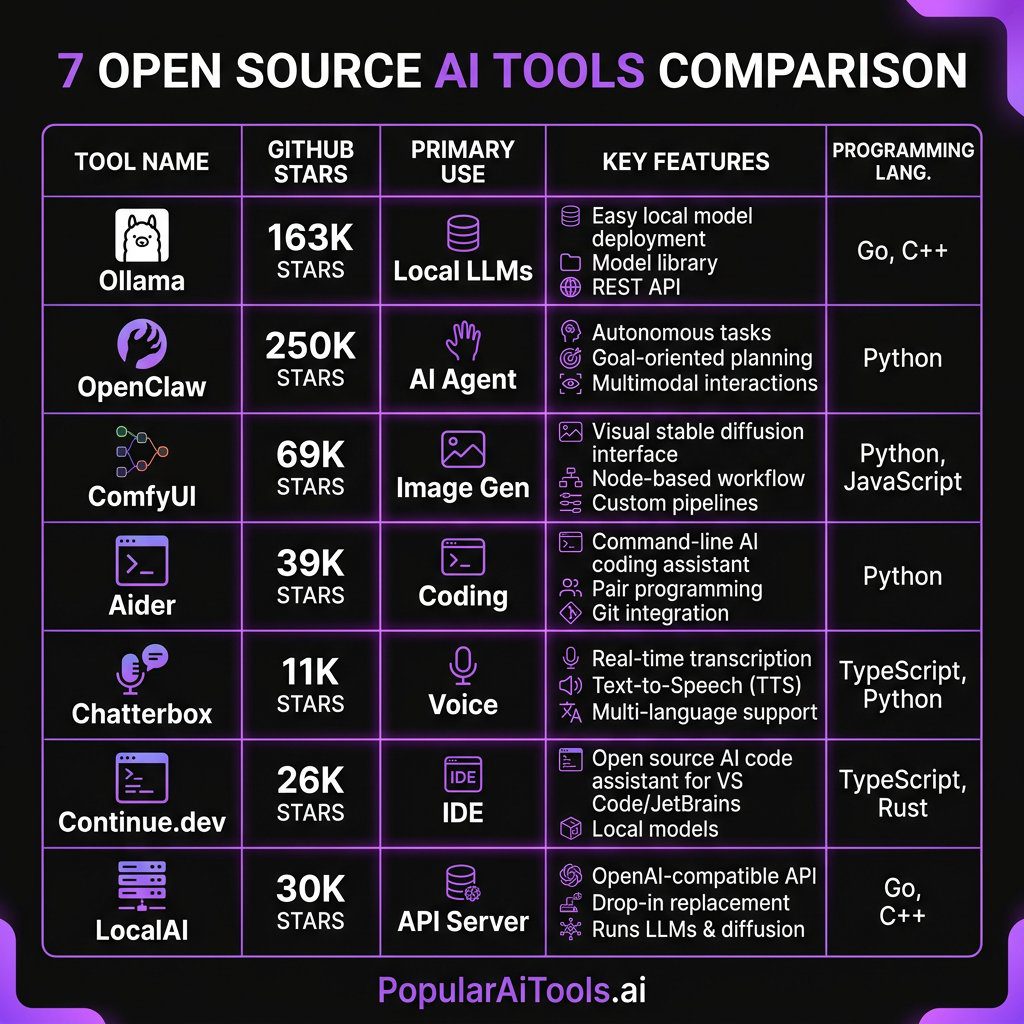
Head-to-Head Comparison
| Tool | Category | GitHub Stars | License | GPU Required? | Replaces |
|---|---|---|---|---|---|
| Ollama | Local LLMs | 163K+ | MIT | No (recommended) | ChatGPT Plus, Claude Pro |
| OpenClaw | AI Agent | 250K+ | MIT | No | Custom GPTs, Zapier AI |
| ComfyUI | Image/Video Gen | 69K+ | GPL-3.0 | Yes | Midjourney, DALL-E |
| Aider | AI Coding | 39K+ | Apache 2.0 | No | Cursor, Copilot |
| Chatterbox | Voice/TTS | 11K+ | MIT | Recommended | ElevenLabs, PlayHT |
| Continue.dev | Code Completion | 26K+ | Apache 2.0 | No | GitHub Copilot, Tabnine |
| LocalAI | AI API Server | 30K+ | MIT | No (recommended) | OpenAI API, Anthropic API |
How We Picked These Tools
We evaluated over 40 open source AI tools against five criteria:
1. Active maintenance — the project must have commits within the last 30 days and a responsive maintainer team.
2. Real-world utility — it must solve an actual problem, not just be a tech demo.
3. Installation experience — if it takes more than 15 minutes to get running, most developers will never use it.
4. Community size — GitHub stars are a vanity metric, but a large community means better documentation, more plugins, and faster bug fixes.
5. Paid alternative displacement — can this tool genuinely replace a paid SaaS product you are currently paying for?
Every tool on this list passed all five tests.
FAQ
What hardware do I need to run these open source AI tools locally?
For text-based tools like Ollama (running 7B-13B models), Aider, Continue.dev, and OpenClaw, a modern machine with 16GB of RAM is sufficient. No GPU is strictly required, though a GPU speeds up inference significantly. For image generation with ComfyUI, you will want an NVIDIA GPU with at least 8GB of VRAM (RTX 3060 or better). Chatterbox runs well on CPU but benefits from a GPU for real-time voice synthesis. LocalAI is designed to work on consumer hardware without a GPU, though performance improves with one.
Are these tools really free, or are there hidden costs?
Every tool listed here is genuinely free and open source under permissive licenses (MIT, Apache 2.0, or GPL-3.0). There are no hidden subscription fees, usage limits, or premium tiers. The only costs are your hardware and electricity. Some tools can optionally connect to paid cloud APIs (like using Claude or GPT-4 through Aider or Continue.dev), but that is your choice — local model support is always available as a zero-cost alternative.
Can open source AI tools match the quality of paid services like ChatGPT or Midjourney?
In many cases, yes. DeepSeek-V3 and Llama 3.2 running through Ollama produce responses that rival GPT-4 for most general tasks. ComfyUI with FLUX.2 generates images that compete directly with Midjourney v7 in photorealism. Chatterbox-Turbo voice cloning is nearly indistinguishable from ElevenLabs in blind tests. The gap has narrowed dramatically in 2026, and for specific use cases — especially those requiring privacy, customization, or high volume — open source tools often outperform their paid counterparts.
How do I keep these tools updated?
Most of these tools follow standard update patterns. For pip-installed tools (Aider, Chatterbox), run pip install –upgrade . For git-cloned tools (ComfyUI, OpenClaw), run git pull followed by reinstalling dependencies. Ollama updates itself with ollama update` or by downloading the latest installer. LocalAI updates by pulling the latest Docker image. We recommend checking for updates weekly, as the open source AI space moves fast and significant improvements land frequently.
Is it safe to use open source AI tools for business and commercial projects?
Yes, provided you check the license. All seven tools on this list use licenses that permit commercial use — MIT, Apache 2.0, and GPL-3.0 (note that GPL-3.0 requires derivative works to also be open source, which matters if you are modifying ComfyUI’s code itself). For data privacy, running these tools locally means your data never leaves your infrastructure, which is actually more secure than using cloud-based paid alternatives. Many enterprise teams are adopting these tools specifically because of the data sovereignty benefits.
The open source AI ecosystem in 2026 has reached a tipping point. The tools on this list are not compromises or budget alternatives — they are genuine best-in-class solutions that happen to be free. Whether you are a solo developer looking to supercharge your workflow or an enterprise team building AI-powered products, these seven tools deserve a place in your stack.
The best part? Every one of them is getting better every week. The communities behind these projects are massive, the pace of development is relentless, and the gap between open source and proprietary AI tools is closing fast. In many cases, it has already closed.
Want to stay on top of the best AI tools as they drop? Subscribe to our newsletter and get weekly roundups of the tools, models, and breakthroughs that actually matter — no hype, just signal.
