
Picsart Review 2026: Features, Pricing, Pros & Cons
Updated March 2026 · 11 min read · By PopularAiTools.ai
TL;DR
Picsart has transformed from a simple photo editor into a full AI creative platform in 2026. With AI image generation, background removal, outpainting, AI avatars, and a new AI Agents marketplace, it offers serious creative power at competitive prices. The Pro plan at $7/month (annual) provides excellent value for content creators and designers who need a versatile, all-in-one visual editing tool. Rating: 4.3/5
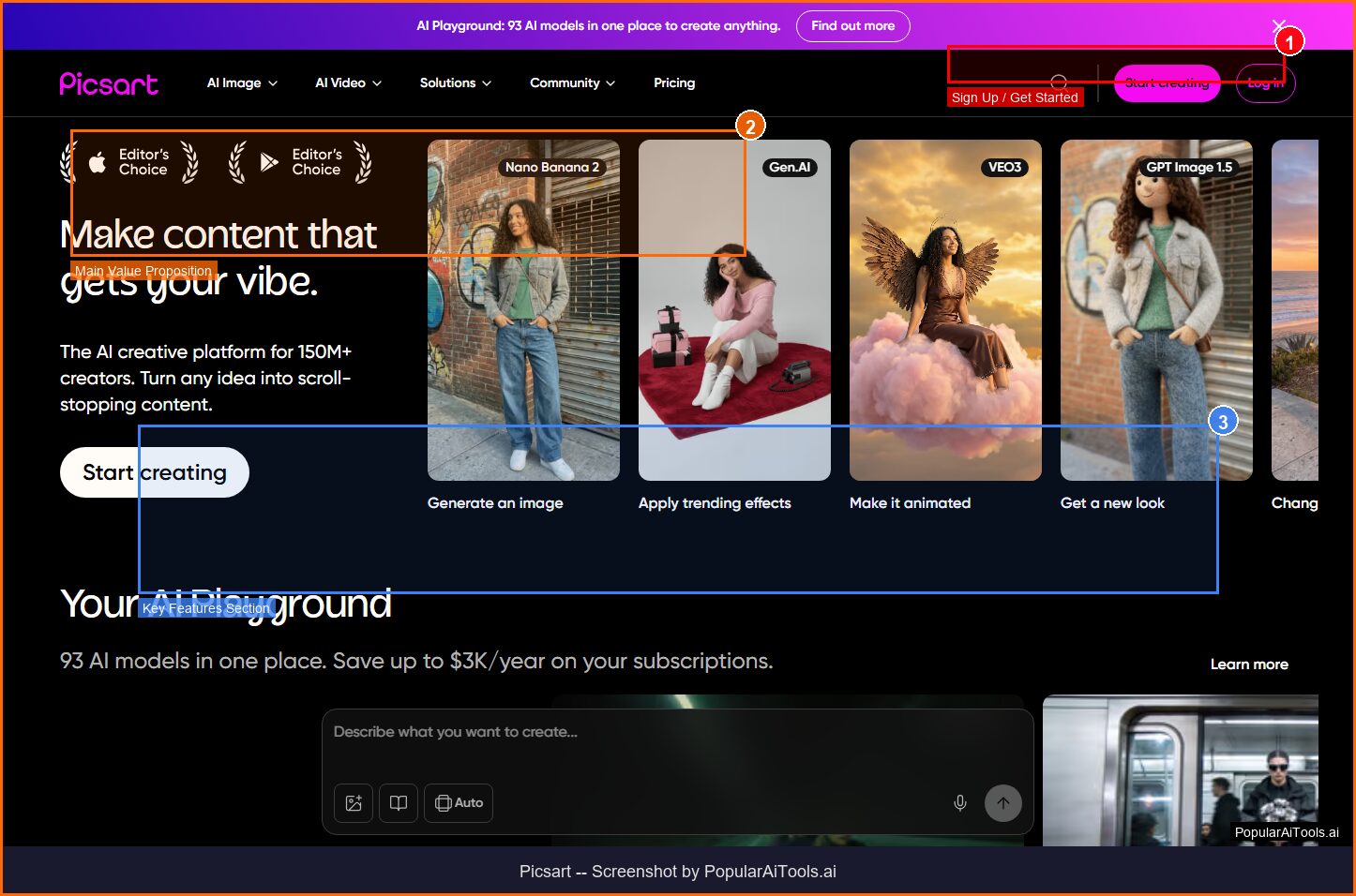
The Picsart homepage — key features and navigation highlighted
What is Picsart?
Picsart is an AI-powered creative platform that combines photo editing, video editing, graphic design, and AI image generation into a single application. With over 150 million monthly active users, it has grown from a mobile photo editor into a comprehensive creative suite that competes with Canva, Adobe Express, and standalone AI tools.
What distinguishes Picsart in 2026 is its aggressive embrace of AI across every aspect of the creative workflow. While competitors bolt AI features onto existing editors, Picsart has rebuilt its platform around artificial intelligence. The AI Image Generator creates original visuals from text prompts. AI Outpainting extends images beyond their original borders. The Background Remover uses machine learning to isolate subjects with precision. And the newly launched AI Agents marketplace lets creators “hire” specialized AI assistants for specific tasks — from product photography to social media design.
The platform is available as a mobile app (iOS and Android), a web-based editor, and through enterprise APIs. The mobile app remains its strongest offering — the interface is intuitive, the effects library is massive, and the editing experience feels native to touch interactions. The web editor provides more screen real estate for complex projects, while the API serves businesses that need programmatic access to Picsart’s AI capabilities.
For e-commerce sellers, social media managers, and content creators who need to produce high volumes of visual content without professional design skills, Picsart occupies a sweet spot between free phone editors and expensive professional software. The AI tools handle the heavy lifting — removing backgrounds, enhancing quality, generating variations — while giving users enough creative control to customize results to their brand.
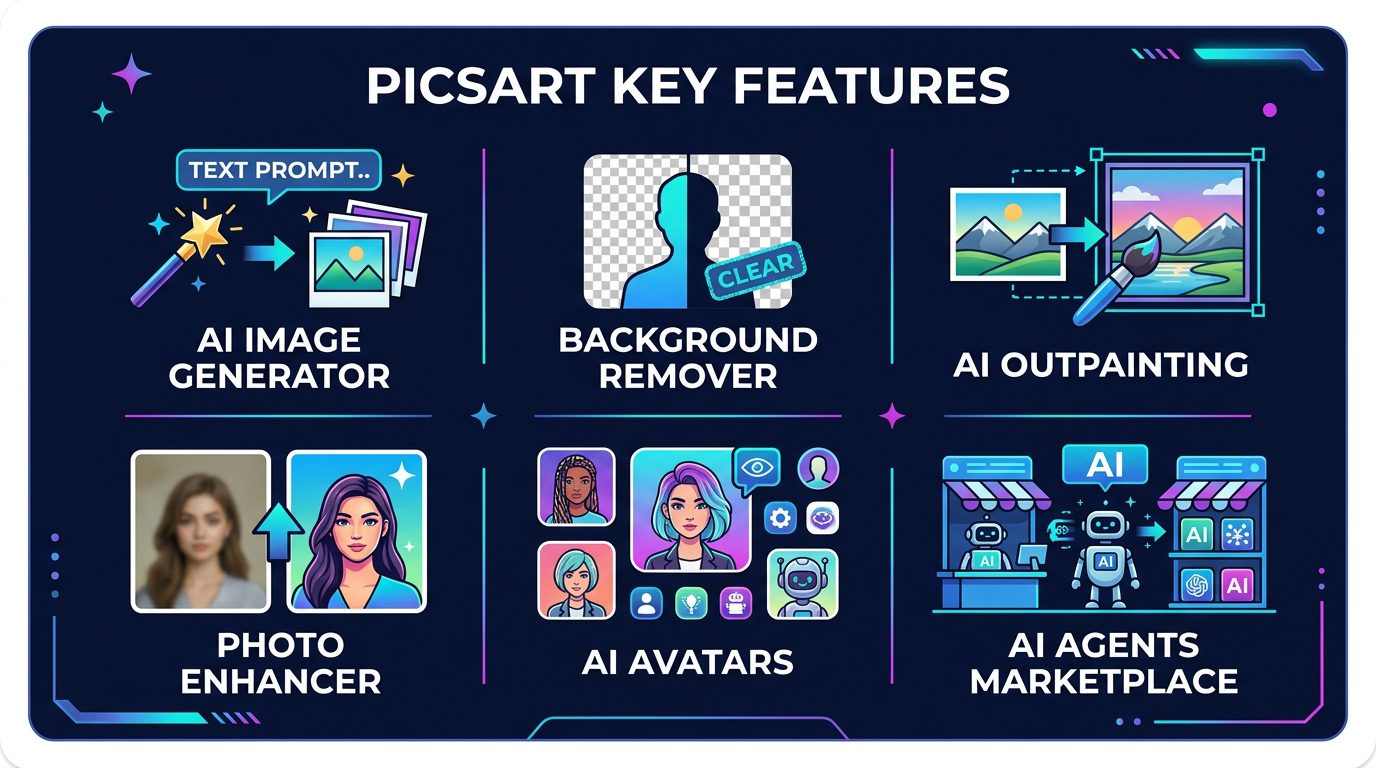
Picsart’s core AI-powered features
Key Features
1. AI Image Generator
Picsart’s text-to-image generator creates original images from natural language prompts. You can specify styles (photorealistic, illustration, anime, abstract), dimensions, and artistic references. The generator supports batch creation — producing multiple variations from a single prompt — which is useful for A/B testing marketing visuals or exploring creative directions. The output quality is competitive with mid-tier dedicated AI generators, though it doesn’t match Midjourney or DALL-E 3 at the highest quality levels.
2. AI Background Remover
One of Picsart’s most-used features, the background remover uses AI to isolate subjects from photos with a single tap. Edge detection handles complex cases like hair, transparent objects, and irregular shapes with impressive accuracy. You can replace backgrounds with solid colors, gradients, other images, or AI-generated scenes. For e-commerce sellers who need product photos on white backgrounds, this feature alone can justify the subscription.
3. AI Outpainting (Expand)
AI Outpainting extends images beyond their original borders, generating new content that seamlessly matches the existing image. Need to convert a portrait-orientation photo to landscape? Outpainting fills in the sides with contextually appropriate content. This is invaluable for social media managers who need to repurpose images across platforms with different aspect ratio requirements.
4. AI Agents Marketplace (New in 2026)
Picsart’s newest innovation is an AI Agents marketplace where creators can access specialized AI assistants. The initial agents include Flair (which integrates with Shopify to analyze market trends and suggest product photography improvements), Resize Pro (intelligent image resizing that preserves composition), Remix (creative style transfer), and Swap (face and object swapping). New agents are added weekly, expanding the platform’s capabilities without bloating the core editor.
5. Photo Enhancer & Upscaler
The AI-powered enhance tool improves image quality by reducing noise, sharpening details, and correcting exposure. The upscaler increases image resolution up to 4x while preserving (and even adding) detail through AI interpolation. For rescuing low-quality photos or preparing images for print at larger sizes, this feature delivers results that previously required specialized software like Topaz Photo AI.
6. AI Avatars
Upload a few selfies and Picsart generates stylized AI avatars in dozens of visual styles — from professional headshots to anime characters to fantasy illustrations. The avatars maintain recognizable likeness while applying creative transformations. Popular for social media profiles, gaming avatars, and creative projects.
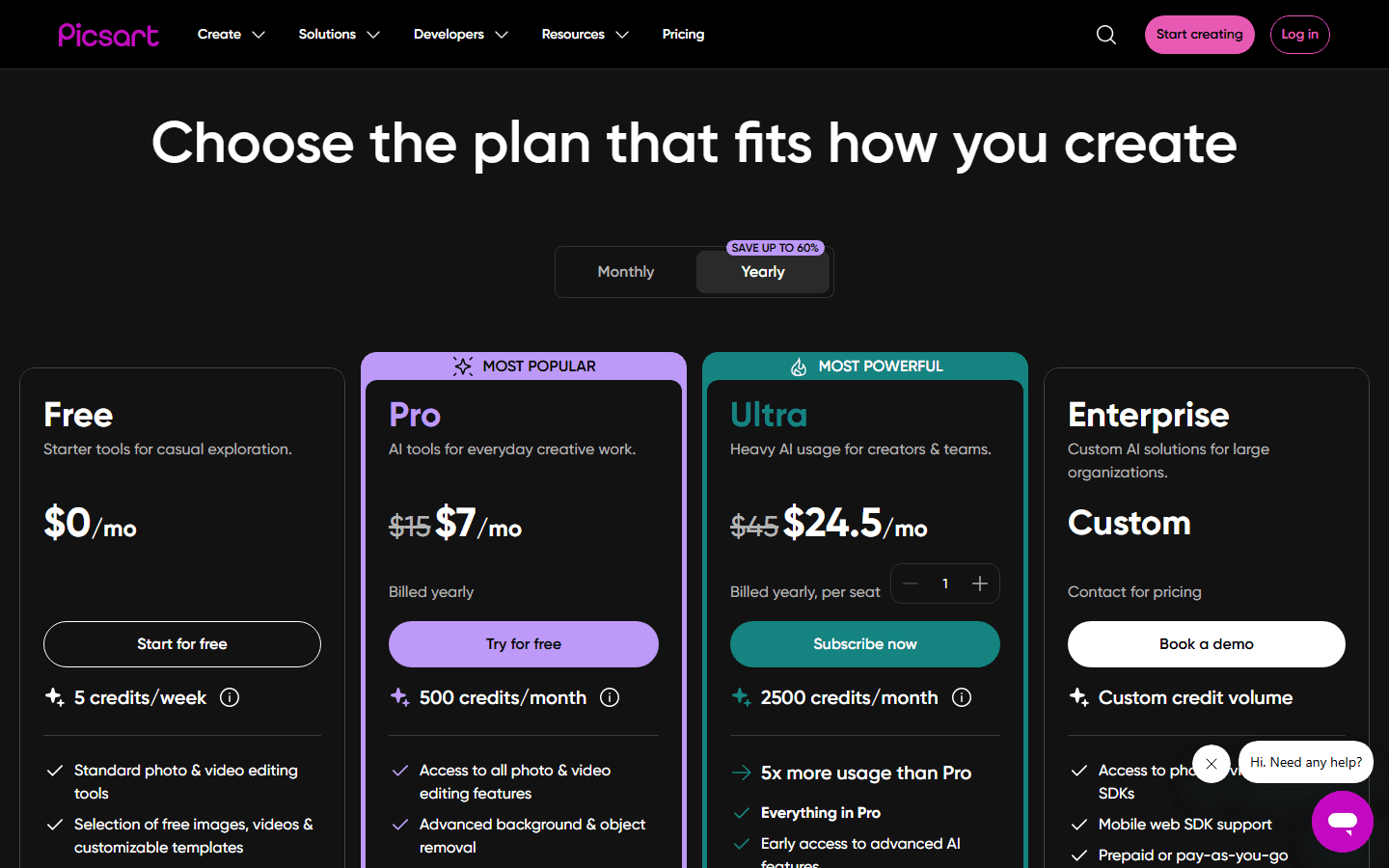
Picsart’s official pricing page (March 2026)
7. Video Editing with AI
Picsart’s video editor has improved significantly, offering trimming, splitting, merging, text overlays, filters, and transitions. AI features extend to video — including auto-subtitles, background removal for video clips, and AI-powered video enhancement. While not as deep as CapCut or DaVinci Resolve for video editing, it provides enough capability for short social media clips without needing a separate video app.
8. Templates & Design Assets
Picsart includes thousands of professionally designed templates for social media posts, stories, ads, invitations, and more. The template library is searchable by category, platform, and style. Combined with the AI tools, you can customize templates far beyond simple text substitution — changing backgrounds, adding AI-generated elements, and applying creative effects.
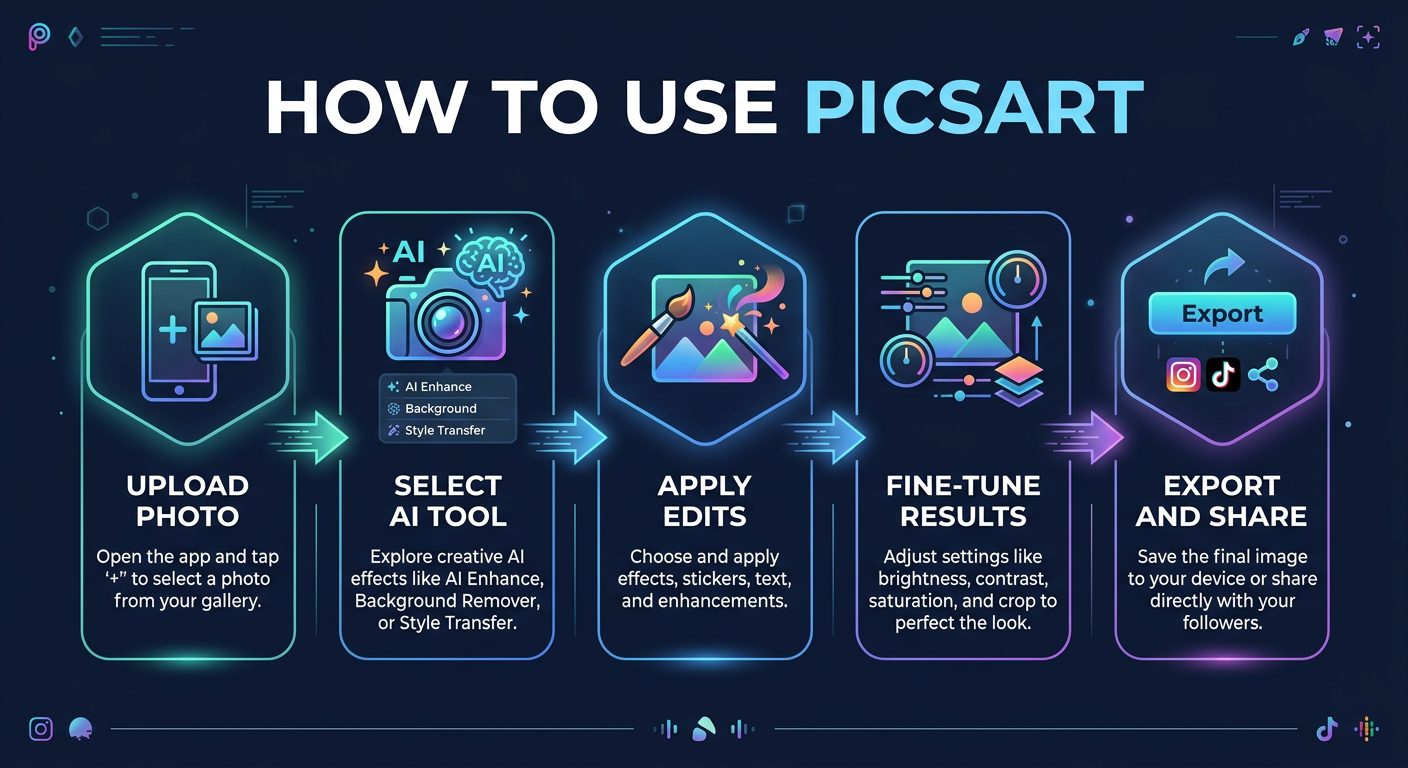
The Picsart creative workflow from start to finish
How to Use Picsart (Step-by-Step)
Step 1: Create Your Account
Visit picsart.com or download the mobile app. Sign up with email, Google, Apple, or Facebook. The free plan activates immediately with access to basic tools and limited AI features.
Step 2: Start a Project
Choose your starting point: upload a photo/video to edit, start with a blank canvas, use a template, or generate an AI image from a text prompt. Select your canvas size based on the platform you’re creating for (Instagram Story, Facebook Post, YouTube Thumbnail, etc.).
Step 3: Apply AI Tools
Access AI features from the toolbar: Background Remover for instant cutouts, AI Enhance to improve quality, Outpainting to extend canvas, or the AI Image Generator for original visuals. Each tool works with one click or tap, with optional refinement controls for fine-tuning.
Step 4: Customize and Refine
Use the manual editing tools to fine-tune your creation. Adjust colors, apply filters, add text with custom fonts, layer multiple elements, draw freehand, or apply effects from the extensive library. The layer system supports complex compositions with blending modes and opacity controls.
Step 5: Export and Share
Save your project in PNG, JPG, or PDF format. Share directly to Instagram, Facebook, TikTok, WhatsApp, or other platforms. Projects are saved to the cloud for future editing, and you can access them from any device linked to your account.
Pricing Plans
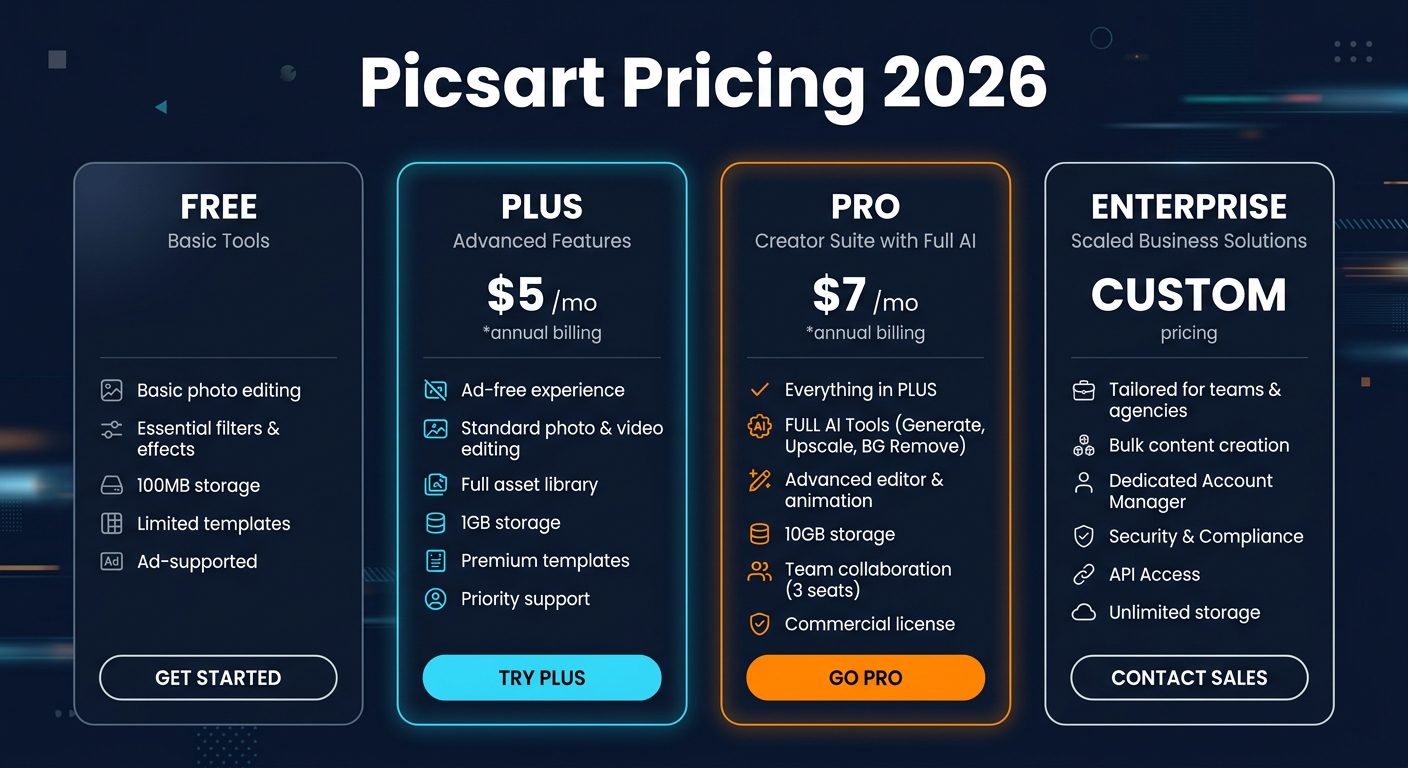
Picsart pricing tiers for 2026
The Plus plan at $5/month (annual billing) is a good entry point — it removes ads, unlocks more templates, and provides access to background removal. But the Pro plan at $7/month is the clear winner, adding the full AI suite including the Image Generator, Outpainting, AI Agents, and advanced enhancement tools. The $2/month difference between Plus and Pro makes the upgrade a no-brainer.
Monthly billing is more expensive: $13/month for Plus and $15/month for Pro. The annual commitment saves 60%+ — significant enough to recommend committing to the year if you plan to use Picsart regularly.
Pros and Cons
Pros
- ✓ Comprehensive AI tools in one platform
- ✓ Excellent mobile app experience
- ✓ AI Agents marketplace is genuinely innovative
- ✓ Competitive pricing ($7/mo Pro annual)
- ✓ Background remover is fast and accurate
- ✓ Massive effects, stickers, and template library
- ✓ Cross-platform (mobile, web, API)
Cons
- ✗ AI image generation quality trails Midjourney/DALL-E
- ✗ Free tier has intrusive ads
- ✗ Web editor less polished than mobile app
- ✗ Advanced features require Pro plan
- ✗ Not a replacement for professional tools like Photoshop
- ✗ Video editing capabilities still basic compared to CapCut
Best Picsart Alternatives
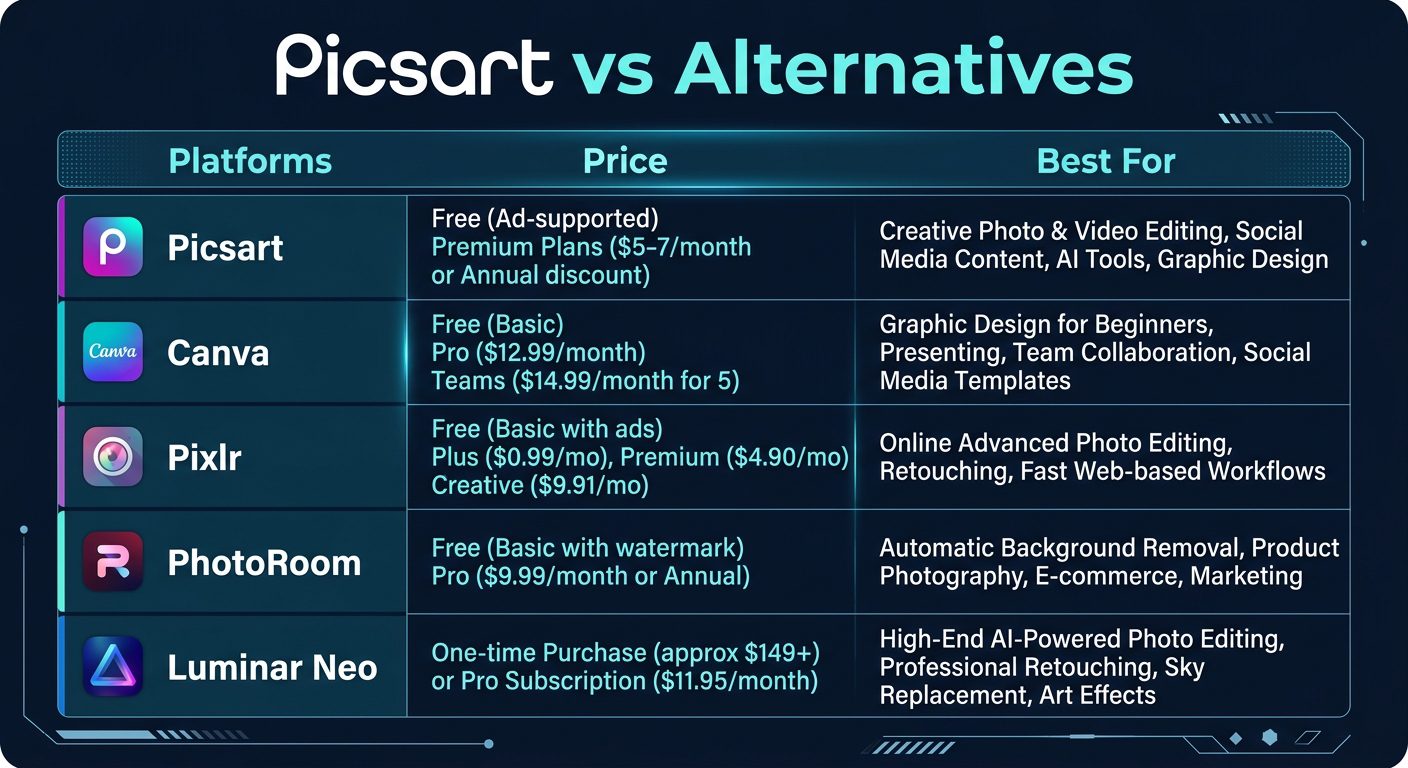
How Picsart compares to leading creative tool alternatives
Canva is Picsart’s most direct competitor for template-based visual content creation. Canva’s template library is larger and its collaboration features are more mature, making it better for teams. However, Picsart offers deeper photo editing capabilities and more advanced AI tools at a lower price point.
Pixlr is the budget champion — powerful AI photo editing starting at just $2.49/month. If your needs are primarily photo editing without the design templates and social features, Pixlr delivers excellent value.
PhotoRoom is the specialist choice for e-commerce sellers. Its batch processing, product-specific AI enhancements, and marketplace-ready templates make it the best tool for high-volume product photography editing.
Luminar Neo offers the most advanced AI photo enhancement technology. Sky replacement, portrait retouching, and image upscaling are all best-in-class. The lifetime license at $149 makes it cost-effective for photographers who want a one-time purchase.
Final Verdict: Is Picsart Worth It?
Picsart has successfully evolved from a mobile photo editor into a legitimate AI-powered creative platform. The 2026 version is substantially more capable than even a year ago, with the AI Agents marketplace representing a genuinely new approach to creative tooling.
For the price — $7/month on the annual Pro plan — Picsart offers exceptional value. You get AI image generation, background removal, outpainting, enhancement, avatars, video editing, and thousands of templates in one app. The mobile experience is particularly strong, making it ideal for creators who work primarily on phones and tablets.
That said, Picsart isn’t trying to replace Photoshop for professional photo editing or Midjourney for top-tier AI image generation. It’s the generalist tool that does many things well rather than one thing perfectly. For content creators, social media managers, small business owners, and casual designers, that versatility is exactly what’s needed.
Our Rating: 4.3 / 5
Build an AI Tool? Get It in Front of the Right Audience
PopularAiTools.ai reaches thousands of qualified AI buyers monthly.
Frequently Asked Questions
Is Picsart free?
Yes, Picsart offers a free tier with basic photo editing tools, limited templates, and restricted access to AI features. The free version includes ads. For full AI capabilities, the Pro plan at $7/month (annual billing) is required.
Is Picsart better than Canva?
It depends on your needs. Picsart excels at photo editing and AI-powered creative tools, while Canva is better for template-based graphic design and team collaboration. Picsart is more affordable ($7/mo vs $13/mo), while Canva has a larger template library. For photo-heavy workflows, Picsart wins. For marketing design, Canva is typically better.
What are Picsart AI Agents?
AI Agents are specialized AI assistants available through Picsart’s marketplace. Each agent handles specific creative tasks — like Flair for Shopify product photography, Resize Pro for intelligent image resizing, and Remix for style transfer. New agents are added weekly. Available on the Pro plan.
Can I use Picsart on my computer?
Yes, Picsart has a web-based editor at picsart.com that works on any computer with a modern browser. While the mobile app offers the most polished experience, the web editor provides access to all the same tools with more screen real estate for detailed editing work.
How does Picsart’s AI Image Generator work?
Type a text description of the image you want, select a style (photorealistic, illustration, anime, etc.), and Picsart generates original images using AI. You can generate multiple variations, then edit the results using Picsart’s photo editing tools. Available on the Pro plan with a monthly generation limit.
Is Picsart safe for children?
Picsart is rated for ages 12+ on app stores. It includes content moderation for its social features, but as with any platform that allows user-generated content sharing, parental supervision is recommended for younger users.
{
“@context”: “https://schema.org”,
“@type”: “FAQPage”,
“mainEntity”: [
{“@type”: “Question”, “name”: “Is Picsart free?”, “acceptedAnswer”: {“@type”: “Answer”, “text”: “Yes, Picsart offers a free tier with basic tools and ads. Full AI capabilities require the Pro plan at $7/month annual.”}},
{“@type”: “Question”, “name”: “Is Picsart better than Canva?”, “acceptedAnswer”: {“@type”: “Answer”, “text”: “Picsart excels at photo editing and AI tools at $7/mo. Canva is better for template-based design and team collaboration at $13/mo.”}},
{“@type”: “Question”, “name”: “What are Picsart AI Agents?”, “acceptedAnswer”: {“@type”: “Answer”, “text”: “Specialized AI assistants for creative tasks like product photography, intelligent resizing, and style transfer. Available on Pro plan.”}},
{“@type”: “Question”, “name”: “Can I use Picsart on my computer?”, “acceptedAnswer”: {“@type”: “Answer”, “text”: “Yes, via the web editor at picsart.com on any modern browser.”}},
{“@type”: “Question”, “name”: “How does Picsart’s AI Image Generator work?”, “acceptedAnswer”: {“@type”: “Answer”, “text”: “Type a text description, select a style, and Picsart generates original AI images that you can further edit.”}},
{“@type”: “Question”, “name”: “Is Picsart safe for children?”, “acceptedAnswer”: {“@type”: “Answer”, “text”: “Rated 12+ with content moderation, but parental supervision recommended for younger users.”}}
]
}
{
“@context”: “https://schema.org”,
“@type”: “Review”,
“itemReviewed”: {
“@type”: “SoftwareApplication”,
“name”: “Picsart”,
“applicationCategory”: “MultimediaApplication”,
“operatingSystem”: “Web, iOS, Android”
},
“reviewRating”: {
“@type”: “Rating”,
“ratingValue”: “4.3”,
“bestRating”: “5”
},
“author”: {
“@type”: “Organization”,
“name”: “PopularAiTools.ai”
},
“datePublished”: “2026-03-20”
}
