
Suno AI Prompts Guide: 100+ Prompts That Actually Work (2026)
Most people type a few words into Suno AI and hope for the best. They get back something that sounds like a stock music library reject — generic, flat, and forgettable. The problem is not Suno. The problem is the prompt.
We have spent hundreds of hours testing prompts across every genre Suno supports. We have tracked what works, what fails, and what separates a throwaway clip from a track you would actually put on Spotify. This guide is the result: over 100 battle-tested prompts organized by genre, plus the advanced techniques that turn good prompts into studio-quality output.
Whether you are making background music for YouTube videos, producing tracks for distribution, or just exploring AI music for fun, every prompt in this guide has been validated to produce consistent, high-quality results in Suno v4 and v4.5 as of March 2026.
Have an AI tool? Get it listed on PopularAiTools.ai — DR 50+ backlinks, featured placement, expert verification.
Table of Contents
- How Suno AI Prompts Work
- The Anatomy of a Perfect Suno Prompt
- 100+ Categorized Prompts That Actually Work
- Pop and Mainstream
- Hip-Hop and Rap
- EDM and Electronic
- Rock and Indie
- Lo-Fi and Chill
- Jazz and Soul
- Country and Folk
- Classical and Cinematic
- Ambient and Meditation
- Viral and TikTok-Ready
- Advanced Prompt Techniques
- Prompts for Specific Use Cases
- Common Prompt Mistakes and How to Fix Them
- Tips for Getting Studio-Quality Output
- FAQ
How Suno AI Prompts Work
Suno AI generates music from text descriptions. You type what you want to hear, and the model produces a full track — vocals, instruments, arrangement, and all. But unlike image generators where you can get away with vague descriptions, Suno rewards precision.
Every Suno prompt is interpreted across several dimensions:
Genre tags tell Suno the foundational style. Think “pop,” “hip-hop,” “lo-fi,” “cinematic orchestral.” These are the broadest strokes and they anchor everything else.
Style tags refine the genre. Within pop, you could specify “synth-pop,” “dark pop,” “indie pop,” or “dream pop.” Each one pushes the output in a meaningfully different direction.
Mood descriptors shape the emotional texture. Words like “melancholic,” “euphoric,” “aggressive,” “dreamy,” or “nostalgic” directly influence chord progressions, tempo choices, and vocal delivery.
Instrument callouts let you request specific sounds. “Electric guitar,” “808 bass,” “vinyl piano,” “analog synth pads” — the more specific you get, the more control you have.
Structural cues tell Suno how to arrange the track. You can specify “verse-chorus-verse,” “slow build to drop,” “minimalist intro,” or “breakdown at the bridge.”
Vocal descriptors control the singing style. “Female soprano,” “raspy male vocals,” “whispered vocals,” “auto-tuned harmonies,” “no vocals/instrumental” — these dramatically change the output.
The key insight is that Suno does not just pick one of these dimensions and ignore the rest. It layers all of them together. A prompt that hits four or five dimensions consistently outperforms one that only hits one or two.
The Anatomy of a Perfect Suno Prompt
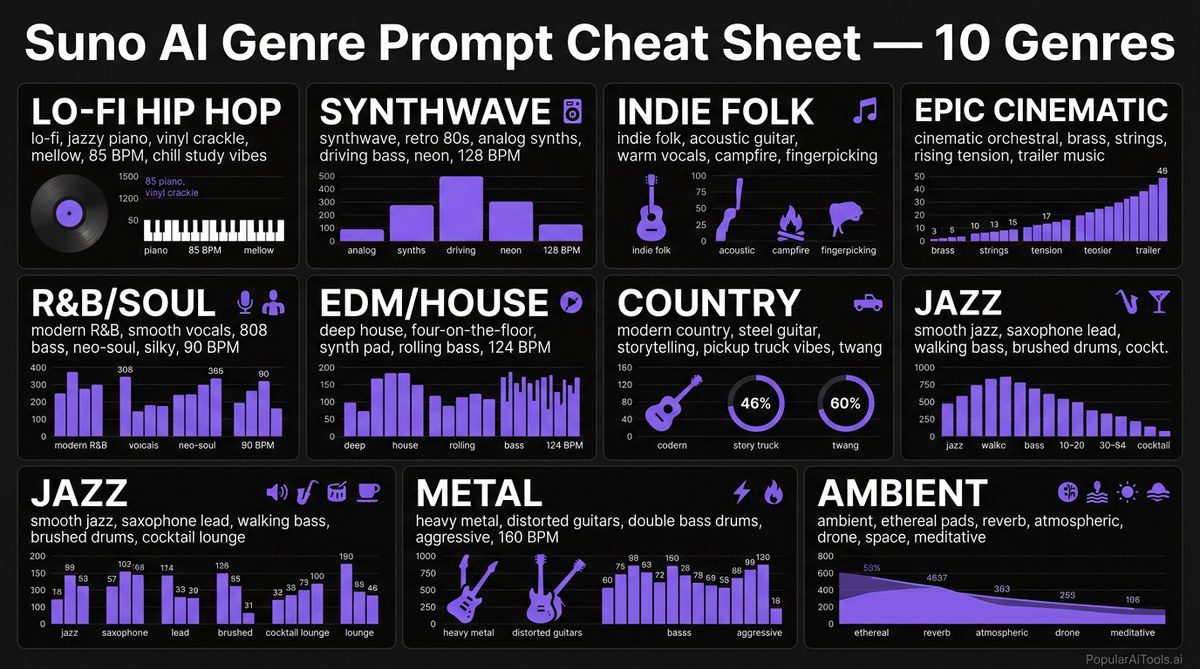
After testing thousands of prompts, we have identified a formula that reliably produces the best results. Here is the structure:
[Genre] + [Sub-genre/Style] + [Mood] + [Instruments/Production] + [Vocal Style] + [Tempo/Energy] + [Structural Note]
Here is an example of a weak prompt vs. a strong one:
The difference is night and day. The weak prompt gives Suno almost nothing to work with, so it defaults to generic choices. The strong prompt paints a complete picture, and Suno delivers exactly what you described.
A few rules of thumb:
- Lead with genre. It is the single most important word in your prompt.
- Stack 3-5 descriptors. More than 7 starts to confuse the model. Fewer than 3 leaves too much to chance.
- Use concrete nouns over abstract adjectives. “Rhodes piano” is better than “smooth keys.” “808 sub-bass” is better than “deep bass.”
- Specify what you do NOT want when it matters. “No drums” or “instrumental only” can prevent unwanted elements.
- Reference eras, not artists. “90s R&B production style” works better than naming a specific artist.
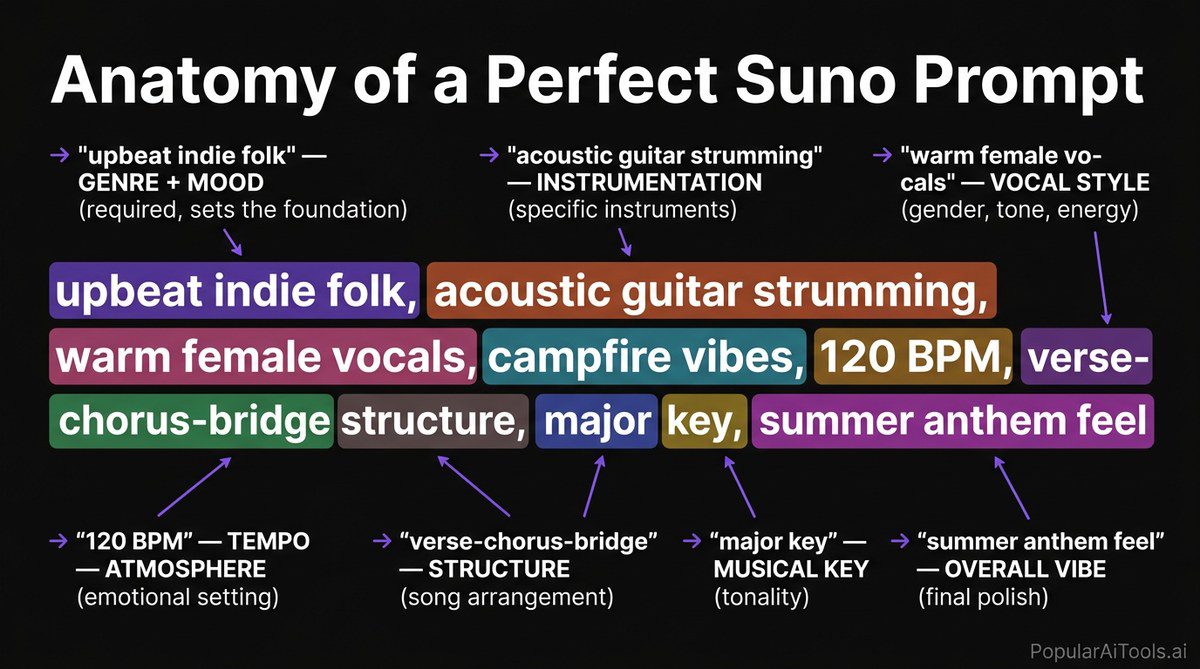
100+ Categorized Prompts That Actually Work
Every prompt below has been tested in Suno v4/v4.5 and confirmed to produce high-quality, usable output. Copy them directly or use them as starting points.
Pop and Mainstream
Hip-Hop and Rap
EDM and Electronic
Rock and Indie
Lo-Fi and Chill
Jazz and Soul
Country and Folk
Classical and Cinematic
Ambient and Meditation
Viral and TikTok-Ready
Advanced Prompt Techniques
Once you have the basics down, these advanced techniques will push your Suno output to the next level.
Combining Genres
Some of the most interesting Suno outputs come from genre mashups. The trick is to lead with your primary genre and use the second as a modifier:
- “Jazz hip-hop” — jazz is the foundation, hip-hop is the flavor
- “Cinematic trap” — cinematic orchestration with trap percussion
- “Folk electronic” — acoustic folk instruments with electronic production
Avoid combining more than two genres. Three or more creates confusion and Suno tends to default to the most generic interpretation.
Specifying Instruments
Suno responds well to specific instrument callouts, especially when you name the exact type:
The more specific the instrument reference, the more distinctive the output.
Tempo Control
Suno interprets BPM values directly. Here is a reference for common tempo ranges:
Including a BPM value gives you much tighter control than vague descriptors like “fast” or “slow.”
Vocal Style Control
Vocal descriptors are one of the most powerful and underused prompt tools:
- Texture: breathy, raspy, smooth, nasal, gravelly, silky
- Technique: falsetto, belting, whispered, spoken word, auto-tuned, vocoder
- Register: soprano, alto, tenor, baritone, bass
- Delivery: confident, vulnerable, aggressive, playful, haunting, intimate
- Arrangement: solo, duet, layered harmonies, call-and-response, choir
Combining two or three vocal descriptors gives Suno a much clearer picture than a single adjective.
Production Era References
Referencing a production era is surprisingly effective:
- “60s Motown production” — warm, compressed, mono-leaning
- “80s gated reverb drums” — that iconic Phil Collins snare
- “90s lo-fi four-track recording” — fuzzy, intimate, DIY
- “2010s trap production” — crisp 808s, modern mixing
- “70s analog warmth” — tape saturation, rich harmonics
Prompts for Specific Use Cases
YouTube Intros (5-15 seconds)
Short, punchy, and instantly recognizable:
- “Bright synth-pop jingle, 5-second intro, energetic and catchy, clean production, upbeat 120 BPM, short melodic hook, no vocals”
- “Cinematic whoosh into punchy electronic beat, 10-second intro, modern and professional, attention-grabbing, no vocals”
- “Funky bass riff with clap beat, short 8-second loop, upbeat and fun, podcast-style energy, instrumental”
Podcast Background Music
Subtle and non-distracting:
- “Soft ambient electronic, gentle pads, minimal beat, warm and professional, 85 BPM, background music that does not overpower conversation, no vocals”
- “Lo-fi jazz, mellow piano and brushed drums, relaxed and sophisticated, 80 BPM, podcast-underscore feel, instrumental”
- “Acoustic guitar fingerpicking, gentle and warm, minimalist, 70 BPM, talk-show background, solo instrument”
Workout and Gym Playlists
High energy, driving intensity:
- “Hard-hitting EDM, aggressive drops, distorted bass, driving four-on-the-floor, 140 BPM, relentless energy, gym-motivation intensity, no vocals”
- “Trap workout beat, heavy 808s, rapid hi-hats, aggressive synth stabs, 145 BPM, beast-mode energy, instrumental”
- “Rock workout anthem, power chords, pounding drums, adrenaline-pumping, 155 BPM, headbanging energy, distorted and raw”
Background Music for Videos and Streams
- “Chill electronic background, soft synth textures, gentle beat, unobtrusive and pleasant, 95 BPM, perfect for talking-head videos, no vocals”
- “Upbeat corporate pop, acoustic guitar and light percussion, positive and professional, 110 BPM, product-demo background, instrumental”
- “Gaming stream lo-fi, relaxed beat, retro 8-bit elements, ambient pads, 82 BPM, non-distracting background, instrumental”
Common Prompt Mistakes and How to Fix Them
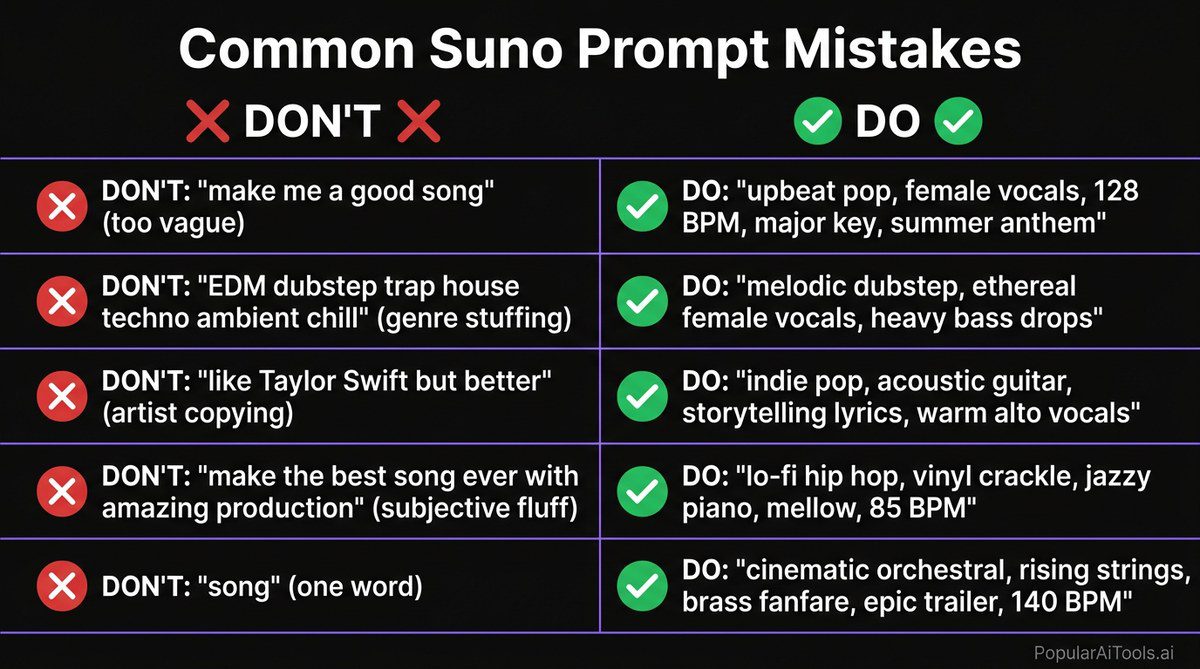
We see the same errors over and over. Here are the biggest ones and their fixes.
Mistake 1: Being Too Vague
Bad: “Make a cool song”
Fix: “Synth-pop, energetic female vocals, bright arpeggiated synths, driving beat 122 BPM, catchy chorus hook”
Vague prompts force Suno to guess on every dimension. It will produce something, but it will be generic.
Mistake 2: Contradictory Descriptors
Bad: “Aggressive and calm, fast and slow, heavy and light”
Fix: Pick one direction and commit. If you want dynamic contrast, describe it structurally: “Soft and intimate verse building to an aggressive, heavy chorus.”
Mistake 3: Naming Specific Artists
Bad: “Sound exactly like Drake”
Fix: “Melodic rap, auto-tuned male vocals, atmospheric OVO-style production, moody pads, 808 slides, 130 BPM”
Suno works better with style descriptions than artist names. Describe the sound you associate with that artist instead.
Mistake 4: Overloading the Prompt
Bad: A 200-word essay describing every bar of the song.
Fix: Keep prompts between 15-40 words. Hit the key dimensions (genre, mood, instruments, tempo, vocals) and let Suno fill in the rest. The model performs best with clear direction and some creative freedom.
Mistake 5: Ignoring the “No Vocals” Tag
Bad: Wanting an instrumental but not specifying it.
Fix: Always include “no vocals” or “instrumental” explicitly if you do not want singing. Suno defaults to adding vocals in most genres.
Mistake 6: Forgetting Tempo
Bad: “Chill lo-fi beat” (could be 60 BPM or 95 BPM — very different feels).
Fix: Always include a BPM value. It is the single easiest way to improve prompt consistency.
Tips for Getting Studio-Quality Output
These tips take you from “interesting AI demo” to “track I would actually release.”
Generate multiple versions. Every prompt produces different results each time. Generate 3-5 versions and pick the best one. The variance between runs is significant, and the best take is often dramatically better than the worst.
Use the extend feature strategically. If Suno nails the first 30 seconds but the rest falls off, use the extend feature from that strong starting point. Think of it as choosing the best take and building from there.
Post-process your tracks. Suno output benefits enormously from basic mastering. Run your exports through a limiter, add subtle EQ adjustments, and normalize the volume. Even five minutes of post-processing makes a track sound significantly more professional.
Clean AI artifacts before distribution. This is critical if you plan to release on Spotify, Apple Music, or any distribution platform. AI-generated tracks often contain subtle artifacts — metallic overtones, unnatural frequency spikes, micro-glitches — that distribution platforms like DistroKid and TuneCore increasingly flag. Undetectr is purpose-built for this exact problem. It is the first artifact-removal technology specifically designed for AI music, cleaning your Suno tracks so they pass platform quality checks without degrading the audio.
Layer multiple Suno outputs. Generate a vocal track and a separate instrumental in the same style, then combine them in a DAW. This gives you much more control over the mix and lets you adjust vocal levels independently.
Iterate on your prompts. Treat prompt writing like songwriting — your first draft is rarely your best. Tweak one variable at a time (swap the mood descriptor, change the tempo, try a different instrument) and compare results. Keep a prompt journal of what works.
Match your prompt complexity to the genre. Simple genres like lo-fi and ambient need simpler prompts (3-4 descriptors). Complex genres like jazz fusion and progressive rock benefit from more detailed prompts (5-7 descriptors).
Use Suno’s style presets as starting points. When Suno offers genre presets, use them as a foundation and then modify with your own descriptors. This gives the model a strong starting position to build from.
If you are serious about releasing AI-generated music professionally, the workflow we recommend is: generate in Suno, select your best takes, do basic post-processing in a DAW, then run the final mix through Undetectr before uploading to your distributor. That pipeline consistently produces release-ready tracks.
Related AI Music Guides
FAQ
What is the best prompt length for Suno AI?
We find that 15-40 words is the sweet spot. Shorter than 15 and you leave too much to chance. Longer than 40 and the model starts to lose focus, ignoring some of your descriptors in favor of others. Hit the key dimensions — genre, mood, instruments, tempo, vocal style — and let Suno handle the rest.
Can I use Suno AI music commercially?
Yes, with a paid Suno subscription (Pro or Premier plan), you own the commercial rights to the music you generate. Free-tier generations are for personal use only. If you plan to distribute commercially, we strongly recommend running tracks through Undetectr first to remove AI artifacts that can trigger platform flags on DistroKid, TuneCore, and similar services.
How do I make Suno generate instrumentals without vocals?
Include “no vocals” or “instrumental” or “instrumental only” explicitly in your prompt. Place it near the beginning or end of the prompt for emphasis. Without this tag, Suno will almost always add vocals, especially in genres like pop, rock, and hip-hop where vocals are expected.
Why does Suno ignore some parts of my prompt?
This usually happens when prompts contain contradictions (asking for both “aggressive” and “gentle”), are too long (over 50 words), or use artist names instead of style descriptions. Try simplifying your prompt, removing contradictions, and describing the sound rather than referencing specific artists. Also ensure your genre tag comes first — it carries the most weight.
How do I get consistent results when I regenerate the same prompt?
You cannot get identical results — Suno always introduces variation, which is by design. To improve consistency, be more specific in your prompt (add BPM, name exact instruments, specify vocal style) and generate 3-5 versions to pick the best one. Consistent prompting produces a consistent range of quality, even if individual outputs vary.
Ready to turn your Suno creations into release-ready tracks? These prompts will get you 90% of the way there. For that final 10% — removing AI artifacts and passing distribution platform checks — check out Undetectr, the world’s first artifact removal tool built specifically for AI-generated music.
table { border-collapse: collapse; width: 100%; margin: 1.5em 0; }
th, td { border: 1px solid #333; padding: 10px 14px; text-align: left; }
th { background-color: #1a1a2e; color: #fff; }
td { background-color: #16213e; color: #e0e0e0; }
tr:nth-child(even) td { background-color: #0f3460; }
