
Try AVCLabs PhotoPro AI today
AVCLabs PhotoPro AI: Revolutionizing Photo Editing with AI
Unleash Your Creativity with AVCLabs PhotoPro AI
Welcome to the future of photo editing. AVCLabs PhotoPro AI is an innovative tool that leverages artificial intelligence to simplify and enhance your photo editing experience. With its advanced features and user-friendly interface, you can now transform your photos into stunning masterpieces with just a few clicks. Try it Free today and experience the difference.
How AVCLabs PhotoPro AI Works
AVCLabs PhotoPro AI is designed to automate and streamline the photo editing process. It uses advanced AI algorithms to perform sophisticated photo edits quickly and automatically. This significantly reduces the workload of photo editing, allowing you to focus more on your creativity and productivity.
Key Features and Benefits of AVCLabs PhotoPro AI
- AI-Powered Object Remover: This feature allows you to remove unwanted objects from your photos, no matter how small or difficult to remove manually.
- AI Face Restoration: Enhance blurry faces in your photos with this tool. It automatically applies the optimal amount of face enhancement to each face.
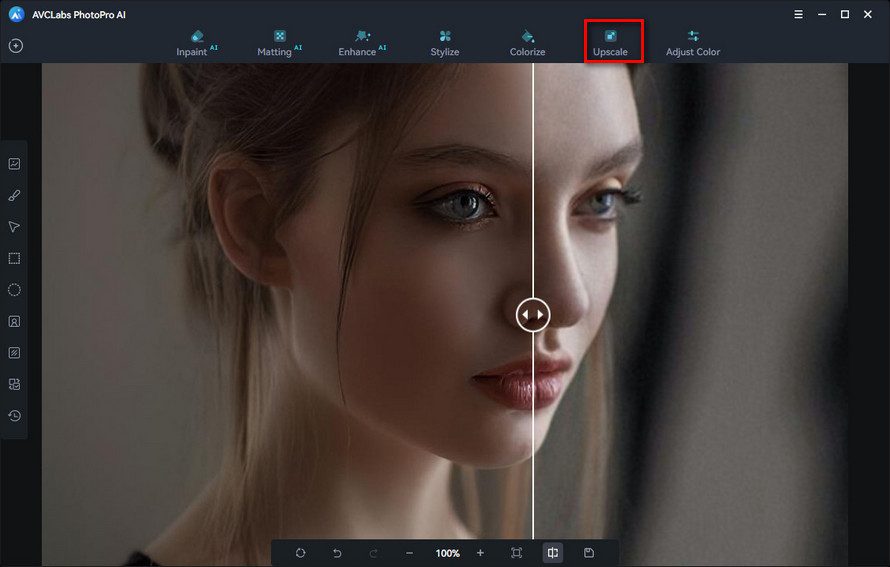
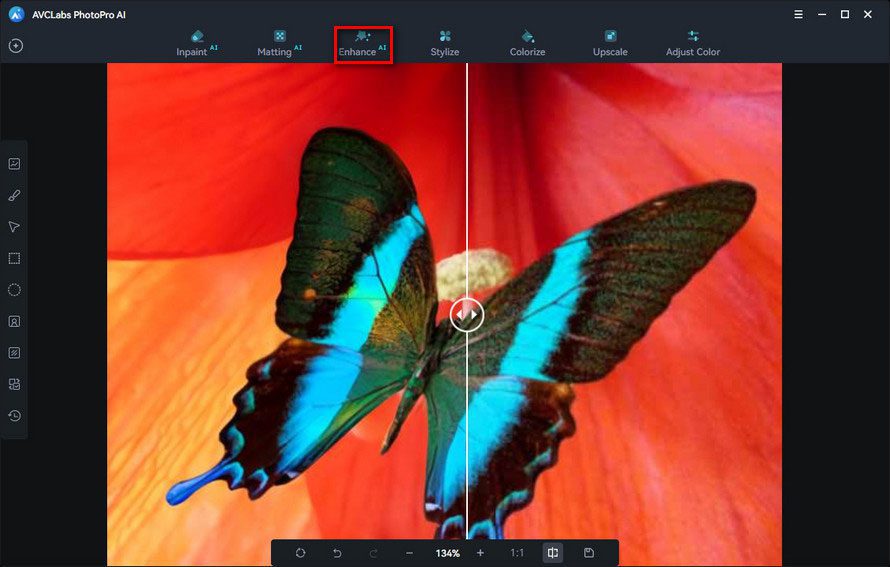
- AI Photo Enhancer: Improve the quality of your old photos with just a few clicks. Fix blurred or pixelated images, remove noise and artifacts, sharpen images, and enhance clarity and detail.
- AI Color Calibration: Automatically fix color cast issues in your photos to make them more natural and true to life.
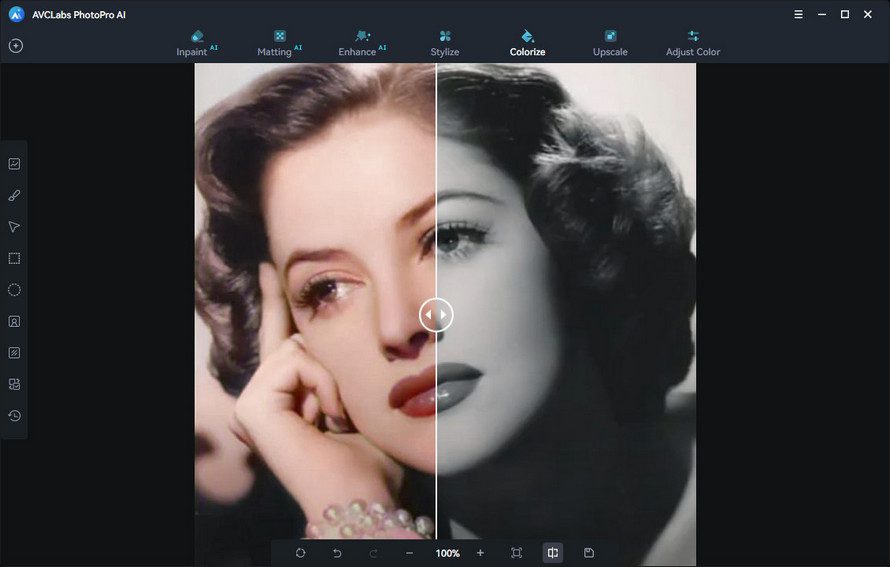
- AI Photo Colorizer: Colorize your old black-and-white photos with just one click.
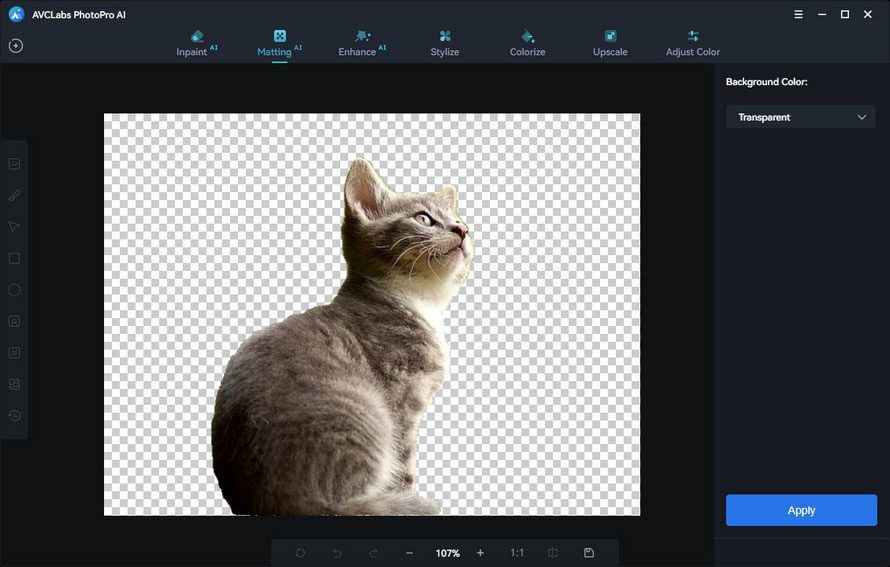
- AI Background Remover: Make the background of an image transparent with just a click of a button.

Use Cases for AVCLabs PhotoPro AI
Whether you’re a professional photographer or a hobbyist, AVCLabs PhotoPro AI is a game-changer. It’s perfect for enhancing old photos, removing unwanted objects, colorizing black-and-white photos, and much more. It’s also ideal for businesses looking to enhance their product photos or create stunning marketing materials.
Ready to revolutionize your photo editing process? Try AVCLabs PhotoPro AI today!
The Problem That AVCLabs PhotoPro AI Addresses
Photo editing can be a time-consuming and complex process. AVCLabs PhotoPro AI simplifies this process by automating many of the tasks that traditionally required manual intervention. It allows you to focus more on the creative aspects of photo editing.

Pricing and Availability of AVCLabs PhotoPro AI
AVCLabs PhotoPro AI is available for both Windows and MacOS. You can try it for free or purchase it directly from the AVCLabs website.
Target Audience for AVCLabs PhotoPro AI
AVCLabs PhotoPro AI is suitable for both beginners and professionals. Its intuitive and user-friendly interface makes it easy to use, regardless of your level of expertise.

Pros and Cons of AVCLabs PhotoPro AI
Pros:
- User-friendly interface
- Advanced AI features
- Wide range of editing tools
- High-quality results
Cons:
- May require a powerful computer for optimal performance
Three Aspects I Appreciate About AVCLabs PhotoPro AI
- AI-Powered: The use of AI in photo editing is a game-changer. It automates many of the tasks that traditionally required manual intervention.
- User-Friendly: The interface is intuitive and easy to use, making it suitable for both beginners and professionals.
- Versatile: AVCLabs PhotoPro AI offers a wide range of editing tools, making it a one-stop solution for all your photo editing needs.

Frequently Asked Questions – FAQ’s
What is AVCLabs PhotoPro AI?
AVCLabs PhotoPro AI is an advanced photo editing software that uses artificial intelligence to automate and enhance the photo editing process. It offers a wide range of features including an AI-powered object remover, face restoration, photo enhancer, color calibration, photo colorizer, and background remover.
How does AVCLabs PhotoPro AI work?
AVCLabs PhotoPro AI uses advanced AI algorithms to perform sophisticated photo edits quickly and automatically. This significantly reduces the workload of photo editing, allowing you to focus more on your creativity and productivity.
Who can use AVCLabs PhotoPro AI?
AVCLabs PhotoPro AI is suitable for both beginners and professionals. Its intuitive and user-friendly interface makes it easy to use, regardless of your level of expertise. It’s perfect for enhancing old photos, removing unwanted objects, colorizing black-and-white photos, and much more. It’s also ideal for businesses looking to enhance their product photos or create stunning marketing materials.
What are the key features of AVCLabs PhotoPro AI?
AVCLabs PhotoPro AI offers a wide range of features including:
- AI-Powered Object Remover: This feature allows you to remove unwanted objects from your photos, no matter how small or difficult to remove manually.
- AI Face Restoration: Enhance blurry faces in your photos with this tool. It automatically applies the optimal amount of face enhancement to each face.
- AI Photo Enhancer: Improve the quality of your old photos with just a few clicks. Fix blurred or pixelated images, remove noise and artifacts, sharpen images, and enhance clarity and detail.
- AI Color Calibration: Automatically fix color cast issues in your photos to make them more natural and true to life.
- AI Photo Colorizer: Colorize your old black-and-white photos with just one click.
- AI Background Remover: Make the background of an image transparent with just a click of a button.
Where can I download AVCLabs PhotoPro AI?
AVCLabs PhotoPro AI is available for both Windows and MacOS. You can try it for free or purchase it directly from the AVCLabs website.
What are the system requirements for AVCLabs PhotoPro AI?
While the specific system requirements are not mentioned on the website, it is generally recommended to have a powerful computer for optimal performance when using advanced photo editing software like AVCLabs PhotoPro AI.
What are users saying about AVCLabs PhotoPro AI?
Users have praised AVCLabs PhotoPro AI for its user-friendly interface, advanced AI features, and the high-quality results it produces. They have found it to be a game-changer in photo editing, significantly enhancing their photos and making them look more professional.
Get Premium AI Tool Insights
Subscribe to get weekly curated AI tool recommendations, exclusive deals, and early access to new tool reviews.
Related Tools
Related Articles
Secure Your Suno Catalogue Now: An Action Plan Before the Watermark and Download-Limit Rollout
Suno's download limits and watermarking arrive within weeks. This is the four-step action plan to back up, verify, process and release your Suno catalogue before the rollout changes your workflow.
Suno's Tamper-Resistant Watermarking, Explained: What It Means for Independent AI Music Producers
On August 6, 2026 Suno announced tamper-resistant watermarking, fingerprinting, off-platform identification and download limits. Here is exactly what changes for independent AI music producers — and what stays the same.
Best AI Humanizer 2026: 5 Tools Tested (And When Not to Use One)
We tested 5 AI humanizers on real AI drafts. Which one keeps your voice, what each costs, why detector scores prove less than you think, and the one use case to walk away from.