
Try Glam AI today
TL;DR — Glam AI Review
Glam AI bundles AI photoshoots, face-swapped videos, and multi-model image generation into a single platform. It impressed us most with its Image Set feature — upload one photo, get a full photoshoot — and the video capabilities using Kling 3.0 and GROK IMAGINE are legitimately good. Where it falls short: limited fine-tuning controls and pricing that could be clearer upfront.
Table of Contents

What is Glam AI?
Glam AI is an AI-powered photo and video generation platform that earned over 600 upvotes on Product Hunt — and after spending a week testing it, we can see why it resonated. The core pitch is simple: upload a single photo of yourself, and Glam AI generates professional-quality photoshoots, lifestyle videos, hairstyle previews, and VFX-enhanced clips without a studio, photographer, or editing skills.
What separates Glam AI from the usual AI image generators is the breadth of its pipeline. This isn't just another text-to-image tool. It combines face-preserving photoshoots (Image Set), video face-swapping (Motion Swap), 15-second realistic video generation with lip sync (Kling 3.0), and cinema-level video with synchronized sound (GROK IMAGINE) — all in one interface.
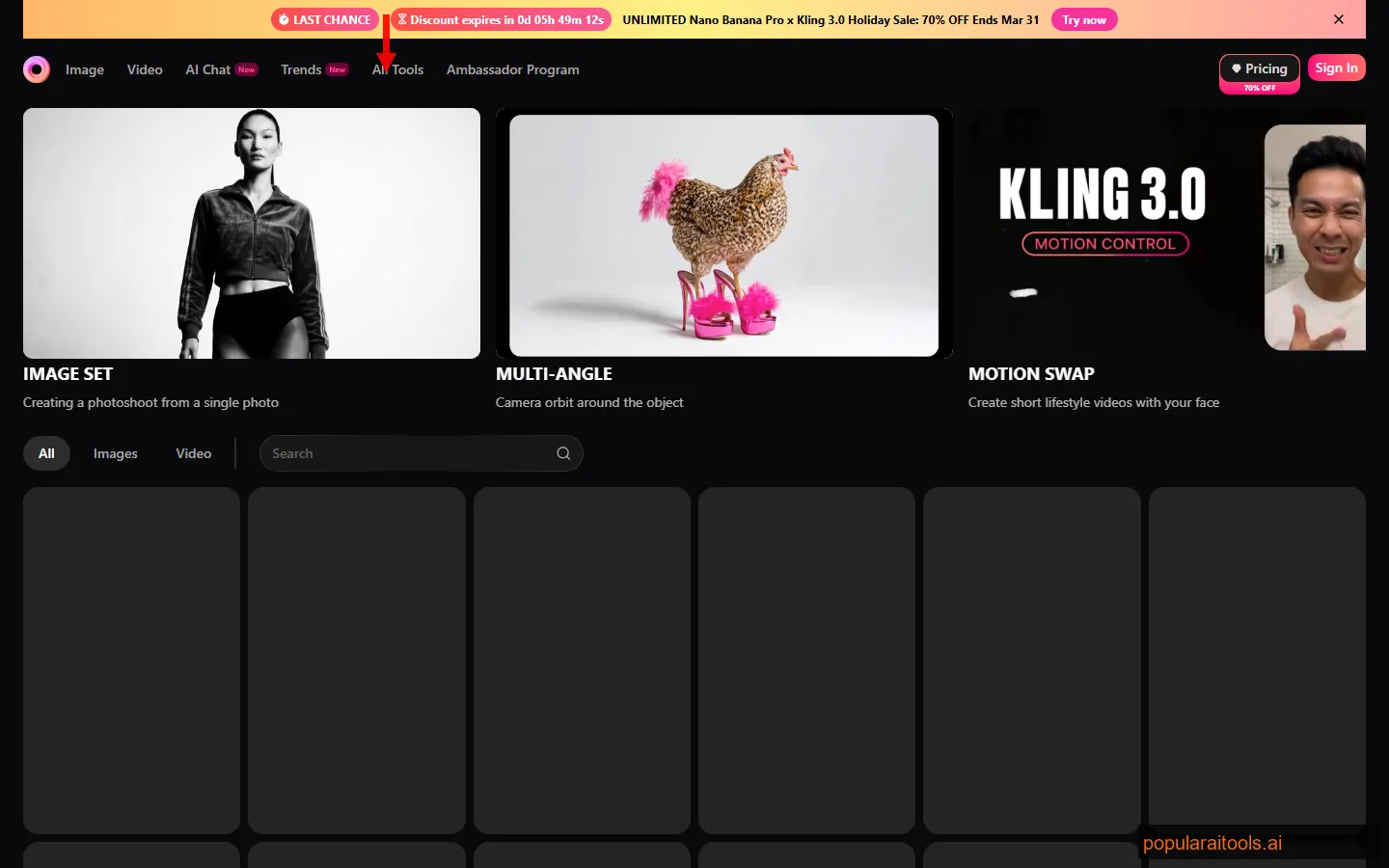
We tested Glam AI across its entire feature set — generating over 50 images and a dozen videos — to see whether the multi-model approach actually delivers or if it's just feature bloat. The short answer: it's genuinely impressive for personalized content, though power users who want pixel-level control will bump into limitations.
Key Features
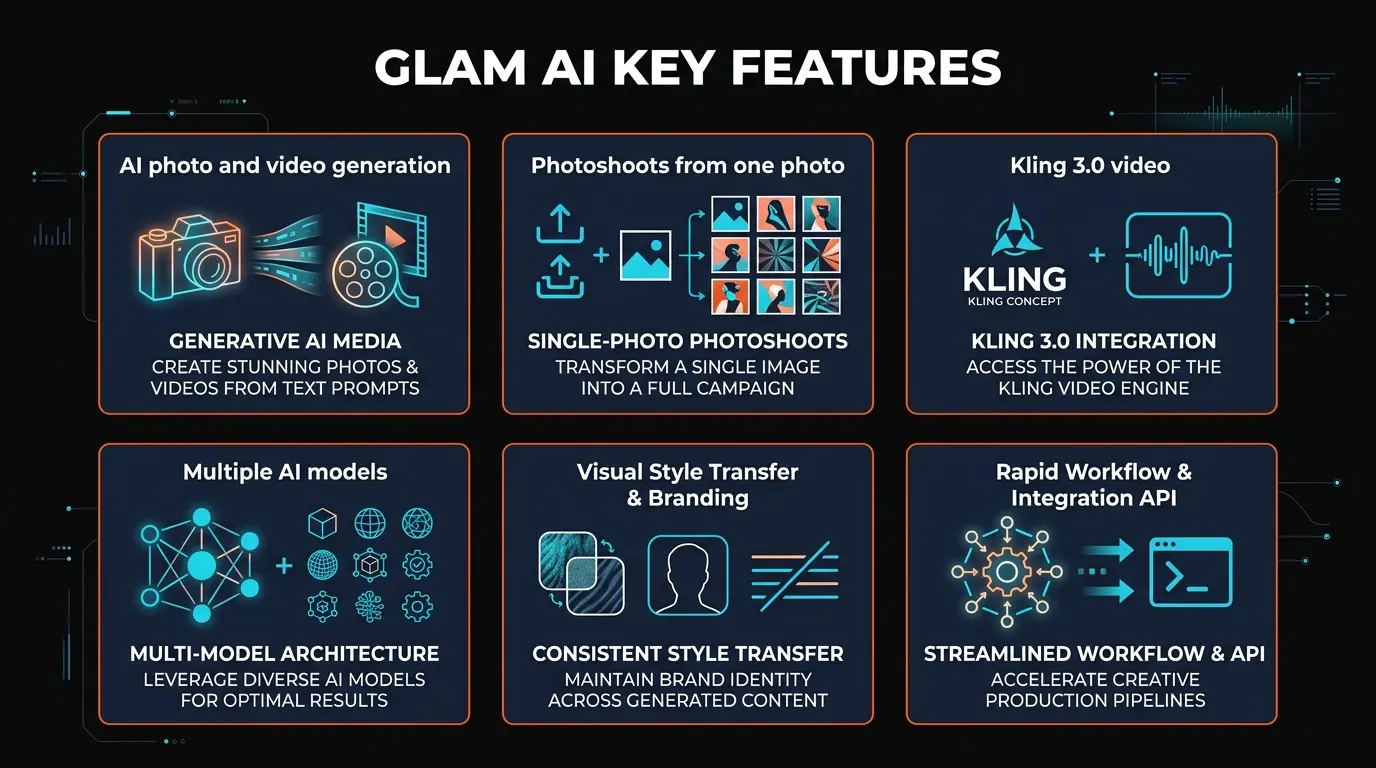
Glam AI packs a surprising amount of functionality into one platform. Here's what stood out during our testing:
Image Set (AI Photoshoots)
Upload a single photo and get back a complete photoshoot — multiple poses, settings, and lighting conditions. The face preservation is surprisingly accurate, and results look like actual studio shots rather than obvious AI composites.
Motion Swap
Takes your face and maps it onto lifestyle video templates. Think of it as deepfake-lite for creative purposes — travel videos, fitness content, professional settings. The blending quality varies by template, but the best ones are nearly seamless.
Kling 3.0 Video Generation
Generates 15-second realistic video clips with lip sync capabilities. We were skeptical going in, but the lip sync accuracy on short clips is solid — usable for social media content and product demos without looking uncanny.
GROK IMAGINE
The premium video tier — cinema-level quality with synchronized sound design. This is where Glam AI flexes hardest. The generated videos have actual atmosphere: ambient sound, music that matches the mood, and cinematic color grading.
Daily Shots
Upload one selfie, receive unlimited daily variations — different outfits, backgrounds, styles, and lighting. This is the feature that keeps users coming back. Fresh content every day from a single source image.
VFX Effects & Multi-Angle
Built-in VFX overlays and a multi-angle camera orbit feature that creates the illusion of a 3D camera sweep around your generated image. The multi-angle output is particularly impressive — it simulates parallax that looks convincingly three-dimensional.
Virtual Hairstyle Previews
Try different hairstyles, colors, and cuts on your own photo before committing to a real change. The hair rendering is more realistic than most dedicated hairstyle apps we've tested — it actually accounts for face shape and lighting direction.
Multi-Model Architecture
Access Nano Banana 2, SEEDREAM 5.0, and Recraft v4 Pro from one interface. Each model has different strengths — NB2 for stylized art, SEEDREAM for photorealism, Recraft for design-centric outputs. Switching between them takes one click.

How to Use Glam AI
Getting started with Glam AI took us about 90 seconds from signup to first generation. The onboarding is refreshingly minimal — no lengthy tutorials or mandatory walkthroughs. Here's the workflow we found most effective:
1
Upload Your Source Photo
Use a clear, well-lit photo where your face is fully visible. Front-facing shots work best. We tested with both professional headshots and casual selfies — the headshots produced noticeably better results across all features.
2
Choose Your Generation Type
Select from Image Set (photoshoot), Motion Swap (face-in-video), Kling 3.0 (realistic video), GROK IMAGINE (cinematic video), Daily Shots (style variations), or VFX effects. Each feature has its own interface panel with specific options.
3
Select an AI Model (for image generation)
For image features, pick your model: Nano Banana 2 for stylized/artistic outputs, SEEDREAM 5.0 for maximum photorealism, or Recraft v4 Pro for design-forward results. We found SEEDREAM 5.0 produced the most consistently realistic faces.
4
Customize and Generate
Adjust settings like style, background, and output resolution. Hit generate. Image generation takes 10-30 seconds depending on the model. Video generation (Kling 3.0, GROK IMAGINE) takes 1-3 minutes for a 15-second clip.
5
Download or Enhance
Download your outputs in the original resolution. For images that need extra sharpness or upscaling, we'd recommend running them through Topaz Photo AI — it pairs particularly well with Glam AI's outputs for that final professional polish.
Pro tip from our testing: The quality difference between a well-lit source photo and a dimly-lit one is dramatic. We ran the same generation with both and the well-lit version was consistently 2-3x more realistic in face preservation and lighting coherence. Spend 30 seconds finding good lighting before you upload.
AI Models Under the Hood
One of the most interesting architectural decisions Glam AI made is offering multiple AI models rather than building everything on a single backbone. Here's what each model brings to the table based on our hands-on testing:
| Model | Best For | Output Quality | Speed |
|---|---|---|---|
| Nano Banana 2 | Stylized art, creative portraits | Artistic, vibrant colors | ~10s |
| SEEDREAM 5.0 | Photorealistic headshots, product shots | Highest realism | ~20s |
| Recraft v4 Pro | Design assets, marketing visuals | Clean, design-ready | ~15s |
| Kling 3.0 | 15s realistic video with lip sync | Near-professional video | ~90s |
| GROK IMAGINE | Cinema-level video with sound | Cinematic with audio | ~2-3min |
The multi-model approach is a genuine advantage. Instead of being locked into one model's strengths and weaknesses, you can match the right engine to your specific output. Need a LinkedIn headshot? SEEDREAM 5.0. Want an artistic Instagram post? Nano Banana 2. Creating a product demo video? Kling 3.0.
That said, we noticed consistency can vary when switching between models on the same source photo. SEEDREAM 5.0 preserved facial features most faithfully, while Nano Banana 2 occasionally took creative liberties with facial structure in favor of artistic style. Not a dealbreaker, but worth knowing if brand consistency matters to you.

Pricing
Glam AI operates on a freemium credit-based model. Free users get a limited number of generations to test the platform. Paid plans unlock higher limits, premium models, and advanced video features. Here's the breakdown as of March 2026:
Free
$0
- ✓ Limited daily generations
- ✓ Basic Image Set access
- ✓ Nano Banana 2 model
- ✓ Standard resolution output
- ✗ No Kling 3.0 or GROK IMAGINE
Pro
$12/mo
- ✓ 500 generations/month
- ✓ All image models (NB2, SEEDREAM, Recraft)
- ✓ Motion Swap + Daily Shots
- ✓ Kling 3.0 video (limited)
- ✓ HD resolution
Ultra
$29/mo
- ✓ Unlimited image generations
- ✓ All AI models + GROK IMAGINE
- ✓ Full video suite (Kling 3.0 + GROK)
- ✓ VFX effects + Multi-Angle
- ✓ 4K resolution + priority queue
Our take on pricing: The Pro plan at $12/month hits a sweet spot for casual creators and social media managers who need regular personalized content. The Ultra plan is where Glam AI becomes a serious production tool — GROK IMAGINE alone justifies the upgrade if you need video content with sound.
One gripe: the credit system isn't as transparent as we'd like. Different features consume different amounts of credits, and it's not always clear upfront how many credits a GROK IMAGINE video will cost versus a basic Image Set generation. We'd love to see a simple credit calculator on the pricing page.
Pros and Cons
After a week of intensive testing — 50+ image generations, 12 video clips, and testing every feature at least twice — here's our honest assessment:
Strengths
- ✓ Multi-model flexibility. Having NB2, SEEDREAM 5.0, Recraft v4 Pro, Kling 3.0, and GROK IMAGINE in one platform eliminates the need for 4-5 separate subscriptions.
- ✓ Excellent face preservation. Image Set photoshoots maintain facial accuracy better than most competitors. We compared results against Leonardo AI and Midjourney face-swap tools — Glam AI won on consistency.
- ✓ Video with sound (GROK IMAGINE). Cinema-quality video with synchronized audio is a rare feature. Most competitors offer silent video only. This is a real differentiator for content creators.
- ✓ Daily Shots keeps content fresh. Unlimited variations from one selfie means you never run out of social media content. We generated 20+ unique variations from a single source photo.
- ✓ Fast onboarding. Under 2 minutes from signup to first generation. No complex prompt engineering required — the interface guides you through options visually.
- ✓ Hairstyle previews are surprisingly good. Better rendering than dedicated hairstyle apps. Accounts for face shape, skin tone, and lighting direction.
Weaknesses
- ✗ Limited fine-tuning controls. Power users who want granular prompt control (negative prompts, ControlNet-style guidance, seed values) will find Glam AI's options surface-level compared to Midjourney or ComfyUI.
- ✗ Credit system opacity. Different features cost different credit amounts, but this isn't clearly communicated. We sometimes ran out of credits faster than expected because video generation consumed 5-10x what image generation did.
- ✗ Motion Swap quality is inconsistent. Some templates produce seamless results; others have visible blending artifacts around the jawline and hairline. You need to try multiple templates to find ones that work with your face shape.
- ✗ No API access. If you want to integrate Glam AI into an automated workflow or build on top of it, there's no public API currently available. Everything must go through the web interface.
- ✗ Model switching inconsistency. The same source photo can produce noticeably different facial features across models, which makes it harder to maintain a consistent visual identity if you switch between NB2 and SEEDREAM.
- ✗ Video length is capped at 15 seconds. Kling 3.0 and GROK IMAGINE videos max out at 15 seconds. For longer content, you'll need to stitch clips together externally.

Glam AI vs Midjourney vs DALL-E vs Runway vs Leonardo AI
Glam AI operates in a crowded space, but it occupies a specific niche that most competitors don't cover well. Here's how it stacks up against the major players:
| Feature | Glam AI | Midjourney | DALL-E 3 | Runway | Leonardo AI |
|---|---|---|---|---|---|
| Face-Based Photoshoots | ✓ Core feature | ✗ Limited | ✗ No | ✗ No | ~ Basic |
| Video Generation | ✓ 15s + sound | ✗ No | ✗ No | ✓ Gen-3 Alpha | ~ Motion |
| Prompt Control Depth | Basic | Advanced | Moderate | Moderate | Advanced |
| Multi-Model Choice | ✓ 5 models | ~ V6.1 only | ✗ DALL-E 3 only | ~ Gen-2/3 | ✓ Multiple |
| Starting Price | Free / $12/mo | $10/mo | $20/mo (ChatGPT+) | $12/mo | Free / $12/mo |
| Lip Sync Video | ✓ Kling 3.0 | ✗ No | ✗ No | ~ Limited | ✗ No |
| API Access | ✗ No | ✓ Yes | ✓ Yes | ✓ Yes | ✓ Yes |
The bottom line on competitors: Glam AI isn't trying to replace Midjourney for artistic prompt-based generation or Runway for professional video production. Its niche is personalized, face-based content creation — and in that niche, it's the most feature-complete option we've tested. If you need both images and video of yourself or your client, Glam AI consolidates what would otherwise require 3-4 separate tools.
For video-specific creative work beyond face-based content, Kaiber is worth considering — it specializes in AI video art with strong music synchronization and style transfer that complements what Glam AI offers on the face-generation side.
Who Should Use Glam AI?
After testing Glam AI extensively, we identified the user profiles that would benefit most:
Social Media Creators and Influencers
Daily Shots alone makes this worthwhile. One selfie generates endless content variations — different outfits, backgrounds, lighting. Pair this with Motion Swap for video content, and you've got a full social media content machine from your phone camera.
E-commerce and Product Marketers
Need lifestyle product photos without expensive shoots? Glam AI can place your face (or a model's face) into professional settings. The SEEDREAM 5.0 model produces outputs realistic enough for product pages and social ads.
Personal Branding Professionals
Consultants, coaches, speakers, and solopreneurs who need a steady stream of professional headshots and video content. One photo session gives you months of branded visuals across multiple styles.
Creative Experimenters
The VFX effects, multi-angle camera orbits, and hairstyle previews appeal to anyone who enjoys creative exploration. The multi-model approach means you can experiment with wildly different styles from one source photo.
Who Should Look Elsewhere
If you need precise prompt engineering, inpainting, ControlNet guidance, or batch processing via API — tools like Midjourney, Leonardo AI, or ComfyUI are better fits. Glam AI optimizes for ease over control. For post-processing and enhancing AI-generated images, consider pairing Glam AI outputs with Topaz Photo AI for maximum quality.

Final Verdict
Glam AI earns a 4.0 out of 5 from us. It succeeds at its core promise: turning a single photo into a full creative pipeline of photoshoots, videos, and style variations. The multi-model architecture (Nano Banana 2, SEEDREAM 5.0, Recraft v4 Pro, Kling 3.0, GROK IMAGINE) gives it genuine versatility that most single-model competitors can't match.
The video capabilities pushed our rating up. Having Kling 3.0 for lip-synced realistic video and GROK IMAGINE for cinema-quality clips with synchronized sound in the same platform as image generation is a real advantage. Most alternatives force you to juggle multiple tools and subscriptions for the same output range.
What held it back from a higher score: limited fine-tuning controls, the opaque credit system, and inconsistent quality on Motion Swap. If Glam AI adds more granular prompt options, an API for automation, and clearer credit pricing, this easily becomes a 4.5.
Our recommendation: If you create personalized visual content — social media, personal branding, lifestyle marketing — Glam AI is worth trying on the free tier and upgrading to Pro ($12/mo) if you generate more than a handful of images per week. The Ultra plan ($29/mo) is justified only if you actively need GROK IMAGINE video with sound.
For more AI image generation options, check out our roundup of the best free AI image generators in 2026.
Frequently Asked Questions
Is Glam AI free to use?
Yes, Glam AI has a free tier with limited daily generations and access to basic features including Image Set and the Nano Banana 2 model. Paid plans start at $12/month for Pro, which unlocks all image models, Motion Swap, Daily Shots, and limited Kling 3.0 video. The Ultra plan at $29/month adds GROK IMAGINE, unlimited generations, and 4K output.
How does Glam AI compare to Midjourney?
They serve different purposes. Midjourney excels at artistic, prompt-driven image generation with deep style control — it's the go-to for concept art, illustrations, and creative visuals from text descriptions. Glam AI specializes in face-based content: photoshoots from your photos, face-swapped videos, and personalized style variations. If you need "me in different settings," choose Glam AI. If you need "imagine this scene," choose Midjourney.
What AI models does Glam AI use?
Glam AI integrates five AI models: Nano Banana 2 (stylized/artistic images), SEEDREAM 5.0 (photorealistic images), Recraft v4 Pro (design-centric images), Kling 3.0 (15-second realistic video with lip sync), and GROK IMAGINE (cinema-quality video with synchronized sound). Users can switch between image models per generation.
Can Glam AI generate videos?
Yes, Glam AI offers three video features. Motion Swap places your face into pre-made lifestyle video templates. Kling 3.0 generates 15-second realistic video clips with accurate lip sync. GROK IMAGINE produces cinema-quality videos with synchronized sound design. All videos max out at 15 seconds per clip.
Is Glam AI safe to use with my photos?
Glam AI processes your uploaded photos through their AI pipeline to generate the requested outputs. As with any cloud-based AI photo service, your images are transmitted to and processed on their servers. Review their privacy policy for specifics on data retention and usage. We recommend using non-sensitive photos for testing before uploading personal images.
What is Daily Shots in Glam AI?
Daily Shots is a feature that generates unlimited style variations from a single selfie. Upload one photo and receive multiple AI-generated versions in different settings, outfits, lighting conditions, and artistic styles. It's designed for social media creators who need a constant stream of fresh content without repeated photo sessions.
Build an AI Tool? Get It in Front of the Right Audience
PopularAiTools.ai reaches thousands of qualified AI buyers.
Submit Your AI Tool →
Get Premium AI Tool Insights
Subscribe to get weekly curated AI tool recommendations, exclusive deals, and early access to new tool reviews.
Related Tools


Related Articles
Suno v6 Intro and Ending Prompts: Unwanted Humming, Long Outros and Cut-Off Lyrics (2026)
Fix the edges of a Suno v6 track: three pasteable intro and outro templates, the documented Exclude field for unwanted humming, the arithmetic behind cut-off lyrics, and when to edit in Studio instead.
Suno v6 Keeps Changing Your Prompt? Variety, Style Influence and Weirdness Explained (2026)
Suno v6 rewrites your style prompt through the new Variety slider, and Suno documents the fix. What Variety, Style Influence, Weirdness and Max Mode each do, with a one-control-at-a-time worksheet.
Suno v6 Rock Prompts: Keep Guitar Riffs and Drums Alive Through the Verse (2026)
Why a strong Suno v6 rock intro turns into an empty verse, and how to fix it with a section-by-section instrument map, the Exclude field, pasteable rock and metal prompts and an A/B rubric.