Udio vs Suno (2026): Which AI Music Generator Actually Wins?

AI Creative Tools Specialist

TL;DR — Quick Verdict
Suno V5 wins on full-song production and workflow speed; Udio wins on vocal naturalness and multilingual depth. If you want complete, radio-ready tracks in seconds, go Suno. If you want the most human-sounding AI vocals and genre range, go Udio. Most serious creators run both.
Table of Contents
- Meet the Contenders: Udio vs Suno at a Glance
- Quick-Glance Comparison Table
- Round 1: Audio Quality and Vocal Naturalness
- Round 2: Pricing and Free Tier
- Round 3: Song Length and Workflow
- Round 4: Genre and Language Range
- Round 5: Commercial Use, Watermarks, and Spotify
- Round 6: Editing, Inpainting, and Iteration
- The Verdict: Which Should YOU Pick?
- Can You Use Both?
Meet the Contenders: Udio vs Suno at a Glance
The udio vs suno debate is the defining question in AI music right now — and unlike most AI tool comparisons, there's no clean universal winner. Both tools launched within a year of each other, both attracted serious VC backing, and both have sparked legitimate copyright controversy. But under the hood, they make very different trade-offs.
Udio launched in 2024 out of a team of ex-Google DeepMind researchers operating under uMusic Inc., with a reported $10M seed from Andreessen Horowitz. The pitch: the most acoustically realistic AI vocals on the planet, built on a diffusion-based audio model. Suno arrived a year earlier, founded by the ex-Kensho team in Cambridge, MA, and backed by Lightspeed, Founders Fund, and Nat Friedman. Their V5 model does something Udio still can't: generate a complete, structured song — up to 8 minutes — in a single shot.
I've been running both tools weekly for months. This comparison covers everything: audio quality, pricing, workflow, genre range, commercial rights, and the specific use cases where each one dominates.
Quick-Glance Comparison Table
Before we go round-by-round, here's the full feature breakdown. Color-coded winners are marked — cyan for Udio, orange for Suno.
| Feature | Udio | Suno V5 |
|---|---|---|
| Founded | 2024 (ex-Google DeepMind) | 2023 (ex-Kensho, Cambridge MA) |
| Model Architecture | Diffusion-based audio | Hybrid transformer + diffusion |
| Vocal Quality | Most natural AI vocals (✓ Winner) | Very strong — slightly more robotic |
| Production Polish | Good | Best-in-class polish (✓ Winner) |
| Max Song Length | 32s base, extend manually | Up to 4-8 min one-shot (✓ Winner) |
| Free Plan | 10 gens/mo, audible watermark | 10 credits/day, no audible watermark |
| Free Tier Watermark | Yes — audible | No audible watermark on V5 (✓ Winner) |
| Pro Plan Price | $10/mo (Standard) | $10/mo (Pro) — Tie |
| Premium Plan Price | $30/mo (Pro) | $30/mo (Premier) — Tie |
| Commercial Rights | Standard+ plan | Pro plan — Tie |
| WAV + Stems Download | Pro ($30/mo) only | Pro ($10/mo) — Tie |
| Mobile App | Web only | iOS + Android native (✓ Winner) |
| Languages Supported | 50+ with strong fidelity (✓ Winner) | Multi-language, English-dominant |
| Inpainting / Edit | Yes — hit or miss | Edit feature — works much better (✓ Winner) |
| Voice Style Cloning | Prompt-only | Personas on Premier plan (✓ Winner) |
| Spotify Integration | Via third-party distributors | Built-in distribution helpers (✓ Winner) |
Round 1: Audio Quality and Vocal Naturalness
This is where the udio vs suno debate gets genuinely interesting — and where your personal use case starts to matter enormously.
Udio's diffusion architecture produces AI vocals that, at their best, can fool a casual listener. The pitch modulation, the micro-inflections, the breath timing — it all feels more organic than anything Suno has put out. When I generate a slow jazz ballad or a K-pop track in Udio, the vocal performance has texture. There are moments that don't feel generated at all.
Suno V5 is not far behind on vocals, but the gap is real and audible. Suno's vocal engine has slightly more robotic precision — which, ironically, works beautifully for pop-EDM and hip-hop where a processed vocal aesthetic is actually desirable. Where Suno dominates decisively is in overall production quality. The mix on a Suno V5 track — the balance of instruments, the spatial depth, the master limiter behavior — sounds more like something that came out of a professional DAW. When you're listening to a full Suno track, it coheres. The instruments don't fight each other. That's genuinely hard to achieve, even with a human producer.
For the udio vs suno vocals debate specifically: Udio takes it. For overall sonic experience as a finished track: Suno takes it. That distinction actually matters for how you'll use each tool.
Round 1 Verdict: Udio
Udio wins on vocal naturalness — the most human-sounding AI singing available. Suno wins on production polish but loses the vocal duel. If you're building tracks where the singing voice is the lead instrument, Udio is your tool.
Round 2: Pricing and Free Tier
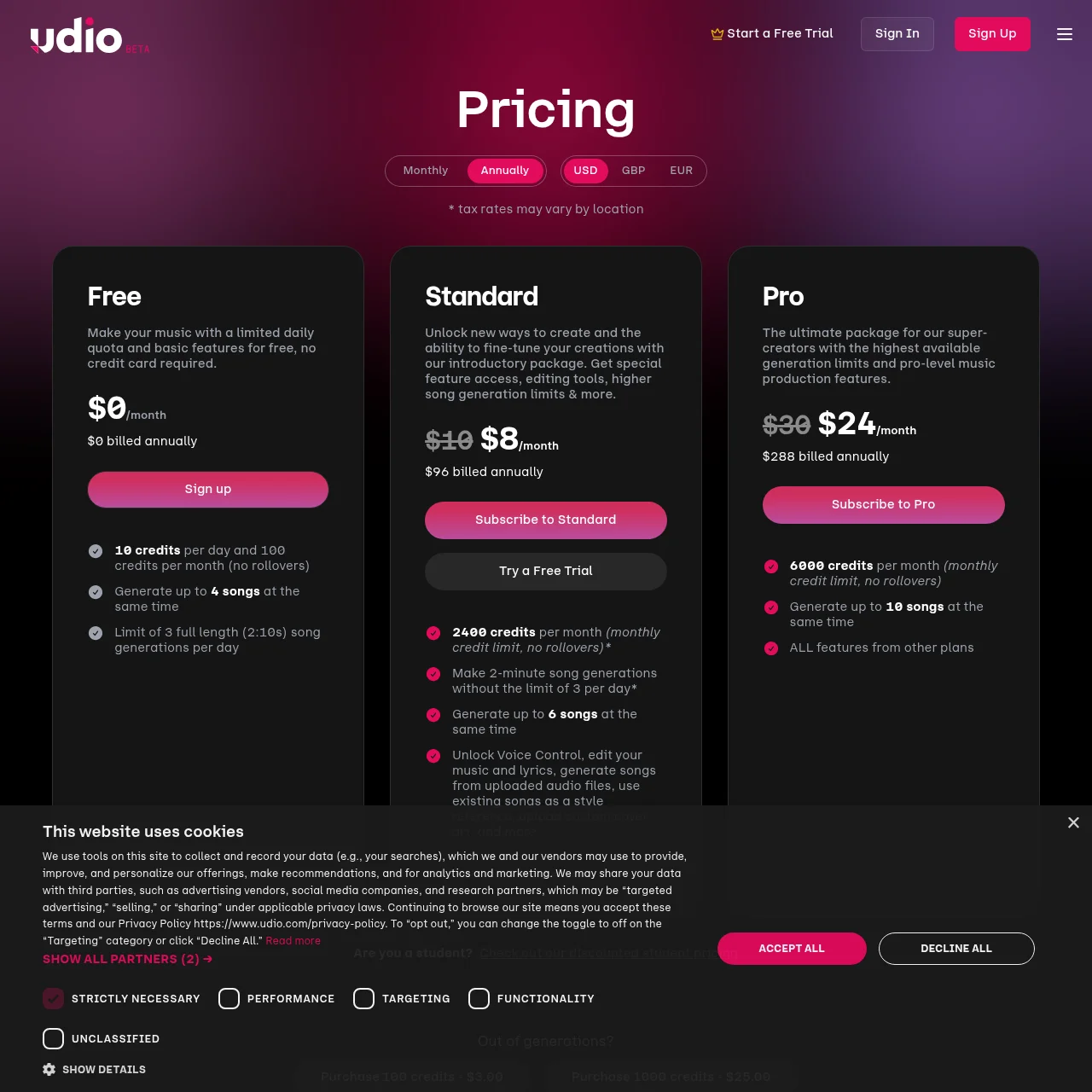
At the headline level, udio vs suno pricing looks like a dead heat: both charge $10/month for a base Pro tier and $30/month for the premium tier. But the details inside those plans tell a different story.
Udio Pricing
- Free: 10 gens/month — audible watermark
- Standard $10/mo: 1,200 gens, MP3 downloads, personal commercial
- Pro $30/mo: 4,800 gens, WAV + stems, full commercial
- Enterprise: custom pricing
Suno Pricing
- Free: 10 credits/day — NO audible watermark on V5
- Pro $10/mo: 2,500 credits (~500 songs), commercial rights
- Premier $30/mo: 10,000 credits, priority queue, Personas
- Enterprise: custom
The critical free-tier difference: Udio's free plan adds an audible watermark to every track. Suno V5's free tier does not have an audible watermark — though commercial use is still prohibited without a paid plan. For casual creators just exploring, Suno's free experience is cleaner.
At $10/month, Suno Pro delivers roughly 500 full songs per month (each costing 5 credits). Udio Standard at the same price gives 1,200 generations — but remember, Udio's 32-second base clips often require 3-5 extension steps to build a full track, so your effective full-song output is considerably lower than 1,200. The numbers are slippery unless you account for that extension workflow cost.
Round 2 Verdict: Suno (narrow)
Suno's free tier is more generous (no audible watermark, daily credits) and Pro plan delivers more complete songs per dollar once you factor in Udio's extension tax. Pricing is essentially tied on paper but Suno wins in practice for most users.
Round 3: Song Length and Workflow
This is the round where the suno vs udio gap is most decisive, and I'll be direct about it: Udio's 32-second base clip model is genuinely frustrating if you want full songs fast.
Here's the Udio workflow for a complete 3-minute track: generate a 32-second clip, listen, decide if it's worth extending, extend to 64 seconds, extend again, stitch sections together, hope the transitions are coherent. You're looking at 6-10 generation steps to get one full song. Each extension re-rolls the audio slightly, meaning tonal drift is a real problem — the bridge can sound noticeably different from the verse if you're not careful with your prompting.
Suno V5 just generates the whole thing. You write a prompt, add lyrics with bracketed structure tags like [Verse], [Chorus], [Bridge], and Suno produces a complete song — intro, verse, chorus, bridge, outro — in one shot, up to 4-8 minutes long. The structural coherence is exceptional. You can go from idea to listenable track in under 90 seconds.
For the full breakdown of Suno V5's current capabilities including its song structure controls, see the Suno V5.5 in-depth review. If you want to go deep on Udio's extension workflow and prompt engineering techniques, read the full Udio review.
Round 3 Verdict: Suno (decisive)
Full songs in one shot, up to 8 minutes, with structural control via lyric tags. It's not a close contest. Suno wins Round 3 convincingly.
Round 4: Genre and Language Range
Both tools have genuinely impressive genre coverage — but the nature of that coverage differs in ways that matter depending on what you're making.
Suno handles pop, hip-hop, EDM, folk, country, and R&B with remarkable polish. These are genres where clean production and structural familiarity are the benchmarks, and Suno clears them comfortably. Ask Suno for a classical piece, a K-pop idol track, or a West African highlife song, and the results are respectable but less precise.
Udio, by contrast, was clearly trained with a broader academic and global music ear. Classical orchestration, opera, traditional Celtic, K-pop idol production, flamenco — Udio handles niche and world genres with more authenticity. The 50+ language support with genuine fidelity (not just phonetic mimicry) is a huge differentiator for non-English producers. A Japanese-language J-pop track in Udio sounds Japanese. The same prompt in Suno can drift toward an accent that feels off.

Round 4 Verdict: Udio
Udio wins on multilingual fidelity and niche genre depth. If you're creating in any language other than English, or working in genres outside mainstream Western pop, Udio is the stronger tool.
Round 5: Commercial Use, Watermarks, and Spotify Distribution
If your goal is to actually sell or distribute AI music — on Spotify, Apple Music, YouTube monetization — then the commercial use question is the most important one you need to answer before choosing between udio or suno.
Both platforms offer commercial licensing on paid plans. Udio's Standard plan ($10/mo) covers personal commercial use; the Pro plan ($30/mo) covers full commercial release including streaming. Suno's Pro plan ($10/mo) explicitly includes commercial rights from the base paid tier. That's a meaningful difference — Suno's commercial rights kick in at $10, while Udio's full commercial coverage requires $30.
The watermark situation also matters for distribution. Udio's free tier embeds an audible watermark that streaming distributors will flag. Suno's free V5 tracks have no audible watermark, though the no-commercial-use restriction still applies. Both platforms note that even paid-tier tracks may carry embedded metadata identifying them as AI-generated, which some platforms are beginning to screen for.
If you're serious about getting your tracks onto Spotify and want them to clear automated AI screening, it's worth running your finished audio through Undetectr to clean AI music for Spotify before uploading. It handles the residual artifact patterns that can trigger rejection — works on both Udio and Suno output. For the full step-by-step distribution guide, the Distribute Suno + Udio Music guide walks through every distributor option.
It's also worth noting the legal backdrop: Udio was sued by the RIAA in mid-2024 over training data usage. The platform continues to operate normally, but the lawsuit is ongoing. Suno faced similar scrutiny from the music industry. Neither has been shut down or had their commercial terms invalidated by court action — but if you're investing heavily in AI music as a business, keep an eye on how these cases resolve. Both platforms have updated their terms to be more explicit about commercial rights precisely because of this pressure.
Round 5 Verdict: Suno (narrow)
Commercial rights at $10/mo vs $30/mo gives Suno a concrete pricing advantage for creators looking to monetize. Tie on watermark removal (both need paid plans for distribution-ready audio). Use Undetectr before any Spotify upload regardless of which platform you're on.
Round 6: Editing, Inpainting, and Iteration
Both tools offer inpainting — the ability to regenerate a specific section of a track without rebuilding from scratch. In theory, this is a killer feature. In practice, the quality gap between the two implementations is significant.
Udio's inpainting is present but inconsistent. Sometimes it works beautifully; sometimes it introduces audible seams where the regenerated section doesn't blend with the original material. The tonal character can shift enough to make the edit obvious. For professional use, you'll often find it's faster to regenerate the entire clip than to try to surgically fix 4 bars.
Suno's Edit feature is meaningfully better. The seam detection and blending is smoother, the regenerated section respects the harmonic context of the surrounding bars more reliably, and the interface for selecting edit regions is more intuitive. This directly supports the iteration speed that makes Suno compelling — you can actually refine a track after generation rather than just throwing it away and starting over.
Suno Premier also unlocks Personas — the ability to lock in a specific voice character or stylistic fingerprint and apply it across generations. This is a feature with obvious value for content creators who want consistent branding across a catalog. Udio has no equivalent feature; vocal control is entirely prompt-based, which means drift between sessions. You can read more about the iteration workflow in the Suno V5.5 in-depth review and in the full Udio review.
Round 6 Verdict: Suno
Better Edit feature, better Personas for brand consistency, better overall iteration loop. Suno wins Round 6 clearly.
The Verdict: Which Should YOU Pick?
The question of which is better udio or suno doesn't have one answer — it has five, depending on your actual workflow. Here's the honest use-case breakdown:
TikTok / Reels creator who needs full tracks fast
→ Suno. Full 3-minute tracks in one shot, no extension chaining, mobile app, fast iteration. This is exactly what Suno was built for.
Songwriter / musician who wants realistic AI vocals to layer or sing over
→ Udio. The most natural AI vocal performance available. Use it to find melodies and vocal textures, then produce your own track around it.
Commercial release targeting Spotify / Apple Music
→ Suno Pro ($10/mo) wins on price-to-commercial-rights ratio. Either works with distribution services — just run your audio through Undetectr to clean AI music for Spotify first.
Non-English producer (Korean, Japanese, Spanish, Arabic, etc.)
→ Udio. 50+ languages with genuine linguistic fidelity is not a marketing claim — it's a real capability gap. Suno's multilingual output is improving but still trails.
Hobbyist exploring genres for fun
→ Start with Suno's free tier (no audible watermark, daily credits) then add Udio free for niche genre experiments. You don't have to choose.
Overall scoreboard across six rounds: Suno wins 4 (production polish, workflow speed, pricing, editing), Udio wins 2 (vocal naturalness, multilingual range). But those 2 Udio wins happen to be the most important categories for a significant subset of serious music creators.
Can You Use Both?
Absolutely — and many serious AI music producers already do. The two tools complement each other more than they compete. A common workflow: use Suno to generate a full instrumental backbone with the song structure nailed, then use Udio to generate a vocal take in the same key and style, blending the Udio vocal performance over the Suno instrumental in a DAW. You get Suno's structural completeness and production polish with Udio's more human vocal delivery.
The combined monthly cost at base paid tiers is $20 — less than one hour of studio time. For anyone serious about AI music production in 2026, that's a reasonable investment in having both tools in your arsenal. Both platforms continue to ship model updates at a rapid pace, and the capability gap between them will keep shifting — so staying subscribed to both keeps you current with whichever model jumps ahead next.
Related Articles
Know a Great AI Music Tool?
We review new AI tools every week. If you've built or discovered something worth covering, submit it to our directory.
Submit Your AI Tool →Popular AI Tools
Find the Right AI Tool for Every Task
Browse 1,000+ AI tools across every category — music, writing, video, coding, design, and more. Reviewed and ranked by the PAT team.
Explore All AI Tools →Frequently Asked Questions
Is Udio better than Suno?
It depends on your priority. Udio produces the most natural-sounding AI vocals on the market and excels at niche genres and multilingual tracks. Suno V5 wins on overall song completeness, production polish, and workflow speed — generating a full 4-8 minute song in one shot. Most creators end up using both for different tasks.
Is Suno or Udio cheaper?
Both have identical headline pricing at $10/month (Pro/Standard) and $30/month (Premier/Pro). In practice, Suno's $10 Pro plan delivers commercial rights immediately and ~500 full songs per month. Udio's $10 Standard covers personal commercial use but you'll need $30 Pro for full commercial release and WAV/stems. Suno is cheaper for commercial use.
Can I use Udio and Suno music commercially?
Yes — both grant commercial rights on paid tiers. Udio Standard ($10/mo) covers personal commercial use; Udio Pro ($30/mo) covers full commercial release including streaming. Suno Pro ($10/mo) includes full commercial rights. Always review each platform's current terms of service before a release, as these can be updated.
Which sounds more like a real song?
Suno V5 produces the most cohesive, polished full tracks that resemble a professionally produced release. Udio wins specifically on vocal naturalness — the AI singing voice is more human, with better micro-inflections and breath timing. For a complete track that sounds like a real song: Suno. For the most realistic AI vocals specifically: Udio.
Can I get either on Spotify?
Yes. Both can be distributed to Spotify via DistroKid, TuneCore, or similar services if you hold commercial rights from a paid plan. Suno has built-in distribution helpers on Premier. Before uploading to any streaming platform, run your audio through Undetectr to clean AI music for Spotify — it handles residual artifact patterns that can flag automated screening filters.
Are Udio and Suno legal to use?
Both platforms are currently operating legally. Udio was sued by the RIAA in mid-2024 over training data and continues to operate while litigation proceeds. Suno faced similar industry scrutiny. Both have updated their terms to address commercial use explicitly. The AI music legal landscape is still evolving — monitor developments if you're investing heavily in either platform for commercial production.
Recommended AI Tools
played.fm
Sell your music and keep 100%: played.fm is a direct-to-fan store + sync marketplace with 0% commission, no gatekeepers, and no bans — a strong fit for AI musicians.
View Review →OpenCode
The open-source AI coding agent: terminal-first TUI, 75+ model providers, LSP context, subagents, and privacy-first design. Free software, ~180K GitHub stars.
View Review →Exa
The neural web search API for AI agents: embeddings-based retrieval, cited highlights, sub-180ms latency, and an MCP server. 20,000 free requests/month.
View Review →Google Antigravity
Google's agent-first IDE: run a fleet of AI agents from a Manager surface, on Gemini 3 Pro, Claude Sonnet 4.5, or OpenAI models. Free in public preview.
View Review →