How to Get Your Suno and Udio Music on Spotify in 2026: The Complete Distribution Guide

AI Creative Tools Specialist
Key Takeaways
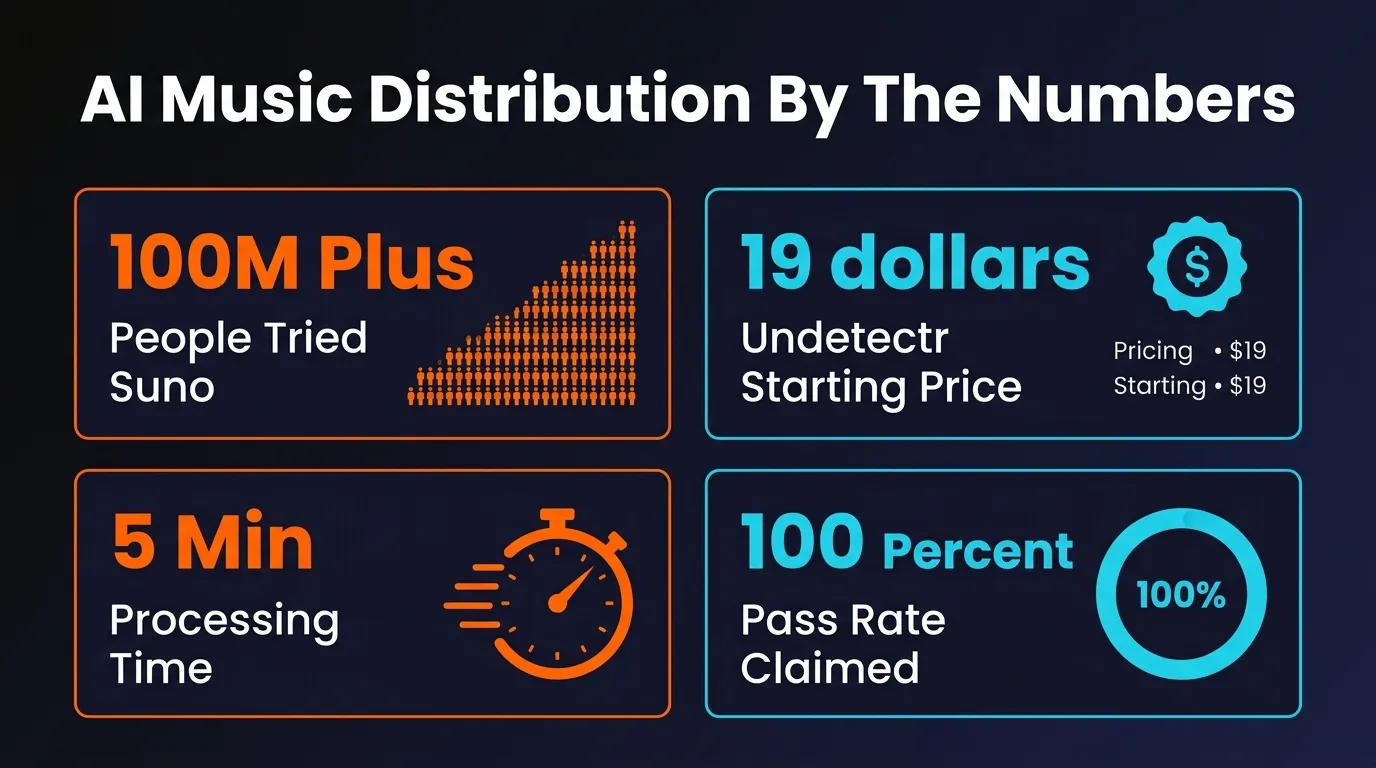
- Over 100 million people have used Suno to create music, but Spotify has pulled 75+ million AI-generated tracks — raw AI output almost always gets caught
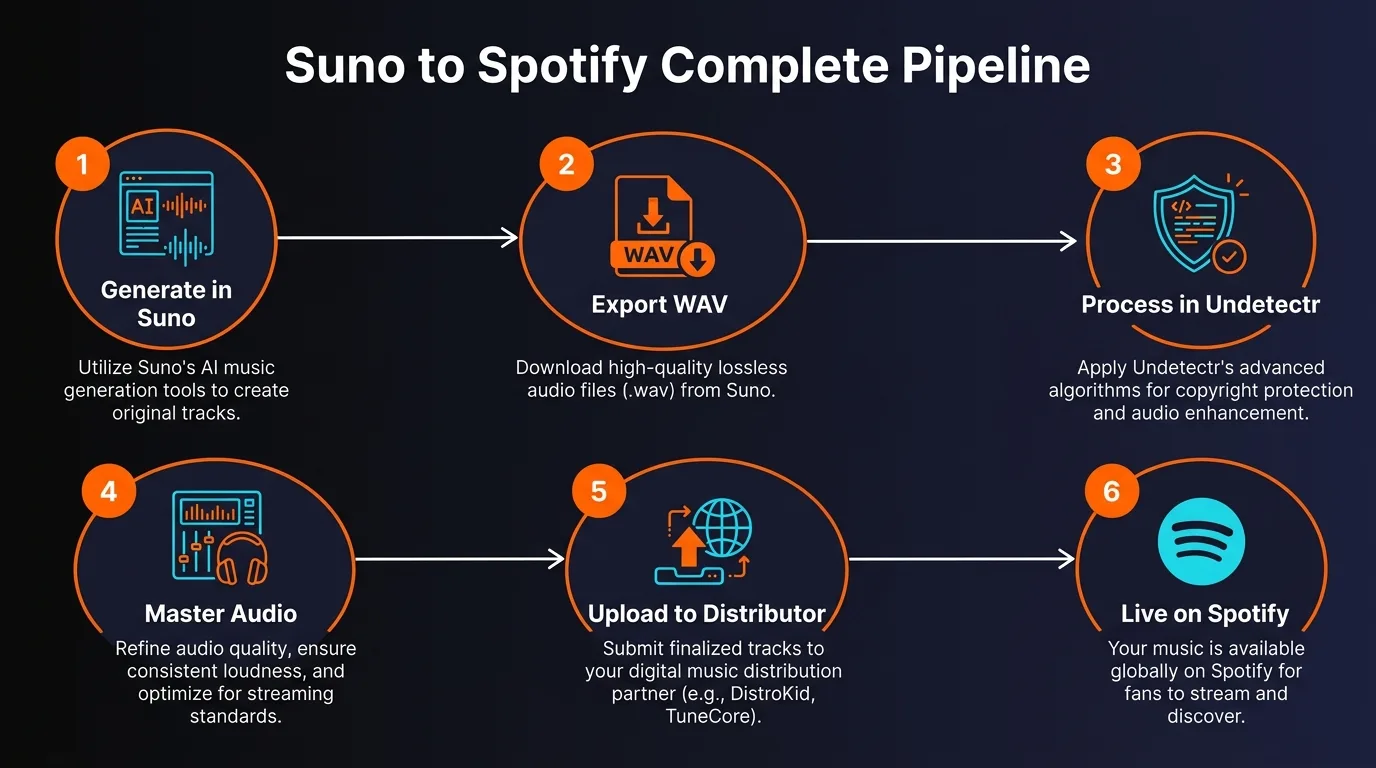
- The 6-step pipeline: Generate, Remove Artifacts, Master, Choose Distributor, Upload Metadata, Pitch and Release
- Always export from Suno/Udio as WAV at 44.1kHz/24-bit — never distribute MP3 files
- Undetectr removes spectral fingerprints, timing patterns, and metadata markers in under a minute — starting at $19 one-time
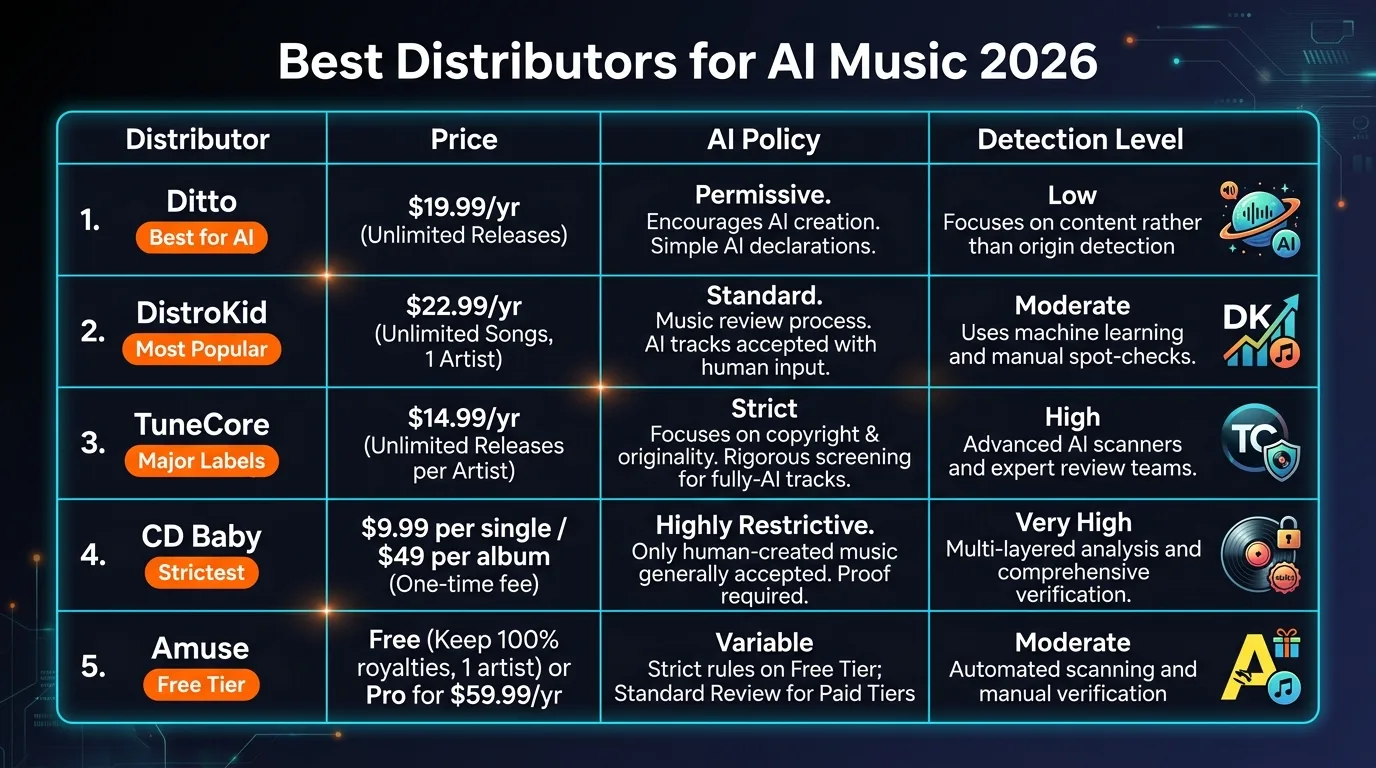
- Distributor ranking by AI-friendliness: Ditto (most permissive) > DistroKid > TuneCore > CD Baby (strictest)
- Set your release date 4 weeks out to qualify for Spotify editorial playlist pitching
Table of Contents
- Why Your AI Tracks Keep Getting Rejected
- Step 1: Generate Your Track in Suno or Udio
- Step 2: Remove AI Artifacts with Undetectr
- Step 3: Master Your Audio for Streaming
- Step 4: Choose the Right Distributor
- Step 5: Upload with Proper Metadata
- Step 6: Pitch to Playlists and Release
- 7 Common Mistakes That Get Tracks Pulled
- Frequently Asked Questions
- Final Word

Why Your AI Tracks Keep Getting Rejected
Let us start with the uncomfortable truth. Over 100 million people have tried Suno. Two million are paying subscribers. The platform generates $300 million in annual recurring revenue. And yet the vast majority of those creators hit the same wall the moment they try to get their music onto Spotify, Apple Music, or any major streaming platform. The Suno watermark remover approach is to strip these signals before they reach the scanner.
Spotify has removed over 75 million AI-generated tracks from its catalog. Deezer has flagged and tagged 13.4 million. These are not random sweeps. Platforms have invested heavily in detection technology that analyzes your audio at a level most creators do not even know exists.
Here is what detection systems actually look for: This is the Suno watermark signal at the heart of every detection check.
Spectral Fingerprints
Every AI generator leaves microscopic signatures in the frequency domain. Suno tracks have characteristic patterns in the 2-8 kHz range. Udio has distinct inpainting artifacts visible in spectrograms. Detection systems analyze 72+ audio features including MFCCs, spectral contrast, and chroma features.
Timing Precision
Human musicians have micro-timing variations in every note, every beat. AI-generated music is unnaturally precise. Detection algorithms measure this temporal regularity and flag tracks that lack organic rhythmic drift.
Hidden Metadata
AI tools embed hidden tags, C2PA cryptographic signatures, and SynthID watermarks directly into audio waveforms. Some survive compression, format conversion, and basic processing. Distributors audit this metadata layer before your track ever reaches a streaming platform.
The detection accuracy is staggering. Deezer claims 100% detection on fully AI-generated Suno and Udio tracks. IRCAM Amplify reports 99% accuracy while scanning over 250,000 tracks per hour. The multi-model ensemble detector authio achieves 99.42% accuracy with a false positive rate under 0.6%.
This is not a problem you can ignore or hope goes away. But it is a problem with a clear solution. This guide walks you through the exact 6-step process to go from an AI-generated track to a live release on Spotify — properly, reliably, and without getting flagged.
Step 1: Generate Your Track in Suno or Udio
Everything starts with your source material. Both Suno and Udio produce remarkable music in 2026, but how you generate and export your track matters more than most creators realize.
Using Suno V5
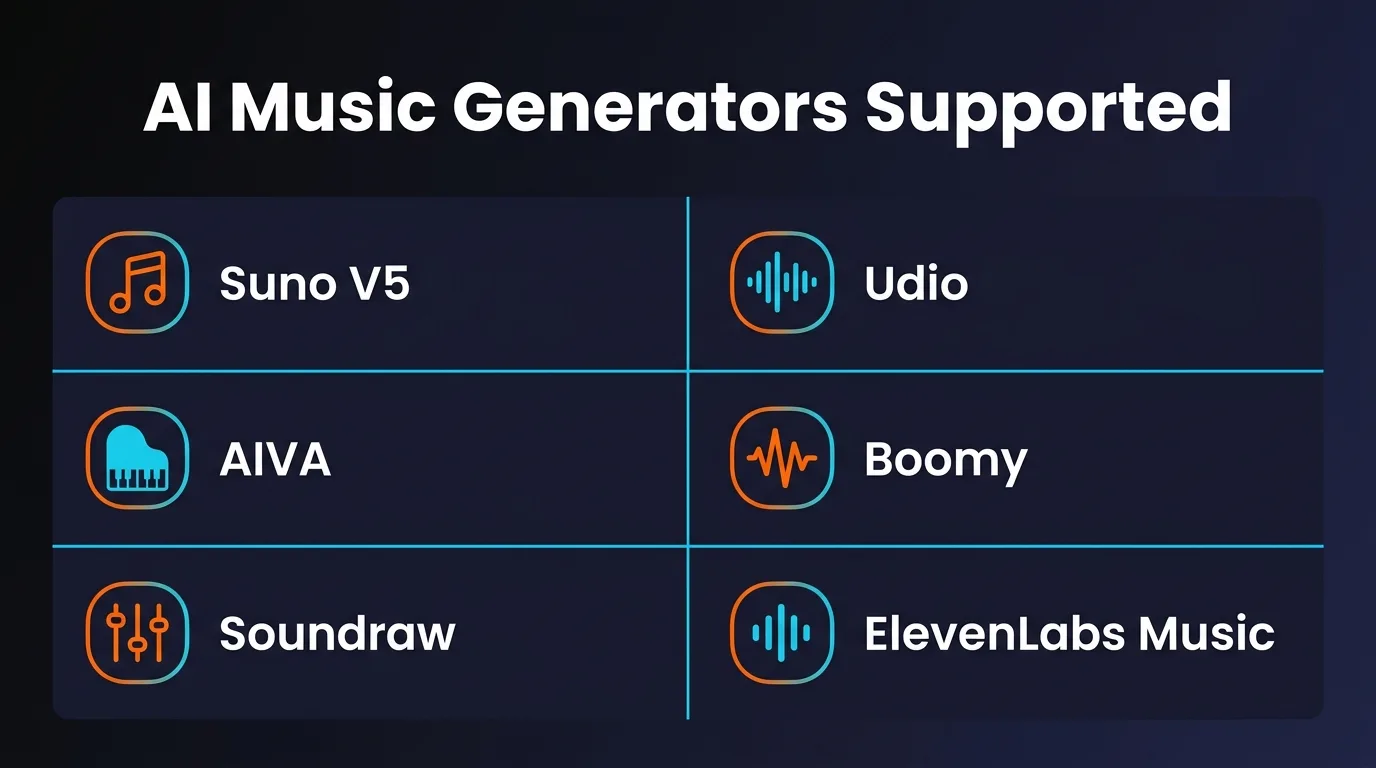
Suno V5 is the current market leader and the most capable AI music generator available. It outputs audio at 44.1kHz (a massive jump from 24kHz in V3), supports generative stems with up to 12 individual tracks, offers vocal personas, and includes a built-in studio DAW for editing. Processing is 10x faster than previous versions.
When generating your track, spend time refining your prompt. Be specific about genre, mood, tempo, instrumentation, and vocal style. The more directed your prompt, the more intentional the output — and the further it moves from sounding like generic AI filler that platforms flag en masse.
Export Settings (Critical)
- Format: WAV (never MP3 — you lose data that cannot be recovered)
- Sample Rate: 44.1kHz (CD quality, matches Spotify's standard)
- Bit Depth: 24-bit (gives mastering tools more headroom)
- Stems: Export individual stems if available — useful for targeted processing
Using Udio
Udio remains a strong alternative to Suno, particularly for certain genres and vocal styles. However, there is an important limitation: Udio disabled its download functionality in October 2025 and has not restored it as of March 2026. If you have existing Udio tracks already downloaded, they can absolutely be processed and distributed. For new creations, Suno V5 is the more practical choice right now.
If you do have Udio exports, the same rules apply: WAV format, 44.1kHz, 24-bit. Udio tracks have different detection signatures than Suno — distinct inpainting artifacts and a characteristically flat noise floor — but both are equally detectable by modern screening systems.
Step 2: Remove AI Artifacts with Undetectr
This is the step that separates tracks that get distributed from tracks that get rejected. Raw AI output — no matter how good it sounds to your ears — contains invisible signatures that detection systems are specifically built to find.
Undetectr is the leading artifact removal tool built specifically for this problem. It is browser-based, requires no installation, and processes tracks in under a minute. Here is exactly what it does to your audio:
Spectral Smoothing
Removes unnatural frequency spikes and robotic harmonic patterns that AI generators embed in the 2-8 kHz range.
Timing Humanization
Adds micro-timing variations to beats and transients, replicating the natural drift that human performers exhibit.
Pitch Variation
Introduces organic wobble to vocals and instruments. Real singers naturally drift in pitch — AI vocals are unnervingly consistent.
Dynamic Range Restoration
AI generators compress dynamics unnaturally. Undetectr restores organic loudness variation across the track.
Metadata Cleanup
Strips AI-specific tags, C2PA signatures, SynthID watermark traces, and hidden binary markers that distributors scan for.
The Undetectr Workflow
Upload — Drop your WAV, MP3, or FLAC file into the browser interface. No account required for basic processing.
Analyze and Remove — The engine identifies generator-specific fingerprints and applies all five processing stages. Takes under one minute.
Download — Get your cleaned track in your preferred format. Ready for mastering and distribution.
Undetectr supports tracks from Suno, Udio, AIVA, Boomy, Soundraw, ElevenLabs Music, Stable Audio, Riffusion, and any other AI platform. Pricing starts at a one-time payment of $19 — no subscriptions, no per-track fees, no recurring charges. There is also a lifetime plan with unlimited processing.
Your track sounds great. Now make sure it passes detection.
Remove AI artifacts from your track in under a minute. No installation, no technical knowledge required.
Remove AI Artifacts Now at Undetectr.com →Step 3: Master Your Audio for Streaming
Mastering is the final polish that makes your track competitive on streaming platforms. It is not optional. Unmastered tracks sound thin and quiet next to professionally mastered releases, and streaming platforms normalize loudness in ways that can crush unmastered audio.
Target Loudness: -14 LUFS
Spotify normalizes all tracks to approximately -14 LUFS (Loudness Units Full Scale) integrated loudness. If your track is mastered louder than this, Spotify turns it down — and the dynamic compression from overloud mastering becomes audible. If it is too quiet, your track sounds weak compared to everything else in a playlist.
The sweet spot is -14 LUFS integrated, with peaks no higher than -1 dBTP (decibels True Peak). This gives Spotify nothing to adjust while preserving your dynamics.
Mastering Options
Our recommendation: use Undetectr's built-in mastering if you are starting from an AI-generated track. It handles artifact removal and mastering in a single pipeline, normalizing to -14 LUFS while applying intelligent frequency balancing, stereo image adjustment for mono compatibility, and smart compression. This eliminates the need for a separate mastering step entirely.
If you want a second pass from a dedicated mastering service, LANDR or eMastered both work well. Just make sure you run Undetectr before the mastering service — artifact removal should always come first, mastering second.
Step 4: Choose the Right Distributor
Not all distributors treat AI music the same way. Some embrace it, some tolerate it with conditions, and some will reject it outright. Choosing the wrong distributor wastes your time and can result in retroactive takedowns even months after your track goes live.
Here is the 2026 distributor landscape ranked by AI-friendliness, from most permissive to strictest:
Our Recommendation
For most AI music creators, Ditto Music is the safest starting point. Their policy explicitly does not prohibit AI-created music, and their focus is on whether you hold the legal rights to the content — not how it was made.
DistroKid is the most popular distributor overall and works fine for AI-assisted tracks, but understand the risks: they screen every upload with automated detection, they share flagging data with Spotify and Apple Music, and they enforce policies retroactively. A track that passed screening today can be removed during a future policy update. This is why running your track through Undetectr first is not optional — it is essential.
Avoid CD Baby for any AI-generated content. Their policy is the most restrictive among major distributors and they have the lowest tolerance for AI involvement of any kind.
Critical Warning: Cross-Platform Intelligence Sharing
When Spotify, Apple Music, or Deezer flags a track, that information flows back to the distributor. DistroKid participates in this cross-platform intelligence sharing. A track pulled from one platform can trigger scrutiny on all platforms where it was distributed — and DistroKid applies policy changes retroactively. Process your tracks before uploading. Do not learn this lesson the hard way.
Choosing a distributor? Make sure your track passes detection first.
Every distributor screens uploads. Remove spectral fingerprints, timing artifacts, and hidden metadata before you upload.
Try Undetectr →Step 5: Upload with Proper Metadata
Metadata errors cause more rejections than most creators realize. Distributors and streaming platforms use metadata fields not just for organization but as additional signals during content screening. Getting this right takes five minutes and prevents entirely avoidable rejections.
Required Metadata Checklist
- Track Title — Clean, no SEO keywords stuffed into the title. Spotify flags tracks with keyword spam.
- Artist Name — Use a consistent artist name across all releases. Build a catalog, not one-offs.
- Album / Single Name — If releasing a single, the album name typically matches the track title.
- Genre and Subgenre — Be accurate. Misclassified genres trigger editorial flags.
- ISRC Code — Most distributors generate these automatically. If not, register through your local ISRC agency. Never reuse codes across tracks.
- UPC / EAN Code — For albums and EPs. Your distributor typically handles this.
- Songwriter / Composer Credits — List yourself as the songwriter. With AI-assisted music, you are the creative director.
- Release Date — Set this 4 weeks in the future (more on this in Step 6).
- Copyright Info — Year and rights holder. Example: 2026 Your Name.
- Cover Art — 3000 x 3000 pixels, JPG or PNG, no blurry images, no copyrighted material, no misleading artist photos.
Cover Art Requirements
Streaming platforms reject cover art that is low resolution, contains text that does not match the track metadata, includes URLs or social media handles, or uses copyrighted imagery. Your cover art must be 3000 x 3000 pixels minimum and should be original or properly licensed.
AI image generators like Midjourney, DALL-E, or Stable Diffusion work perfectly for creating original cover art. Just make sure the output meets the resolution and content requirements. Many distributors also offer built-in cover art creation tools.
Step 6: Pitch to Playlists and Release
This is where strategy separates amateurs from artists who actually build listener bases. How and when you release matters enormously.
Set Your Release Date 4 Weeks Out
Do not release immediately. Set your release date at least 4 weeks from today. Here is why:
- Spotify editorial playlist pitching requires your track to be submitted at least 7 days before release. The editorial team receives thousands of pitches daily — giving them more lead time increases your chances.
- Pre-save campaigns build momentum before your track goes live. Pre-saves count as Day 1 streams, which signals algorithmic popularity to Spotify's Discovery engine.
- Marketing preparation — four weeks gives you time to create social content, reach out to playlist curators, and coordinate any promotional efforts.
Pitch to Spotify Playlists
Once your distributor delivers your track to Spotify (typically 2-5 business days after upload), access Spotify for Artists to pitch your unreleased track to editorial playlists. This is the single highest-impact action you can take for organic discovery.
Pitching Best Practices
- Write a compelling pitch description — explain the story, mood, and what makes the track unique
- Select accurate genres and moods. Spotify curators filter by these tags
- Mention instruments, cultural influences, and target listener demographics
- Do not mention AI generation in the pitch. Focus on the music itself
- Pitch only one track per release to editorial — pick your strongest
Beyond Spotify: Multi-Platform Strategy
Your distributor will deliver your track to multiple platforms simultaneously. Make sure you are also claiming your artist profiles on Apple Music for Artists, Amazon Music for Artists, and YouTube Music. Each platform has its own algorithmic discovery system, and optimizing for all of them multiplies your reach.
For YouTube specifically, be aware that Content ID has evolved beyond simple waveform matching to include AI pattern recognition. It now analyzes melodic patterns, harmonic progressions, rhythmic structures, and timbral characteristics. This is another reason why artifact removal through Undetectr is critical — YouTube's systems can flag AI music for Content ID claims even when it is entirely original.
7 Common Mistakes That Get Tracks Pulled
We have seen these errors derail releases repeatedly. Avoid every single one.
1. Uploading MP3 Instead of WAV
MP3 compression introduces artifacts and loses data permanently. It also gives artifact removal and mastering tools less information to work with. Always start from WAV at 44.1kHz/24-bit.
2. Skipping Artifact Removal
Detection systems are too accurate in 2026 to rely on luck. Deezer claims 100% detection on raw Suno and Udio output. Processing through Undetectr is not optional — it is the single most important step in this pipeline.
3. Skipping Mastering
Unmastered tracks sound amateur on streaming platforms and can trigger additional scrutiny. A track that is too quiet or has unbalanced frequencies stands out in all the wrong ways.
4. Wrong Metadata
Inconsistent artist names, missing songwriter credits, incorrect genre tags, and low-resolution cover art all trigger flags. Fill in every field accurately.
5. Mass-Uploading Similar Tracks
Spotify's spam filter specifically targets mass uploads, duplicates, and artificially short tracks. Quality over quantity. Build a real catalog with intention.
6. Choosing the Wrong Distributor
Uploading AI-generated music through CD Baby is almost guaranteed rejection. Match your content to a distributor whose policy aligns with how your music was created.
7. Releasing Immediately
Skipping the 4-week lead time means missing Spotify editorial playlist pitching entirely. This is the highest-impact organic discovery channel available to independent artists. Do not waste it.
Frequently Asked Questions
Can you legally put AI-generated music on Spotify?
Yes. Spotify allows AI-assisted music on the platform. However, fully AI-generated spam tracks are being actively removed — Spotify has pulled over 75 million such tracks. The key is that your music must demonstrate genuine creative intent, pass automated detection screening, and be uploaded through a distributor that permits AI-assisted content. Distributors like Ditto Music and DistroKid allow it with proper disclosure.
Why does DistroKid reject AI music?
DistroKid runs automated AI screening on every upload using spectral analysis, metadata inspection, and pattern recognition. If your track contains detectable AI artifacts — spectral fingerprints from Suno or Udio, machine-precise timing, or embedded metadata markers — it will be flagged. DistroKid also participates in cross-platform intelligence sharing with Spotify, Apple Music, and Deezer, so a flag on one platform can trigger scrutiny everywhere.
What is the best audio format for distributing AI music?
Always export as WAV at 44.1kHz sample rate and 24-bit depth. Never use MP3 for distribution — it introduces compression artifacts and loses audio data that cannot be recovered. WAV preserves the full quality of your track and gives mastering tools and artifact removal software the most data to work with. FLAC is also acceptable as a lossless format.
How long does it take to get AI music on Spotify?
The technical process from generation to upload takes about 30 minutes. However, most distributors take 2 to 5 business days to deliver your track to Spotify. We recommend setting your release date 4 weeks out so you can pitch to Spotify editorial playlists through Spotify for Artists, which requires at least 7 days advance notice. Total realistic timeline: 4 to 5 weeks from creation to live on Spotify.
What is Undetectr and how does it help with Spotify distribution?
Undetectr is a browser-based audio processing tool that removes the hidden artifacts AI music generators leave behind. It performs spectral smoothing, timing humanization, pitch variation, dynamic range restoration, and metadata cleanup. These are the exact signals that Spotify, DistroKid, and other platforms use to detect and reject AI-generated tracks. Processing takes under a minute and requires no technical knowledge. Pricing starts at a one-time payment of $19.
Can Spotify detect Suno V5 music?
Yes. Suno tracks are among the easiest for detection systems to catch. Suno embeds both intentional watermarks and architecture-specific spectral signatures, particularly in the 2 to 8 kHz frequency range. Detection tools like Deezer's system claim 100% accuracy on fully AI-generated Suno tracks. Suno V5 improved audio quality to 44.1kHz, but the underlying spectral fingerprints remain detectable without proper processing.
Final Word
The gap between creating AI music and actually getting it distributed has never been wider — and never been more solvable. In 2026, platforms are spending millions on detection technology. Deezer has filed patents. IRCAM Amplify scans a quarter-million tracks per hour. Spotify has purged 75 million tracks and is not slowing down.
But the creators who follow the pipeline — generate properly, remove artifacts, master to spec, choose the right distributor, upload clean metadata, and pitch with strategy — are getting their music onto every major platform and building real listener bases. The technology exists to bridge the gap. The process is straightforward. It just requires doing each step correctly.
Here is the complete pipeline one more time:
- Generate in Suno V5 or Udio. Export as WAV at 44.1kHz/24-bit.
- Process through Undetectr to remove spectral fingerprints, timing artifacts, and metadata markers.
- Master to -14 LUFS integrated loudness. Use Undetectr mastering or a dedicated service.
- Distribute through Ditto (safest) or DistroKid (with disclosure).
- Metadata — fill every field. ISRC codes, songwriter credits, 3000x3000 cover art.
- Release in 4 weeks. Pitch to Spotify editorial playlists. Promote across social.
That is the entire system. Six steps. Most of it takes under an hour. The 4-week wait is for strategy, not for processing. Your music deserves to be heard by real listeners on real platforms. The tools to make that happen are available right now.
Your music deserves to be heard.
Remove AI artifacts, master for streaming, and distribute with confidence. One tool, one-time payment, unlimited processing.
Start with Undetectr.com →Written by Eddie Mathews for PopularAiTools.ai. Eddie covers AI music tools, audio production, and the evolving intersection of artificial intelligence and music distribution. Published March 27, 2026. Last updated March 27, 2026.
Recommended AI Tools
played.fm
Sell your music and keep 100%: played.fm is a direct-to-fan store + sync marketplace with 0% commission, no gatekeepers, and no bans — a strong fit for AI musicians.
View Review →OpenCode
The open-source AI coding agent: terminal-first TUI, 75+ model providers, LSP context, subagents, and privacy-first design. Free software, ~180K GitHub stars.
View Review →Exa
The neural web search API for AI agents: embeddings-based retrieval, cited highlights, sub-180ms latency, and an MCP server. 20,000 free requests/month.
View Review →Google Antigravity
Google's agent-first IDE: run a fleet of AI agents from a Manager surface, on Gemini 3 Pro, Claude Sonnet 4.5, or OpenAI models. Free in public preview.
View Review →