Your AI Music Is Getting Rejected by DistroKid and Spotify — Here Is How to Fix It

AI Creative Tools Specialist
Key Takeaways
- Spotify has removed over 75 million AI-generated tracks and Deezer tagged 13.4 million more — distributors are running automated detection on every single upload
- AI detectors analyze 72 audio features including MFCCs, spectral contrast, and timing patterns — simply adding reverb or EQ does not fool them
- Suno tracks leave characteristic fingerprints in the 2-8 kHz frequency range that detection systems specifically target
- Cross-platform intelligence sharing means a flag on Spotify triggers scrutiny on every platform where your track was distributed
- Undetectr is one of only two tools left that removes AI spectral artifacts, timing signatures, and metadata markers — Spectrahertz shut down March 10, 2026
- One-time payment from $19 — not a subscription — with integrated mastering at -14 LUFS
Table of Contents
- The Problem: Why Your AI Music Keeps Getting Rejected
- How AI Music Detection Actually Works
- Every Major Distributor's AI Policy in 2026
- Why DAW Post-Processing Is Not Enough Anymore
- How to Actually Fix It: Removing AI Fingerprints
- Tool Comparison: What Is Left in 2026
- Pros and Cons
- Frequently Asked Questions
- Final Verdict

You spent hours crafting the perfect prompt. The track sounds incredible — radio-ready, emotionally resonant, exactly what you envisioned. You upload it to DistroKid, fill out the metadata, hit submit, and wait.
Then you get the email. Rejected.
No detailed explanation. No appeal process that actually works. Just a vague reference to content policy violations and a dead end. Your track never reaches Spotify. It never reaches Apple Music. It sits in a rejection queue while the algorithm you spent months building an audience around goes silent.
If this sounds familiar, you are not alone. Thousands of creators using Suno, Udio, Boomy, and other AI music generators are hitting the same wall in 2026. The platforms got smarter. The detectors got better. And the window for uploading raw AI output and getting away with it has closed. A purpose-built Suno watermark remover handles this cleanly before submission.
But the situation is not hopeless. There is a technical reason your tracks get flagged, and there is a specific way to fix it. This article breaks down exactly what is happening and what to do about it.
The Problem: Why Your AI Music Keeps Getting Rejected
The scale of what happened is staggering. Spotify removed over 75 million AI-generated tracks in a single sweep. Deezer detected and tagged 13.4 million AI tracks on its platform. These were not manual reviews — they were automated purges powered by detection systems that scan every upload before it goes live.
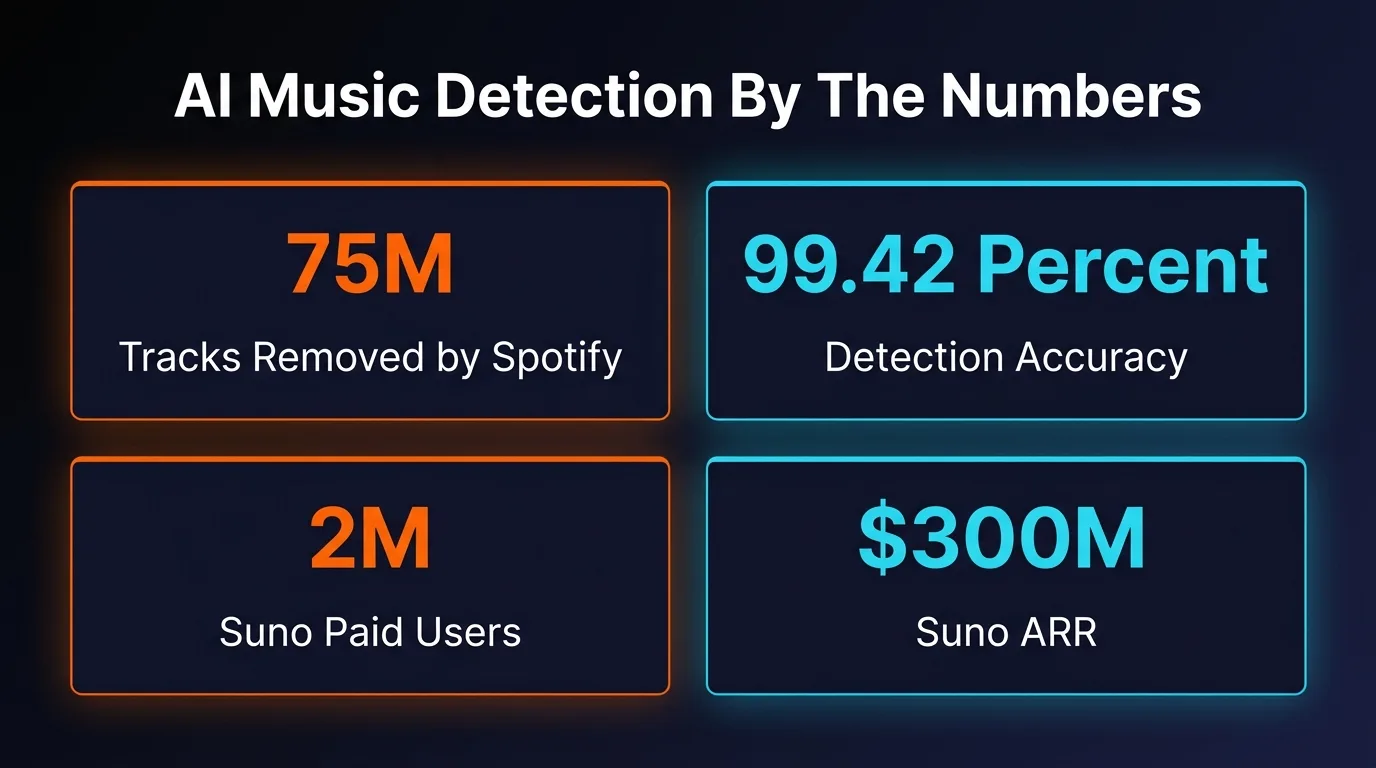
The timing matters. Suno now has 2 million paid subscribers and a $300 million annual run rate. Over 100 million people have tried the platform. That flood of AI-generated content forced streaming platforms to respond, and they did — aggressively.
Here is the part most creators miss: DistroKid, TuneCore, and CD Baby all run automated AI detection on every single upload before it reaches any streaming platform. Your track does not get rejected by Spotify. It gets rejected by your distributor's screening layer before Spotify ever sees it.
And it gets worse. Cross-platform intelligence sharing means that when Spotify, Apple Music, or Deezer flags a track, that information flows back to the distributor. DistroKid participates in this intelligence sharing. A track pulled from one platform can trigger scrutiny on every platform where it was distributed. DistroKid also applies policy changes retroactively — tracks that were accepted six months ago can be flagged and removed during routine sweeps.
The rejection is not random. It is systematic. And understanding what the detection systems actually look for is the first step toward fixing it. All of these collectively form the Suno watermark that distributors look for.
Stop getting rejected. Remove AI fingerprints before you upload.
Try Undetectr →How AI Music Detection Actually Works
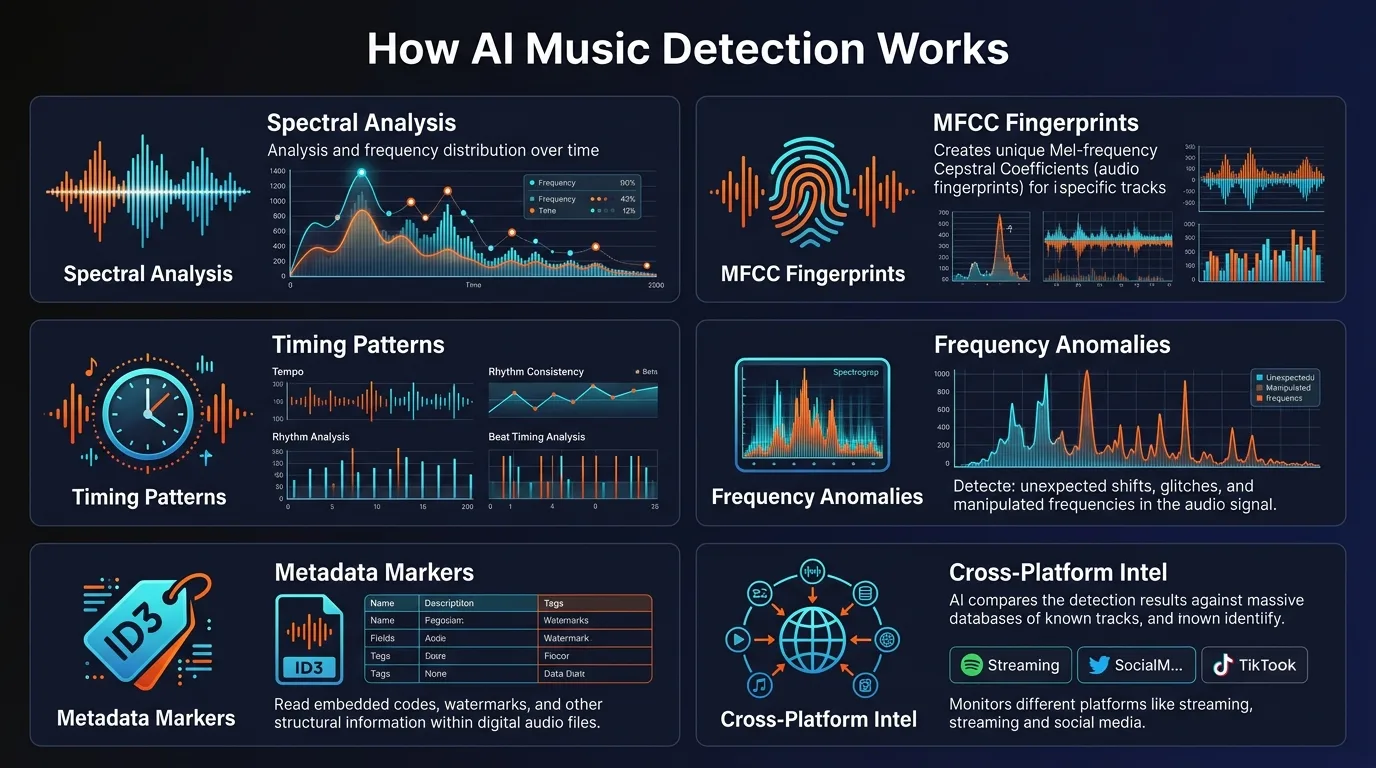
AI music detection in 2026 is not guesswork. It is a multi-layered forensic analysis that examines your track across dozens of dimensions simultaneously. Understanding each layer explains why surface-level fixes fail.
Layer 1: Spectral Analysis
Every AI music generator leaves microscopic fingerprints in the frequency domain. Research presented at ISMIR 2025 demonstrated that deconvolution layers — a core component in neural audio generators — produce systematic spectral peaks at predictable frequency intervals. Detection systems analyze 72 audio features including MFCCs (Mel-Frequency Cepstral Coefficients), spectral contrast, chroma features, and rhythmic patterns.
Suno tracks are among the easiest to catch. They leave characteristic frequency distribution patterns in the 2-8 kHz range — a region where the human ear is most sensitive and where detection algorithms focus their analysis. Suno embeds both intentional identification markers and architecture-specific spectral signatures that persist through compression and format conversion.
Udio tracks have a different fingerprint — identifiable inpainting artifacts, characteristically flat noise floors, and stereo field patterns more uniform than organic recordings. Each generator leaves its own trail.
Layer 2: Timing and Rhythm Analysis
Human musicians do not play in perfect time. A real drummer drifts by a few milliseconds per beat. A vocalist slides into notes rather than hitting them with machine precision. AI generators produce unnaturally perfect timing — every hit, every note onset, every transient lands exactly on the grid. Detection systems measure these micro-timing variations and flag tracks that are too precise to be human.
AI-generated vocals also have unnervingly consistent pitch. Real singers naturally drift by tiny amounts — it is what makes a vocal performance feel alive. AI vocals hit every note dead-center, and that consistency is a signal detectors have learned to read.
Layer 3: Metadata and Watermarking
Beyond the audio itself, detection systems read hidden data tags, C2PA cryptographic signatures, SynthID watermarks, and encoding characteristics baked into the file. Suno uses proprietary, inaudible watermarking technology that embeds multiple identification layers. Google's SynthID — used by the Lyria music model — survives compression, format conversion, and basic audio processing.
Layer 4: Ensemble Detection
The most advanced detection systems do not rely on a single model. Authio uses 12 specialized neural networks in ensemble to achieve 99.42% detection accuracy with a false positive rate under 0.6%. IRCAM Amplify claims 99% accuracy and can scan over 250,000 tracks per hour. Deezer claims 100% detection on fully AI-generated Suno and Udio tracks and has filed two patents on its detection technology.
These are the systems your track has to pass. Not one of them — all of them. Because distributors and platforms share intelligence.
Every Major Distributor's AI Policy in 2026
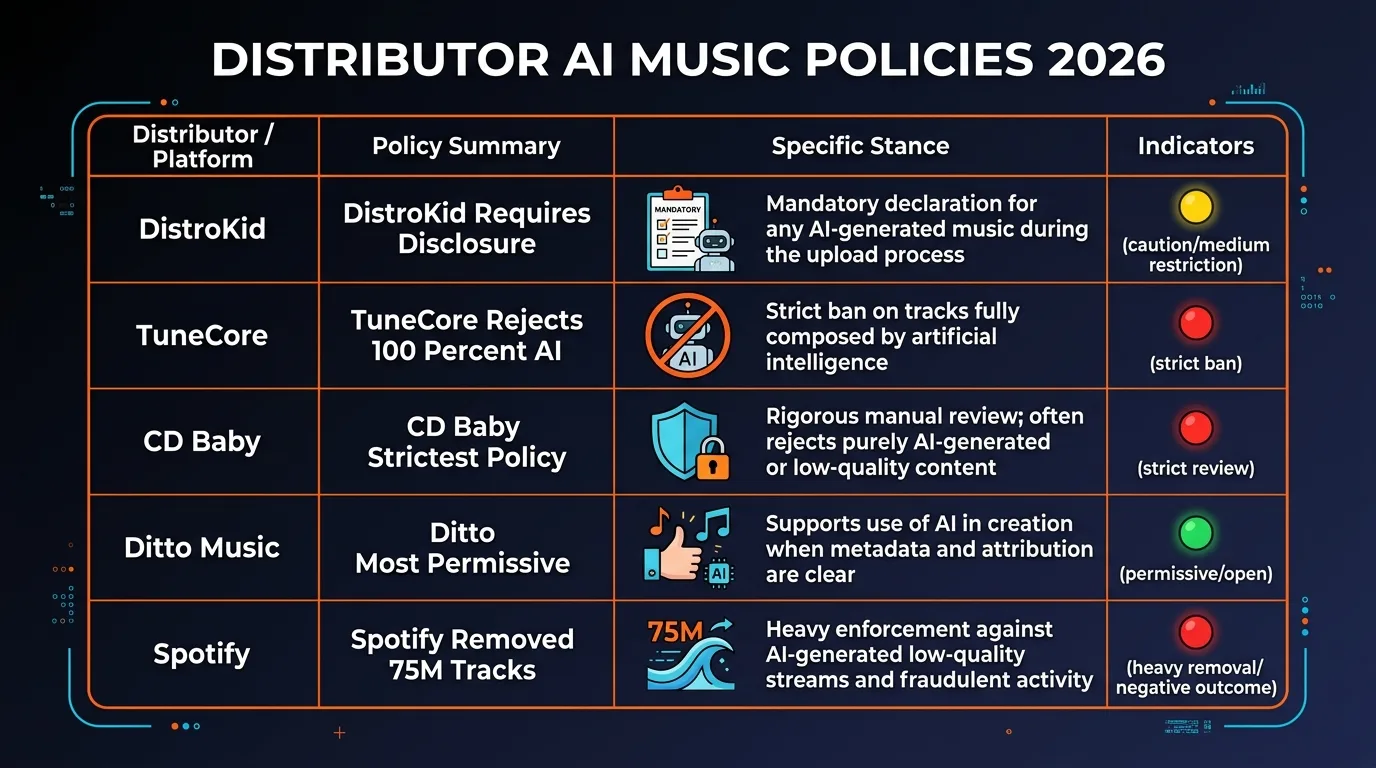
Each distributor handles AI-generated music differently. Some are more permissive than others, but all of them screen uploads. Here is the current landscape.
The takeaway: even the most permissive distributor cannot protect you from DSP-level detection. Getting past DistroKid is only half the battle. Your track also has to survive Spotify's scanning, Apple Music's algorithms, and the cross-platform intelligence network they all feed into.
Why DAW Post-Processing Is Not Enough Anymore
The advice you see in Reddit threads and YouTube tutorials — "just import it into Ableton, add some EQ and reverb, re-export" — worked in 2024. It does not work now.
Here is why: adding reverb, compression, or EQ changes the surface of the audio, but it does not remove the underlying spectral fingerprints. Those signatures are embedded at the architectural level of the AI model. Suno's deconvolution layers produce systematic spectral peaks at predictable frequency intervals. EQ can boost or cut frequencies, but it cannot surgically remove the patterns that detection algorithms are trained to find.
Timing humanization is another area where manual DAW work falls short. You can nudge notes off-grid in your DAW, but AI detectors analyze micro-timing variations across the entire track — not just where individual notes land. The pattern of timing precision across a full three-minute track is itself a signal.
Metadata is the final gap. Even if you strip the obvious tags, watermarks like SynthID are embedded in the audio waveform itself. They survive format conversion, compression, and standard audio processing. You cannot EQ a watermark out of existence.
Manual DAW processing can take hours per track and still leave detectable artifacts. It also requires production knowledge that most AI music creators — who were drawn to tools like Suno specifically because they are not audio engineers — do not have.
How to Actually Fix It: Removing AI Fingerprints
Fixing the problem requires addressing all the layers that detection systems analyze — spectral fingerprints, timing signatures, metadata markers, and audio characteristics — simultaneously. That is what Undetectr was built to do.
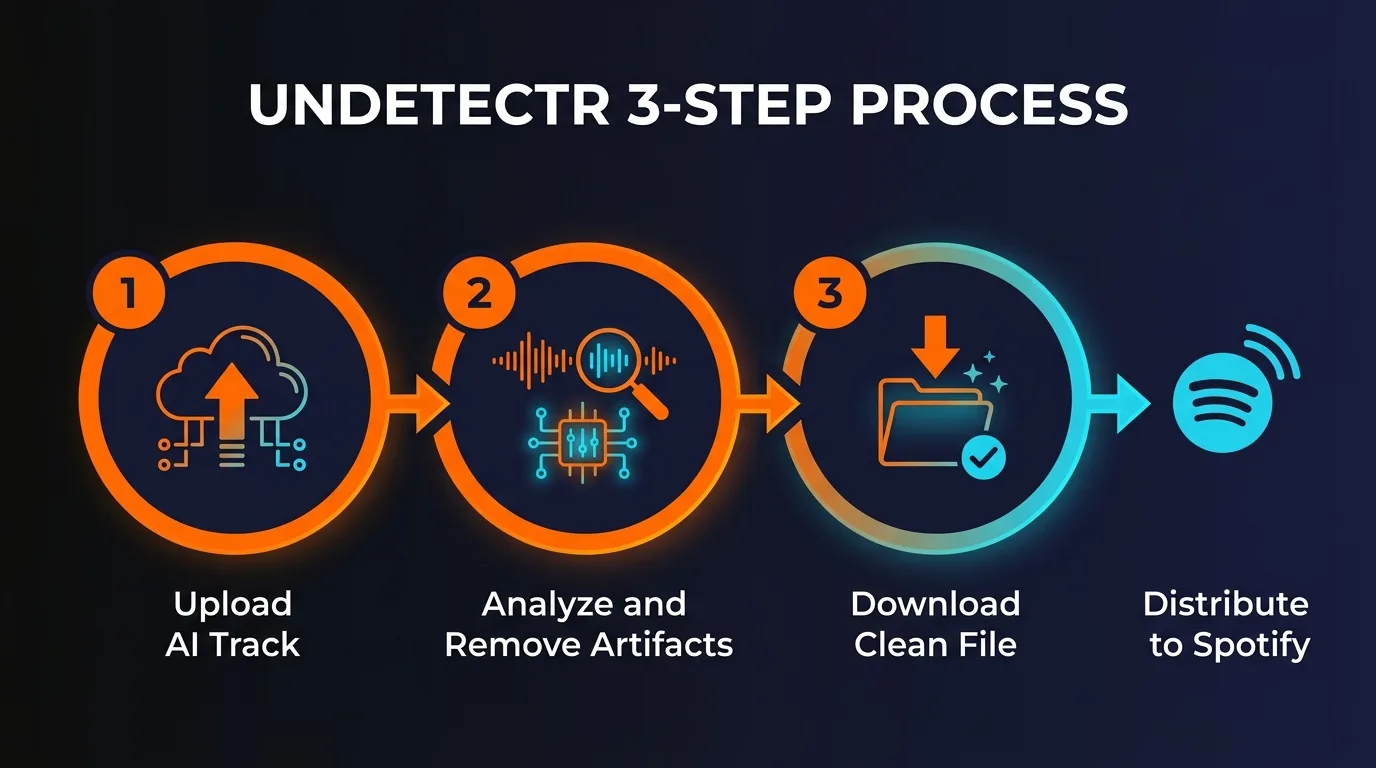
Undetectr is a browser-based audio processing tool that analyzes and modifies stereo music files to remove the artifacts associated with AI generation. It works in three steps.
Step 1: Upload
Drop an MP3, WAV, or FLAC file into the browser-based interface. No software to install, no CLI tools, no technical knowledge required. Processing takes under a minute.
Step 2: Analyze and Remove
The engine performs spectral smoothing (removes unnatural frequency spikes), timing humanization (adds micro-timing variations to beats and transients), pitch variation (introduces organic wobble), dynamic range restoration, and metadata cleanup — all automatically.
Step 3: Download
Get your cleaned track in MP3, WAV, or FLAC format. The file is ready to upload to DistroKid, TuneCore, CD Baby, Ditto, or any other distributor.
What the Engine Targets
Spectral smoothing removes the unnatural frequency spikes and robotic harmonic patterns that detectors flag in the 2-8 kHz range and beyond. This is not EQ — it is targeted surgical removal of the specific spectral signatures each AI generator leaves behind.
Timing humanization adds micro-timing variations to beats and transients. Real musicians do not play in perfect time, and the engine reintroduces the subtle imperfections that make a track sound human-performed.
Pitch variation introduces organic wobble to vocals and instruments. Real vocalists naturally drift in pitch by tiny amounts — AI vocals are unnervingly consistent. The engine addresses that consistency.
Dynamic range restoration corrects the unnatural compression that AI generators apply. And metadata cleanup strips AI-specific tags, watermark traces, and hidden binary markers from the file.
Integrated Mastering
Undetectr also includes mastering capabilities. Album-level normalization at -14 LUFS matches Spotify's loudness standard while preserving dynamic range. It handles frequency balancing across lows, mids, and highs so your track translates across all playback systems — from studio monitors to earbuds. Stereo image adjustment maintains mono compatibility for mobile and Bluetooth playback. Clean ISRC, UPC, and track metadata tags ensure distributors do not flag or reject uploads for formatting issues.
Supported Generators and Platforms
Undetectr works with tracks from Suno (including V5), Udio, AIVA, Boomy, Soundraw, ElevenLabs Music, Stable Audio, Riffusion, and any other AI music platform. Processed tracks are designed to pass detection on DistroKid, TuneCore, CD Baby, Ditto, Spotify, Apple Music, Amazon Music, YouTube Music, Deezer, Tidal, and YouTube Content ID.
Pricing
One-time payment starting from $19. No monthly fees, no annual renewals, no per-track limits on the lifetime plan. The lifetime option includes unlimited processing and every future update at no extra cost. In a market where most audio tools charge $10-30 per month, paying once and owning it forever is a significant advantage — especially if you are processing tracks regularly.
Process your first track and see the difference for yourself.
Process your first track free at Undetectr.com →Tool Comparison: What Is Left in 2026
The AI music artifact removal space has consolidated rapidly. Spectrahertz — which offered professional AI audio restoration, watermark detection, and artifact removal — permanently shut down on March 10, 2026. The open-source ai-audio-fingerprint-remover on GitHub was deprecated in December 2025. That leaves exactly two dedicated tools.
Undetectr differentiates on comprehensiveness. While TrackWasher focuses on phase decorrelation, stereo widening, and harmonic enrichment, Undetectr addresses all five detection layers — spectral, timing, pitch, dynamic range, and metadata. The 28-post blog also means you get ongoing education about the evolving detection landscape, not just a tool.
Pros and Cons
What We Like
- Addresses all five detection layers — not just spectral
- One-time payment from $19 instead of monthly subscription
- Entirely browser-based — no software install, no CLI
- Supports every major AI generator (Suno, Udio, AIVA, Boomy, Soundraw, ElevenLabs, Stable Audio)
- Integrated mastering at -14 LUFS saves a separate step
- Processing takes under a minute per track
- 28-post blog provides ongoing guidance on the evolving landscape
What Could Be Better
- Detection is an arms race — no tool can guarantee 100% pass rates forever as detectors evolve
- No stem-level processing — works on the stereo mix, not individual tracks
- Exact pricing tiers are not always clear on the site
- No desktop application for offline processing
- Would benefit from a before/after spectrogram comparison feature
Frequently Asked Questions
Why is DistroKid rejecting my AI-generated music?
DistroKid runs automated AI detection on every upload. Their system analyzes 72 audio features including spectral fingerprints, timing patterns, and metadata markers. Suno tracks in particular leave characteristic signatures in the 2-8 kHz frequency range. If the detection system flags your track, it gets rejected before it ever reaches Spotify or Apple Music.
Can Spotify detect AI-generated music?
Yes. Spotify has already removed over 75 million AI-generated tracks from its platform. They use deep scanning algorithms that detect synthetic vocals, unnatural timing precision, and spectral artifacts unique to AI generators. Spotify also participates in cross-platform intelligence sharing — if your track gets flagged on one platform, that information flows to every other platform where it was distributed.
What audio features do AI music detectors analyze?
Modern AI music detectors analyze 72 audio features including MFCCs (Mel-Frequency Cepstral Coefficients), spectral contrast, chroma features, rhythmic patterns, phase coherence, stereo field uniformity, noise floor characteristics, and harmonic consistency. Some systems like authio use 12 specialized neural networks in ensemble to achieve 99.42% detection accuracy.
Does Undetectr work with Suno V5 tracks?
Yes. Undetectr supports tracks from Suno (including V5), Udio, AIVA, Boomy, Soundraw, ElevenLabs Music, Stable Audio, Riffusion, and any other AI music platform. The tool targets universal AI artifacts across all generators, not just specific ones.
Is Undetectr a subscription service?
No. Undetectr uses a one-time payment model starting from $19. There are no monthly fees, no annual renewals, and no per-track limits on the lifetime plan. The lifetime plan includes unlimited processing and every future update at no extra cost.
What happened to Spectrahertz?
Spectrahertz permanently shut down on March 10, 2026. It was a professional AI audio restoration service that offered watermark detection and artifact removal. Its closure leaves only two tools in the AI music artifact removal space: Undetectr and TrackWasher.
Final Verdict
The AI music distribution landscape in 2026 is unforgiving. Spotify pulled 75 million tracks. Deezer tagged 13.4 million. DistroKid, TuneCore, and CD Baby run automated detection on every upload. Detection systems analyze 72 audio features with accuracy rates above 99%. And cross-platform intelligence sharing means one flag can cascade across every streaming service.
The days of uploading raw Suno or Udio output and hoping for the best are over. If you are serious about distributing AI-generated music, you need to address the spectral fingerprints, timing signatures, pitch consistency, dynamic range anomalies, and metadata markers that detection systems are trained to find.
Undetectr addresses all five layers in a single automated workflow. It is browser-based, processes tracks in under a minute, includes mastering at -14 LUFS, and costs a one-time payment starting at $19. With Spectrahertz gone and the open-source alternative deprecated, the options have narrowed considerably.
Is it a guarantee? No — detection is an arms race, and no tool can promise permanent invisibility as algorithms evolve. But right now, it is the most comprehensive solution available for AI music creators who want their tracks on Spotify, Apple Music, and every other major platform.
The rejection emails do not have to keep coming. The fix exists. The question is whether you use it before your next upload or after your next rejection.
Ready to Get Your Music on Spotify?
Remove AI fingerprints, pass distributor screening, and start earning royalties.
Visit Undetectr.com →Recommended AI Tools
played.fm
Sell your music and keep 100%: played.fm is a direct-to-fan store + sync marketplace with 0% commission, no gatekeepers, and no bans — a strong fit for AI musicians.
View Review →OpenCode
The open-source AI coding agent: terminal-first TUI, 75+ model providers, LSP context, subagents, and privacy-first design. Free software, ~180K GitHub stars.
View Review →Exa
The neural web search API for AI agents: embeddings-based retrieval, cited highlights, sub-180ms latency, and an MCP server. 20,000 free requests/month.
View Review →Google Antigravity
Google's agent-first IDE: run a fleet of AI agents from a Manager surface, on Gemini 3 Pro, Claude Sonnet 4.5, or OpenAI models. Free in public preview.
View Review →