
Try AVCLabs Video Enhancer AI today
AVCLabs Video Enhancer AI: Breathe New Life into Your Videos
Introduction
Experience the power of AI with AVCLabs Video Enhancer AI, a cutting-edge video upscaling and quality enhancement software. This tool uses advanced AI algorithms to transform your low-quality videos into high-definition masterpieces. Whether you’re looking to upscale your videos, colorize black and white footage, or enhance the overall quality, AVCLabs Video Enhancer AI has got you covered.
How AVCLabs Video Enhancer AI Operates
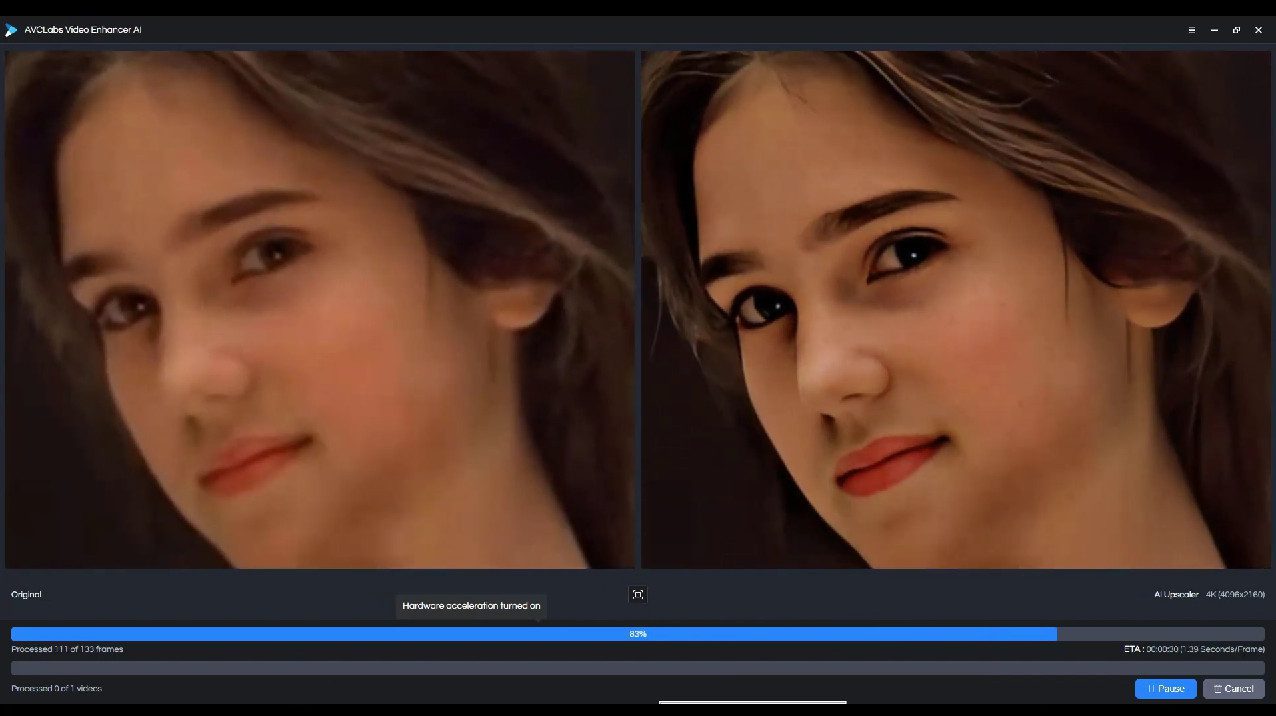
AVCLabs Video Enhancer AI uses deep learning models to upscale videos from SD to HD, HD to 4K, and even 4K to 8K. It employs super-resolution upscaling and multi-frame enhancement to ensure the best possible video quality. The software also leverages NVIDIA’s TensorRT models to accelerate video processing, resulting in faster and more efficient performance.

Key Features and Benefits
- AI Video Upscaler: Upscale your videos from SD to HD, HD to 4K, or even 4K to 8K with the help of deep learning-based Super Resolution technology.
- AI Video Enhancer: Improve the quality of your videos, restore old videos, and increase video resolution without losing quality.
- AI Video Colorizer: Transform your black-and-white footage into a vivid, eye-catching experience with an AI-powered colorization model.
- Frame Interpolation: Boost frame rate for anime, stop motions, and animations automatically with AI Frame Interpolation.
- NVIDIA TensorRT Acceleration: Achieve substantial speed improvements with the help of TensorRT Models.
Use Cases for AVCLabs Video Enhancer AI
AVCLabs Video Enhancer AI is perfect for anyone looking to improve the quality of their videos. Whether you’re a filmmaker looking to upscale your footage, a content creator wanting to enhance the quality of your videos, or a hobbyist looking to breathe new life into old, grainy footage, this software is for you.

The Problem That AVCLabs Video Enhancer AI Addresses
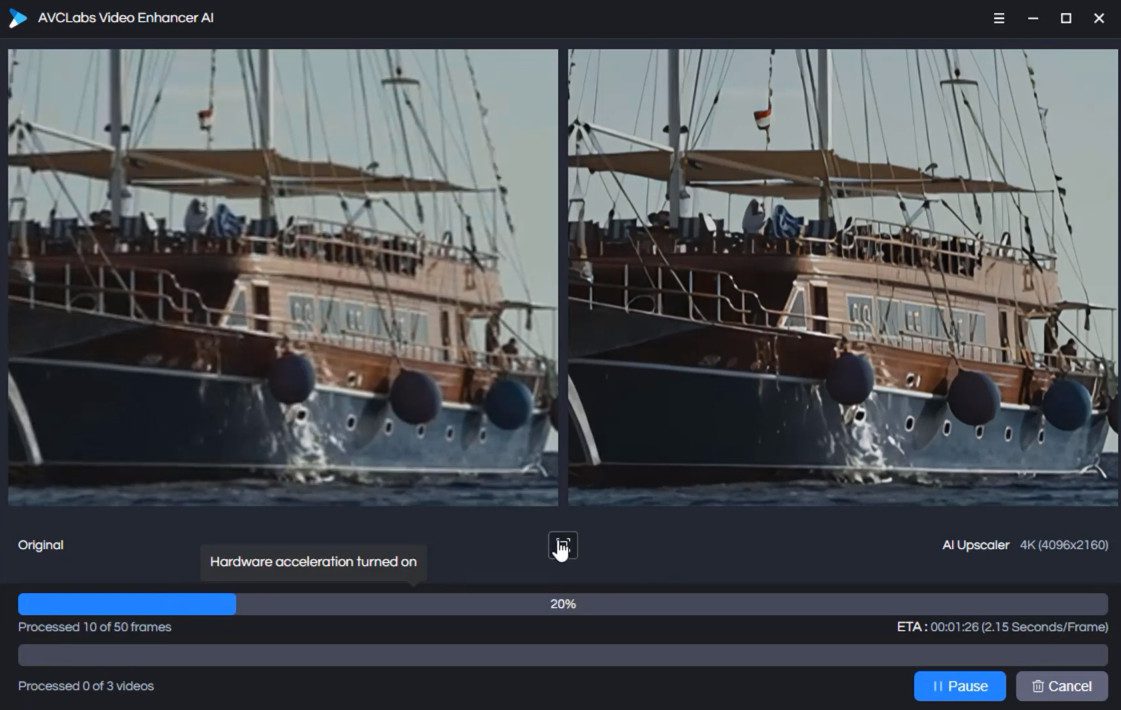
AVCLabs Video Enhancer AI addresses the common problem of low-quality videos. Whether it’s old footage that’s lost its quality over time or videos that were initially recorded in low resolution, this software can transform them into high-quality, high-definition videos.
Pricing and Availability
For information on pricing and availability, please visit the official website.

Target Audience
AVCLabs Video Enhancer AI is ideal for filmmakers, content creators, video editors, and hobbyists who regularly work with video content and are looking for a reliable tool to enhance their video quality.
Pros and Cons
Pros:
- Uses advanced AI algorithms for video upscaling and enhancement
- Offers a range of features including video upscaling, video enhancement, and video colorization
- Leverages NVIDIA’s TensorRT models for faster video processing
Cons:
- Requires a relatively high system and hardware requirements for optimal performance

Three Aspects to Appreciate About AVCLabs Video Enhancer AI
- Advanced AI Algorithms: The use of advanced AI algorithms for video upscaling and enhancement is truly impressive.
- Range of Features: The software offers a wide range of features, making it a versatile tool for all your video enhancement needs.
- Speed and Efficiency: The use of NVIDIA’s TensorRT models for faster video processing is a major plus.
Frequently Asked Questions – FAQ’s
Q1: What is AVCLabs Video Enhancer AI?
AVCLabs Video Enhancer AI is a state-of-the-art video upscaling and quality enhancement software. It uses advanced AI algorithms and deep learning models to upscale videos from SD to HD, HD to 4K, and even 4K to 8K. The software also offers features like video colorization and frame interpolation, making it a versatile tool for all your video enhancement needs.
Q2: How does AVCLabs Video Enhancer AI work?
AVCLabs Video Enhancer AI employs super-resolution upscaling and multi-frame enhancement to ensure the best possible video quality. It leverages NVIDIA’s TensorRT models to accelerate video processing, resulting in faster and more efficient performance. The software uses AI to enhance video quality, restore old videos, increase video resolution without losing quality, and colorize black and white videos.
Q3: Who can benefit from using AVCLabs Video Enhancer AI?
AVCLabs Video Enhancer AI is ideal for filmmakers, content creators, video editors, and hobbyists who regularly work with video content. Whether you’re looking to upscale your footage, enhance the quality of your videos, or breathe new life into old, grainy footage, this software is for you.
Q4: What problem does AVCLabs Video Enhancer AI solve?
AVCLabs Video Enhancer AI addresses the common problem of low-quality videos. Whether it’s old footage that’s lost its quality over time or videos that were initially recorded in low resolution, this software can transform them into high-quality, high-definition videos.
Q5: Where can I find information on pricing and availability for AVCLabs Video Enhancer AI?
For information on pricing and availability, you can visit the official AVCLabs Video Enhancer AI website.
Q6: What are the system requirements for AVCLabs Video Enhancer AI?
AVCLabs Video Enhancer AI requires a system with a 4GHz Intel/AMD processor or above, 8GB or higher RAM, and more than 15G of free space. For optimal performance, it is recommended to use an Intel i7 (7th generation) or greater (4GHz and above) or Ryzen 7 or greater (4GHz and above).
Q7: What are some user reviews of AVCLabs Video Enhancer AI?
Users have praised AVCLabs Video Enhancer AI for its advanced AI algorithms, range of features, and speed and efficiency. They have found it to be a valuable tool for enhancing their videography and have recommended it to others interested in improving their video quality.
<p><strong>Plan:</strong> Free Trial</p>
<p><strong>Website:</strong> <a href=”” target=”_blank” rel=”noopener”>Visit Website</a></p>
<p><strong>Affiliate Offer:</strong> <a href=”https://www.avclabs.com/video-enhancer-ai.html” target=”_blank” rel=”nofollow sponsored” class=”cta-button”>Get This Tool</a></p>
<p><strong>Categories:</strong> </p>

Get Premium AI Tool Insights
Subscribe to get weekly curated AI tool recommendations, exclusive deals, and early access to new tool reviews.
Related Tools
Related Articles
Suno v6 Intro and Ending Prompts: Unwanted Humming, Long Outros and Cut-Off Lyrics (2026)
Fix the edges of a Suno v6 track: three pasteable intro and outro templates, the documented Exclude field for unwanted humming, the arithmetic behind cut-off lyrics, and when to edit in Studio instead.
Suno v6 Keeps Changing Your Prompt? Variety, Style Influence and Weirdness Explained (2026)
Suno v6 rewrites your style prompt through the new Variety slider, and Suno documents the fix. What Variety, Style Influence, Weirdness and Max Mode each do, with a one-control-at-a-time worksheet.
Suno v6 Rock Prompts: Keep Guitar Riffs and Drums Alive Through the Verse (2026)
Why a strong Suno v6 rock intro turns into an empty verse, and how to fix it with a section-by-section instrument map, the Exclude field, pasteable rock and metal prompts and an A/B rubric.