
TL;DR — ngram
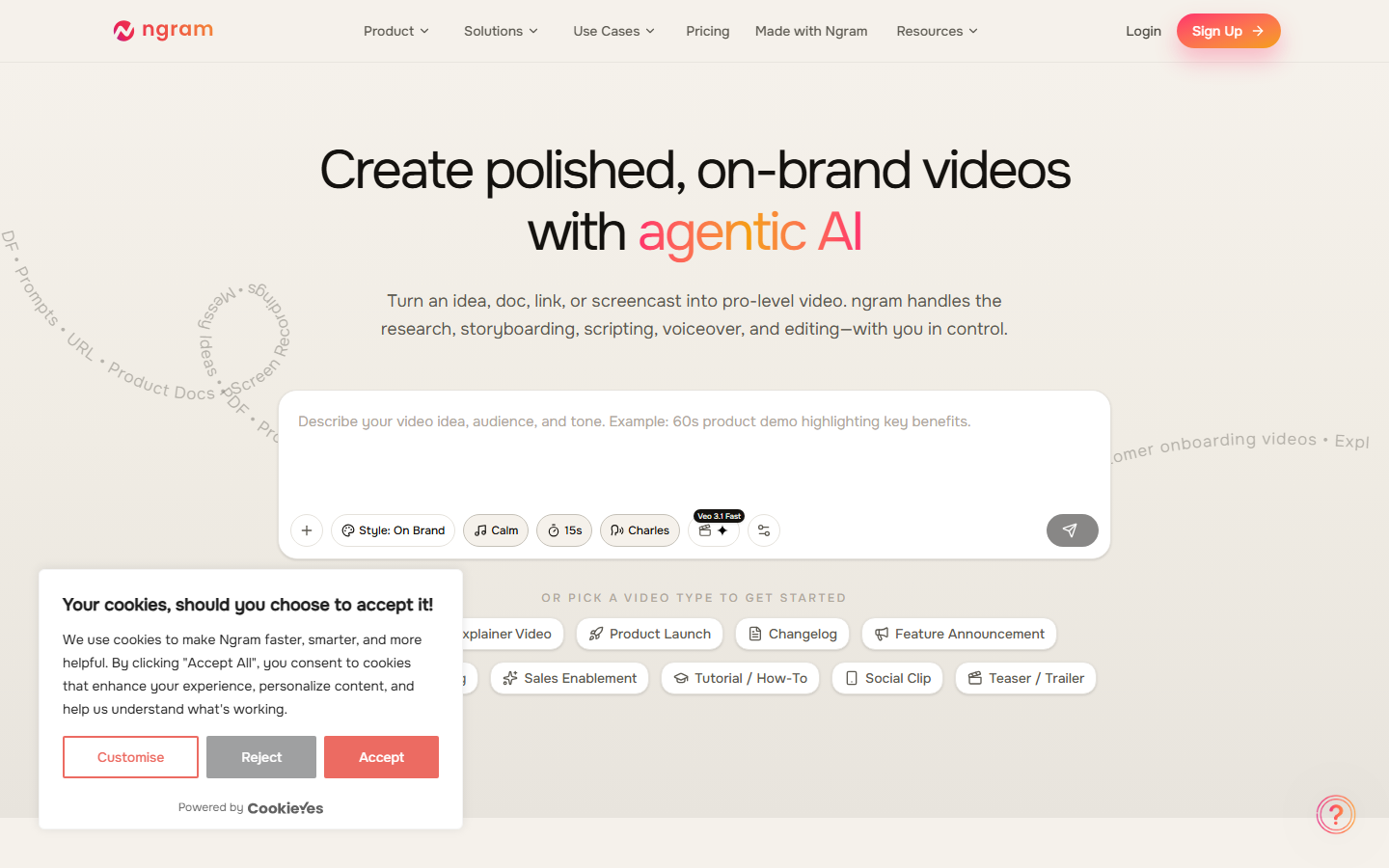
ngram is an AI-powered video creation platform that transforms plain-language descriptions into polished, branded videos. It integrates Remotion directly into its pipeline, letting users describe videos in natural language, choose animation styles like motion graphics, and have the AI generate the visuals and code behind the scenes. Designed for marketers, content creators, and teams who need professional videos fast without editing skills.
Table of Contents
What is ngram?
ngram is an AI-powered video creation platform that transforms plain-language descriptions into polished, branded videos. It integrates Remotion directly into its pipeline, letting users describe videos in natural language, choose animation styles like motion graphics, and have the AI generate the visuals and code behind the scenes. Designed for marketers, content creators, and teams who need professional videos fast without editing skills.
Screenshot of ngram homepage — captured March 21, 2026 by PopularAiTools.ai
Key Features of ngram
AI Video Generation
Describe your video in plain language and ngram generates narratives, scene-by-scene storyboards, and polished video output automatically.
Remotion Integration
Built-in Remotion support for motion graphics. Select Motion Graphics as your animation style and ngram generates the Remotion code behind the scenes.
Multiple Animation Styles
Choose from motion graphics, kinetic typography, and standard video formats to match your content and brand needs.
Brand Consistency
Set up brand colors, fonts, and style guidelines that are automatically applied to all generated content for consistency.
Screen Recording to Video
Transform screen recordings, docs, and images into polished videos in minutes with AI-powered editing.
Team Collaboration
Share projects, review videos, and collaborate with team members in a single workspace designed for creative teams.
How to Use ngram
1
Sign Up
Create a free account at ngram.com to access the video creation workspace.
2
Describe Your Video
Write a plain-language description of the video you want, including topic, style, and key messages.
3
Choose Animation Style
Select from motion graphics, standard video, or other styles to match your content needs.
4
Review and Edit
Preview the AI-generated video and make adjustments to scenes, timing, and visuals as needed.
5
Export and Share
Download your finished video in your preferred format and resolution for any platform.

ngram Pricing
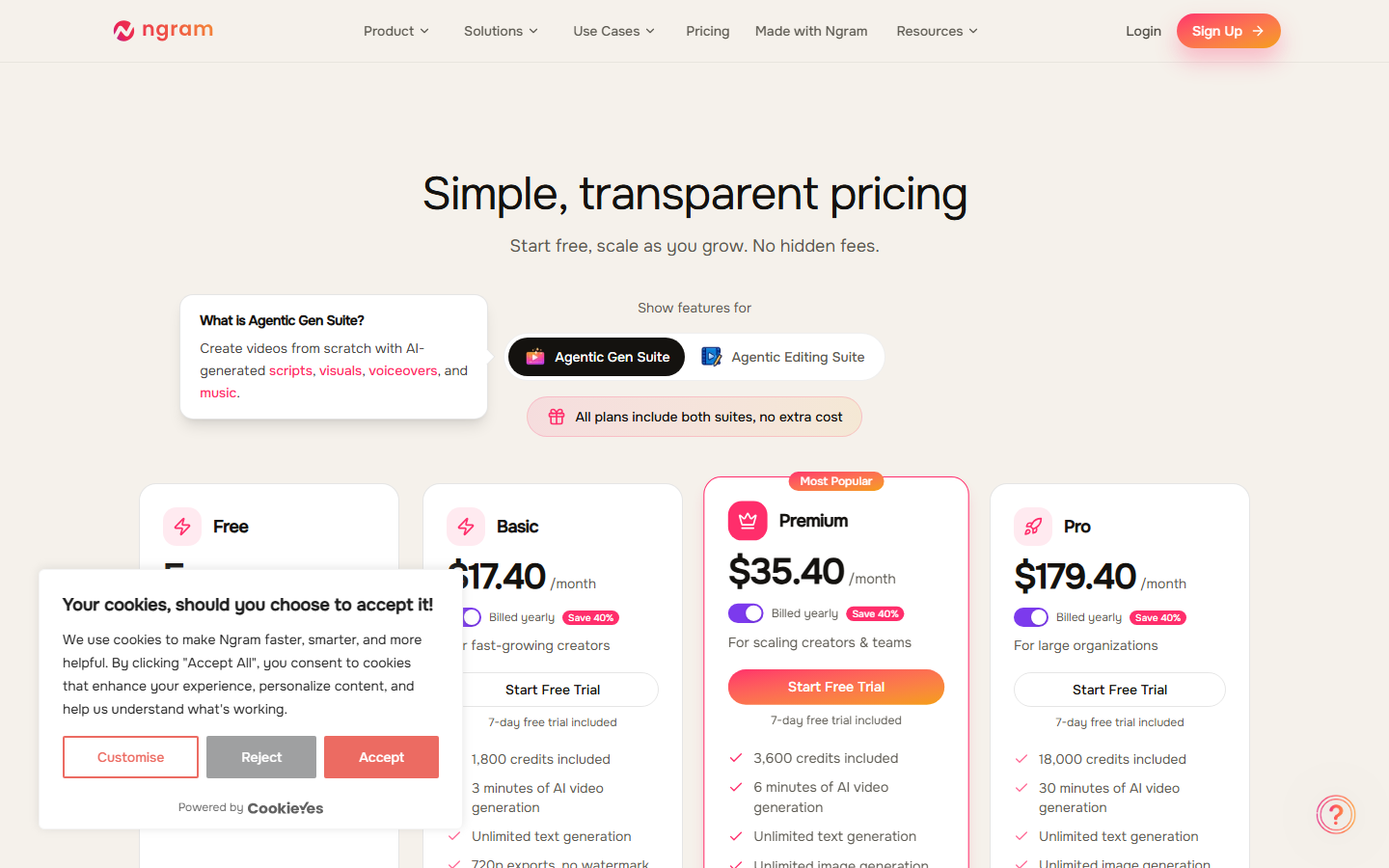
Free plan available | Pro plans from ~$20/mo
Pros and Cons
✓ Pros
- ✓Natural language video creation requires no editing skills
- ✓Built-in Remotion integration for professional motion graphics
- ✓Fast turnaround from idea to finished video
- ✓Free tier available for testing and evaluation
- ✓Multiple animation styles for different content needs
- ✓Clean and intuitive interface for non-technical users
✗ Cons
- ✗Relatively new platform still building out features
- ✗Limited customization compared to traditional video editors
- ✗Motion graphics quality depends on prompt clarity
- ✗May not suit complex or highly specific video requirements
ngram Alternatives
Synthesia
Leading AI video platform with realistic avatars, better for talking-head content.
Loom
Screen recording and async video tool, simpler but more established for teams.
Descript
All-in-one video editor with AI transcription, great for podcasts and interviews.
InVideo
Template-based video creation with more manual control and large template library.
Our Verdict
4.1/5
ngram offers a refreshingly simple approach to video creation: describe what you want and let AI handle production. The Remotion integration for motion graphics is a standout feature that sets it apart from generic AI video tools. For marketers and content creators who need polished videos quickly without learning complex editing software, ngram is a solid choice. The free tier makes it easy to evaluate. Rating: 4.1/5
Try ngram Today →
Visit the official ngram website to get started
Frequently Asked Questions
Is ngram free?
Yes, ngram offers a free plan with limited video creation. Paid plans unlock unlimited videos, higher resolution, and remove watermarks.
What is Remotion integration?
Remotion is a framework for creating videos programmatically. ngram integrates it so you can generate motion graphics from text without writing code.
Can I create videos in different formats?
Yes, ngram supports horizontal, vertical (9:16 for social), and square formats.
Does ngram support brand guidelines?
Yes, you can set up brand colors, fonts, and style guidelines that are applied automatically.
How long does it take to create a video?
Most videos are generated within a few minutes depending on length and complexity.
Can I edit the generated video?
Yes, you can review and edit scenes, timing, and visuals after AI generates the initial version.
What animation styles are available?
ngram supports motion graphics, kinetic typography, standard video, and other animation styles.
Does ngram support team collaboration?
Yes, team plans include shared workspaces, project sharing, and collaborative review features.
Last updated: March 21, 2026 | Review by PopularAiTools.ai
Get Premium AI Tool Insights
Subscribe to get weekly curated AI tool recommendations, exclusive deals, and early access to new tool reviews.
Related Tools
Related Articles
Suno v6 Intro and Ending Prompts: Unwanted Humming, Long Outros and Cut-Off Lyrics (2026)
Fix the edges of a Suno v6 track: three pasteable intro and outro templates, the documented Exclude field for unwanted humming, the arithmetic behind cut-off lyrics, and when to edit in Studio instead.
Suno v6 Keeps Changing Your Prompt? Variety, Style Influence and Weirdness Explained (2026)
Suno v6 rewrites your style prompt through the new Variety slider, and Suno documents the fix. What Variety, Style Influence, Weirdness and Max Mode each do, with a one-control-at-a-time worksheet.
Suno v6 Rock Prompts: Keep Guitar Riffs and Drums Alive Through the Verse (2026)
Why a strong Suno v6 rock intro turns into an empty verse, and how to fix it with a section-by-section instrument map, the Exclude field, pasteable rock and metal prompts and an A/B rubric.