
Sleek Review 2026: Features, Pricing, Pros & Cons
Updated March 2026 · 11 min read · By PopularAiTools.ai
TL;DR
An AI-powered design tool that generates mobile app mockups and landing pages from text descriptions, with production-ready code export in Next.js, Tailwind, and shadcn/ui. The freemium pricing model makes it accessible, with plans starting at $0. Rating: 4.1/5
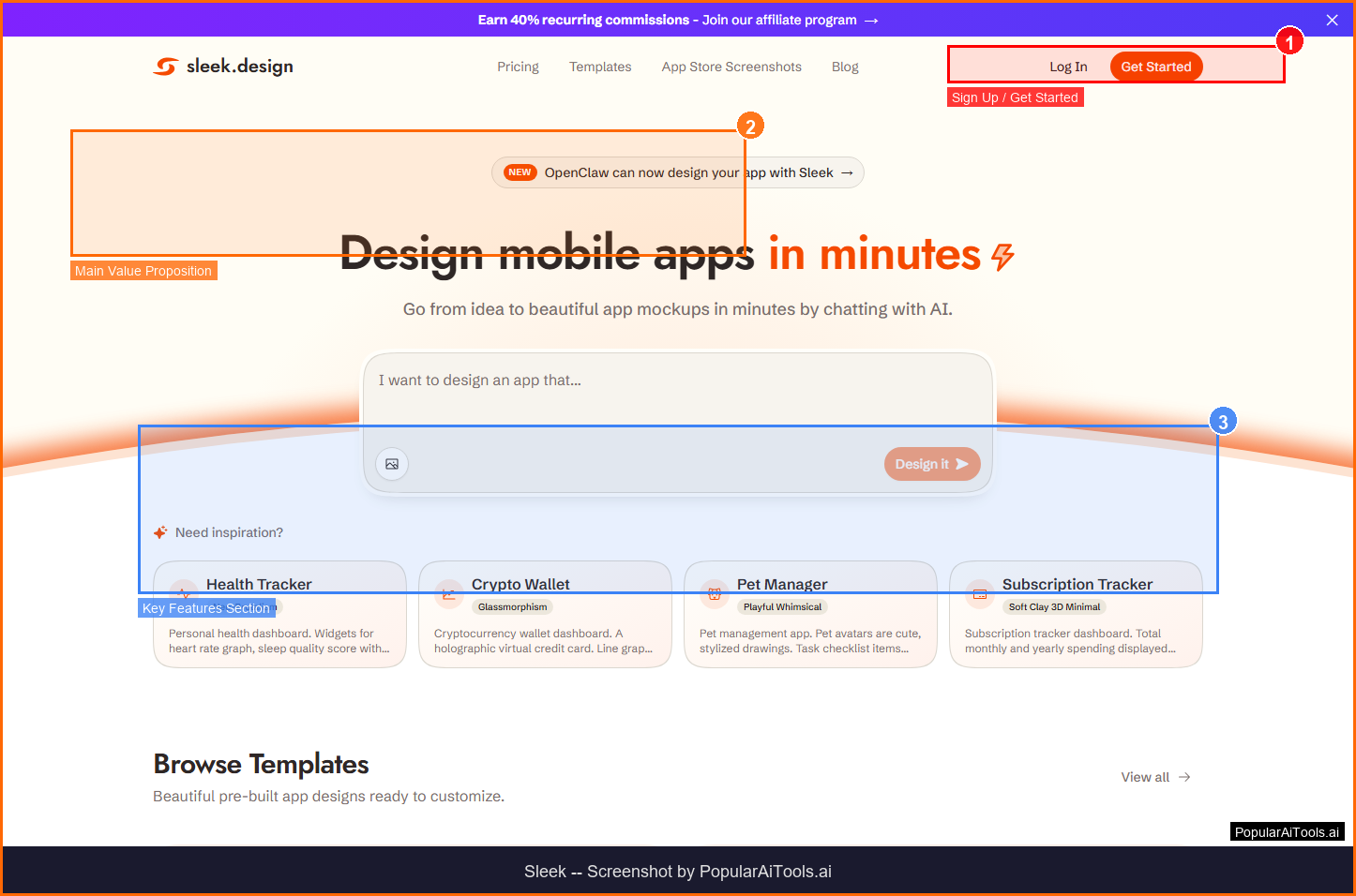
The Sleek homepage - key features and navigation highlighted
What is Sleek?
An AI-powered design tool that generates mobile app mockups and landing pages from text descriptions, with production-ready code export in Next.js, Tailwind, and shadcn/ui.
Sleek stands out in the crowded AI landscape by focusing on solving a specific problem well rather than trying to be everything to everyone. The platform is designed to integrate seamlessly into existing workflows, reducing the learning curve and time-to-value for new users.
Whether you are an individual user looking to boost productivity or a team seeking to streamline operations, Sleek offers a freemium approach that lets you start with core features and scale as your needs grow. The platform has gained traction in 2026 as organizations increasingly adopt specialized AI tools for specific workflow challenges.
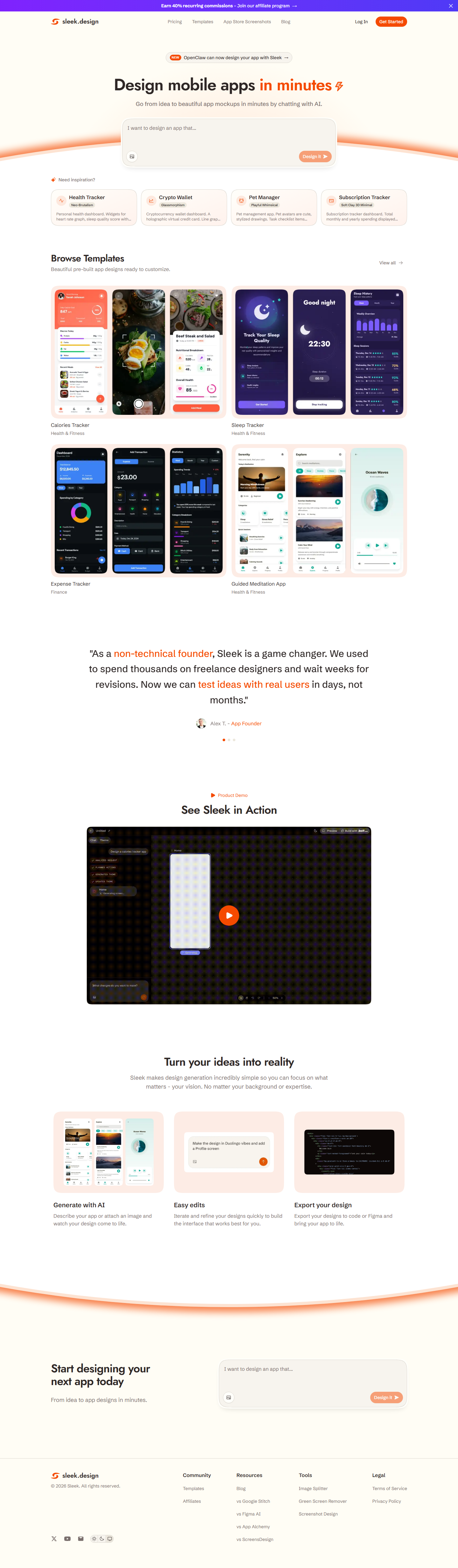
Sleek core features at a glance
Key Features
1. AI Mobile App Mockup Generation
Describe your app idea in plain text and Sleek generates beautiful iOS and Android mockup designs instantly. No design experience required. The AI understands app design patterns and creates professional-looking interfaces with proper navigation, spacing, and component layout.
2. Landing Page Builder
Beyond mobile apps, Sleek functions as an AI landing page builder. Describe your product or company and it generates complete, conversion-focused landing pages with hero sections, feature lists, pricing tables, testimonials, and CTAs.
3. Production-Ready Code Export
Export your designs as production-ready code in Next.js with Tailwind CSS and shadcn/ui components. This is not prototype code. The output is clean, well-structured, and ready for deployment with minimal modifications.
4. Component Library
Access pre-built components for common page sections: pricing tables, roadmaps, waitlist forms, feature grids, and more. Each component is AI-customized to match your product description and brand.
5. Chat-Based Design Interface
Design through conversation. Chat with the AI to describe changes, request new sections, adjust layouts, and refine your design. The iterative chat interface makes design accessible to founders, PMs, and non-designers.
How Sleek fits into your workflow
How to Use Sleek (Step-by-Step)
Step 1: Visit Sleek.design
Navigate to sleek.design in your browser. No installation required.
Step 2: Describe Your Product
Enter a description of your app or product. Include the type of business, target audience, and key features you want to highlight.
Step 3: Choose Your Format
Select whether you want a mobile app mockup or a landing page design.
Step 4: Customize with Chat
Use the chat interface to refine your design. Request changes to layout, colors, sections, or content.
Step 5: Export Code
When satisfied, export your design as Next.js + Tailwind + shadcn/ui code ready for development and deployment.
Pricing Plans
Sleek pricing tiers compared (March 2026)
Sleek offers a freemium pricing structure. The Free plan at $0 provides enough functionality for basic use cases and evaluation. The paid plans unlock advanced features, higher limits, and priority support that professional users and teams will need.

Pros and Cons
Pros
- ✓ Generates professional designs from simple text descriptions
- ✓ Code export in modern frameworks (Next.js, Tailwind, shadcn/ui)
- ✓ Free tier available for basic design generation
- ✓ No design skills required
- ✓ Fast iteration through chat-based interface
- ✓ Components cover common landing page patterns
Cons
- ✗ Limited to Next.js/Tailwind stack for code export
- ✗ Pro pricing details not clearly published
- ✗ Design quality varies based on description specificity
- ✗ Not suitable for complex multi-page applications
- ✗ Limited customization compared to full design tools like Figma
Best Sleek Alternatives
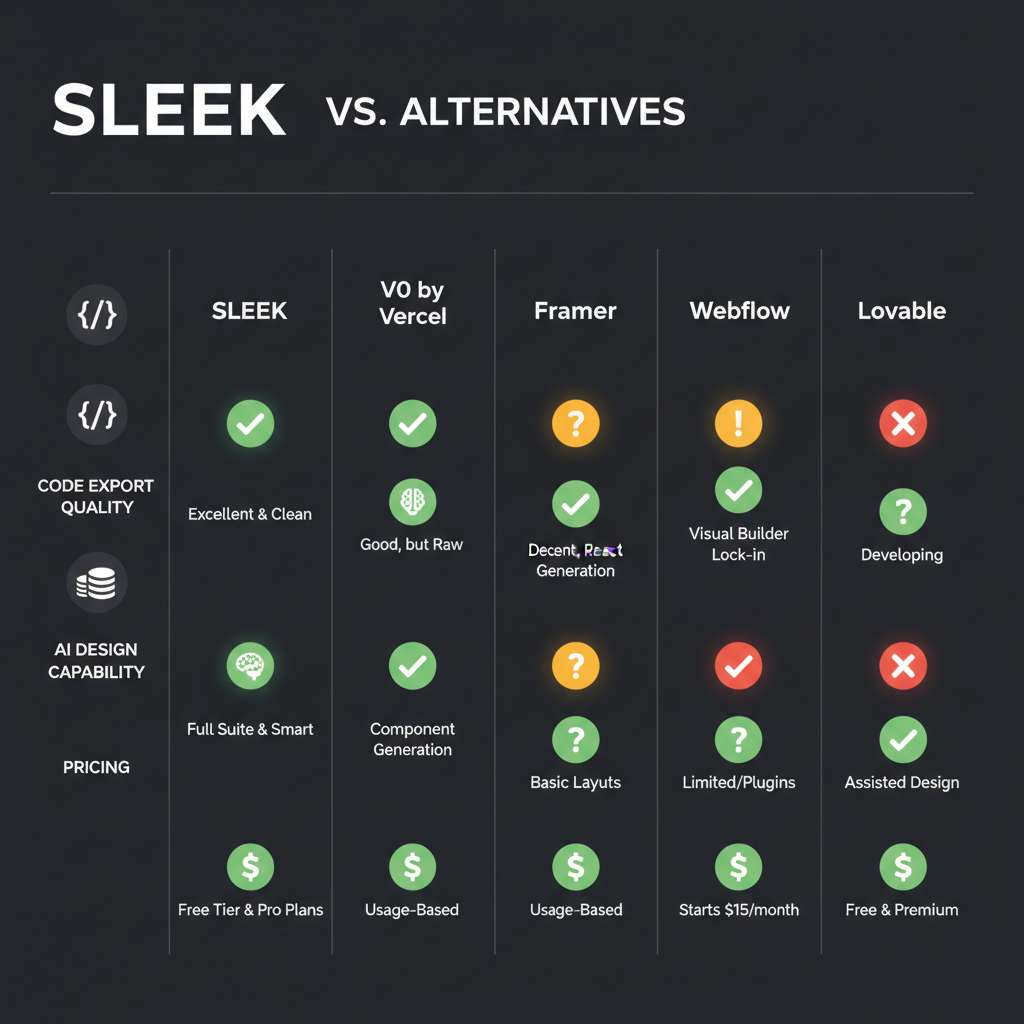
How Sleek compares to top alternatives
V0 by Vercel (Free / $20/mo) specializes in AI UI generation and is the top choice for React/Next.js developers.
Framer (Free / $15/mo) specializes in No-code builder and is the top choice for Designers wanting no-code.
Lovable ($20/mo) specializes in AI full-stack and is the top choice for Full app generation.
Webflow (Free / $14/mo) specializes in Visual builder and is the top choice for Professional web design.
Final Verdict: Is Sleek Worth It?
After thorough evaluation in 2026, Sleek proves to be a solid option in its category. The freemium pricing model makes it accessible for users who want to test before committing, and the core feature set addresses real workflow needs without unnecessary bloat.
The platform excels at its primary use case and delivers genuine value for users within its target audience. While there are areas for improvement, the development team appears actively engaged in expanding capabilities and addressing limitations.
For users seeking a focused, purpose-built tool rather than a sprawling all-in-one platform, Sleek earns its place in the consideration set. We recommend starting with the free tier to evaluate fit before upgrading.
Our Rating: 4.1 / 5
Build an AI Tool? Get It in Front of the Right Audience
PopularAiTools.ai reaches thousands of qualified AI buyers monthly.
Submit Your AI Tool →Frequently Asked Questions
Is Sleek free?
Yes, Sleek offers a free tier that allows you to generate basic app mockups and landing page designs. Advanced features like code export may require a paid plan.
What code frameworks does Sleek export?
Sleek exports production-ready code in Next.js with Tailwind CSS and shadcn/ui components. The code is clean and deployment-ready.
Can I use Sleek for mobile app design?
Yes, Sleek was originally designed as an AI mobile app mockup generator. You can create iOS and Android app designs by describing your app idea in plain text.
How is Sleek different from V0 by Vercel?
While both generate UI from text, Sleek focuses more on complete landing pages and app mockups with a conversational interface, while V0 is more developer-oriented with component-level generation.
Do I need coding skills to use Sleek?
No. Sleek is designed for non-technical users like founders and product managers. The chat interface lets you design through conversation, and the exported code can be handed to a developer for deployment.
Get Premium AI Tool Insights
Subscribe to get weekly curated AI tool recommendations, exclusive deals, and early access to new tool reviews.
Related Tools
V
VideoProc Converter AI
ai-coding

Relia
ai-coding
AI-powered Chrome extension that audits code flow, catches hallucinations in AI-generated code, and flags security vulnerabilities before they ship.

Git AutoReview
ai-coding
Updated March 2026 · 12 min read · By PopularAiTools.ai

Parallel Code
ai-coding
Free open-source desktop app that dispatches 10+ AI coding agents simultaneously across isolated git branches. Supports Claude Code, Codex CLI, and Gemini CLI. Keyboard-first Electron app with diff review workflow and QR code mobile monitoring. macOS + Linux. MIT license.
Related Articles
10 Claude Code Skills, Plugins & CLIs to Install on Day One (April 2026)
Starting Claude Code from scratch in 2026? Install these 10 skills, plugins, and CLIs on day one — Codex CLI, Obsidian, Autoresearch, Firecrawl, Playwright, NotebookLM, Skill Creator, RAG-Anything, Google Workspace CLI, and awesome-design-md. Full install commands included.
We Tested 24 AI Models Inside Claude Code: The 2026 Tier List
We swapped 24 different AI models into Claude Code and ran identical tool-call tests on each. Here's the S-tier-to-D-tier ranking, real cost comparison, and the single best Claude Sonnet 4.6 alternative for 2026 — including the GLM 4.6 sleeper pick that matched Sonnet at 15% the cost.
Claude as a Creative Studio: Make Ads, Images, and Video From One Chat (2026)
Claude doesn't generate raster images natively, but in 2026 it's the smartest creative director on Earth — orchestrating Nano Banana 2, Sora 2, Runway, Higgsfield, Remotion, and VEED into a single ad-and-video factory. The full stack, the variant matrix trick, and how to build a YouTube Shorts factory.