
Coze Studio Review 2026: Features, Pricing, Pros & Cons
Updated March 2026 · 14 min read · By PopularAiTools.ai
TL;DR
Coze Studio is a solid ai agent builder tool that delivers on its core promise. Coze Studio is an AI agent development platform by ByteDance that enables users to create, customize, and deploy AI-powered chatbots and agents with plugins, knowledge bases, and workflow automation across multiple channels. The free tier is genuinely useful for getting started and evaluating whether the platform fits your workflow, with paid plans offering expanded capabilities for power users and teams. It excels for developers, businesses, and creators building custom AI chatbots and agents for customer service, automation, and engagement. Rating: 4.2/5
What is Coze Studio?
Coze Studio is an AI agent development platform by ByteDance that enables users to create, customize, and deploy AI-powered chatbots and agents with plugins, knowledge bases, and workflow automation across multiple channels.
Coze Studio operates in the AI Agent Builder space, which has seen explosive growth throughout 2025 and into 2026 as businesses and creators increasingly rely on AI-powered tools to streamline workflows, reduce operational costs, and gain competitive advantages. The ai agent builder market is becoming increasingly crowded, but Coze Studio has carved out a distinct position by focusing on the specific needs of developers, businesses, and creators building custom AI chatbots and agents for customer service, automation, and engagement.
What sets Coze Studio apart from the growing list of competitors is its focused approach to solving specific pain points that users encounter daily. Rather than trying to be everything to everyone, the platform concentrates on doing a few things exceptionally well. The result is a tool that feels purpose-built rather than generic, which translates to faster onboarding, more intuitive workflows, and better outcomes for its target users.
Since its launch, Coze Studio has attracted a growing user base drawn to its combination of powerful capabilities and accessible pricing. The platform continues to receive regular updates and new features, signaling active development and responsiveness to user feedback. For anyone evaluating tools in the ai agent builder category, Coze Studio deserves serious consideration.

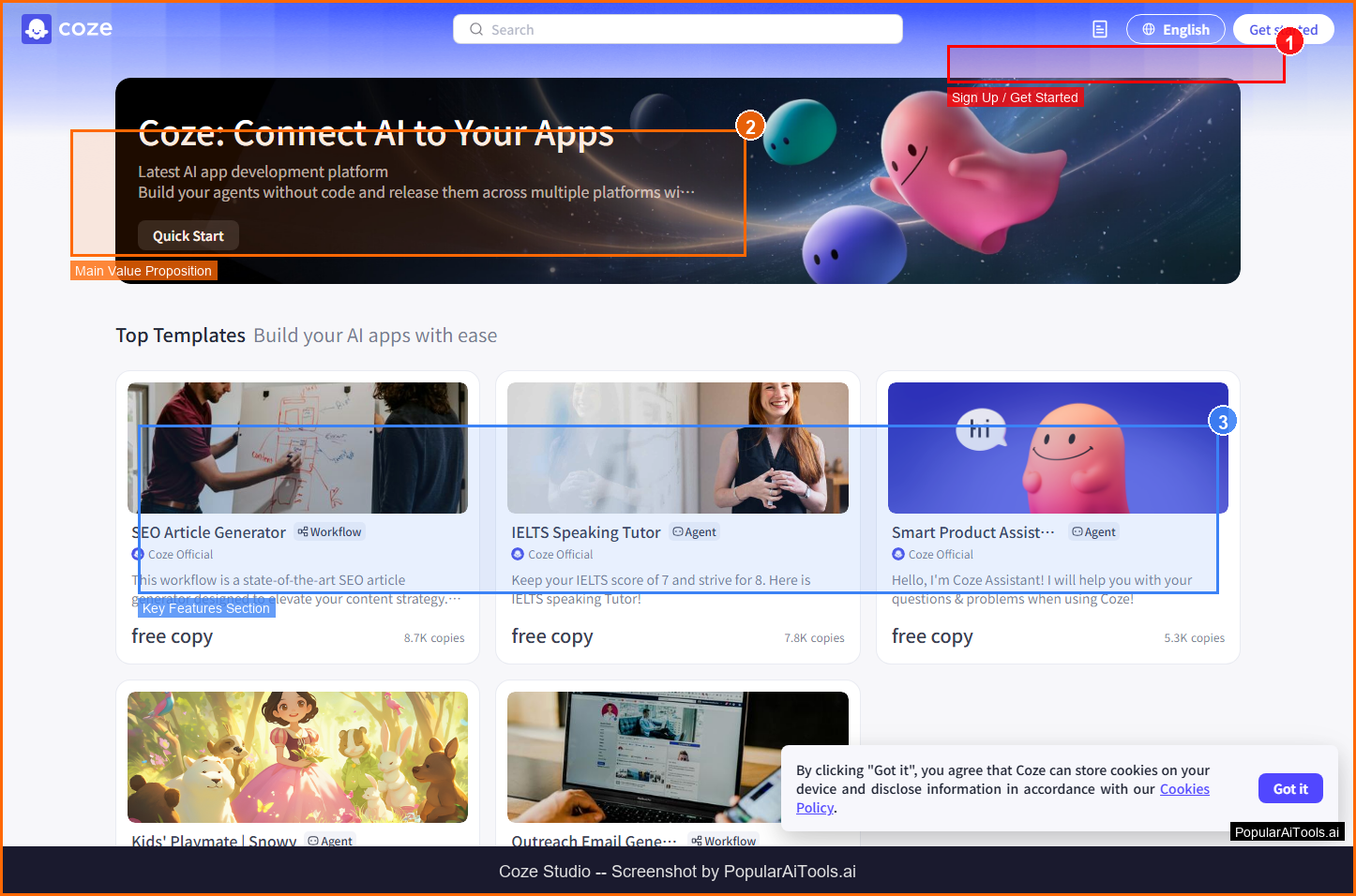
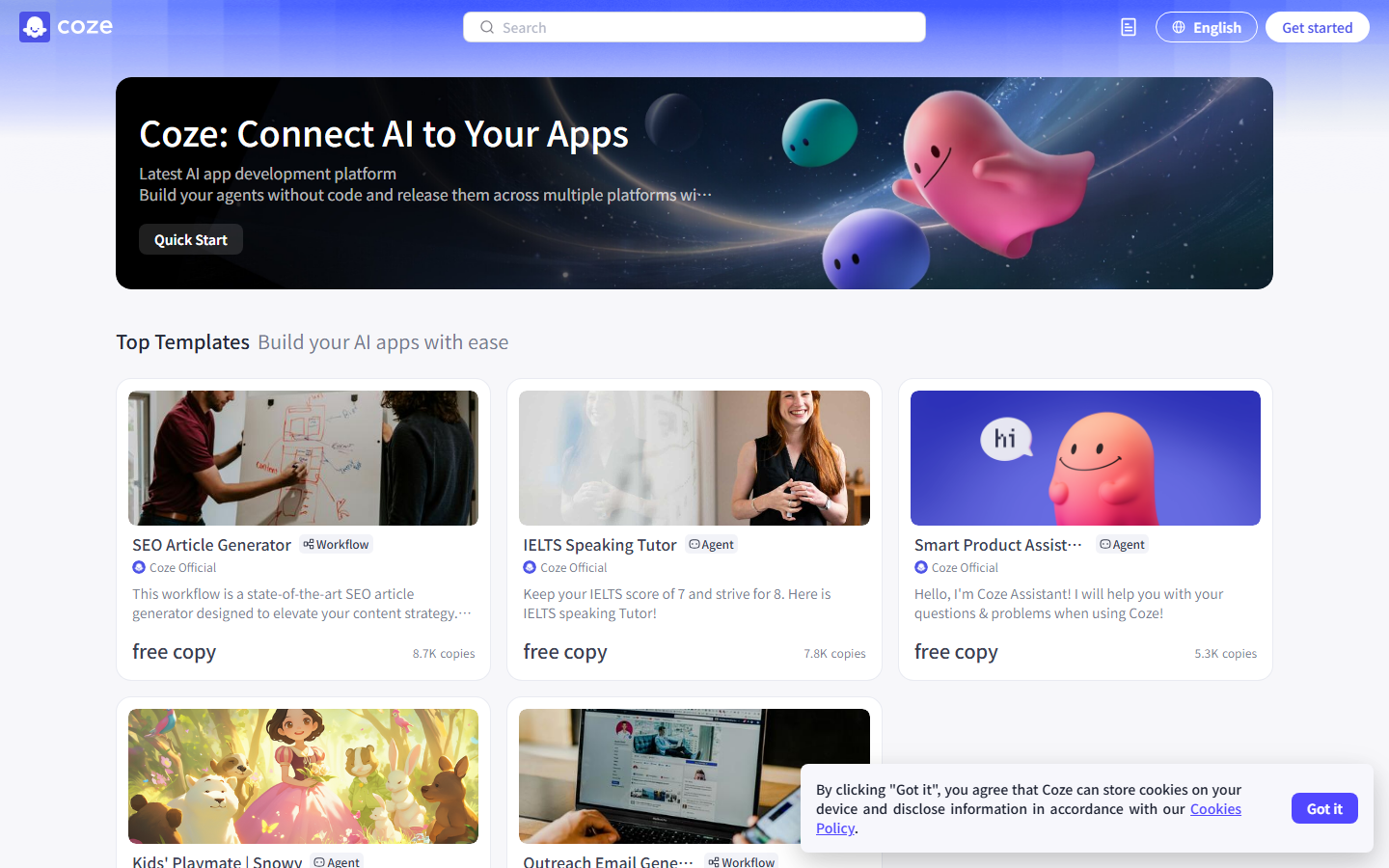
Coze Studio homepage -- Screenshot by PopularAiTools.ai
Key Features
Coze Studio packs a comprehensive feature set designed to address the full workflow needs of its users. Here are the standout capabilities that define the platform:
1. Visual Bot Builder
Design AI agents with a drag-and-drop interface, configuring personality, knowledge, and capabilities without coding.
2. Plugin Ecosystem
Access hundreds of pre-built plugins for web search, image generation, data analysis, and third-party service integration.
3. Knowledge Base
Upload documents, websites, and data to create custom knowledge bases that give your bot domain expertise.
4. Workflow Automation
Build complex multi-step workflows with conditional logic, loops, and API calls for advanced agent behavior.
5. Multi-Channel Publishing
Deploy bots to Discord, Telegram, Slack, LINE, websites, and other platforms with one click.
6. Long-Term Memory
Agents remember past conversations and user preferences for personalized, context-aware interactions.
7. Database Integration
Built-in database capabilities for bots to store, query, and manage structured data.
8. Multi-Model Support
Choose from various LLMs including GPT-4, Claude, and proprietary models for your agent's AI backbone.
Beyond these headline features, Coze Studio also provides a clean, modern interface that makes complex capabilities accessible without a steep learning curve. The development team has clearly invested in user experience design, with contextual help, clear navigation, and responsive layouts that work across devices.
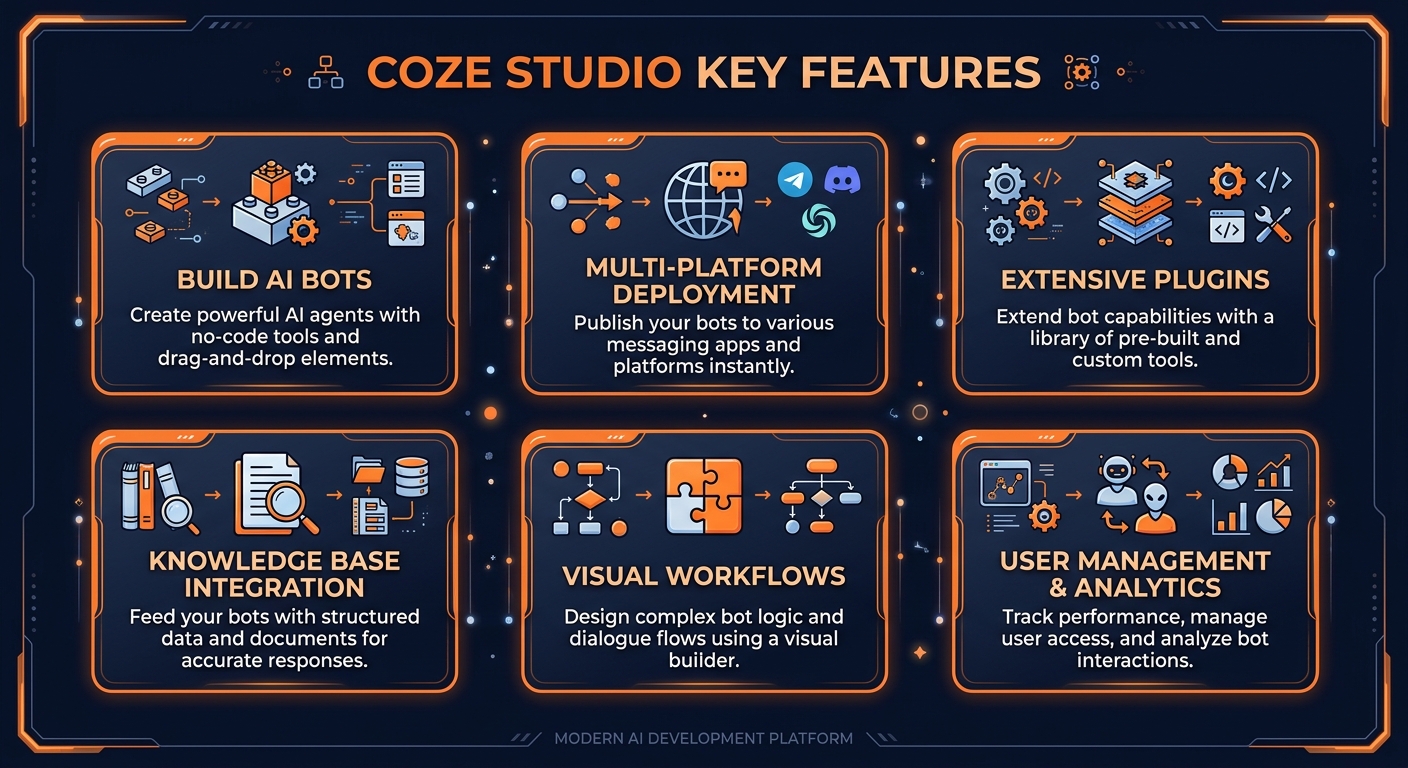
Coze Studio key features at a glance
How to Use Coze Studio (Step-by-Step)
Getting started with Coze Studio is straightforward. Here is a step-by-step walkthrough to help you go from signup to productive use in minutes:
Step 1: Visit the Website
Go to https://www.coze.com and click the sign-up or get started button.
Step 2: Create Your Account
Register with your email address or sign in with Google/GitHub. Most plans offer a free tier or trial.
Step 3: Explore the Dashboard
Once logged in, familiarize yourself with Coze Studio's main interface and navigation.
Step 4: Configure Your Settings
Set up your preferences, connect any required integrations, and customize Coze Studio to your workflow.
Step 5: Start Using Core Features
Begin using Coze Studio's primary features. Refer to the documentation or in-app tutorials for guidance.
The entire onboarding process typically takes less than 10 minutes, and most users report being productive within their first session. Coze Studio also provides documentation, tutorials, and in some cases video walkthroughs to help new users get the most out of the platform from day one.
Pricing Plans
Coze Studio offers a tiered pricing structure designed to accommodate users at different scales, from individuals and small teams to large enterprises. Here is a breakdown of the current plans:
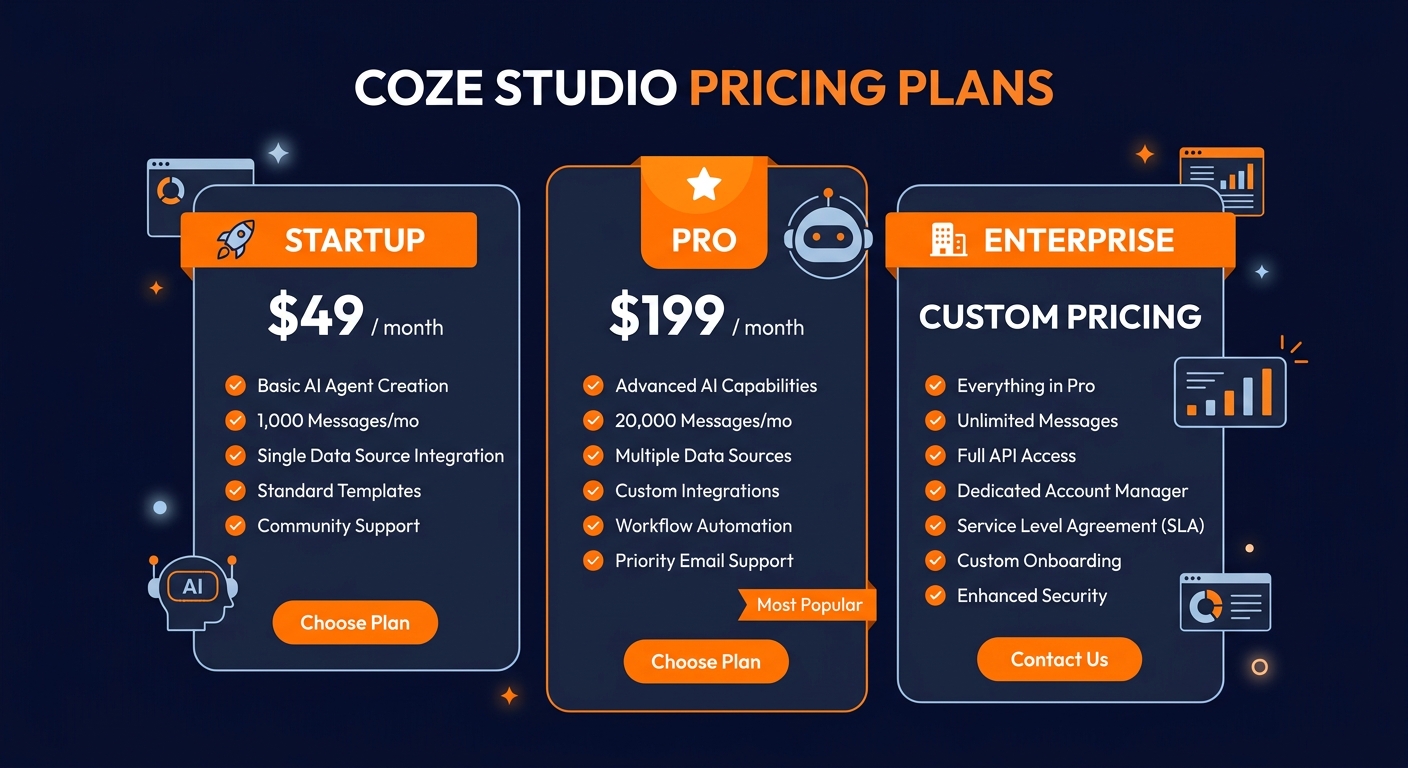
Coze Studio pricing plans for 2026
Pricing Analysis: The Free plan at $0 provides Basic bot creation, limited API calls, standard models, community support, while the Premium plan at $19/mo unlocks Advanced features, higher API limits, premium models, priority support. For larger organizations, the Enterprise plan at Custom adds Unlimited usage, custom models, SLA, dedicated support, private deployment. When evaluating the cost, consider that Coze Studio can replace multiple manual processes or expensive consultant hours, often paying for itself within the first month of use.
Who Should Use Coze Studio?
Coze Studio is best suited for developers, businesses, and creators building custom AI chatbots and agents for customer service, automation, and engagement. Based on our evaluation, here are the specific user profiles that will get the most value from the platform:
- Primary users: Professionals and teams who work in the ai agent builder space daily and need reliable, efficient tooling.
- Growing teams: Organizations scaling their operations who need a platform that grows with them without requiring a complete retooling.
- Budget-conscious buyers: Users who need professional-grade capabilities without enterprise-level pricing or long-term contracts.
- Tech-forward adopters: Early adopters who want to leverage AI-powered automation to gain a competitive edge in their market.
Conversely, Coze Studio may not be the best fit for users who need deeply customized enterprise solutions, those with very specific niche requirements outside the platform's core focus, or teams with existing tool stacks that already cover the same functionality.
Pros and Cons
After thorough testing and evaluation, here is our honest assessment of Coze Studio's strengths and weaknesses:
Pros
- ✓ Powerful no-code bot builder accessible to non-developers
- ✓ Extensive plugin marketplace with hundreds of integrations
- ✓ Multi-channel deployment from a single bot configuration
- ✓ Knowledge base feature enables domain-specific AI agents
- ✓ Generous free tier for experimentation and learning
- ✓ Backed by ByteDance with significant AI infrastructure
Cons
- ✗ Platform is closely tied to ByteDance ecosystem
- ✗ Some users may have data privacy concerns given ByteDance ownership
- ✗ Advanced workflow features have a steep learning curve
- ✗ Plugin quality varies across the marketplace
- ✗ Documentation is still maturing in English
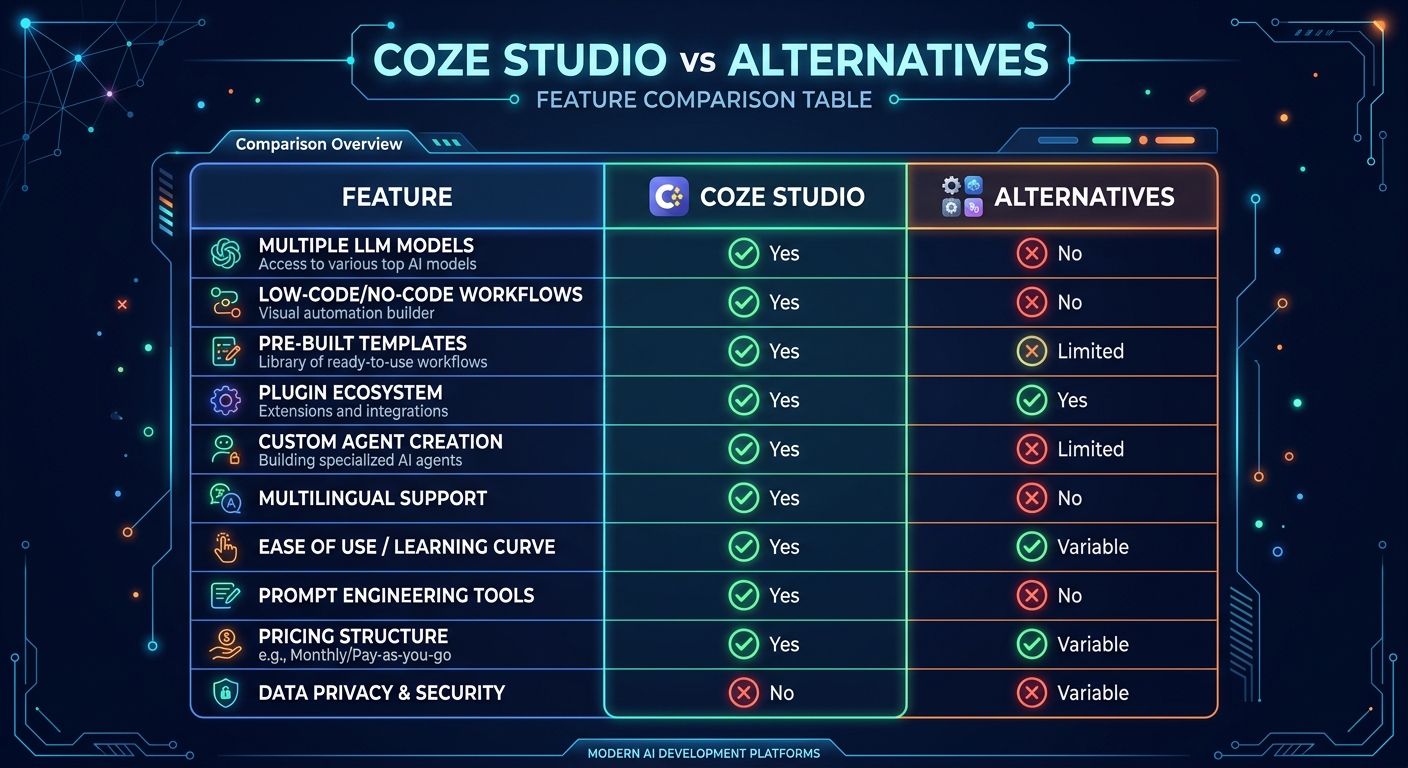
Coze Studio vs. alternatives at a glance
Best Coze Studio Alternatives
While Coze Studio is a strong option, it is worth comparing it against other tools in the market to ensure you choose the best fit for your specific needs. Here are the top alternatives we recommend considering:
Each of these alternatives has its own strengths. We recommend trying the free tiers or trials of your top two or three choices before committing to a paid plan. The best tool is ultimately the one that fits your specific workflow, budget, and technical requirements.
Final Verdict
Coze Studio delivers a strong, focused offering in the ai agent builder space that is well worth considering for anyone in its target audience. Coze Studio is an AI agent development platform by ByteDance that enables users to create, customize, and deploy AI-powered chatbots and agents with plugins, knowledge bases, and workflow automation across multiple channels. For developers, businesses, and creators building custom AI chatbots and agents for customer service, automation, and engagement, it provides genuine value that justifies the investment of both time and money.
The platform is well-designed with a clear product vision, the feature set is comprehensive enough for most use cases, and the pricing is competitive for what you get. The development team appears responsive to user feedback, and the product continues to improve with regular updates. While not without its limitations, Coze Studio earns its place as a solid option in an increasingly crowded market and is one we can recommend for users who fit the target profile.
Our Rating: 4.2/5
Have You Tried Coze Studio?
Share your experience with the PopularAiTools.ai community. Your review helps other users make informed decisions about which AI tools are worth their time and money.
Submit Your Review
Frequently Asked Questions
Is Coze Studio free to use?
Yes, Coze Studio offers a generous free tier that includes basic bot creation, standard model access, and community support. Premium plans with advanced features start at $19/month.
Who makes Coze Studio?
Coze Studio is developed by ByteDance, the company behind TikTok. It leverages ByteDance's extensive AI infrastructure and research capabilities.
Can I deploy Coze bots to multiple platforms?
Yes, Coze supports one-click deployment to Discord, Telegram, Slack, LINE, websites, and other messaging platforms from a single bot configuration.
What AI models does Coze support?
Coze supports multiple LLMs including GPT-4, Claude, and proprietary models. Users can select the best model for their specific use case and budget.
Can I upload my own data to create a knowledge base?
Yes, you can upload documents, PDFs, websites, and structured data to create custom knowledge bases that give your bot specialized expertise in any domain.
Does Coze require coding skills?
No, Coze Studio features a visual drag-and-drop interface for bot creation. However, advanced workflow automation and plugin development may benefit from technical knowledge.
Is my data secure on Coze?
Coze implements security measures for data protection, but users should review the privacy policy carefully given ByteDance's ownership and data handling practices.
Can Coze bots remember previous conversations?
Yes, Coze supports long-term memory features that allow bots to remember past interactions and user preferences for personalized, context-aware responses.
Get Premium AI Tool Insights
Subscribe to get weekly curated AI tool recommendations, exclusive deals, and early access to new tool reviews.
Related Tools
V
VideoProc Converter AI
ai-coding

Relia
ai-coding
AI-powered Chrome extension that audits code flow, catches hallucinations in AI-generated code, and flags security vulnerabilities before they ship.

Git AutoReview
ai-coding
Updated March 2026 · 12 min read · By PopularAiTools.ai

Parallel Code
ai-coding
Free open-source desktop app that dispatches 10+ AI coding agents simultaneously across isolated git branches. Supports Claude Code, Codex CLI, and Gemini CLI. Keyboard-first Electron app with diff review workflow and QR code mobile monitoring. macOS + Linux. MIT license.
Related Articles
Suno v6 Intro and Ending Prompts: Unwanted Humming, Long Outros and Cut-Off Lyrics (2026)
Fix the edges of a Suno v6 track: three pasteable intro and outro templates, the documented Exclude field for unwanted humming, the arithmetic behind cut-off lyrics, and when to edit in Studio instead.
Suno v6 Keeps Changing Your Prompt? Variety, Style Influence and Weirdness Explained (2026)
Suno v6 rewrites your style prompt through the new Variety slider, and Suno documents the fix. What Variety, Style Influence, Weirdness and Max Mode each do, with a one-control-at-a-time worksheet.
Suno v6 Rock Prompts: Keep Guitar Riffs and Drums Alive Through the Verse (2026)
Why a strong Suno v6 rock intro turns into an empty verse, and how to fix it with a section-by-section instrument map, the Exclude field, pasteable rock and metal prompts and an A/B rubric.