
Try Venn.ai today
⚡ TL;DR — Venn.ai Review
Venn.ai is the missing permissions layer between your AI tools and business apps. It lets Claude, ChatGPT, Cursor, and VS Code access Salesforce, HubSpot, Gmail, Slack, and 20+ other apps — with granular read/write controls and audit logs so nothing happens without your say-so. The free tier (5 connectors, 25K actions/mo) is enough to evaluate it, and Pro at $50/year is one of the better deals in AI tooling.
📋 Table of Contents

What is Venn.ai?
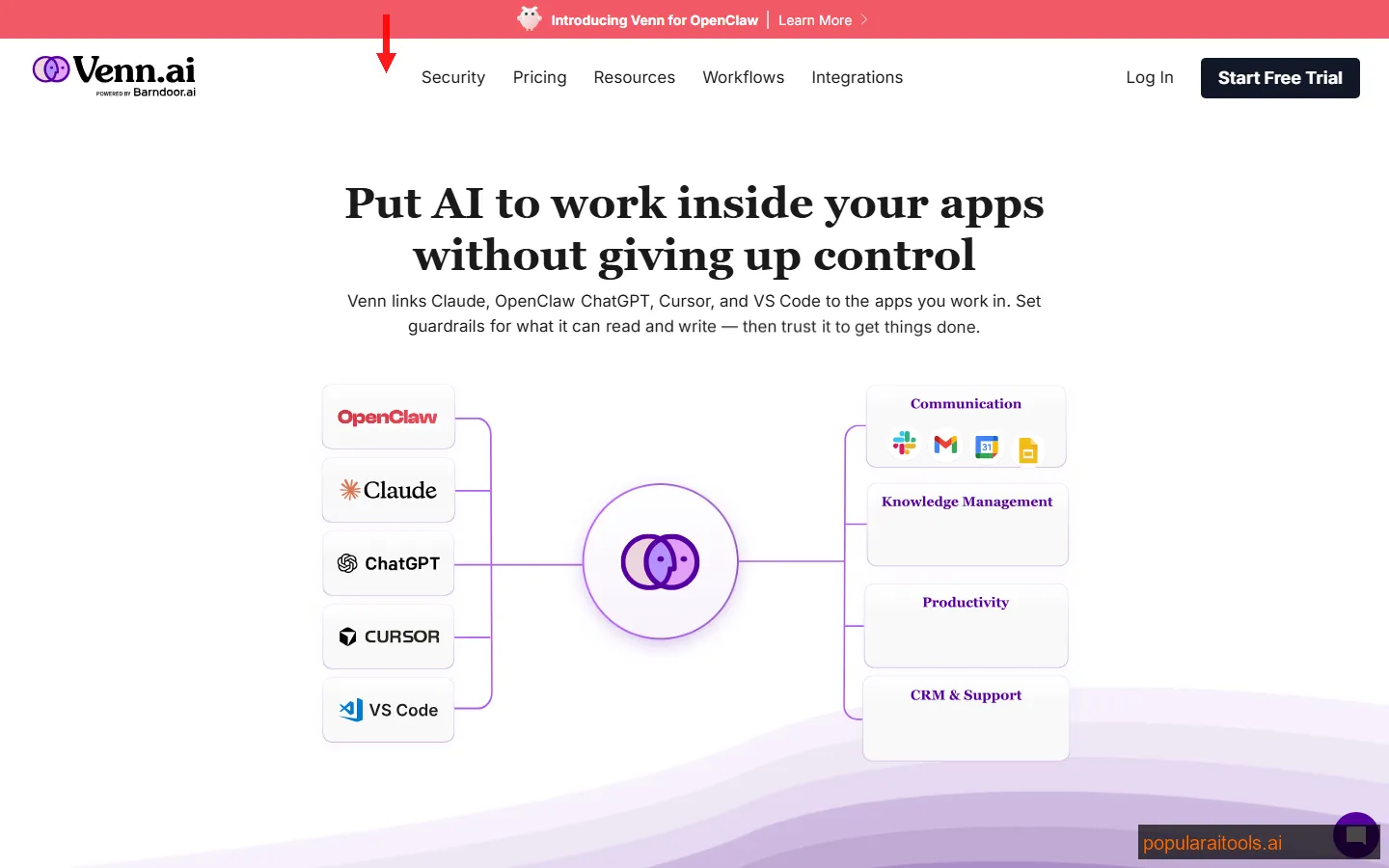
Venn.ai is a permissions and connectivity layer that sits between your AI assistants — Claude, ChatGPT, Cursor, VS Code — and the business apps they need to access. Think of it as a security-first bridge: instead of giving each AI tool its own API keys and hoping for the best, Venn.ai centralizes access with granular read-only or read-write permissions per connector, full activity audit logs, and a single dashboard to manage everything.
The product launched on Product Hunt and pulled 367 upvotes, which in the AI tool space signals genuine developer interest rather than just hype. What caught our attention was the pitch: "Set permissions once, use on any AI." That is the exact problem we have been running into — managing separate integrations for every AI tool is a nightmare once you hit 5+ business apps.
Venn.ai currently supports 20+ connectors across CRM (Salesforce, HubSpot), communication (Gmail, Google Workspace, Slack), productivity (Notion), e-commerce (Shopify), and payments (Stripe). The connector list keeps growing, but what matters is the architecture: permissions are set per connector and automatically enforced across every AI tool you connect.
Key Features
We spent a week testing Venn.ai across our own stack — connecting it to Gmail, Notion, Slack, and Stripe via Claude and Cursor. Here is what stood out, and what fell flat.
Universal AI Connector
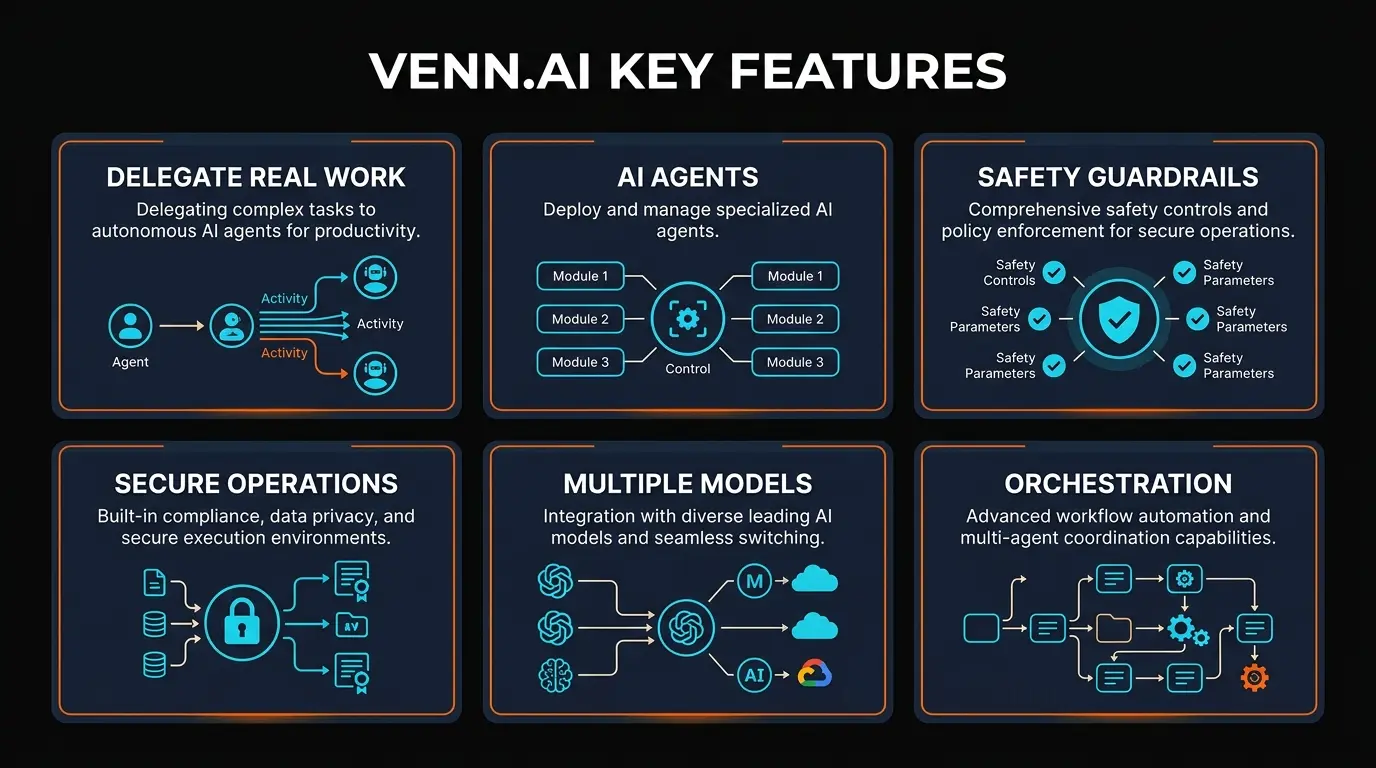
Connects Claude, ChatGPT, Cursor, and VS Code to 20+ business apps through a single permissions layer. Set it up once — every AI tool inherits the same access rules.
Granular Permission Controls
Per-connector read-only vs read-write toggles. Your AI can read Salesforce contacts without being able to modify them. This is the killer feature for risk-averse teams.
Activity Audit Logs
Every action your AI takes is logged — which connector, what data, when. Essential for compliance teams and anyone who needs to explain what their AI accessed during an audit.
20+ Business App Connectors
Salesforce, HubSpot, Gmail, Google Workspace, Slack, Notion, Shopify, Stripe, and growing. The spread covers CRM, communication, productivity, e-commerce, and payments.
One-Click Revocation
Kill access to any connector instantly from the dashboard. No hunting through individual AI tool settings. If something looks wrong in the audit log, cut it off in seconds.
IDE Integration
Cursor and VS Code support means your coding AI can pull context from Jira, Notion, or Salesforce without leaving the editor. We used this to have Claude draft customer emails using live CRM data in Cursor.

How Venn.ai Works
The setup process is refreshingly simple. We had Claude connected to Gmail, Slack, and Notion within 10 minutes. Here is the actual workflow:
1
Create your Venn.ai account
Sign up at venn.ai. Free tier gets you started immediately — no credit card required.
2
Add your business app connectors
OAuth flows for each app — click, authorize, done. We connected Gmail in under 30 seconds. Salesforce took about 2 minutes because of their longer OAuth flow.
3
Set permissions per connector
This is where Venn.ai earns its keep. For each connector, toggle between read-only (AI can view data but not modify) and read-write (AI can create, update, delete). We kept Salesforce on read-only and gave Slack read-write for drafting messages.
4
Connect your AI tools
Link Claude, ChatGPT, Cursor, or VS Code. Each AI tool inherits the exact permissions you configured — no reconfiguration needed per tool.
5
Use your AI with full business context
Ask Claude to "summarize today's Salesforce pipeline" or have Cursor draft a Slack update using Notion project data. The AI accesses only what you allowed, and everything is logged.
The real magic is in step 3. Most AI integration tools either give full access or no access. Venn.ai's per-connector permission model means you can let Claude read your entire HubSpot CRM for research purposes while blocking it from modifying any records. That distinction matters — especially in sales teams where one bad AI-generated email update could corrupt a pipeline.
If you are already using tools like Taskade for AI-powered project management or ClickUp for task automation, Venn.ai complements them by adding the data-access layer those tools do not provide. Taskade is great for managing AI workflows within its own ecosystem, but Venn.ai lets your AI reach outside — into Salesforce, Gmail, Stripe, and everywhere else your business data actually lives.
Pricing Plans
Venn.ai keeps pricing dead simple with two tiers. No usage-based billing surprises, no hidden connector fees.
Free
$0
Forever free
- ✓ 5 connectors
- ✓ 25,000 actions/month
- ✓ Read-only access
- ✓ Claude, ChatGPT, Cursor, VS Code
- ✗ No read-write permissions
- ✗ No audit logs
Pro
$50/year
~$4.17/month
- ✓ Unlimited connectors
- ✓ Unlimited actions
- ✓ Read-write permissions
- ✓ Claude, ChatGPT, Cursor, VS Code
- ✓ Full activity audit logs
- ✓ Priority support
$50/year is genuinely cheap for what you get. For context: Zapier's lowest paid plan is $19.99/month ($240/year), and Make.com starts at $9/month ($108/year). Venn.ai is not a direct replacement for either — it does something different — but the price-to-value ratio is excellent for teams that need permissioned AI access to business tools.
The main limitation on the free tier is the read-only restriction. For exploring and research workflows — like having Claude summarize your Salesforce pipeline or pull Notion docs — free works fine. But the moment you want your AI to draft emails in Gmail, update HubSpot deals, or create Slack messages, you need Pro.

Pros and Cons
Strengths
- ✓ Granular permissions actually work. Per-connector read/write toggles give you real control, not just an on/off switch. We tested toggling Salesforce to read-only and verified Claude could not modify records.
- ✓ Phenomenal pricing. $50/year for unlimited everything is a steal compared to Zapier ($240/yr) or Make ($108/yr). The free tier is also genuinely usable, not just a teaser.
- ✓ Set-once, use-everywhere model. Configuring permissions once and having them apply across Claude, ChatGPT, Cursor, and VS Code saves significant setup time.
- ✓ Audit logs for compliance. Pro plan logs every AI action. Critical for regulated industries, SOC 2 teams, or anyone who needs to explain what their AI did.
- ✓ Fast setup. 10 minutes from signup to first working query across multiple business apps. OAuth flows are smooth.
Weaknesses
- ✗ No workflow automation. Venn.ai connects AI to apps, but it does not create automated trigger-action workflows like Zapier or Make. You still need a separate tool for that.
- ✗ Free tier is read-only. The 25K actions/month cap is generous, but read-only limits practical use cases. Most teams will need Pro fairly quickly.
- ✗ Limited to 4 AI tools. Claude, ChatGPT, Cursor, and VS Code only. No Gemini, Copilot, Perplexity, or other AI assistants yet.
- ✗ No team/org features visible yet. Pricing is per-user. No shared team dashboards, role-based access, or org-wide policies that enterprise buyers expect.
- ✗ Young product. Still early — connector count is growing but not yet on par with Zapier's 7,000+ integrations. Expect rough edges.
Venn.ai vs Zapier AI vs Make.com
We get asked this constantly, so let us be direct: Venn.ai, Zapier, and Make solve different problems. But there is enough overlap in the "AI + business apps" space that a comparison is warranted.
| Feature | Venn.ai | Zapier AI | Make.com |
|---|---|---|---|
| Primary purpose | AI-to-app permissions | Workflow automation | Visual automation |
| App connectors | 20+ | 7,000+ | 1,800+ |
| AI tool support | Claude, ChatGPT, Cursor, VS Code | ChatGPT (built-in AI) | OpenAI module |
| Per-connector permissions | ✓ Read-only / Read-write | ✗ | ✗ |
| Audit logs | ✓ (Pro) | ✓ (Team+) | ✓ (Enterprise) |
| Pricing (entry paid) | $50/year | $240/year | $108/year |
| Workflow builder | ✗ | ✓ (core feature) | ✓ (core feature) |
The bottom line: If you need automated workflows (when X happens, do Y), use Zapier or Make. If you need your AI tools to safely access business data with proper guardrails, use Venn.ai. Many teams will use Venn.ai alongside Zapier or Make, not instead of it.
Where Venn.ai genuinely wins is the multi-AI support. Zapier's AI features are built around ChatGPT. Make has an OpenAI module but no native Claude or Cursor integration. Venn.ai is the only tool that lets you use Claude, ChatGPT, Cursor, and VS Code through a single permissions layer — and that is a meaningful advantage for teams that use multiple AI tools daily.

Who Should Use Venn.ai?
After a week of testing, here is who we think gets the most value:
- Sales teams using AI for CRM work. If your reps use Claude or ChatGPT to draft emails, research prospects, or summarize deal pipelines, Venn.ai gives them live Salesforce/HubSpot data without the risk of accidental modifications. Read-only mode on CRM connectors is the sweet spot.
- Developers who live in Cursor/VS Code. The IDE integration means your coding AI can pull Jira tickets, Notion specs, or Slack conversation context without context-switching. We used this heavily and it genuinely reduced our back-and-forth.
- Compliance-conscious teams. If you are in fintech, healthcare, or any regulated industry where "what did your AI access?" is a real question, the audit logs on Pro justify the $50/year by themselves.
- Solo operators managing multiple AI tools. If you bounce between Claude for writing, ChatGPT for research, and Cursor for coding, Venn.ai eliminates the need to set up business app connections separately for each one.
Who should not use Venn.ai? Teams that need complex multi-step automation workflows — that is still Zapier or Make territory. And large enterprises with 100+ users will want to wait until Venn.ai adds team management features.
Final Verdict
Venn.ai solves a problem that has been getting worse every month: as AI tools proliferate, managing which AI can access which business data becomes a genuine security and compliance headache. Venn.ai's approach — centralized permissions, per-connector granularity, audit logging, multi-AI support — is exactly right.
The product is still young. Twenty connectors is a solid start but nowhere near Zapier's ecosystem. The lack of workflow automation means it is complementary to, not a replacement for, existing automation tools. And teams with more than a handful of users will want org-level features that do not exist yet.
But at $50/year for unlimited connectors and actions with full audit logging? The pricing is hard to argue with. If you use multiple AI tools and need them to safely interact with your business stack, Venn.ai is the best purpose-built solution we have tested in 2026.
Our Rating: 4.2/5
Excellent permissions layer for AI-to-business-app connectivity. Loses a point for limited connector count and no workflow automation.
Try Venn.ai Free →
Frequently Asked Questions
FAQ
Is Venn.ai free to use?
Yes. The free plan includes 5 connectors and 25,000 actions per month in read-only mode. No credit card required. For read-write access, unlimited connectors, and audit logs, the Pro plan costs $50 per year.
What AI tools does Venn.ai work with?
Venn.ai currently supports Claude, ChatGPT, Cursor, and VS Code. You configure permissions once and they apply across all connected AI tools — no per-tool reconfiguration needed.
Is Venn.ai safe for business data?
Safety is the core value proposition. Per-connector permissions (read-only vs read-write), activity audit logs on Pro, and instant revocation from a central dashboard. Your AI tools only access what you explicitly allow.
How does Venn.ai compare to Zapier?
They solve different problems. Zapier automates workflows between apps (trigger-action sequences). Venn.ai gives AI assistants safe, permissioned access to your business apps. Most teams use both — Zapier for automation, Venn.ai for AI-to-app connectivity.
What business apps does Venn.ai support?
20+ apps including Salesforce, HubSpot, Gmail, Google Workspace, Slack, Notion, Shopify, and Stripe. New connectors are added regularly. The focus is on the most-used business tools across CRM, communication, productivity, e-commerce, and payments.
Can I use Venn.ai with Cursor or VS Code?
Yes. Both IDE integrations are fully supported. Your coding AI can pull context from Jira, Notion, Salesforce, or any other connected app without leaving your editor. We used this to have Claude draft customer emails using live CRM data directly in Cursor.
Does Venn.ai have an activity audit log?
Yes, on the Pro plan ($50/year). The audit log tracks every action — which connector, what data, and when. It is essential for compliance-heavy industries and SOC 2 teams that need to document AI interactions with business data.
What happens if I exceed the free plan limits?
The free plan caps at 25,000 actions/month and 5 connectors. If you hit either limit, actions pause until the next billing cycle or you upgrade to Pro, which removes both limits. No surprise overage charges.
Build an AI Tool? Get It in Front of the Right Audience
PopularAiTools.ai reaches thousands of qualified AI buyers.
Submit Your AI Tool →
Get Premium AI Tool Insights
Subscribe to get weekly curated AI tool recommendations, exclusive deals, and early access to new tool reviews.
Related Tools

Droidrun
ai-automation
Open-source AI framework that lets LLM agents control Android and iOS apps via native accessibility APIs. 91.4% success rate, €2.1M funded.
M
Manus AI
ai-automation
Autonomous AI agent platform that executes complex multi-step tasks — browses the web, writes code, creates files, and works in the background without guidance.
R
Renamer.ai
ai-automation
AI-powered file renaming tool that uses OCR to read document content and automatically generates meaningful file names. Supports 30+ file types and 20+ languages.

MuleRun
Related Articles
Suno v6 Intro and Ending Prompts: Unwanted Humming, Long Outros and Cut-Off Lyrics (2026)
Fix the edges of a Suno v6 track: three pasteable intro and outro templates, the documented Exclude field for unwanted humming, the arithmetic behind cut-off lyrics, and when to edit in Studio instead.
Suno v6 Keeps Changing Your Prompt? Variety, Style Influence and Weirdness Explained (2026)
Suno v6 rewrites your style prompt through the new Variety slider, and Suno documents the fix. What Variety, Style Influence, Weirdness and Max Mode each do, with a one-control-at-a-time worksheet.
Suno v6 Rock Prompts: Keep Guitar Riffs and Drums Alive Through the Verse (2026)
Why a strong Suno v6 rock intro turns into an empty verse, and how to fix it with a section-by-section instrument map, the Exclude field, pasteable rock and metal prompts and an A/B rubric.