Omma Review 2026: AI Creates Code, 3D, and Media in Parallel

Head of AI Research

⚡ TL;DR — Omma Review
Omma is the first AI creative studio that combines code generation, 3D scene building, image creation, and data processing into one parallel-execution environment. It turns text descriptions into interactive websites, web apps, 3D games, and presentations in seconds. The parallel agent architecture is genuinely impressive — nothing else on the market covers this creative surface area. But the platform is still maturing, and for pure web development, dedicated tools like Bolt.new and v0.dev remain more polished.
📋 Table of Contents
What is Omma?
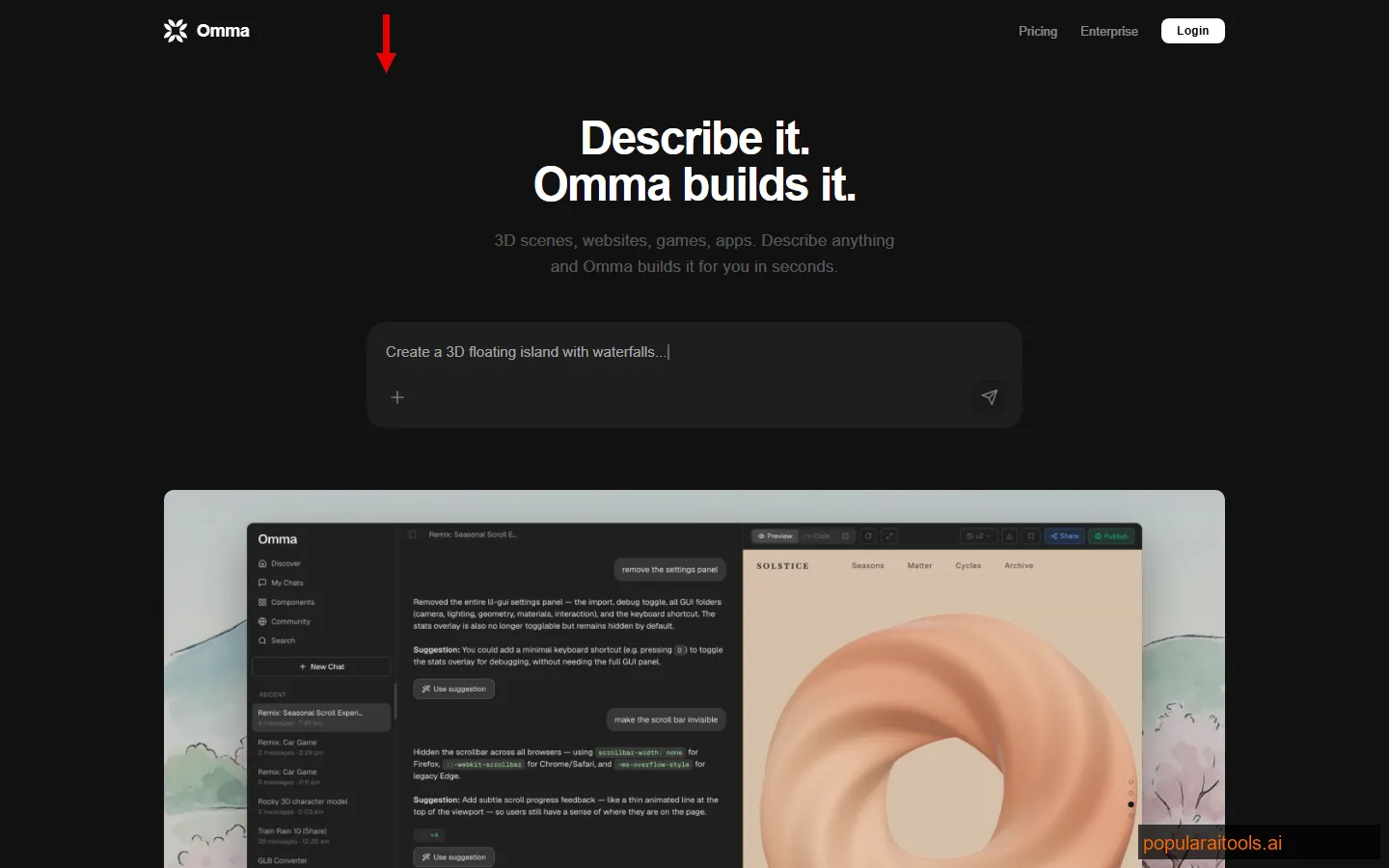
Omma is an AI creative studio that transforms text descriptions into fully interactive digital experiences — websites, web applications, 3D scenes and games, presentations, and data visualizations. It launched on Product Hunt on March 25, 2026, pulling 191 upvotes, which signals genuine interest from the developer and creator community. What caught our attention was not another "AI builds a website" pitch — those are a dime a dozen in 2026. It was the scope.
Most AI coding tools generate web apps. Some generate images. A handful generate 3D content. Omma tries to do all of it simultaneously. You describe what you want — "a 3D solar system explorer with clickable planets that show real NASA data" — and Omma spins up multiple AI agents that work in parallel: one writes the HTML and JavaScript, another generates the planet textures, a third processes the data files, and a fourth assembles the 3D scene. What previously took hours of switching between a code editor, Midjourney, Blender, and a data pipeline now happens in one interface in seconds.
We spent two weeks testing Omma across different project types — an interactive product showcase website, a browser-based 3D mini-game, a data visualization dashboard fed from CSV files, and a presentation with animated transitions. The goal was to find where the parallel-execution model genuinely delivers and where it falls short compared to specialized tools. The results were both impressive and instructive.
If you have been following the AI coding space, you will want to see how Omma stacks up in our best AI coding assistants for 2026 roundup. Spoiler: it occupies a niche that none of the other tools even attempt.
Key Features
Omma packs a surprisingly wide feature set for a platform that just launched. Here is what actually works, based on our hands-on testing across four different project types.
Parallel Agent Execution
Multiple AI agents work simultaneously on different parts of your project — code, images, 3D models, data processing. This is not just faster; it produces more cohesive results because agents coordinate during generation rather than being stitched together after the fact.
Text-to-Website Generation
Describe a website or web app in natural language and Omma generates fully functional HTML, CSS, and JavaScript. Supports React components, responsive layouts, and interactive elements. Our product showcase site took about 45 seconds from prompt to preview.
3D Scene and Game Builder
Generates interactive 3D scenes using Three.js. Supports GLB and OBJ model imports. We built a simple space shooter game in under 2 minutes — functional controls, particle effects, and a score counter included. Not AAA quality, but genuinely playable.
Multi-Format File Support
Upload CSV, JSON, DOC, GLB, OBJ, PNG, SVG, and MP4 files. Omma can process data files into visualizations, use images as assets, incorporate 3D models into scenes, and reference documents for content. No other AI creative tool accepts this range of inputs.
Presentation Generator
Creates interactive HTML presentations with animated transitions, embedded charts, and responsive layouts. It is not PowerPoint — it is closer to a web-native presentation format. The results look polished and work in any browser without plugins.
Community Gallery
A public gallery of user-created projects you can browse, fork, and remix. This is equal parts inspiration and proof of concept — you can see exactly what Omma is capable of before committing to building your own project. Some community creations are genuinely impressive.
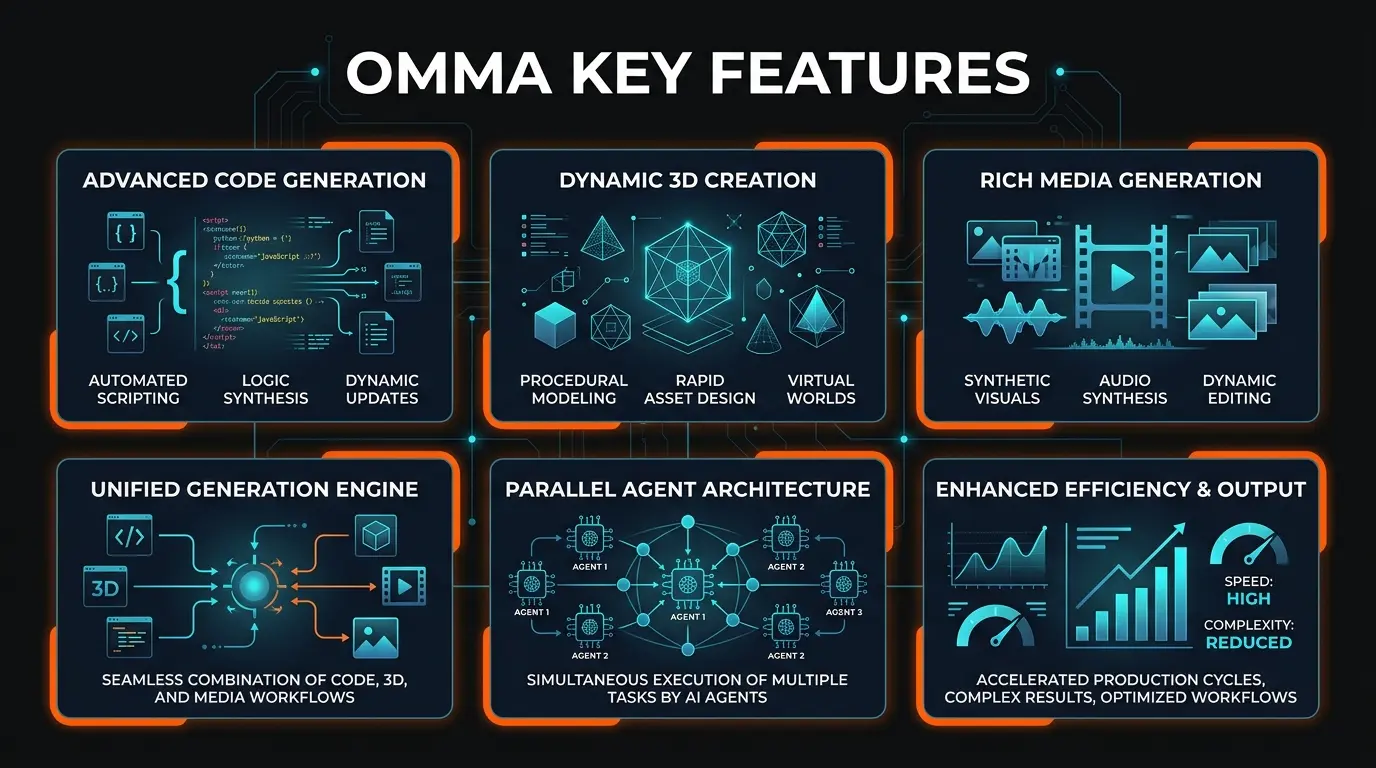
The feature that genuinely differentiates Omma is the parallel agent architecture. Every other AI coding tool we have tested — Bolt.new, v0.dev, Replit Agent — operates sequentially. You describe what you want, the AI writes code, you iterate. Omma splits the work across specialized agents that execute simultaneously. The result is not just faster generation; it is a fundamentally different approach to building interactive content where code, visuals, and data come together as a coordinated whole rather than being assembled piece by piece.
How Omma Works
Getting from a text prompt to a working interactive project takes under a minute for most use cases. Here is the actual workflow we followed across all four test projects.
Type a natural language description of what you want to build. Be specific about the type of experience — website, 3D scene, data visualization, presentation. Include details about interactivity, style, and data sources. "Build a dark-themed product showcase for a SaaS tool with animated feature cards, a pricing comparison table, and a hero section with a 3D rotating logo" works far better than "make me a landing page."
Attach CSV data, JSON configs, 3D models (GLB, OBJ), images (PNG, SVG), or documents (DOC) that Omma should incorporate. For our data visualization dashboard, we uploaded a 500-row CSV and Omma automatically parsed, cleaned, and visualized it with interactive charts.
This is where Omma shines. You can see multiple agents working simultaneously — one generating HTML structure, another creating CSS animations, a third producing image assets, a fourth processing your data files. The coordination is visible in the interface and genuinely impressive. Our 3D mini-game had three agents working in parallel: scene geometry, game logic, and visual effects.
The live preview updates as agents complete their work. Click through your project, test interactions, and provide follow-up prompts to refine specific elements. "Make the hero section taller," "change the chart colors to match the brand," "add particle effects to the space background." Two or three rounds of refinement usually gets you to something shareable.
Share your project via a public URL or export the code to work with locally. Projects can also be published to the community gallery for others to discover and remix. The export includes all generated assets — HTML, CSS, JS, images, and 3D models — so you own everything.
The speed difference is noticeable. Building our product showcase website — which included animated feature cards, a pricing table, and a Three.js hero element — took about 45 seconds on Omma. Re-creating the same project manually with a code editor, an image generator, and Three.js documentation open would have taken at least 2-3 hours. Even using Bolt.new for just the web portion, you would still need separate tools for the 3D elements and image assets.
That said, the iteration loop is where Omma shows its age as a new platform. Follow-up prompts sometimes break things that were working — the parallel agents occasionally overwrite each other's work during refinement passes. It happened twice in our testing: once the 3D element disappeared after we asked for a color change, and once a chart lost its data binding after a layout tweak. Both were fixable with another prompt, but it added friction that more mature tools have largely solved.
Pricing
Omma is still finalizing its pricing model since its March 2026 launch. Here is what is available as of our testing.
Free Tier
- ✓ Basic project generation
- ✓ Community gallery access
- ✓ Standard file uploads
- ✗ Limited parallel agents
- ✗ Generation cap per day
Pro
- ✓ Unlimited generations
- ✓ Full parallel agent access
- ✓ Priority generation queue
- ✓ Larger file uploads
- ✓ Private projects
The free tier is enough to evaluate Omma and build several test projects. We hit the daily generation limit once during a heavy testing session, which suggests casual users will be fine but power users will want Pro quickly. The fact that pricing is still TBD is actually typical for tools this new — they are gathering usage data to set tiers that make sense. Keep an eye on omma.dev for updates.
Pros and Cons
Strengths
- ✓ Unmatched creative surface area. No other tool combines code generation, 3D scenes, image creation, data processing, and presentations in one interface. This is genuinely unique in the AI tool landscape.
- ✓ Parallel execution actually works. Watching multiple agents build different components simultaneously is not just a gimmick — it produces faster results and more cohesive projects than sequential generation.
- ✓ Impressive file format support. CSV, JSON, DOC, GLB, OBJ, PNG, SVG, MP4 — the breadth of accepted inputs makes Omma genuinely useful for multimedia projects that other AI coding tools simply cannot handle.
- ✓ Community gallery is a smart addition. Being able to browse, fork, and remix other users' projects doubles as both inspiration and a learning resource. Several gallery projects showed capabilities we had not thought to test.
- ✓ Speed is remarkable. Complex multimedia projects that would take hours across multiple tools generate in under a minute. The "what previously took hours now takes seconds" tagline is, for once, not an exaggeration.
Weaknesses
- ✗ Iteration can break things. Follow-up prompts occasionally cause parallel agents to overwrite each other's work. We lost a working 3D element and a data binding during refinement. Fixable, but frustrating.
- ✗ No deployment pipeline. You get a shareable URL and code export, but there is no integrated hosting, CI/CD, or custom domain support like Bolt.new or Replit offer. You will need to deploy the exported code yourself.
- ✗ Code quality is functional, not production-grade. The generated JavaScript is heavily inline, lacks proper component architecture, and has minimal error handling. Fine for demos and prototypes, but you would not ship this code to production without significant refactoring.
- ✗ No backend support. Omma generates frontend code, 3D scenes, and client-side logic. There is no database, authentication, or server-side processing. For anything that needs a backend, you still need Bolt.new, Replit, or a traditional stack.
- ✗ Very new platform. Launched March 2026 with limited documentation, evolving pricing, and expected rough edges. Early adopters should approach with appropriate expectations.
Omma vs Bolt.new vs v0.dev vs Replit Agent
This is the comparison everyone asks about. The honest answer is that Omma occupies a different niche than Bolt.new, v0.dev, or Replit Agent. But there is enough overlap in the "describe something, get code back" space that the comparison matters.
| Feature | Omma | Bolt.new | v0.dev | Replit Agent |
|---|---|---|---|---|
| Primary use case | Interactive experiences | Full-stack web apps | UI components | Full-stack apps |
| 3D scene generation | ✓ Three.js, GLB, OBJ | ✗ | ✗ | ✗ (manual only) |
| Parallel agent execution | ✓ Multiple simultaneous | ✗ Sequential | ✗ Sequential | ✗ Sequential |
| File upload support | 8 formats (CSV, JSON, GLB, etc.) | Images, text | Images | Full filesystem |
| Backend/database | ✗ Frontend only | ✓ Full-stack | ✗ Frontend only | ✓ Full-stack + DB |
| Deployment | Share URL + export | ✓ Built-in hosting | ✓ Vercel deploy | ✓ .repl.co hosting |
| Best for | Multimedia + 3D projects | Production web apps | React/Next.js UI | Beginner-friendly apps |
| Pricing (entry) | Free (Pro TBD) | Free / $20/mo | Free / $20/mo | Free / $25/mo |
The bottom line: If you need a production-ready web application with backend, database, and deployment — use Bolt.new or Replit Agent. If you need polished React and Next.js components — use v0.dev. If you need interactive multimedia experiences that combine code, 3D, images, and data — Omma is the only tool that does it all in one place.
Omma's real competitor is not any single tool — it is the combination of tools you would otherwise need: a code editor + Three.js + an image generator + a data pipeline + a presentation tool. The parallel execution model makes this practical in a way that manually switching between five different tools never will be. For more context on the broader AI coding landscape, see our complete AI coding assistant comparison.
Who Should Use Omma?
After two weeks of testing, here is who we think benefits most from Omma:
- Creative developers building interactive experiences. If your projects involve 3D elements, animations, data visualizations, or multimedia — the exact work that requires switching between multiple tools — Omma consolidates your workflow into one interface. This is the core use case and where the platform delivers the most value.
- Startup founders who need impressive demos fast. Need an interactive product demo for a pitch deck or investor meeting? Omma generates shareable, visually impressive experiences in under a minute. We built a product showcase that looked better than some production marketing sites.
- Educators and content creators. Interactive presentations, data visualizations from CSV files, and 3D demonstrations are genuinely useful for teaching. The presentations Omma generates are far more engaging than static slides.
- Developers exploring 3D web experiences. If you have been curious about Three.js or WebGL but intimidated by the learning curve, Omma generates working 3D code you can study, modify, and learn from. The community gallery has dozens of examples to learn from.
Who should not use Omma? Anyone who needs production web applications with backends, databases, and deployment pipelines — that is Bolt.new or Replit territory. And developers who need fine-grained control over every line of code will find the parallel agent approach too opaque. Omma gives you the result fast but makes it harder to control exactly how the result is built.
Final Verdict
Omma is doing something genuinely different in the AI tool space. While every other AI coding tool is racing to build the best web app generator, Omma is building a creative studio that treats code, 3D scenes, images, data, and presentations as equal first-class citizens. The parallel agent execution model is not just marketing — it produces faster, more cohesive results than stringing together multiple sequential tools.
The platform is unmistakably young. The iteration experience can be frustrating when agents overwrite each other's work. There is no backend support, no integrated deployment, and no polished CI/CD pipeline. The code quality is prototype-grade. And pricing is still being figured out. These are real limitations that will matter to many users.
But here is what earns Omma a 4.0/5: nothing else does what it does. If you need an interactive 3D experience, a data visualization from a CSV, an animated presentation, and a multimedia website — all from natural language descriptions — Omma is genuinely the only option that handles all of that in one place with simultaneous execution. For the right use case, it is not just faster than the alternatives; it is the only tool that even attempts the job.
We will be watching Omma closely. If the team can stabilize the iteration loop, add backend support, and build a proper deployment pipeline, this could become one of the most important creative tools in the AI space. For now, it is a brilliant prototype machine and a glimpse of where AI creative studios are headed in 2026 and beyond.
Our Rating: 4.0/5
Unique parallel-execution creative studio combining code, 3D, and multimedia generation. Loses a point for no backend support, immature iteration loop, and no deployment pipeline.
Try Omma Free →Frequently Asked Questions
FAQ
Build an AI Tool? Get It in Front of the Right Audience
PopularAiTools.ai reaches thousands of qualified AI buyers.
Submit Your AI Tool →Recommended AI Tools
played.fm
Sell your music and keep 100%: played.fm is a direct-to-fan store + sync marketplace with 0% commission, no gatekeepers, and no bans — a strong fit for AI musicians.
View Review →OpenCode
The open-source AI coding agent: terminal-first TUI, 75+ model providers, LSP context, subagents, and privacy-first design. Free software, ~180K GitHub stars.
View Review →Exa
The neural web search API for AI agents: embeddings-based retrieval, cited highlights, sub-180ms latency, and an MCP server. 20,000 free requests/month.
View Review →Google Antigravity
Google's agent-first IDE: run a fleet of AI agents from a Manager surface, on Gemini 3 Pro, Claude Sonnet 4.5, or OpenAI models. Free in public preview.
View Review →