Invoke Studio Review 2026: The Visual Agentic Coding IDE

AI Infrastructure Lead

⚡ TL;DR — Invoke Studio Review
Invoke Studio combines kanban-style visual planning with AI code generation — a genuinely novel approach to agentic coding. The plan-first canvas is the standout feature, letting you map architecture before a single line is written. But with 123 Product Hunt upvotes and an early-stage product, it is unproven territory. Promising concept, not yet a daily driver.
📋 Table of Contents
What is Invoke Studio?
Invoke Studio is an agentic coding IDE that takes a different approach to AI-assisted development. Instead of dropping you into an editor and letting the AI autocomplete your code, Invoke Studio starts with visual planning — kanban boards, architecture canvases, and feature maps — then generates code from that structured plan.
The idea is simple: most AI coding tools are reactive. You type, the AI suggests. Invoke Studio wants to be proactive. You design your project visually, break it into features and dependencies, and then the AI builds it with full context of the architecture you defined. Think Trello meets Cursor, with the planning board driving the code generation.

It launched on Product Hunt on March 30, 2026, picking up 123 upvotes — solid for a dev tool launch, though far from breakout territory. The community response has been curious but cautious: developers see the appeal of structured planning but want proof it actually produces better code than just talking to an AI agent directly.
We spent a week testing Invoke Studio on a small Next.js project to see whether the visual planning layer adds genuine value or just adds friction. Here is what we found.
Key Features
Invoke Studio's feature set is built around one central thesis: better planning leads to better code generation. Here is what that looks like in practice:
📋 Visual Planning Canvas
A freeform canvas where you lay out project architecture visually — components, data flows, API routes, database schemas. Drag and connect nodes to define relationships before any code is written.
📌 Kanban Project Board
Break features into tasks on a kanban board. Each card becomes an AI agent task — the board drives the coding pipeline. Move cards through "Planned," "Generating," "Review," and "Done" stages.
🤖 Agentic Code Generation
AI agents generate code based on your visual plan context — not just the current file, but the full architecture you mapped. Claims to produce more coherent multi-file outputs because it understands the bigger picture.
🏗️ Architecture-First Workflow
Forces you to think about structure before implementation. Define component hierarchy, state management patterns, and API contracts visually. The AI then respects these architectural decisions during generation.
🔄 Plan-to-Code Sync
Changes to the visual plan propagate to code suggestions. Update a component relationship on the canvas, and the AI adjusts generated code accordingly. In theory, this keeps architecture and implementation aligned.
👁️ Code Preview and Diff
Preview generated code before accepting it, with standard diff views. Review changes file-by-file. Similar to what Cursor and Windsurf offer, but triggered from the planning board rather than inline chat.
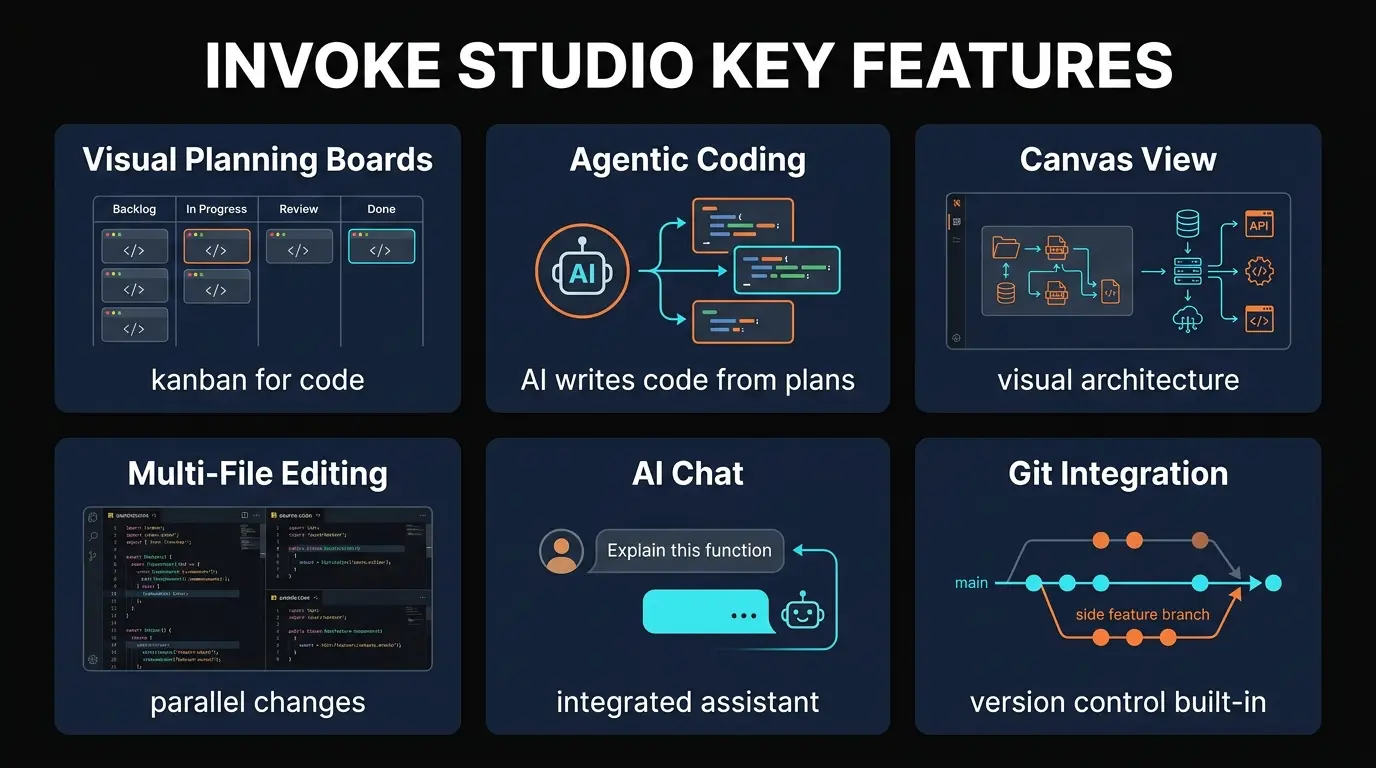
The visual canvas is genuinely interesting. We mapped out a Next.js app with 8 routes, a Convex backend, and three API integrations on the canvas in about 20 minutes. The AI then generated scaffolding that actually respected the architecture we drew — component names matched, imports referenced the right paths, and the data flow followed our diagram. That was a good moment.
But "interesting" and "production-ready" are different things. The code generation itself is noticeably less capable than what Cursor produces. The planning layer adds value for initial scaffolding, but once you are in the weeds of implementation — debugging, refactoring, writing tests — Invoke Studio's editor lacks the polish and speed of mature alternatives.
How to Use Invoke Studio: Step-by-Step
The workflow is different from traditional AI code editors. Here is how a typical session looks:
Sign up and create a new project workspace. You name it, set the tech stack (React, Next.js, Python, etc.), and get dropped into the planning canvas — not an empty code editor.
Drag components onto the canvas — pages, API routes, database tables, third-party integrations. Connect them with arrows to show data flow and dependencies. This is the step that separates Invoke Studio from everything else.
Convert your architecture nodes into kanban cards. Each card represents a feature or component to build. Prioritize and order them. The board becomes your AI task queue.
Select a card and hit generate. The AI agent takes the task context plus the full architecture diagram and produces code. Review the output in the diff viewer, then accept or iterate.
Switch to the code editor for manual adjustments, debugging, and testing. The editor is functional but basic compared to Cursor or VS Code. You will likely want to export to your main editor for serious implementation work.
The plan-first workflow clicked immediately for our team's architect, who liked being able to think visually before committing to code structure. Our more hands-on developers found it added friction — they wanted to just start coding and iterate, which is exactly what Cursor and Windsurf excel at.
Pricing
Invoke Studio is in early access, and pricing is still being finalized. Here is what we know as of March 2026:
Early Access
- ✓ Visual planning canvas
- ✓ Kanban project board
- ✓ Limited AI generation
- ✓ Basic code editor
Pro (Coming Soon)
- ✓ Unlimited AI generation
- ✓ Team collaboration
- ✓ Advanced model selection
- ✓ Priority support
Team (Coming Soon)
- ✓ Shared planning boards
- ✓ Role-based access
- ✓ Project templates
- ✓ Admin dashboard
Our take: The free early access tier is the right move for a product at this stage. No one should be paying for Invoke Studio until the code generation quality catches up with Cursor ($20/month) and Windsurf ($20/month). If they price the Pro tier competitively — say $15-25/month — and ship meaningful improvements to the AI engine, it could find a niche. But charging Cursor-level prices for an early-stage product would be a mistake.
Pros and Cons
Strengths
- ✓ Novel visual planning approach. No other AI coding IDE puts architecture planning front and center like this. The canvas genuinely changes how you think about project structure.
- ✓ Kanban-driven task management. The board integrates planning with execution. Cards become AI tasks. It is a smart workflow that project managers and architects will love.
- ✓ Better initial scaffolding. Because the AI has your full architecture context, the generated project structure is more coherent than what you get from a cold-start prompt in Cursor or Windsurf.
- ✓ Free early access. No commitment required. You can test the visual planning approach without paying anything.
- ✓ Fills a real gap. The "plan before you code" workflow is something experienced developers do mentally anyway. Making it visual and feeding it to AI is a logical step.
Weaknesses
- ✗ Code generation quality lags behind. The AI output is noticeably weaker than Cursor or Windsurf. More hallucinations, less context awareness within files, and weaker refactoring capability.
- ✗ Limited model support. Cannot match Cursor's 5+ providers (GPT-5.4, Claude Opus 4.6, Gemini 3 Pro). Model flexibility matters, and Invoke Studio does not offer it yet.
- ✗ No extension ecosystem. No VS Code extension compatibility. No plugin marketplace. You are locked into whatever Invoke Studio ships out of the box.
- ✗ Early stage = stability concerns. We hit several UI freezes during canvas editing, and the code generation occasionally timed out. Not ready for production workloads.
- ✗ Planning overhead for small tasks. If you need to write a quick utility function or fix a bug, the plan-first workflow is overkill. You just want to type and get suggestions — which is exactly what Cursor does better.
- ✗ No track record. Zero enterprise adoption, no public benchmarks, no community plugins. You are betting on a vision, not proven results.
Invoke Studio vs Cursor vs Windsurf vs Replit: Full Comparison
How does Invoke Studio stack up against the established AI coding tools? Here is an honest comparison as of March 2026:
| Feature | Invoke Studio | Cursor | Windsurf | Replit Agent |
|---|---|---|---|---|
| Type | Web-based IDE + Canvas | Standalone IDE | Standalone IDE | Web-based IDE |
| Visual Planning | Canvas + Kanban (best) | None | None | None |
| AI Models | Limited | 5+ providers (best) | 3+ providers + SWE-1.5 | Claude + custom |
| Code Quality | Basic | Excellent (best) | Very good | Good for prototypes |
| Extension Ecosystem | None | VS Code + 30 plugins | Limited | Built-in only |
| Maturity | Early access | Production (Fortune 500) | Production | Production |
| Free Tier | Full early access | Limited agents + Tab | Light quota | Limited |
| Best For | Architecture planning + scaffolding | Full-time AI-assisted development | Tight agentic workflows | Quick prototypes, beginners |
The honest comparison: Invoke Studio wins on one thing — visual project planning. On every other metric, the established tools are ahead, and in most cases significantly so. Cursor is the most complete package for professional developers. Windsurf offers strong agentic capabilities with a cleaner onboarding. Replit Agent is better for rapid prototyping in the browser.
That said, Invoke Studio is not trying to compete on the same axis. It is betting that the planning layer will eventually make the code generation better — and that is a reasonable bet. It is just too early to know if it pays off. For a broader look at the AI coding landscape, see our Best AI Coding Assistants 2026 roundup.
Who Should Try Invoke Studio?
Invoke Studio is not for everyone, and it does not need to be. Here is who will get the most value from it right now:
- Technical architects and team leads who already sketch architectures before coding. If you whiteboard project structures on Miro or Excalidraw before touching code, Invoke Studio formalizes that workflow and connects it to AI generation.
- Solo developers building greenfield projects where the visual planning pays off during scaffolding. If you are starting from zero and want a structured approach, the canvas helps you think through decisions before committing to code.
- Early adopters who enjoy testing new dev tools. If you tried Cursor in 2024 when it was rough, and now it is your daily driver, you understand why testing early-stage tools can pay off. Invoke Studio could follow that trajectory — or not.
- Educators and bootcamp instructors teaching project planning alongside coding. The visual canvas is an excellent teaching tool for showing how architecture decisions affect implementation.
Who should skip it: Professional developers with working Cursor or Windsurf setups. Teams with production deadlines. Anyone who needs VS Code extensions, multi-model flexibility, or enterprise security features. Invoke Studio is not ready for any of these use cases.
Final Verdict
Invoke Studio has one genuinely good idea: visual architecture planning that feeds directly into AI code generation. The kanban-to-code pipeline makes sense on paper, and the initial scaffolding results are promising. We could see this approach becoming standard in how developers interact with AI coding tools within a few years.
But ideas and execution are different things. The code generation quality is a clear step below what Cursor and Windsurf produce. The editor lacks basic features that experienced developers expect. There is no extension ecosystem, limited model support, and no enterprise credibility. At 123 Product Hunt upvotes, community traction is modest.
We are giving Invoke Studio a 3.7 out of 5 — a score that reflects genuine innovation weighed against the reality of an early-stage product. The visual planning canvas earns points that no competitor can claim. The execution gaps hold it back from a higher rating.
Our recommendation: Try it for free during early access. Use the canvas to plan your next project. But keep Cursor or Windsurf as your actual coding tool. If Invoke Studio ships meaningful improvements to code generation quality and model support over the next 3-6 months, revisit. This is a "watch closely" tool, not a "switch today" tool.
Build an AI Tool? Get It in Front of the Right Audience
PopularAiTools.ai reaches thousands of qualified AI buyers.
Submit Your AI Tool →Frequently Asked Questions
Recommended AI Tools
played.fm
Sell your music and keep 100%: played.fm is a direct-to-fan store + sync marketplace with 0% commission, no gatekeepers, and no bans — a strong fit for AI musicians.
View Review →OpenCode
The open-source AI coding agent: terminal-first TUI, 75+ model providers, LSP context, subagents, and privacy-first design. Free software, ~180K GitHub stars.
View Review →Exa
The neural web search API for AI agents: embeddings-based retrieval, cited highlights, sub-180ms latency, and an MCP server. 20,000 free requests/month.
View Review →Google Antigravity
Google's agent-first IDE: run a fleet of AI agents from a Manager surface, on Gemini 3 Pro, Claude Sonnet 4.5, or OpenAI models. Free in public preview.
View Review →